
Local service guide
Plan software installation in Des Moines, IA
Arrange software installation in Des Moines by requesting a written quote that covers your device, applications, account setup and completion testing. Set backup responsibilities and access permissions before the appointment. For help learning to use a device, consider Des Moines Public Library's free technology help classes and contact staff about your question before paying for installation work. [1]
Define the installation and the result you need
Give the technician your device model, operating system version and exact application names. Include error messages and say whether you own the software or need to purchase it. Describe a concrete result, such as opening household budget files, joining a video appointment or sending email from your existing account.
Request a scope for each device. Separate application installation from operating-system changes, file transfer and troubleshooting. Name the files and settings you want to preserve, and ask the technician to check compatibility before you approve a software purchase.
Set an approval limit for extra work. Confirm whether you owe a diagnostic charge if the technician cannot complete the installation and what explanation you will receive about the unresolved problem.
Choose library help, remote service or an appointment
Des Moines Public Library offers free technology help classes and invites questions about devices and library resources. North Side Library also offers computer classes. Contact staff or check the event calendar before arranging help. Confirm whether they can address your question; do not assume a class includes installation on your personal computer. [1]
For paid service, tell the provider whether your computer starts, connects to the internet and lets you sign in. Have the technician explain how they would complete the agreed work remotely. Choose a home visit or drop-off appointment if you want help beside you or the provider needs physical access to the device.
For a home visit, get the visit charge in writing. For drop-off work, confirm collection arrangements, the contact method for approving changes and whether to bring your charger or accessories. Plan how you will access essential documents while the technician has your computer.
Compare itemized quotes and confirm Iowa tax treatment
Request separate amounts for labor, software purchases, subscriptions, file transfer, travel and tax. Confirm whether the technician quotes a fixed total or charges for time. Compare providers using the same device list, installation brief and completion test.
Iowa Department of Revenue's software guidance describes tax changes beginning January 1, 2019, including taxation of electronically delivered software and services related to specified digital products. The department calls the guidance informal and includes undated statements about planned rulemaking and finalizing exemption rules. Those statements do not establish when the department completed that work. [2]
Have the seller confirm the current treatment of the specific software and services on your quote. The department describes a commercial-enterprise exemption with eligibility and exclusive-use conditions. For a home-office purchase, request confirmation of the covered items and how household use affects eligibility before assuming an exemption. [2]
Control account access and protect your files
Iowa Fraud Fighters describes computer-tech scams in which impostors request remote access for a supposed virus fix or software download. It warns that scammers use the access to steal personal information or damage computers. Stop an unexpected support conversation and check the provider through contact details you selected before granting access. [3]
Back up the files you want to preserve and open a sample from the backup before work begins. Enter passwords yourself during the appointment. Keep recovery codes out of the job description, close private documents and agree on which accounts the technician may access.
Keep software accounts in your name. Review subscription charges and renewal terms before approving a purchase. Agree whether the technician may leave remote-access software installed, who can use it and how you will remove or disable that access after the appointment.
Test the work before ending the appointment
Open the application yourself while the technician is available. Complete the task from your installation brief, open an existing file and test any agreed connection to another device. Review account ownership and subscription details together.
Collect a handover note naming the software, completed work and unresolved issues. Get the contact details for follow-up help and confirm any follow-up charge. Have the technician end remote access, then check that you can reopen the application and sign in without assistance.
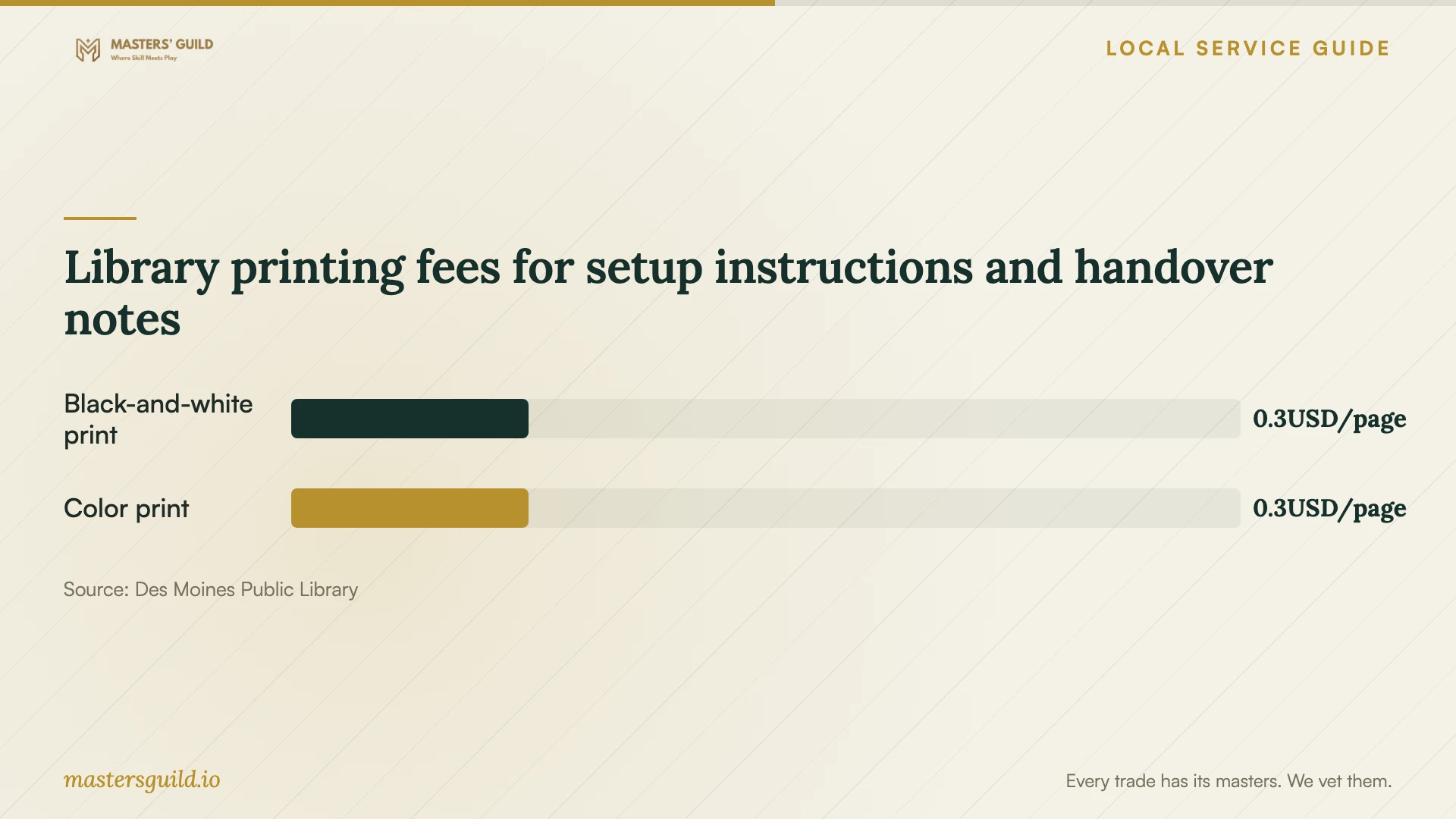
Library printing fees for setup instructions and handover notes
Local details that affect your job
Use the city's basic technology help before booking
Des Moines Public Library offers free technology help classes, accepts device questions and lists computer classes at North Side Library. Contact staff with your specific problem before hiring a technician. Confirm the available assistance for your own device rather than assuming that instruction includes software installation. [1]
Arrange temporary computer and printing access
All Des Moines Public Library locations provide public computers with internet access for up to two hours, using a library card or guest pass. Workstations shut down 15 minutes before closing. Consider this option for reading setup instructions during drop-off service. The library charges $0.25 per page for black-and-white or color printing. [1]
Check a suspicious support offer through Iowa's consumer resource
Iowa Fraud Fighters identifies the Iowa Attorney General's Office as a resource for reporting consumer scams and investigating suspicious offers. If an unexpected caller requests remote access for a virus fix or software download, withhold access and contact that office about the offer before proceeding. [3]
Check home-office purchases against Iowa exemption conditions
Iowa Department of Revenue describes a commercial-enterprise exemption for certain software and related services, subject to eligibility and exclusive-use conditions. Its guidance also includes undated rulemaking language. Ask the seller to verify current rules and document any exemption, including the treatment of household use, before approving a home-office purchase. [2]
Choose the next step for your software job
| Your situation | Next step | Confirm before proceeding |
|---|---|---|
| You need help using a device | Contact the library about free technology help classes | Whether staff or a scheduled class can address your question |
| You want an application installed | Request an installation and testing quote | Compatibility, account ownership and the total charge |
| You need file transfer or operating-system work | Request a separate scope | Backup responsibility and which files and settings to preserve |
| An unexpected caller offers a virus fix | Withhold remote access and check the offer through Iowa's consumer resource | Iowa Fraud Fighters describes this remote-access scam and names the Attorney General's Office as a resource |
| You want a home-business tax exemption | Have the seller verify current Iowa requirements | Eligibility, covered items and exclusive-use conditions |
Your hiring checklist
- List device models, operating system versions and application names.
- Write down the task you want to complete after installation.
- Gather purchase receipts and confirm access to your software accounts.
- Back up important files and open a sample from the backup.
- Get itemized charges, tax treatment and an approval limit for extra work.
- Agree on password handling and the limits of remote access.
- Complete the agreed test and collect a handover note.
Frequently Asked Questions
How much should I budget for installation?
Get an itemized quote for your device, applications and completion test. Request separate labor, software, subscription, travel and tax amounts. Confirm any diagnostic charge and set a limit that requires your approval before the technician adds work.
Can the library install software on my computer?
Des Moines Public Library offers free technology help classes and accepts device questions. Contact staff to describe the problem and confirm whether they can help with your personal computer. Arrange installation work with a technician if the library's assistance does not cover your task. [1]
Should I send the technician my password?
Enter credentials yourself during the appointment. Keep passwords and recovery codes out of your job description. Agree on the account access needed for the task and have the technician end remote access after testing.
Does a home-office purchase qualify for an Iowa tax exemption?
Have the seller verify your eligibility before claiming an exemption. Iowa Department of Revenue describes a commercial-enterprise exemption with covered-item and exclusive-use conditions. Its page includes undated rulemaking statements, so request confirmation against current official requirements and document how you will use the purchase. [2]
Sources and scope
This guide combines the sources below with practical planning guidance. Figures apply to the stated geography and period; request a written quote for your property.