
Local service guide
Technical Skills Training in Denver: Plan Your Lessons
Arrange Technical Skills Training around a task you need to complete, such as updating a spreadsheet, organizing files, or maintaining a website. Check Denver Public Library’s free technology classes and ongoing Digital Navigator help before paying for beginner instruction. For lessons built around your business workflow, request a written scope, a complete quote, and a practice task you can complete without help. [1]
Choose the task before choosing the instructor
Describe the work you want to do after training. For a shop owner, that might mean entering weekly sales and creating a readable chart. For an office manager, it could mean organizing shared files and finding documents without assistance. Give the instructor a sample with customer, employee, and financial details removed.
Separate the skills you want to learn from work you want someone to finish. If you need instruction and a completed spreadsheet or website update, request separate descriptions and prices. Ask who will own the files, how you will access them, and what materials the instructor will leave for practice.
Check the free local options
Denver Public Library offers drop-in help with internet, email, phone, tablet, and related questions, plus in-person technology appointments at several branches. Its Digital Navigators provide free, ongoing help with beginner skills, online safety, mobile devices, and finding affordable internet or devices. Match the service to your immediate obstacle and check appointment arrangements or the branch schedule. [1]
For structured learning, review the class description. The library lists Excel basics, formulas and functions, and charts and pivot tables; it recommends Excel Basics for the latter two classes. It also lists Spanish-language computer basics. Confirm the scheduled session, language, and prerequisites before arranging time away from work. [3]
The library provides Learning Express Library access with a library card and Udemy access with a permanent library card plus a Google, Microsoft, or Gale account. Its listed Udemy subjects include development, data science, cloud computing, and IT operations. Compare a course outline with your goal before deciding which questions you want a private instructor to address. [1]
Request a lesson plan and complete quote
Ask the instructor to explain how they would teach your sample task and assess your starting skills. Request a teaching example that uses your software. For coding, data, or cybersecurity instruction, agree on a practice environment and access permissions before the lesson. Use sample data when you can.
Request a written quote covering lesson length, preparation, travel, software subscriptions, materials, and follow-up support. Ask about cancellation terms and unused prepaid lessons. Start with a defined lesson before buying a package, and agree on the task you should be able to demonstrate at its end.
For staff training, describe each participant’s starting skills and the workflow they share. Ask how the instructor will provide individual practice and check progress. Request instructions that staff can use afterward, and establish whether follow-up questions belong in the quoted fee.
Arrange devices and practice access
The library lists Windows 11 and Microsoft Office 2021 on its public computers. It also provides in-library Chromebooks and Wi-Fi, but its access page says customers can no longer borrow Chromebooks or hotspots to take home. If your workplace uses another software version or a browser-based application, ask the instructor to teach in the setup you will use at work. [2]
Before a remote lesson, test your microphone, screen sharing, and application login. For an in-person lesson, confirm the venue, power supply, and internet access. Ask branch staff before planning a private lesson at a library. Enter your own passwords and agree on whether the instructor may record the session.
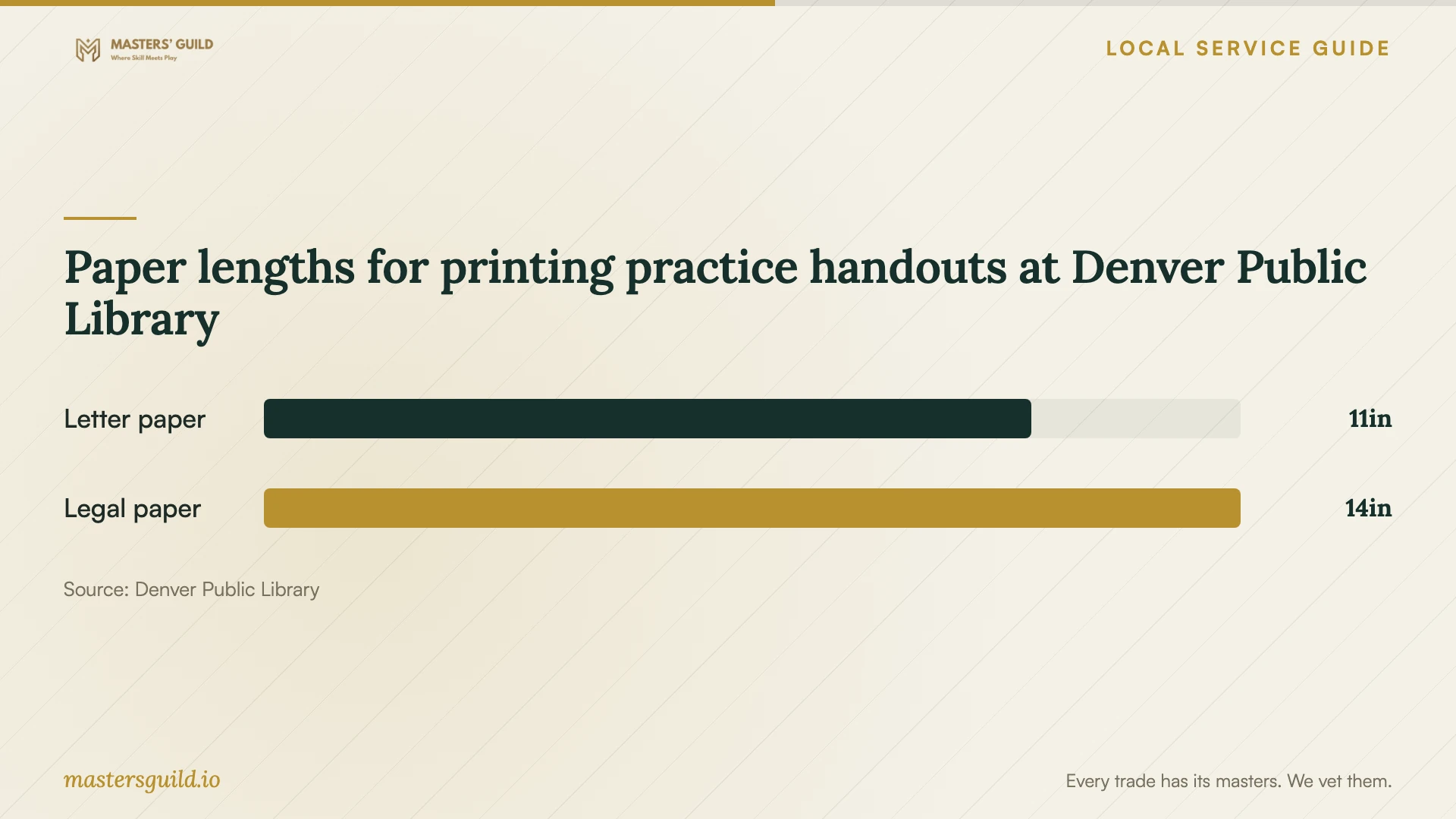
If you want printed practice instructions, the library offers free printing in letter and legal sizes, with a 100-page printing and copying limit. It requires library-supplied paper. Ask the instructor for a readable handout in a supported size; the chart compares the published paper lengths, not lesson prices or printing availability. [2]
Check your progress before booking more
End the lesson by completing the agreed task while the instructor observes. Ask for instructions that match your device and software. Record the steps you can repeat and the points where you need help. Use that record to choose your next task, request a revised lesson scope, or spend time practicing before another session.
Paper lengths for printing practice handouts at Denver Public Library
Local details that affect your job
Arrange ongoing beginner assistance
Denver Public Library’s Digital Navigators offer free, ongoing help with beginner technology, online safety, mobile devices, and affordable connectivity. The library provides an online route for arranging an in-person appointment. Consider this service if device use or internet access prevents you from starting a course. [1]
Secure internet access for remote lessons
The library’s access page says it has ended take-home Chromebook and hotspot circulation. It continues to provide in-library computers, Chromebooks, and Wi-Fi. Confirm your home or workplace connection before purchasing remote instruction, or arrange a suitable venue for attending and practicing. [2]
Choose an Excel starting point
The library lists separate Excel classes for basics, formulas and functions, and charts and pivot tables. It recommends Excel Basics before the latter two. Review those descriptions to choose a starting point, then identify the business-specific exercises you want a private instructor to teach. [3]
Choose a starting route
| Your need | Route to consider | Check before arranging |
|---|---|---|
| Email, browser, or device questions | Library drop-in help or a technology appointment | Branch availability and topic fit |
| Ongoing beginner support or affordable connectivity | Library Digital Navigator | Appointment arrangements and your access needs |
| Excel foundations or further spreadsheet skills | Library technology class | Schedule and recommended starting skills |
| Instruction using your business files | Private instructor with an agreed scope | Teaching examples, privacy arrangements, and complete price |
| Independent study in development or data science | Library-provided Udemy access | Permanent library card and required account |
Your hiring checklist
- Describe the task you want to complete without assistance.
- List your device, software version, and current skills.
- Review the library’s class descriptions and assistance options.
- Prepare a sample file with confidential information removed.
- Request the complete price, cancellation terms, and package conditions.
- Confirm the venue, connection, accessibility needs, and practice equipment.
- Agree on a final demonstration and the materials you will keep.
Frequently Asked Questions
Can I learn basic computer skills locally for free?
Denver Public Library offers free technology classes and free, ongoing Digital Navigator help. Its catalog includes computer basics, email, internet use, and file management. Check the schedule and choose a class or assistance appointment that matches your starting skills. [1] [3]
How should I budget for private training?
Request written quotes for the same task and lesson format. Compare preparation, travel, software, materials, and follow-up charges. Ask whether setup uses part of your teaching time. The cited library pages do not establish private instructor prices. [1] [2] [3]
Can I practice without owning a computer?
The library offers public computers with a free library card and Chromebooks for use inside branches. Its computers include Microsoft Office 2021. Check that the software fits your course and plan branch practice time, since the library has ended take-home technology circulation. [2]
How do I decide whether to continue after the first lesson?
Repeat the agreed task without prompts and note where you get stuck. Ask the instructor to propose practice or another lesson for those points. Before booking, agree on the expected outcome and price.
Sources and scope
This guide combines the sources below with practical planning guidance. Figures apply to the stated geography and period; request a written quote for your property.