
Local service guide
Software Installation in Denver, CO
Arrange Software Installation in Denver by giving the technician your device model, operating system, program names, and intended tasks before requesting a written quote. Ask them to separate installation labor, software purchases, backup, and troubleshooting. For help learning email or using a laptop, consider Denver Public Library’s personalized tech appointments before booking paid work. [1]
Choose help that fits the task
Start by deciding whether you want someone to teach you, install a program, or repair an installation that has failed. Write down the result you need and any error message. For example, ask for an email application that sends and receives messages from your existing account, rather than asking for general computer setup.
Denver Public Library offers drop-in help with internet navigation, email, phones, tablets, and eBooks. It also offers personalized in-person appointments for laptop and mobile-device use at several branches. Ask staff whether they can address your question; the published description does not promise operating-system reinstalls or paid-software deployment. [1]
For paid work, ask the technician to confirm experience with your exact operating system and application. Describe any printer, scanner, or other device you need the program to work with. If you want an operating-system change or file migration, request a separate scope and a backup plan before approving the work.
Get a quote you can compare
Give each technician the same list of devices and applications. Ask whether the quote covers downloads, installation, account sign-in, updates, configuration, and a demonstration. Request separate amounts for labor, software licenses, subscriptions, travel, and data transfer, plus an explanation of any minimum charge.
Ask how the technician will handle an unexpected error. Agree on a spending limit and require your approval before they add troubleshooting, replace software, or erase the device. For hourly work, request an initial allowance and a point at which the technician must stop and discuss the remaining work.
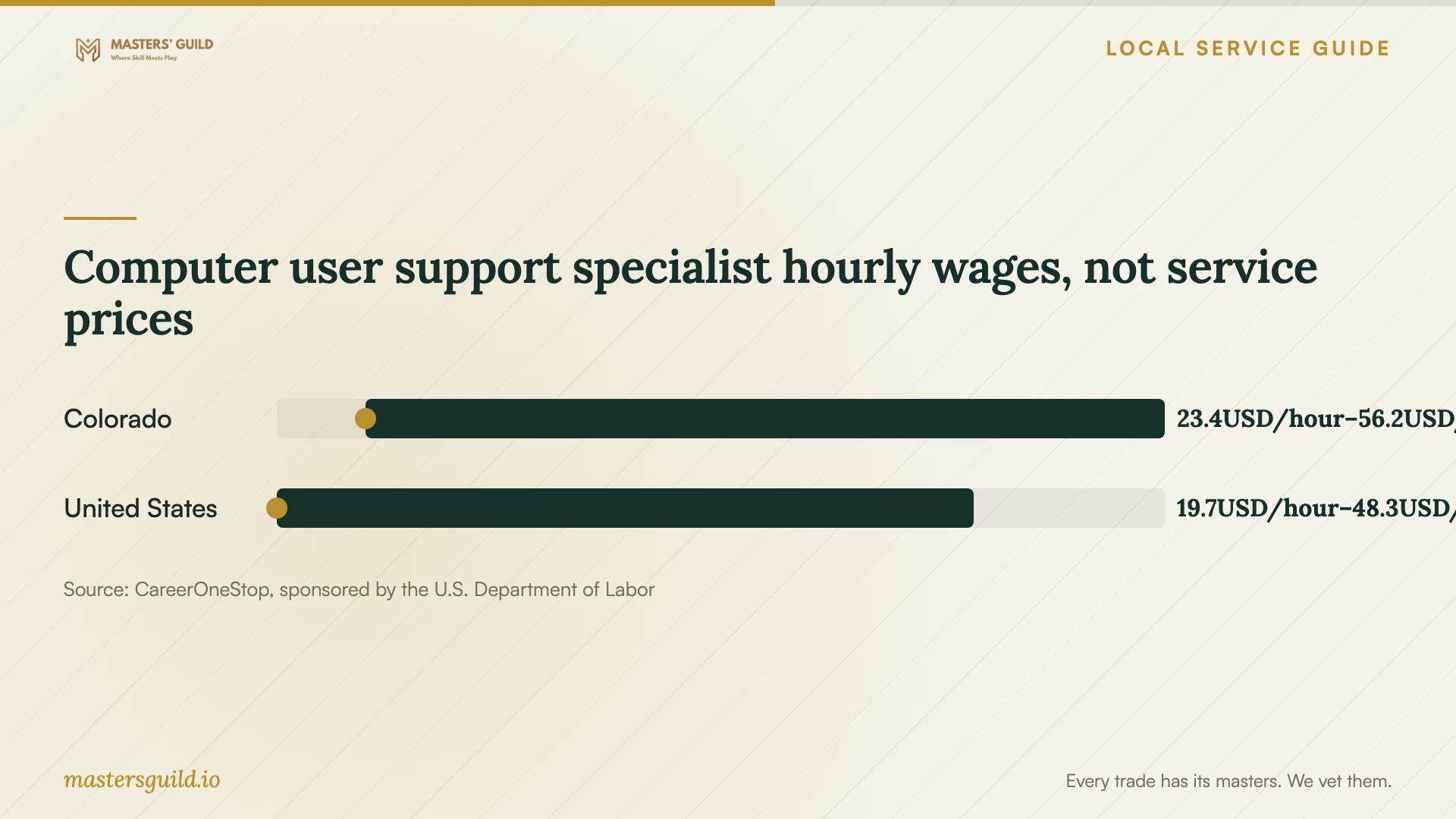
CareerOneStop reports May 2025 hourly wages for computer user support specialists, including published low and high values of $23.36 and $56.18 in Colorado. Its national values are $19.70 and $48.34. These figures come from the Bureau of Labor Statistics occupational wage survey. They describe worker pay across the occupation, not Denver installation charges or a recommended quote. [3]
Prepare your device and accounts
Before the appointment, make a backup of the files you want to keep and open several files from that backup to check them. Tell the technician where you saved it. Ask them to explain which files and settings they intend to preserve before an operating-system reinstall or other work that could erase data.
Gather your purchase receipt, subscription information, and the account associated with the software. Sign in yourself when possible, including entering verification codes. Ask the technician to use the software publisher’s download source and explain any request to disable a security setting. Avoid putting passwords in the job description.
For remote help, confirm that the computer starts, connects to the internet, and can run the technician’s proposed support tool. Ask how you will end the session and remove continuing access afterward. If you cannot reach the desktop or connect, describe that limitation before agreeing to remote service.
Plan around local access options
Denver Public Library lists Windows 11, Microsoft Office 2021, Chrome, Firefox, Edge, and VLC among the software on its public computers. You can use a library computer with a free library card. Consider this option for an immediate document task while you compare home software choices; confirm that the available program meets your needs. [2]
The library’s current access page says it ended take-home Chromebook and hotspot circulation as of July 30. It continues to offer in-library computers, in-library Chromebooks, and free Wi-Fi. If you lack home internet, arrange connectivity before booking remote installation rather than planning to borrow a take-home hotspot. [2]
Digital Navigators offer free, ongoing help finding low-cost internet and affordable devices, learning beginner technology skills, and understanding online safety. If connectivity or basic device use blocks your installation plan, ask about this program before committing to a software purchase. [1]
Check the work before closing the visit
Ask the technician to test the program with you using a file or task you recognize. Open an existing document, save a new copy, and test the relevant email or printing function. Restart the computer and reopen the application. Confirm which account owns the purchase and where you can find renewal information.
Request a short record of the applications installed, changes made, unresolved errors, and follow-up terms. Check that you can sign in without the technician’s help. For remote work, confirm that the session has ended and ask whether any support software remains configured for future access.
Computer user support specialist hourly wages, not service prices
Local details that affect your job
Branch appointments for learning and basic help
Denver Public Library offers personalized in-person technology appointments at several branches and scheduled drop-in help at specified locations. Check the location and topic before traveling. Use this route to explore a laptop-use or email question, and ask staff whether your request fits their assistance. [1]
Temporary software access inside the library
Library computers include Microsoft Office 2021, and patrons can use computers with a free library card. If you need to work on a document before your home installation appointment, consider library access and confirm the program and file format you need. [2]
Arrange home connectivity before remote service
The library says it ended take-home Chromebook and hotspot lending as of July 30, while retaining free Wi-Fi and computer access inside branches. Do not base a remote installation appointment on borrowing a take-home hotspot. Digital Navigators can help you look for low-cost internet and affordable devices. [1] [2]
Choose your next step
| Your situation | Option to consider | Confirm before proceeding |
|---|---|---|
| You need help using email or a laptop | A library tech appointment or drop-in session | Branch availability and whether staff can address your question |
| You need temporary access to Word or Excel | Microsoft Office 2021 on a library computer | Library-card access and suitability for your file |
| You want someone to install and configure purchased software | A technician with experience in your operating system | License ownership, included tasks, and a working-task demonstration |
| You cannot start the computer or connect to the internet | Discuss an in-person assessment | Diagnosis scope, backup handling, and approval for additional work |
| Home internet or device affordability blocks the job | Denver Public Library Digital Navigators | Help finding low-cost internet or an affordable device before booking |
Your hiring checklist
- List the device model, operating system, applications, and exact task you want to complete.
- Share error messages and explain whether the computer starts and connects to the internet.
- Request an itemized quote with a spending limit for additional troubleshooting.
- Back up important files and check that you can open the backup copies.
- Gather purchase records and account access; enter passwords and verification codes yourself.
- Agree on data preservation and remote-access removal before work starts.
- Test the installed program, restart the computer, and collect a record of the work.
Frequently Asked Questions
Can the library install software for me?
The library describes assistance and instruction with device use, email, internet navigation, and similar topics. Its published page does not promise software installation on your personal computer. Ask staff about your exact request before choosing this option. [1]
How much should I budget for installation?
The supplied sources do not establish Denver service prices. Request a written quote for your devices and programs, with labor, software purchases, travel, backup, and troubleshooting separated. Use the wage chart as occupational context, not as a customer price list. [3]
Should I choose remote or in-person help?
Ask the technician whether remote work suits your task and device condition. Confirm internet access and the proposed support tool first. For a computer that cannot start or connect, discuss an in-person assessment and its cost before booking.
Do I need to give the technician my password?
Arrange to enter passwords and verification codes yourself. Ask which account permissions the work requires and how the technician will end remote access. Keep a record of account or security changes and confirm that you can sign in after the appointment.
Sources and scope
This guide combines the sources below with practical planning guidance. Figures apply to the stated geography and period; request a written quote for your property.