
Local service guide
Data Recovery and Backup in Denver
For Data Recovery and Backup in Denver, choose a provider around your immediate need: restoring a known backup, assessing a failed device, or responding to a suspected cyberattack. Request a written diagnostic scope, approval limit, data-handling terms, and recovery priorities before handing over equipment. For ransomware, CISA recommends isolating affected systems and restoring critical services on a clean network. [2]
Choose the right recovery scope
Describe the problem before requesting a price: missing files, an unreadable device, a failed backup restore, or a ransom message. Give the provider the device model, storage type, symptoms, and a list of actions you have taken. Establish whether the proposed work covers file recovery, application restoration, or both.
For a suspected device failure, pause further use and ask the specialist how to preserve it for assessment. Avoid authorizing a reset or reinstall while you still need files from that device. Identify the most valuable folders, date ranges, and file types so the provider can quote against a concrete goal.
Treat suspected ransomware as an incident-response job. CISA advises disconnecting affected devices from the network or Wi-Fi to contain infection. It recommends powering them down only when network isolation is impossible because shutdown loses potential evidence in volatile memory. Ask an incident responder to direct containment and evidence collection. [2]
Get a quote you can approve
Request separate charges for assessment, recovery attempts, replacement storage, transport, and restoring applications. Have the provider state which charges apply if it cannot recover your priority files. Define any no-data, no-fee promise in writing, including what counts as usable data and which expenses remain payable.
Set an approval limit before work begins. Request an estimated assessment date and the point at which the provider can give a recovery schedule. Confirm whether the person receiving your equipment will perform the work or send it to another facility. Record the device serial number and obtain a receipt at each handoff.
Agree on privacy and access terms: who may inspect files, where copies will remain, how the provider will transfer recovered data, and when it will delete its working copies. For ongoing backup management, CISA recommends contract language that formalizes security requirements and limits third-party access to the systems within their responsibilities. [2]
Specify backups around a working restore
Tell the backup provider how much recent work you can afford to lose and how long you can operate without each application. Prioritize accounting, bookings, customer records, and the systems needed to open those records. Have the provider document covered devices, accounts, retention periods, and exclusions.
CISA recommends maintaining offline, encrypted backups of critical data and testing their availability and integrity in a disaster-recovery scenario. Its guidance explains that ransomware variants can delete or encrypt accessible backups. Ask the provider to show which copy remains protected if an attacker gains access to your production systems. [2]
Make the acceptance test practical: restore selected files to a separate destination, open them, and demonstrate access to a priority application. Name the person who receives failure alerts and the person who approves corrective work. Keep a written recovery procedure accessible during an outage; CISA recommends hard-copy and offline incident-response plans. [2]
Verify support and close out the job
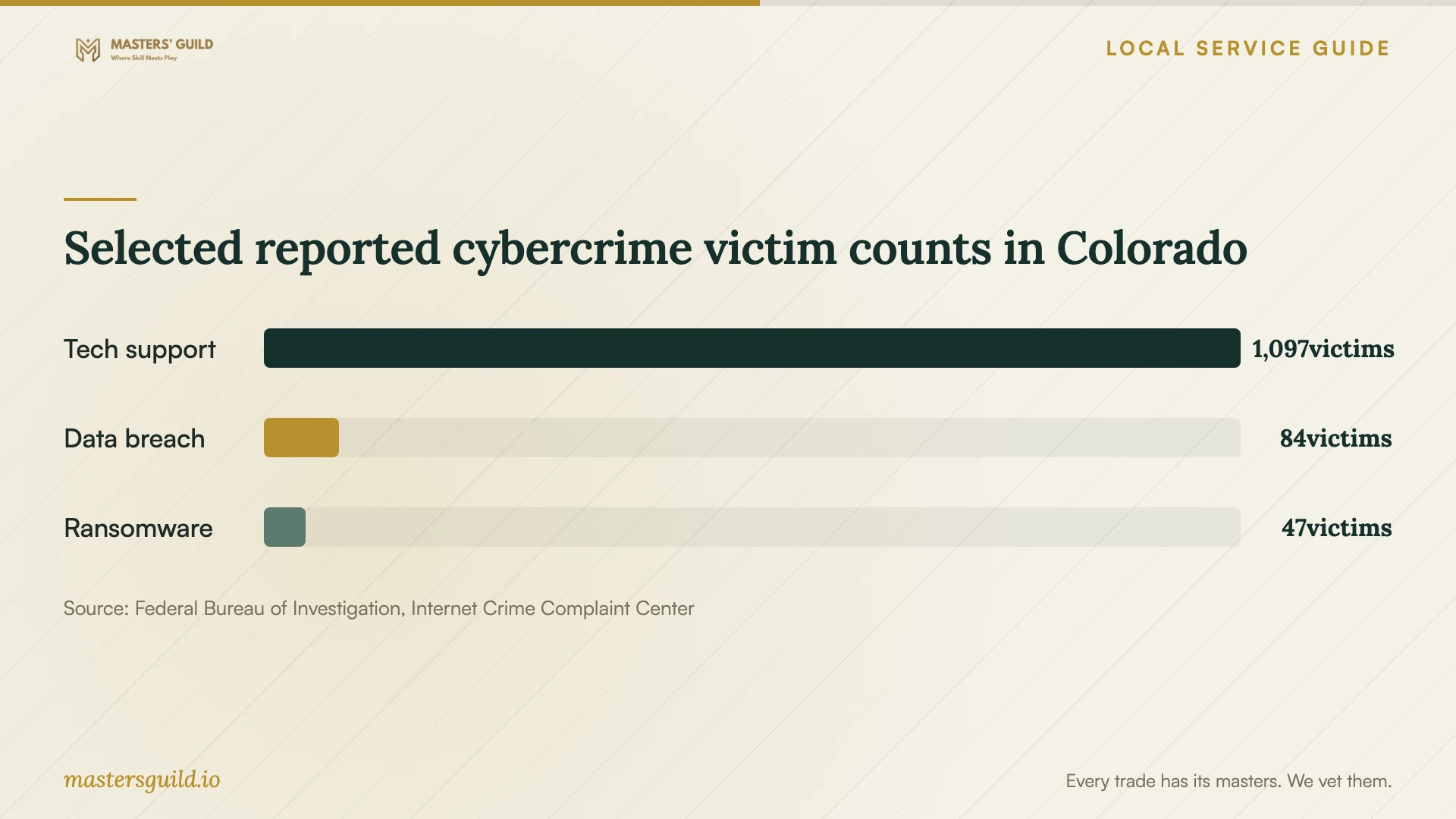
The FBI's 2025 Colorado IC3 report lists 1,097 tech-support crime victims and $32,098,456 in reported victim losses for that category statewide. Use that context to verify a provider through contact details you obtain yourself before allowing remote access or paying. These figures describe reported crime in Colorado, not the quality of Denver recovery providers. [3]
Before accepting recovered data, open your priority files and check the date ranges you requested. Request a list of missing or damaged items and document any remaining application work. Confirm that you can access the new backup without depending on a technician's personal account.
Keep the original equipment until you finish verification and resolve any evidence-preservation needs. Then agree on sanitization and recycling. Denver advises safeguarding personal data before recycling or reuse; for a business device that cannot be wiped, ask the provider to specify a destruction method and the documentation you will receive. [1]
Selected reported cybercrime victim counts in Colorado
Local details that affect your job
Business equipment needs a separate recycling arrangement
Denver's E-cycle Coupon serves Denver County residents and excludes businesses, non-residents, and PO boxes. Eligible households receive one coupon per calendar year for drop-offs and must bring proof of address and their coupon code. For office equipment, request a business recycling arrangement in your recovery quote rather than budgeting around the residential discount. [1]
Plan disposal before replacing computers
Denver states that Colorado bans covered electronics from landfill disposal. Its list includes CPUs, laptops, monitors, and printers. If recovery work leads you to replace office computers, arrange recycling after you verify the recovered files and settle data-handling requirements. Agree on who will transport the retired equipment and provide a receipt. [1]
Match the job to the help you need
| Situation | Scope to request | Acceptance question |
|---|---|---|
| You have a backup to test | A supervised restore to a separate destination | Can I open the priority files and use the required application? |
| A device is unreadable | A specialist assessment with an approval limit | Which priority files can you deliver, and what will an unsuccessful attempt cost? |
| You suspect ransomware | Incident response, isolation, evidence preservation, and recovery on clean systems | Who decides that the environment is ready for restoration? |
| You need ongoing backup management | Offline encrypted protection, restore tests, and written access responsibilities | Can you demonstrate recovery and show who handles failed backups? |
| You are retiring office computers | Data-handling closeout and business electronics recycling | Who provides the custody and recycling receipts? |
Your hiring checklist
- List priority files, applications, and date ranges.
- Record device models, serial numbers, symptoms, and previous recovery attempts.
- Identify available backups and the last restore you verified.
- Request assessment charges, an approval limit, and unsuccessful-recovery terms.
- Confirm work location, subcontractors, custody receipts, and copy-deletion terms.
- Agree on a restore demonstration and responsibility for backup alerts.
- Arrange business recycling after recovery verification and any evidence hold.
Frequently Asked Questions
How much should I budget for recovery?
Request a device-specific assessment and an itemized quote. Compare assessment fees, unsuccessful-attempt charges, replacement media, transport, and application restoration against the same priority-file list. Set a spending limit that requires your approval before the provider performs additional work.
Should I reconnect backups after ransomware?
Have your incident responder direct that step. CISA recommends restoring offline, encrypted backups according to critical-service priorities and taking care to avoid reinfecting clean systems during recovery. [2]
Can my business use Denver's E-cycle Coupon?
Denver excludes businesses from the coupon program. Arrange a business recycling service for office equipment and include transport and data-handling documentation in the scope. [1]
How do I check a backup provider's work?
Request a restore demonstration using files and applications you choose. CISA recommends tests of backup availability and integrity. Agree on who receives failure alerts, resolves them, and retains the recovery instructions. [2]
Sources and scope
This guide combines the sources below with practical planning guidance. Figures apply to the stated geography and period; request a written quote for your property.