
Local service guide
Cloud Service Setup in Denver, CO
For Cloud Service Setup in Denver, hire help when you want someone to configure several devices, move existing files, or demonstrate a successful recovery. Request a written scope covering account ownership, selected folders, access permissions, subscription charges, and completion checks. For introductory device or account instruction, consider Denver Public Library’s personalized tech appointments before purchasing a setup service. [1]
Define the setup you want to approve
Write a short description of what you want to do after the appointment. For example: open household documents on a laptop and phone, protect a photo collection, or move files out of an old account. Identify the devices and folders involved. Ask the technician to explain how the proposed service handles deletion, recovery, and files you need while offline.
For a migration, specify the source account, destination account, and items you want included. Ask about photos, shared folders, and files that other people own. Agree on a method for checking the transfer before you authorize removal of originals. Require the technician to document anything excluded, unsuccessful, or still awaiting upload.
Compare quotes by scope and completion
Request separate amounts for setup labor, migration work, and ongoing subscriptions. Ask whether the quote includes all listed devices, a recovery demonstration, and help after the appointment. For hourly work, agree on a spending limit and require approval before the technician exceeds it. For a fixed quote, write down the conditions that could change the price.
Ask each candidate to describe the handoff. You should receive a list of configured devices and folders, instructions for accessing your files, and an explanation of account recovery. Agree on who will monitor unfinished uploads and resolve errors. Define completion through observable checks, such as opening selected files on each device and recovering a test file.
Choose remote or in-home assistance around the work you need. Ask the provider whether they can handle your device list remotely and how they will obtain temporary access. If you want someone to inspect several devices with you or help you learn the controls in person, include that requirement in your request.
Check your connection and storage units
Use your street address when checking internet options. The FCC’s National Broadband Map identifies providers that report serving a location, along with technologies and maximum advertised upload and download speeds. Treat those figures as reported availability information. Measure your upload speed at home and ask the technician to use that measurement when discussing the transfer schedule. [3]
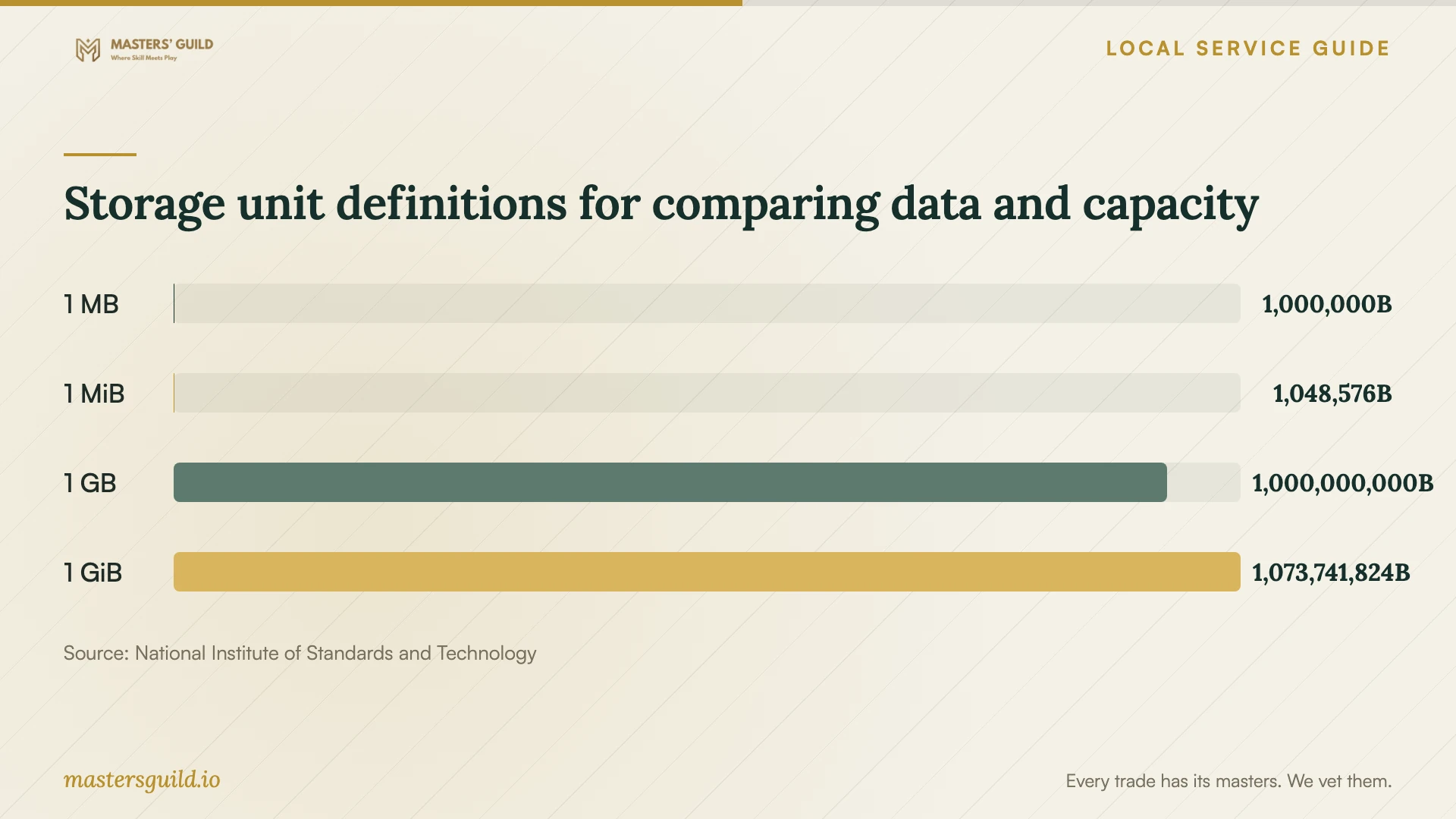
Ask the technician to inventory the data you plan to move and state whether the total uses GB or GiB. NIST defines one GB as 1,000,000,000 bytes and one GiB as 1,073,741,824 bytes. Use a common unit when comparing your inventory with a storage allowance, and leave room for the files you expect to add. [4]
Keep control of the account and test the handoff
Create the account under an email address you control. Enter your own password and keep recovery information accessible to you. Ask the technician to help configure multifactor authentication and explain the recovery steps. Agree on how they will remove temporary access when the work ends.
Review sharing permissions together. Identify who should view or edit each shared folder, and ask the technician to demonstrate those permissions with a test file. For a household account, decide which files belong in shared storage and which should remain private. Record these choices so another family member can understand the setup.
Before approving completion, open representative files from the destination account and each configured device. Ask the technician to demonstrate recovery using a disposable test file. Keep your original data until you have checked the agreed transfer scope. Record remaining uploads, errors, follow-up responsibilities, and the date you will review them.
Storage unit definitions for comparing data and capacity
Local details that affect your job
Use branch instruction for introductory questions
Denver Public Library offers drop-in tech help at specified locations and personalized appointments at several branches for phone, tablet, laptop, internet, and email instruction. If your main need is learning to use a device or account, check the schedule or ask about appointment scope before paying for a migration. The library’s description does not promise a managed cloud transfer or backup installation. [1]
Arrange home connectivity before a large transfer
The library’s Denver resource list, updated July 2, 2026, identifies low-cost home internet options and Digital Navigators who help residents obtain affordable internet and learn technology skills. It also lists public WiFi near library sites. If you need home internet before arranging setup, start with a Digital Navigator and confirm eligibility, equipment costs, and service terms. Plan where your devices will stay connected during the transfer. [2]
Choose the next step for your household
| Your situation | Next step | Confirm before proceeding |
|---|---|---|
| You need help learning device or email controls | Consider a Denver Public Library tech appointment | Branch availability and whether staff can address your question |
| You need affordable home internet | Ask a library Digital Navigator for help | Eligibility, equipment charges, and service terms |
| You want to compare internet options | Check the FCC map at your address | Reported upload speed and availability with the provider |
| You want files moved between accounts | Request a defined migration quote | Included folders, transfer checks, and responsibility for errors |
| You want recoverable household files | Include a recovery demonstration in the setup scope | Which files the technician will protect and how you will restore them |
Your hiring checklist
- List each device, operating system, source account, and folder you want included.
- Decide whether you want shared access, backup recovery, migration, or a combination.
- Confirm that you can sign in and access your recovery email or phone.
- Measure home upload speed and record the amount of data with its storage unit.
- Request separate labor and subscription charges, plus a limit for extra work.
- Agree on sharing permissions and removal of the technician’s temporary access.
- Require file-opening and recovery demonstrations, with a written list of unfinished work.
Frequently Asked Questions
Can I use free local help before hiring someone?
Denver Public Library offers tech instruction, drop-in assistance, and personalized appointments at several branches. Digital Navigators provide free, ongoing help with beginner skills, affordable internet, and online safety. Ask about your specific task; these descriptions do not establish that staff will perform a complete cloud migration. [1]
How should I compare setup prices?
Give each provider the same device and folder list. Ask for labor, subscriptions, migration work, and follow-up support as separate items. Agree on completion checks and a spending limit. Use the written scope to compare offers rather than assuming that quotes cover the same work.
Does the FCC map tell me how fast my files will upload?
The FCC map displays maximum advertised upload speeds reported by providers at a location. Use it to investigate available service, then measure your connection at home. Ask the technician to discuss scheduling using that measurement and your data inventory. [3]
Should I delete the original files after setup?
Wait until you have checked the agreed transfer scope, opened representative files, and reviewed any errors or exclusions. Ask the technician to demonstrate recovery with a test file. Decide together when to remove originals and document that decision.
Sources and scope
This guide combines the sources below with practical planning guidance. Figures apply to the stated geography and period; request a written quote for your property.