
Local service guide
Smart Appliance Setup in Dallas, TX
For Smart Appliance Setup in Dallas, hire technology help for app pairing and network troubleshooting, and describe physical installation as a separate part of the job. For a new circuit, wiring changes or plumbing alterations, confirm the appropriate trade professional and City permit requirements before booking. Request a written quote separating connectivity work, appliance installation and permit responsibilities. [1] [3]
Define setup before requesting a quote
Send the appliance brand and model number, describe its installation status and name the feature you want to use. For example, request that a washer already connected to power and water appear in your household account, with cycle notifications tested on your phone. Include positioning the machine or changing connections if you need that work too.
Have the provider check the manufacturer's setup requirements for your exact model before the visit. Include your phone, router model and existing household hub. Request a compatibility check before buying equipment or paying for an integration.
Treat new wiring, circuits and plumbing changes as separate hiring decisions. The Dallas guide identifies electrical and plumbing trade permits for these categories and says trade professionals must hold the appropriate license and City registration. Give the contractor the full scope so they can confirm the applicable permit path with City staff. [1]
Choose qualifications that match the work
For app and network work, discuss how the provider will investigate a failed connection, check compatibility and hand over account control. Send current error messages. Confirm whether the quoted visit includes troubleshooting or only an attempt to pair the appliance.
For non-exempt electrical work, verify qualifications through the Texas Department of Licensing and Regulation. TDLR says anyone performing or offering this work must hold a license and work through a licensed electrical contractor. Its program also lists residential appliance installer and appliance installation contractor credentials. Have the provider identify which credential covers your proposed work. [3]
Keep exemption claims specific. TDLR describes an exemption for residential appliance dealers, manufacturers and their authorized designees doing electrical work while repairing or servicing an existing appliance. It warns that municipal or regional regulations may override state exemptions. Have a provider claiming this exemption explain how it applies to your appliance and scope, then confirm local requirements. [2]
Compare written scope and charges
Request an itemized quote for the named appliances and agreed outcomes. Separate app setup, network troubleshooting, physical installation, equipment and trade work. Agree on the charge if the appliance cannot connect during the visit, and require your approval before the provider adds work or purchases equipment.
Confirm whether the provider charges a fixed amount or bills for time, includes travel and offers follow-up support. For several appliances, list each model and requested function. Include household sharing and hub integration in the written scope if you want those tasks completed.
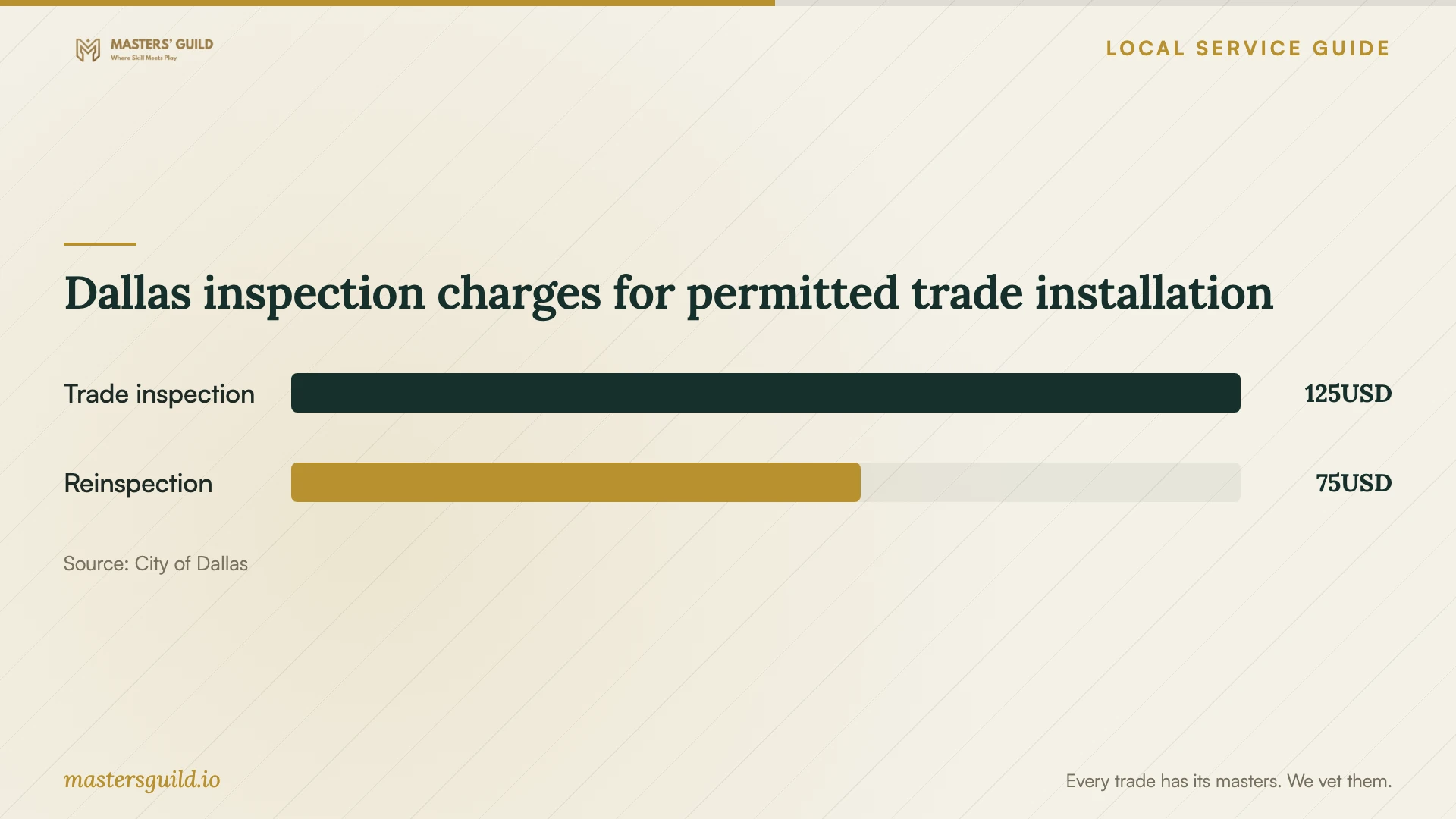
For permitted trade work, agree who pays City fees and schedules inspections. The Dallas guide lists a $125 inspection fee per trade and $75 per trade per reinspection following a failed inspection. The reinspection itself does not need to fail for that charge to apply. These City inspection charges do not establish appliance setup labor prices or the total permit bill. Confirm current fees with City staff. [1]
Prepare access and test the handover
Have your phone, account recovery method, appliance manual and router information ready. Enter your own passwords during the appointment. Decide who in your household should receive notifications and have control before work starts.
Test the agreed features with the provider present. Open the app yourself, check appliance status and try the controls or notifications included in the scope. Have the provider explain the physical controls and recovery steps to follow after a connection problem.
Keep a handover record with device names, account ownership, completed tests and unresolved issues. Record settings the provider changed and the contact for follow-up. For an unfinished feature, agree on the next step and any additional charge before closing the appointment.
Dallas inspection charges for permitted trade installation
Local details that affect your job
Check Dallas registration for permitted trade work
Before hiring for electrical or plumbing alterations, use the Contractor Registration search in DallasNow. The City allows searches without an account by business name or registration number. Check Active status, the correct trade and the expiration date. Have the contractor identify who will pull the permit and meet inspectors. [1]
Link trade work to an existing remodel permit
If appliance installation forms part of a permitted remodel, give each trade contractor the primary permit record number in writing. Dallas requires contractors to enter that number exactly when linking their trade records. Each trade has separate inspections, which contractors schedule from the trade record's Inspections tab. Retain those record numbers and track permitted installation alongside app setup. [1]
Resolve unclear connection requirements before booking
Contact Dallas Planning & Development at (214) 948-4480 or visit 320 E. Jefferson Blvd, Dallas TX 75203 for permit questions. Describe the proposed wiring or plumbing changes rather than asking only whether smart appliance setup needs a permit. The City labels its online guide as general guidance and directs readers to confirm current requirements with staff. [1]
Match the provider to your scope
| Planned work | Provider to consider | Confirm before booking |
|---|---|---|
| App pairing for an installed appliance | Technology setup provider | Exact model, agreed features, account handover and unsuccessful-visit charge |
| Connection troubleshooting across appliances | Provider offering network troubleshooting | Diagnostic scope and approval before equipment purchases |
| New circuit or building wiring changes | Licensed electrical contractor | Applicable license, Dallas registration, permit and inspections |
| Plumbing pipe or fixture alterations | Appropriate licensed plumbing professional | Dallas registration, permit requirements and inspection responsibility |
Your hiring checklist
- List each appliance's brand, model and requested app feature.
- Describe existing physical connections and any installation work you need.
- Send error messages and router information before the appointment.
- Confirm compatibility before approving equipment purchases.
- Agree on labor, troubleshooting, unsuccessful-visit and follow-up charges.
- Prepare your phone and account recovery access; enter passwords yourself.
- For trade work, confirm qualifications, City registration and permit responsibilities.
- Test agreed features and retain a handover record.
Frequently Asked Questions
Do I need an electrician for app setup?
For app pairing, request technology setup help. Describe any electrical work separately. Texas requires licensing for non-exempt electrical work through a licensed electrical contractor. Have the provider identify the applicable qualification or exemption and confirm Dallas requirements for physical alterations. [1] [3]
Does an appliance service exemption cover new wiring?
Do not assume it does. TDLR describes the residential appliance exemption for dealers, manufacturers and authorized designees repairing or servicing an existing appliance. It also warns that municipal rules may override exemptions. Confirm the claimed exemption and local permit requirements for the exact work. [2] [1]
What should I do if pairing fails?
Have the provider document the error, completed tests and next proposed step. Before booking, agree on the charge for an unsuccessful visit and whether follow-up troubleshooting is included. Approve equipment purchases or additional work before the provider proceeds.
Should I share my account password?
Plan to enter passwords yourself and keep the account under your own email address. Review household sharing, recovery access and temporary permissions with the provider. Remove access you no longer want during handover.
Sources and scope
This guide combines the sources below with practical planning guidance. Figures apply to the stated geography and period; request a written quote for your property.