
Local service guide
Network Setup and Support in Dallas, TX
Arrange Network Setup and Support by asking for a diagnosis and a written scope before approving equipment purchases. Describe the rooms and devices you need connected, then separate router configuration, Wi-Fi coverage, Ethernet cabling and any new electrical work. For a Dallas home, confirm city requirements before approving building alterations or power work. Dallas requires licensed electricians for electrical work, subject to its stated homeowner exception; Texas exempts specified communications circuits from state electrician licensing but warns that municipal rules may override exemptions. [1] [2]
Define the problem before buying equipment
Write down where the connection fails, which devices you use and what you were doing when the problem occurred. Include video calls, streaming, printing or access to work systems. Ask the technician to compare performance near the router with performance in the rooms you use, and to include a wired connection test where practical. Agree on the tests before the visit.
For a move or a change of internet provider, check service availability at the property before choosing network equipment. The Texas Broadband Development Office directs readers who need address-level information to the FCC National Broadband Map. Providers submit the availability data. Use that information to identify options, then confirm installation and service details with the provider. [4]
Give the technician your equipment models and explain whether you want to keep them. Ask for a diagnosis-only option and a separate equipment recommendation. Request an explanation of how each proposed purchase addresses the problem you reported, plus an alternative that uses your current equipment if the technician considers that workable.
Choose a scope you can compare
For router or Wi-Fi work, request a quote that names the configuration tasks, equipment locations, device connections and completion tests. If the provider recommends mesh equipment, ask them to identify proposed node locations and explain how they will connect the nodes. Decide which rooms need testing before approving the plan.
For Ethernet installation, mark the outlet locations you want and ask the installer to propose cable routes. Request separate line items for cable, wall plates, terminations, testing and wall repairs. Ask who will label the connections and whether the installer will provide a record of the test results. Include responsibility for moving furniture and restoring access areas.
For price comparisons, give each provider the same room list and requested deliverables. Ask whether the quote includes equipment, labor, travel, repairs and follow-up support. Establish how the provider will seek approval for extra work. Set an agreed spending limit for diagnosis if you have not yet chosen an installation scope.
Resolve Dallas power and building questions
Texas exempts people performing work on specified low-voltage circuits, optical fiber cables and communications circuits from state electrician licensing. TDLR also states that municipal or regional regulations may override those exemptions. Ask a cabling installer to explain how the proposed work fits the exemption and how they will confirm the applicable Dallas requirements. [1]
Dallas states that electrical work must use a licensed electrician, with a homeowner exception requiring proof of knowledge and expertise to the Chief Electrical Inspector. The city also states that electrical work requires permits unless Chapter 52 provides an exemption. If your network plan includes a new outlet or circuit, identify the electrician and resolve permits before scheduling that work. [2]
The city says building work involving structural elements generally needs a permit and lists additional requirements for exterior work in historic or conservation districts. Before approving an exterior cable route or building alteration, ask Building Inspection about the exact address and scope. Avoid relying on a broad statement that all network installation work follows the same rule. [2]
Prepare for the visit and agree on handover
Have an authorized account holder available for internet-provider or equipment access. Prepare a device list and clear access to the proposed work areas. Enter passwords yourself where practical, and agree on any temporary access the technician needs. Ask them to explain proposed account or network-name changes before making them.
At handover, test the rooms and tasks you named in the scope. Ask for the equipment list, a simple connection diagram, cable labels and instructions for managing your network. Confirm who controls administrator access and how to request follow-up help. Record unresolved issues, the next step and any additional charge before accepting completion.
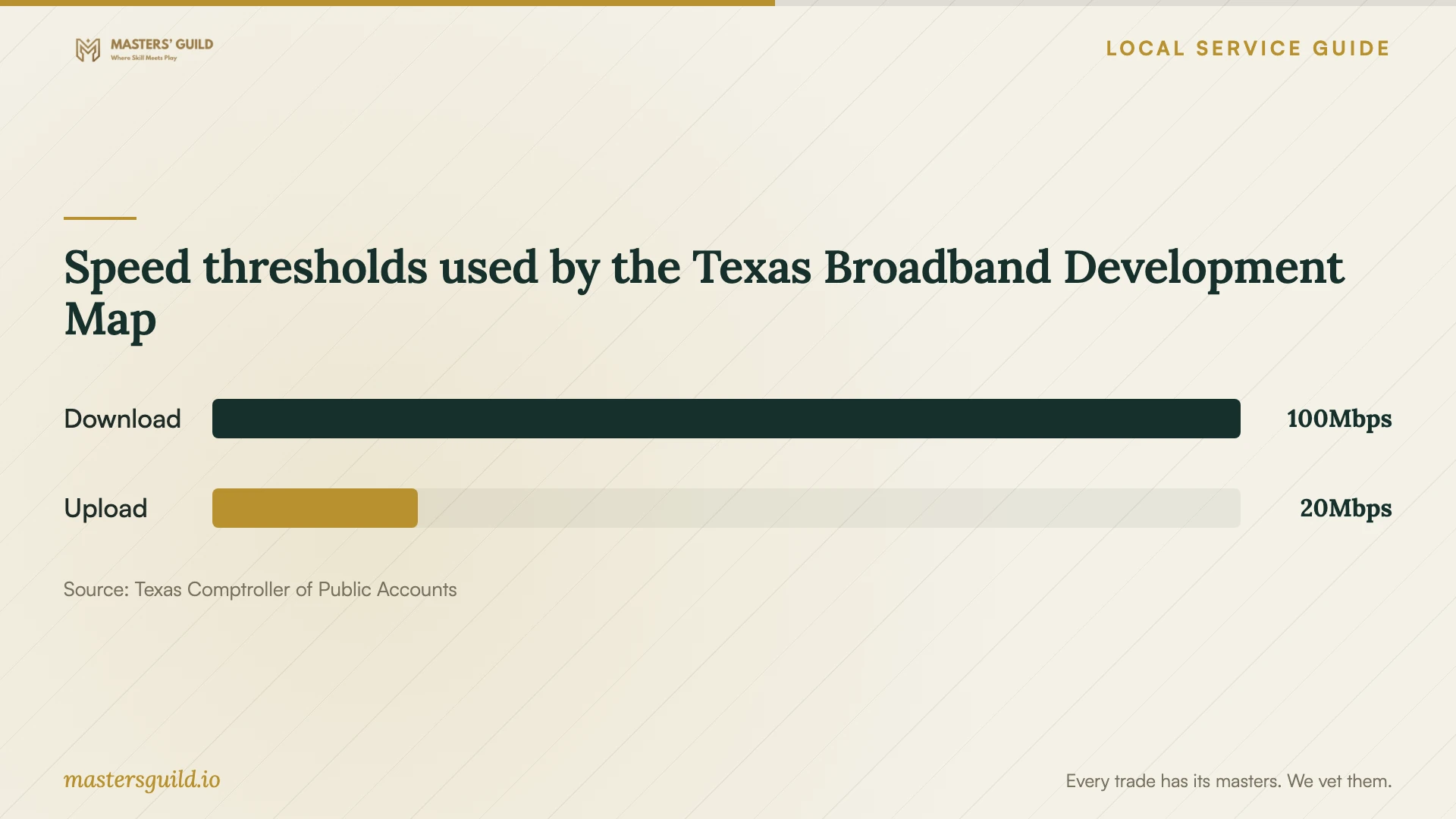
Speed thresholds used by the Texas Broadband Development Map
Local details that affect your job
A Dallas contact for scope-specific permit questions
Dallas lists Plan Review and Field Service Inspections at the Oak Cliff Municipal Center, 320 E. Jefferson Blvd., with phone number 214-948-4480. Before approving power work, structural alterations or an exterior cable route, describe the address and proposed installation to the city. Ask which permits or reviews apply and have the provider identify who will handle them. [2]
Local help before commissioning paid support
The city's Digital Navigators program offers qualifying residents digital skills classes, technology and internet resources, and affordable internet enrollment support, including Lifeline. It lists one-on-one walk-in support at community anchor sites, including CitySquare at 1610 S. Malcolm X Blvd. and Bachman Lake Together at 9507 Overlake Dr. Check program eligibility and current hours if your main need is basic digital help or internet access. The city page does not describe an in-home Ethernet installation service. [3]
Choose the next step for your connection problem
| Your situation | Next step | Ask before approving |
|---|---|---|
| You have not chosen internet service | Check address-level availability using the map resources described by Texas BDO. | Will the provider serve this address, and what installation does it require? |
| You want help connecting devices or configuring Wi-Fi | Request a diagnosis and configuration scope. | Which devices and rooms will you test at completion? |
| You want Ethernet outlets | Request a cable route, termination and testing plan; confirm local requirements. | How does the scope fit state exemptions and Dallas rules? |
| You need a new power outlet or circuit | Resolve Dallas electrical licensing and permit requirements. | Who will perform the electrical work and handle any required permit? |
| You need basic digital skills or affordable internet help | Check eligibility for Dallas Digital Navigators support. | Which site or program can address my need? |
Your hiring checklist
- List the rooms, devices and tasks you want the technician to test.
- Record equipment models and the symptoms you have observed.
- Separate diagnosis, equipment purchases, cabling and power work in the quote.
- Ask the provider to identify cable routes and responsibility for wall repairs.
- Have the provider resolve applicable city requirements for the proposed scope.
- Agree on downtime, extra-work approval and a spending limit.
- Request connection labels, test results and administrator handover.
- Confirm follow-up support terms and record unresolved issues.
Frequently Asked Questions
Does an Ethernet installer need a Texas electrician license?
TDLR lists communications circuits, optical fiber cables and specified low-voltage circuits among exemptions from state electrician licensing. It also warns that municipal or regional rules may override exemptions. Confirm the exact installation scope and Dallas requirements before hiring. [1]
Does Dallas require a permit for network cabling?
The supplied Dallas FAQ does not settle the permit requirement for a particular Ethernet installation. It gives general permit rules and directs readers to Chapter 52 exemptions. Describe the cable route, building alterations and any electrical work to Building Inspection before approving the scope. [2]
How should I compare quotes without a published local price range?
Ask each provider to quote the same scope. Compare diagnosis, equipment, outlet locations, testing, wall repairs and support terms. Require approval before equipment purchases or extra work, and ask what you owe if diagnosis ends without an installation.
Can I get help with internet access or basic computer skills?
Dallas Digital Navigators offers qualifying residents digital skills classes, technology access and internet resources, including enrollment support for affordable plans. The city lists community anchor sites for one-on-one walk-in support. Check eligibility and current schedules before visiting. [3]
Sources and scope
This guide combines the sources below with practical planning guidance. Figures apply to the stated geography and period; request a written quote for your property.