
Local service guide
Data Recovery and Backup in Dallas, TX
For Data Recovery and Backup in Dallas, choose a provider around your immediate task: recovering missing files, restoring a known backup, or responding to a suspected attack. Request a written diagnostic scope, approval limit, data-handling terms and delivery plan before handing over equipment. For suspected ransomware, engage incident-response support and isolate affected systems from the network; CISA recommends isolation before restoration work. [3]
Choose the scope before choosing the provider
Start the intake conversation with the device type, the failure symptoms, the last time you accessed the files and any work someone has attempted. List your priority folders and applications. Ask whether the provider will perform the work at your premises, at its own facility or through another laboratory, and who will hold your equipment at each stage.
For missing files without signs of an attack, request a recovery assessment. For an existing backup, ask for restoration and application checks. For a ransom note or suspected unauthorized access, request incident response alongside recovery. CISA warns that ransomware can follow an earlier unresolved compromise and advises responders to identify associated malware before rebuilding from backups. [3]
Ask the provider to explain its proposed handling of the original device before authorizing changes. Set an approval point for additional work. If you suspect an attack, have the responder address evidence preservation: CISA recommends preserving volatile evidence, including system memory and logs. [3]
Get a quote you can approve in stages
Request separate charges for diagnosis, recovery attempts, replacement storage, transport, urgent service and backup configuration. Ask what you owe if the provider recovers nothing or only part of your priority data. Define acceptable delivery by naming the files you need and how you will check that they open.
Agree on update times and ask the provider to distinguish the diagnostic appointment from the expected completion date. For a business restoration, include the work needed to check applications and user access. Avoid approving a broad instruction to restore everything without a priority list and spending limit.
For ongoing offsite backup, ask the provider to show the taxable portion and tax on the invoice. The Texas Comptroller includes offsite backup of electronic files under data processing and states that 20 percent of the charge is exempt. Do not assume the same classification applies to each recovery or support line item; ask the seller to explain its treatment. [1]
Put privacy and equipment custody in writing
Before handoff, record device serial numbers and obtain a receipt. Ask who can access recovered files, whether a subcontractor will receive them, how the provider will transfer them and when it will delete working copies. Specify how the provider should return the original equipment and any replacement media.
Keep access permissions narrow. CISA recommends least privilege and separation of duties for third parties, and contract language that formalizes backup security requirements. Ask the provider to identify the access it needs for the job, then agree on who will remove that access after completion. [3]
Specify a backup service you can restore from
Name the systems the provider must protect, including business application data and any cloud services within your chosen scope. Set two plain-language targets: how much recent work you can afford to lose and how long you can operate without the system. Have the provider explain the proposed schedule and restoration process against those targets.
CISA recommends offline, encrypted backups of critical data and regular disaster-recovery tests. It also discusses cloud backup protection through delete protection, object locks and version control. Ask the provider how it will protect your backup copies from compromised accounts and how you will recover access if your main systems are unavailable. [3]
Include a test restore in the handover. Choose representative files and a business application, agree on a safe test destination and check the results with the person who uses them. Document who receives failure alerts, who follows up and when you will repeat the test.
Prepare for outages and suspected breaches
For premises served by Oncor, use its outage map or alerts to check power status before arranging an onsite restoration. Oncor explains that restoration estimates can change as crews identify repairs and specialized equipment needs. Ask your provider to agree on a fallback appointment or alternate work location rather than tying completion to an uncertain power-return time. [5]
For ransomware, CISA recommends disconnecting affected devices from the network. It advises powering them down only when network disconnection is not possible, because shutdown loses potential evidence in volatile memory. Contact your responder through a separate channel, such as a phone call, and let the response team coordinate containment and restoration. [3]
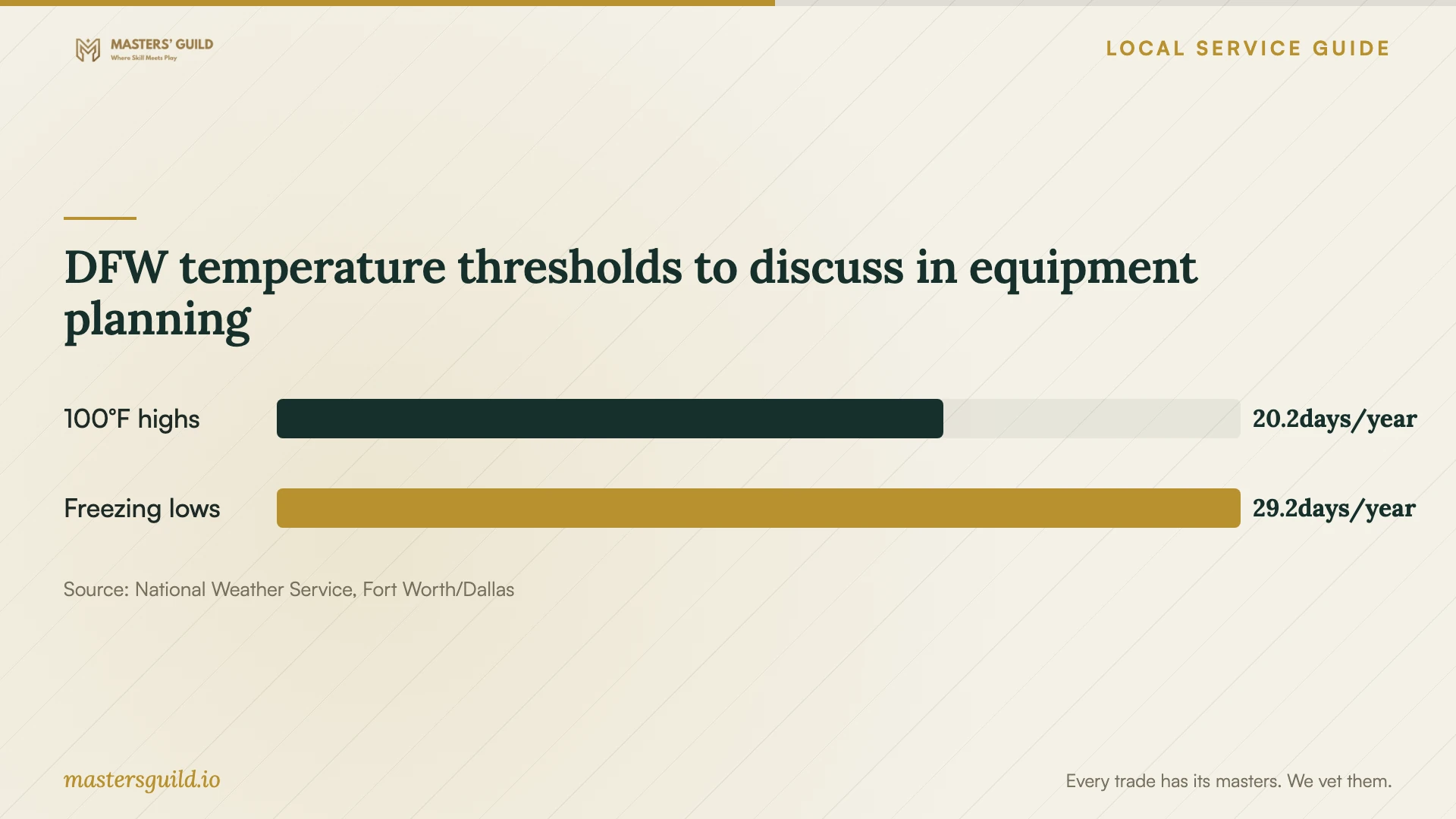
DFW temperature thresholds to discuss in equipment planning
Local details that affect your job
Texas backup tax changes quote comparisons
Texas treats offsite electronic-file backup as data processing, with 20 percent of that service charge exempt from tax. Ask each bidder to separate ongoing backup from recovery work and provide a tax-inclusive total. This lets you compare the same service scope without assuming that every invoice item has identical tax treatment. [1]
Texas breach reporting needs an assigned owner
The Texas Attorney General requires organizations experiencing a qualifying system-security breach affecting 250 or more Texans to report as soon as practicably possible and no later than 30 days after discovery. Organizations must also notify affected consumers. Reports must go through the electronic form, and only an authorized representative should submit them. If you suspect exposure, assign a reporting owner and involve counsel while the recovery provider preserves evidence. [2] [3]
Oncor status checks affect onsite scheduling
If Oncor serves your premises, its Storm Center provides an outage map and outage reporting at 888.313.4747. You can register for MyOncor Alerts by texting REG to 66267. Check status before dispatching an onsite technician. Oncor states that damaged customer electrical equipment may require repairs by a private electrician before it can restore power, so confirm electrical readiness before booking equipment restart work. [5]
Match the service to the immediate problem
| Your situation | Request | Confirm before approval |
|---|---|---|
| Missing files without signs of an attack | Recovery assessment | Priority files, proposed device handling and partial-recovery charges |
| You have a backup to restore | Restoration and application checks | Chosen restore point, test destination and acceptance criteria |
| Ransom note or suspected unauthorized access | Incident response with recovery | Network isolation, evidence preservation and a clean restoration environment |
| You need ongoing protection | Backup setup and monitoring | Offline encrypted copies, restore tests, alert ownership and Texas tax treatment |
| Power remains unavailable | Status check and revised onsite schedule | Oncor status where applicable and any customer electrical repairs |
Your hiring checklist
- Record symptoms, device identifiers and previous recovery attempts.
- List priority files, applications and the latest backup you want assessed.
- Confirm the work location, transport method and any laboratory subcontractor.
- Approve a diagnostic fee and a limit for additional work.
- Agree on partial-recovery charges, delivery media and acceptance checks.
- Document file access, transfer, retention and equipment-return terms.
- Assign responsibility for backup alerts and schedule a test restore.
Frequently Asked Questions
How much should I budget for recovery?
Request a written assessment and staged quote for your device and symptoms. Ask for the diagnostic charge, approval limit, transport costs, delivery media and charges for unsuccessful or partial recovery. The cited sources do not establish a Dallas recovery price range.
How do I know the backup service is ready?
Ask the provider to demonstrate a restore and document the result. CISA recommends testing backup availability and integrity in a disaster-recovery scenario. Agree on alert handling and future tests before accepting the setup. [3]
Should I turn off a computer after a ransomware warning?
CISA recommends isolating affected systems from the network first. It advises shutdown when disconnection is impossible, because shutdown loses evidence in volatile memory. Engage an incident responder to coordinate the next steps. [3]
Does successful recovery settle a possible data breach?
Keep recovery and breach assessment as separate workstreams. CISA describes attacks involving both encryption and stolen data. Texas requires reporting of qualifying breaches affecting 250 or more Texans within its stated deadline, along with consumer notification. Have counsel assess the obligations while responders investigate. [2] [3]
Sources and scope
This guide combines the sources below with practical planning guidance. Figures apply to the stated geography and period; request a written quote for your property.