
Local service guide
Computer Virus Removal in Dallas, TX
For Computer Virus Removal in Dallas, choose a technician who offers a written diagnosis and cleanup scope, explains how they will preserve your essential files, and obtains permission before erasing the device. Compare itemized quotes that cover your needs, including any restoration work. Describe the symptoms before deciding on remote service, drop-off, or a home visit.
Give the technician enough information to diagnose
Write a short account of the problem: unwanted windows, unfamiliar software, browser changes, warning messages, or trouble signing in. Include when you noticed it and what you tried. Describe what you saw without naming an infection you have not confirmed. Have the technician explain the diagnosis before you commit to a repair package.
Name your immediate priority, such as opening family photographs, recovering documents, or using the computer for a deadline. Tell the technician whether you can access a backup. For a proposed operating-system reinstall, get an explanation of which applications you must reinstall and which accounts you must sign into afterward.
Choose a service arrangement you can manage
Discuss whether remote work suits the symptoms and your ability to use the computer. Before a session, confirm the technician’s identity and business contact details, how you will start and end access, and whether you need to remain present. Keep account passwords out of the job description.
For drop-off work, obtain a receipt identifying your computer and any accessories you leave. Establish who will hold the device and how you will receive the assessment. For a home visit, describe the setup and confirm travel charges, appointment length, and arrangements for work that cannot finish during the visit. Choose an assessment and return schedule you can accommodate.
Compare quotes for the same scope
Have each provider itemize diagnosis, cleanup, operating-system work, backup, restoration, travel, and optional software. Identify the amount you owe if you decline repair after diagnosis. Compare totals for the same work and separate optional purchases from the repair you intend to approve. Specify how the provider should contact you before exceeding your spending limit.
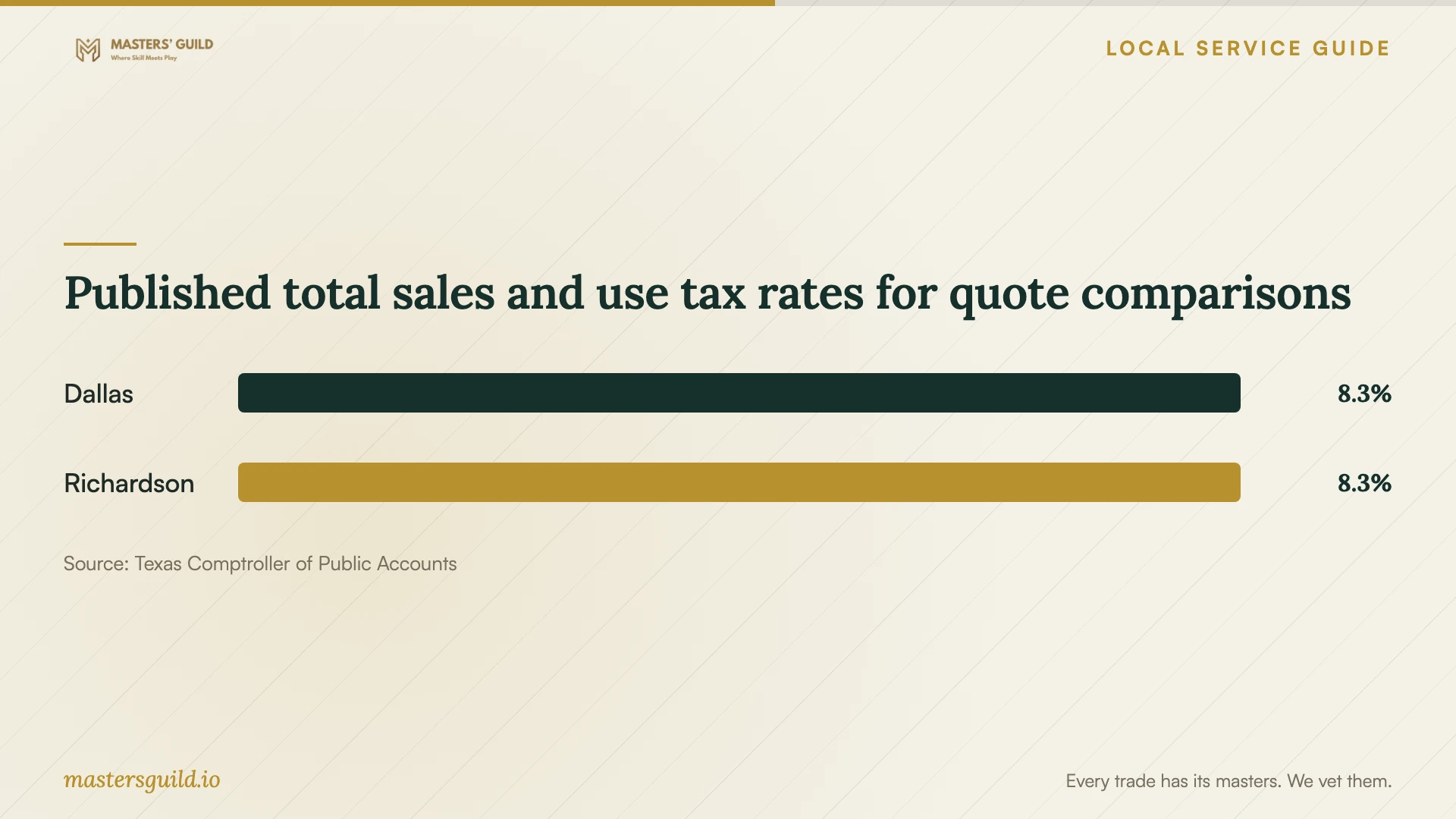
The Texas Comptroller lists personal-property repair among taxable service categories. Have the provider explain the tax treatment of the quoted components, including any backup add-on. Use the published city rates below as context for taxable charges, then confirm the rate and taxable amount for your transaction. [2] [3]
Define access and preservation boundaries
Give the technician a list of folders to preserve and specify where they may store copies. Establish who may access those copies and when the provider will delete retained copies. Put permission for erasure or reinstallation in writing. Before granting access, explain any private material you want excluded from routine inspection.
If you suspect fraud or need material preserved for a dispute, discuss that purpose before cleanup begins. Texas includes computer forensics and computer support that reviews data to investigate potential criminal or civil matters in its taxable security-services guidance. Discuss a separate investigation scope and obtain preservation instructions before authorizing changes. [2]
Check the result before accepting the device
At handover, have the technician explain what they found, what they changed, and what remains unresolved. Open your priority files and try the applications you need. Review any new software charges or subscriptions before accepting them. Keep the work summary with your receipt so you can describe the repair if you need follow-up help.
Discuss whom to contact if the original symptoms return and whether another assessment carries a charge. If you choose replacement instead, compare a separate file-retrieval quote with your replacement budget. Include preparation of the old device for disposal in that decision.
Published total sales and use tax rates for quote comparisons
Local details that affect your job
Dallas resident drop-off offers a replacement route
Dallas residents can take electronics to McCommas Bluff Landfill or one of three Sanitation transfer stations. The city includes computers and laptops among accepted items and directs residents to its landfill and transfer-station information for addresses, residential drop-off hours, and other requirements. Before traveling, check those details and arrange retrieval of wanted files and erasure of sensitive data with your technician. [1]
Texas offsite-backup rules affect the estimate
Texas lists offsite electronic file backup as data processing and exempts 20 percent of data-processing charges from tax. For a quote that includes offsite backup, have the provider identify that component and its taxable portion. Compare that line separately from cleanup; do not extend the data-processing exemption to the entire repair bill. [2]
Match the appointment to your priority
| Your situation | Scope to discuss | Before booking |
|---|---|---|
| You do not know what caused the symptoms | Diagnosis with a next-step estimate | Confirm the assessment charge |
| You need photographs or documents preserved | File preservation and restoration | Identify the folders and backup location |
| You want to consider remote help | Suitability assessment and supervised access | Confirm how access starts and ends |
| You suspect fraud or anticipate a dispute | Preservation instructions and investigation | Discuss the purpose before cleanup |
| You are considering replacement | File retrieval and disposal preparation | Compare that scope with your replacement budget |
Your hiring checklist
- Record the symptoms and steps you have tried.
- Identify priority folders, applications, and an accessible backup.
- Confirm the service arrangement and assessment date.
- Review the itemized total and charge for declining repair.
- Document access boundaries and permission for destructive work.
- Test priority files and applications at handover.
Frequently Asked Questions
How much should I budget for removal?
Obtain itemized quotes after describing the symptoms and files you need preserved. Compare diagnosis, cleanup, restoration, optional purchases, and the final total including applicable tax. Check what you owe if you decline repair and set a spending limit for additional work.
What should I bring to a drop-off appointment?
Confirm which accessories the technician needs before leaving home. Bring your symptom notes and file-priority list, and tell the provider about any backup. Record the device and accessories on the intake receipt and keep a copy.
How should I compare cleanup with replacement?
Compare the proposed repair total with your replacement budget, including file retrieval, application setup, and disposal preparation. Have the technician explain unresolved problems before you decide. Keep the file-retrieval price separate so you can assess it even if you decline cleanup.
Sources and scope
This guide combines the sources below with practical planning guidance. Figures apply to the stated geography and period; request a written quote for your property.