
Local service guide
Cloud Service Setup in Dallas, TX
Arrange Cloud Service Setup in Dallas by asking a technician to quote the devices, files, account permissions and restore test you need. Keep account ownership and subscription billing in your name. Before paying for basic computer help, check the City's Digital Navigators program for qualifying residents; ask whether its support fits your task. [1]
Specify the result you want
Write down what you want to access and from which devices. For example, ask for selected household documents on a laptop and phone, separate access for another family member, and a demonstrated restore of a test file. Name the folders you want excluded, too. Give each technician the same description so you can compare offers on scope.
Ask the technician to explain how the proposed service handles deletion, file history and recovery. Have them identify which settings serve everyday access and which serve your recovery goal. Request that explanation before authorizing changes to your existing files.
Check the connection before the transfer
The FCC lets you search a street address for providers, connection technologies and maximum advertised download and upload speeds. Providers report those details to the FCC. Use the address-level information when considering internet options for your home, and confirm availability with the provider before changing plans. [4]
Ask the technician to measure your upload performance and inventory the files before committing to a completion time. Agree on who will monitor the initial transfer, how you will handle interruptions and whether follow-up verification costs extra. Ask whether setup can finish during the appointment while file transfers continue afterward.
If you plan to use a cellular connection, distinguish outdoor coverage from service inside your home. The FCC's mobile map represents outdoor or in-vehicle coverage and does not show indoor coverage. Ask for an indoor connection check before relying on that option for the job. [4]
Compare the full bill
Request separate amounts for consultation, configuration, file transfer, recurring storage and any return visit. Ask who receives the subscription payment and whether the quoted setup fee includes training and verification. Set a spending limit for additional work and require approval before the technician exceeds it.
Texas lists data storage, offsite electronic backup and software as a service within taxable data processing. The Comptroller exempts 20 percent of data-processing charges from tax. Its detailed guidance also lists consulting among nontaxable services and explains conditions for distinguishing taxable and nontaxable work on a bill. Ask the provider to explain the classification and taxable portion of each charge. [2] [3]
Compare written quotes for the same devices, files and verification work. Include subscription charges in your comparison and ask what happens to your files if you cancel.
Keep control of your accounts and files
Create or approve the account yourself and use your own contact details for recovery. Enter passwords and verification codes yourself during the appointment. Ask the technician to explain any access they need, agree on its duration, and remove that access during handover.
Before migration, ask for a plan to preserve the originals until you accept the result. Agree on how the technician will handle duplicate names, excluded folders and transfer errors. Avoid approving deletion or disposal of the old device as part of an undefined cleanup task.
At handover, open representative files on each intended device, check access from another household account and restore a test file to a separate location. Request a written list of unfinished transfers or errors, the subscription details and the steps for getting help after the appointment.
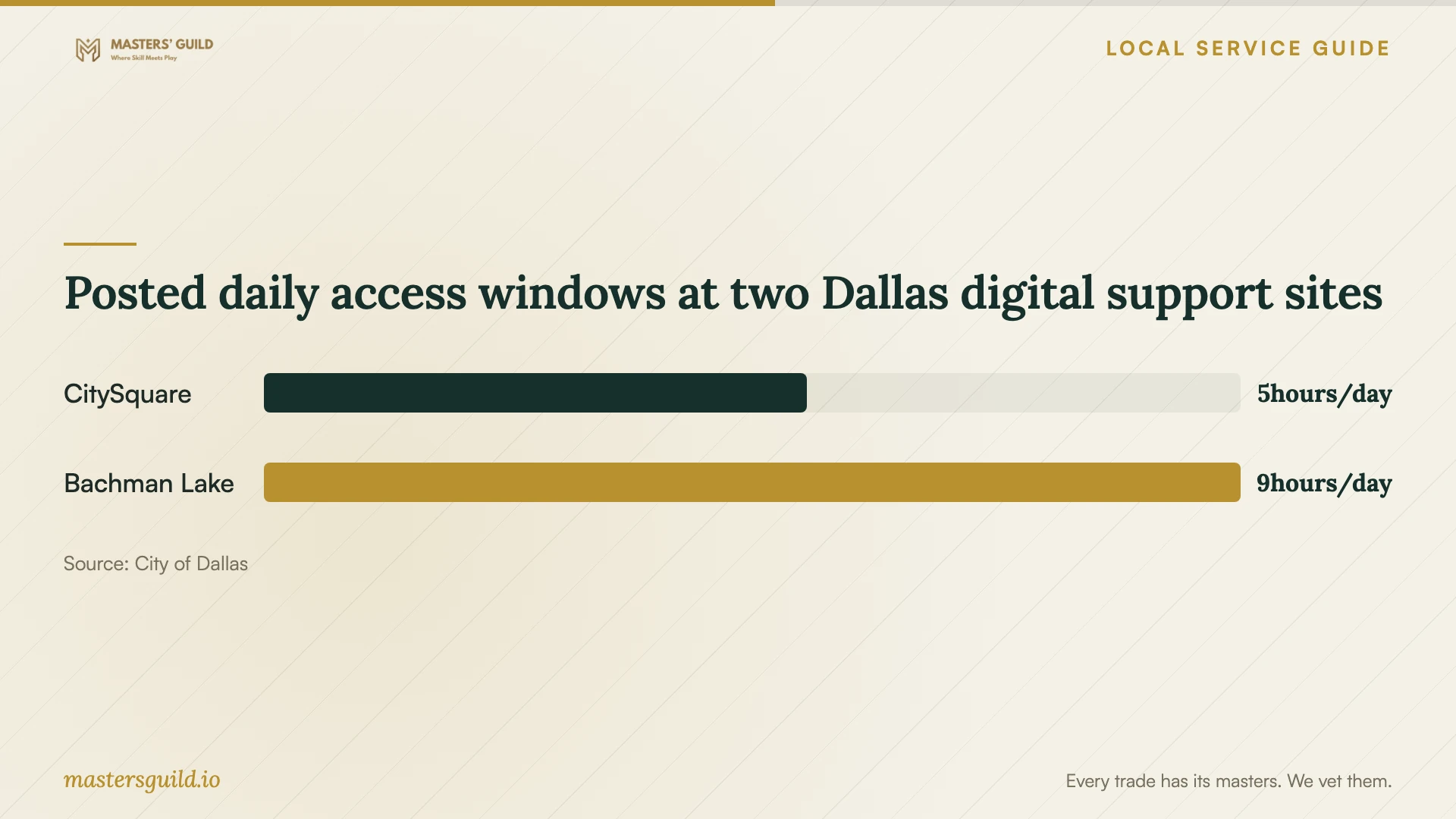
Posted daily access windows at two Dallas digital support sites
Local details that affect your job
Check Dallas digital support before hiring for basic help
The City of Dallas runs Digital Navigators with Dallas Innovation Alliance. It offers qualifying residents digital skills classes, technology and internet resources, and one-on-one support at community anchor sites. CitySquare's Connected Learning Center is at 1610 S. Malcolm X Blvd., with posted Tuesday through Thursday hours of 9:00 AM to 2:00 PM. Ask about eligibility and your task before visiting; the city page does not promise cloud migration or backup configuration. [1]
Resolve internet access before scheduling setup
Dallas Digital Navigators also provides enrollment support for affordable internet plans, including Lifeline. If internet access is your first obstacle, ask about that support before arranging a file transfer. The program lists the Tech Lab at Bachman Lake Together, 9507 Overlake Dr., with Monday through Friday hours of 8:00 AM to 5:00 PM. Confirm current hours and the help available before traveling. [1]
Apply Texas billing rules to your quote
For work in Dallas, ask the provider to distinguish consultation from data-processing services on the invoice. Texas treats offsite electronic backup as data processing, with a 20 percent exemption from tax on data-processing charges. Separate consulting treatment depends on the nature of the work and the Comptroller's mixed-service billing conditions; a provider's label alone should not replace an explanation. [2] [3]
Choose the next step for your household
| Your situation | Next step | Question to settle |
|---|---|---|
| You need basic computer or online skills help | Check Dallas Digital Navigators eligibility and support scope | Can staff help with this task, or do I need a technician? |
| You lack a suitable internet connection | Ask about city enrollment support and check FCC address-level options | Which service can I obtain at my address? |
| You want files moved between accounts or devices | Request a migration quote with preservation and verification steps | How will you report missing files, duplicates and errors? |
| You want a recovery plan | Include a demonstrated restore and a written recovery walkthrough | Can I repeat the restore myself after handover? |
| Your quote bundles advice, backup and storage | Ask for separate charges and a Texas tax explanation | Which charges count as data processing, and how is the exemption applied? |
Your hiring checklist
- List the devices, account owners, selected folders and excluded files.
- Describe the access and recovery result you want the technician to demonstrate.
- Ask about relevant platform experience and how the technician handles private files.
- Request an itemized quote covering setup, transfer, subscriptions, tax and follow-up.
- Agree on account access and preserve the originals until you accept the migration.
- Confirm who monitors unfinished uploads and checks transfer errors.
- Test device access, household permissions and a file restore before closing the job.
Frequently Asked Questions
Can I use Dallas digital support instead of hiring a technician?
Check whether your task fits. Digital Navigators offers qualifying residents digital skills help, internet resources and one-on-one support. The city page does not specify cloud migration or backup setup, so ask about those tasks before planning a visit. [1]
How long should I book the technician for?
Ask for an appointment estimate after the technician reviews your devices, selected files and connection. Have them distinguish time spent configuring accounts from time spent transferring files, and identify any verification work that requires a follow-up.
Will Texas sales tax apply?
Texas includes data storage and offsite electronic backup in taxable data processing, with 20 percent of the charge exempt from tax. Consulting can receive different treatment under the Comptroller's guidance. Ask for the taxable portion and billing explanation rather than assuming one treatment for the whole job. [2] [3]
What should I receive before accepting the work?
Request a demonstration on your intended devices, a test restore, account recovery instructions and a list of remaining errors or uploads. Keep the original files until you have checked the result and agreed on how to address unfinished work.
Sources and scope
This guide combines the sources below with practical planning guidance. Figures apply to the stated geography and period; request a written quote for your property.