
Local service guide
Smart Appliance Setup in Columbus, OH
For Smart Appliance Setup in Columbus, hire around a written list of appliance models, connection problems and features you want demonstrated before the provider leaves. Ask for separate quotes for app pairing, network troubleshooting and physical installation. If you want dishwasher or laundry scheduling, check your electricity plan first: Ohio Power Company limits its residential time-of-use rate to Standard Service Offer customers with an AMI smart meter. [1]
Define the job before requesting offers
Describe each appliance by brand and model, then list the work you want: first-time pairing, reconnecting after a router change, setting notifications or demonstrating a supported schedule. Include the exact error message if setup has stalled. Ask the provider to confirm model compatibility before you book.
Separate software setup from physical installation in your request. Tell the provider whether the appliance already has its power, water and drain connections, and whether you expect them to move it. If the job includes changes to wiring or utility connections, request a separate installation assessment and ask who will check the requirements for your address. Do not assume an app-setup quote includes that work.
For a price you can compare, request an itemized quote with the device list, travel charge, troubleshooting allowance and any equipment purchases. Ask how the provider handles an appliance they cannot connect and whether a return visit costs extra. The supplied sources do not establish a Columbus setup price range; use written offers for your actual scope.
Match appliance schedules to your electricity account
Ohio Power Company, formerly AEP Ohio, offers a time-of-use rate with higher charges during specified peak periods and reduced charges during other hours. The utility restricts eligibility to residential Standard Service Offer customers with an AMI smart meter. Check your bill and account eligibility before asking the setup provider to configure a rate-based routine. [1]
For that rate, the utility lists summer peak hours as 2 p.m. to 6 p.m. from May 1 through October 31. Winter peak hours run from 6 a.m. to 9 a.m. from November 1 through April 30. These periods apply on weekdays except the listed legal holidays. Ask the provider to explain whether your appliance supports the schedule you want, how to change it for winter and how to cancel a delayed cycle. [1]
The utility says enrollment changes may take up to two billing periods to appear on your bill. Keep your existing routine until you confirm the rate has taken effect, and choose operating times that fit the appliance instructions and your household. Do not accept a promised dollar saving based only on connecting an appliance. [1]
Prepare accounts and agree on a handover test
Have your phone, appliance instructions and access to the email account you intend to use ready for the visit. Sign in yourself when possible. Ask the provider to describe any account permissions they need and agree on removing their access at handover. Keep account recovery details under your control.
Before approving completion, ask for a demonstration of each agreed feature. Open the app on your phone, check the appliance status and try the requested notification or schedule. Ask how you will operate the appliance if the app connection fails, using the manufacturer’s instructions as the reference. Record any feature the provider could not verify.
Request a short handover note with the account owner, appliance names, selected settings and unresolved issues. If the provider changed your network configuration, ask them to record those changes and show you how to restore the prior settings. Agree on follow-up terms before the visit ends.
Review household usage after setup
Ohio Power Company’s Energy Tools let customers compare bills and explore energy use. Customers with an AMI meter can examine 15-minute usage intervals and see a bill projection. Ask the provider to leave a record of the schedule they configured so you can compare it with the times shown in your account. [2]
Treat that review as a household usage check. The utility describes home energy data, so do not attribute a change to one appliance without separate evidence. Note other changes in your routine when comparing periods. AMI customers may also opt into Weekly Energy Reports with day-by-day and hourly breakdowns if they want a follow-up view. [2]
Use efficiency data when replacement is part of the decision
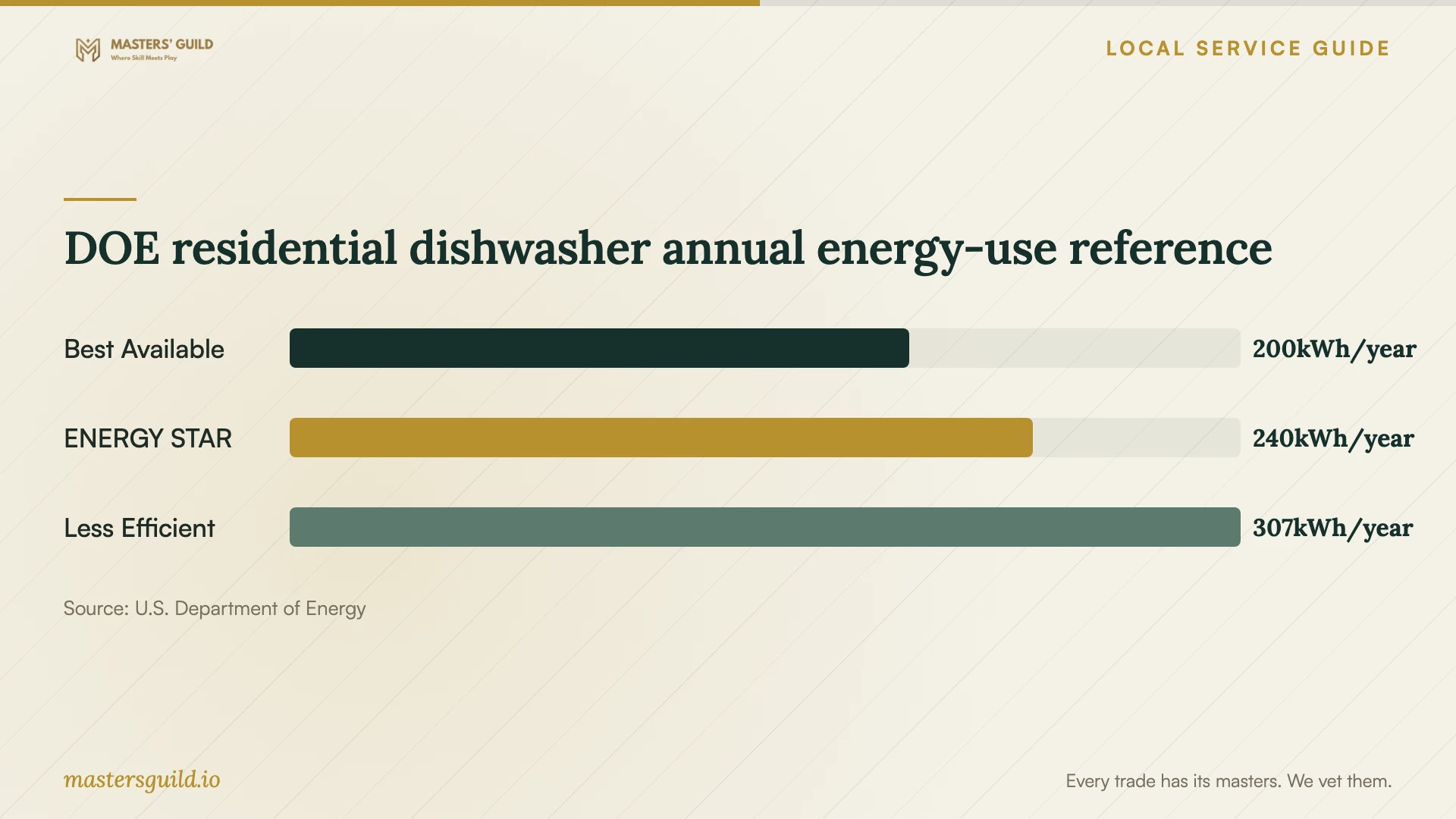
If you are choosing between reconnecting a dishwasher and replacing it, compare energy performance alongside the app features you want. The Department of Energy’s October 2023 residential dishwasher guidance lists annual energy use of 200 kWh for its Best Available example, 240 kWh for its ENERGY STAR example and 307 kWh for its Less Efficient example. [3]
The chart uses those published examples as a national reference. DOE bases the energy values on standardized testing with hot water supplied by an electric resistance water heater. The comparison does not measure the effect of app pairing or predict your household bill. Ask for the energy information for the exact appliance you own or plan to buy. [3]
DOE residential dishwasher annual energy-use reference
Local details that affect your job
Confirm Ohio Power time-of-use eligibility before booking
For a Columbus household whose bill is from Ohio Power Company, verify Standard Service Offer enrollment and an AMI smart meter before requesting peak-hour scheduling. The utility requires both for its residential time-of-use rate. If you enroll, allow up to two billing periods for the change to appear; ask the provider to show you how to revise the schedule yourself. [1]
Choose a follow-up method that matches your meter
Ohio Power Company gives AMI customers access to 15-minute usage intervals and optional Weekly Energy Reports. Customers without an AMI meter cannot receive those weekly reports. Check your account before making interval-data review part of the setup handover, and ask for a written schedule record you can use with the tools available to you. [2]
Choose the scope to request
| Your situation | Request | Check before completion |
|---|---|---|
| You want app controls for an installed appliance | Model-specific pairing and a control demonstration | Operate the agreed features from your phone |
| Pairing failed after a network change | Troubleshooting with a written spending limit | Record network changes and unresolved errors |
| You want Ohio Power time-of-use scheduling | Confirm SSO and AMI eligibility, then request supported seasonal settings | Demonstrate editing and cancelling the schedule |
| You want utility usage follow-up | Check AMI interval tools and optional Weekly Energy Reports | Keep a dated record of the appliance settings |
| The appliance still needs physical connections | A separate installation assessment | Confirm the responsible provider and address-specific requirements |
Your hiring checklist
- Send appliance model numbers, requested features and any error messages before booking.
- State whether physical installation or moving the appliance belongs in the job.
- Request an itemized quote and written terms for unsuccessful pairing or a return visit.
- Have your phone, manufacturer instructions and account recovery access ready.
- Check your electricity plan before requesting rate-based scheduling.
- Ask the provider to demonstrate controls and schedule cancellation on your phone.
- Record selected settings, unresolved issues and any network changes.
- Confirm that you control the accounts and remove access you no longer want the provider to hold.
Frequently Asked Questions
How much should I budget for setup?
Request a written quote for your appliance models and desired features. Ask for separate charges for pairing, network troubleshooting and physical installation, plus any minimum visit fee. The available evidence does not establish a local price range.
Will connecting my appliance lower my electricity bill?
Do not assume a saving from connectivity. Ohio Power’s time-of-use rate charges eligible customers differently according to usage time, so check your plan before changing schedules. DOE’s dishwasher comparison concerns appliance efficiency and does not quantify savings from app setup. [1] [3]
Can I keep the same peak-hour schedule all year?
Ohio Power’s time-of-use peak hours change seasonally: 2 p.m. to 6 p.m. from May through October and 6 a.m. to 9 a.m. from November through April, on applicable weekdays. Ask for instructions to review your settings at the seasonal change. [1]
Can the utility show how much electricity one appliance uses?
The cited Energy Tools guidance describes household usage, including 15-minute intervals for AMI customers. Use it to review timing and overall consumption; do not treat it as a separate measurement of one appliance. [2]
Sources and scope
This guide combines the sources below with practical planning guidance. Figures apply to the stated geography and period; request a written quote for your property.