
Local service guide
Data Recovery and Backup in Columbus, OH
For Data Recovery and Backup in Columbus, OH, request a device assessment, a written recovery quote and a separate backup setup with a demonstrated restore. Identify the files you need before approving work, and agree on payment terms for partial recovery. CISA recommends frequent backups and disconnecting an external backup drive between backups. [1]
Choose the recovery scope before arranging a visit
Describe what you observed: missing folders, an unreadable external drive, a computer that will not start or a ransom message. Give the provider the device model, operating system and actions you took after the problem began. For a damaged or unreadable device, pause further attempts and request preservation instructions before assessment.
Confirm who will perform the work. If the intake provider plans to send your device elsewhere, request the destination, responsible company and your approval process. Before an appointment, establish whether to bring the whole computer or the storage device. Include pickup, shipping and return arrangements in the quote.
For suspected ransomware, CISA advises isolating affected devices from the network. It recommends shutdown only when other network-disconnection methods are unavailable, because shutdown loses potential evidence in memory. Tell the provider about the suspected incident before granting remote access or connecting a backup drive. [2]
Compare written quotes and protect private files
Obtain device-specific written quotes. Request separate charges for assessment, recovery work, return storage and delivery. Compare what you owe if you decline the proposed work or receive only some requested files. Set a spending limit and require approval before the provider adds work or sends the device to another facility.
Define acceptance before handing over the device. List essential folders or file types and identify any dates that matter. Request a recovered-file list and a way to check that important documents or photographs open. Distinguish the assessment deadline from the delivery deadline, and agree on the procedure for disputing incomplete results.
Discuss access to family records, tax documents and photographs. Request written terms covering who can view files, where the provider stores working copies and when it deletes them. Obtain a receipt identifying the device and accessories. Agree on a secure method for sharing any required encryption key; keep credentials out of public job descriptions.
Specify a backup you can restore
CISA recommends a secure external drive or a vetted cloud service for backups. It advises storing an external backup drive in a safe place and disconnecting it between backups to limit ransomware access. Have the installer identify the included folders, explain the backup routine and show you how to check for failures. [1]
Request a restore into a separate folder and open the restored files together. CISA's ransomware guide recommends offline, encrypted backups of critical data and testing their availability and integrity. Include written restoration instructions in the handover, with a procedure for accessing your backup when the original computer is unavailable. [2]
Keep ownership of the backup account and agree on who holds recovery keys. CISA advises backing up data and securing recovery keys and passwords before starting encryption. Have the provider explain recurring storage charges, support charges and the steps for ending its access to your account. [1]
Interpret drive-failure figures with care
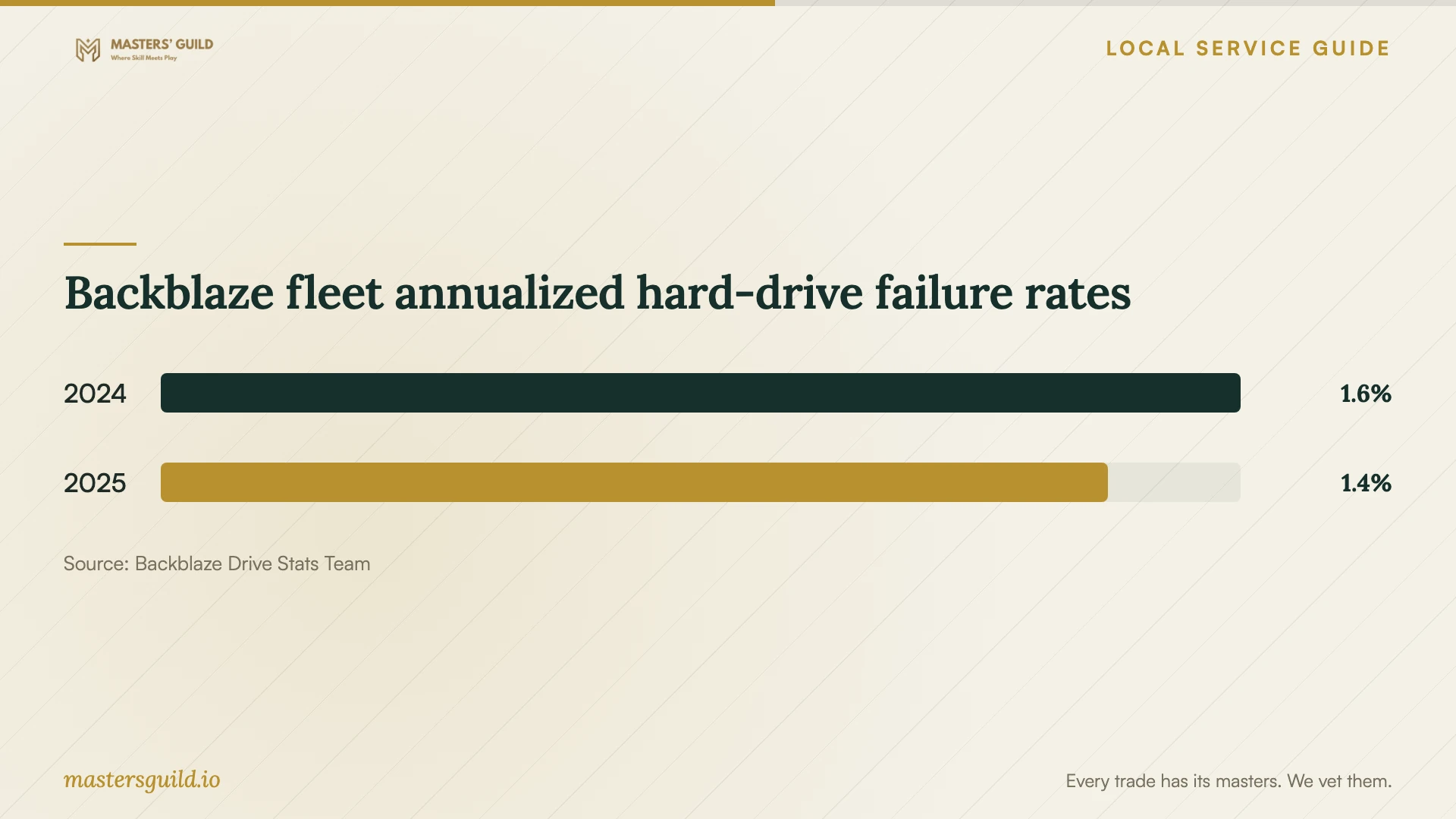
Backblaze reported annualized hard-drive failure rates of 1.55% for 2024 and 1.36% for 2025 in its data-center storage fleet. These observations do not establish your home computer's failure probability or a specialist's chance of recovering your files. The company notes that drive age, technology and fleet composition affect its results. [4]
Use the chart as background for discussing backup protection. Base approval of recovery work on your device assessment, the requested files and the written terms. Request a demonstration of the replacement backup process before accepting the installation.
Arrange device retirement after checking your files
Retain the original device until you have checked the returned files and made another backup. Then request a device-specific data-erasure or storage-destruction plan and a record of the completed work. Include responsibility for the recycling handoff in your agreement.
SWACO lists household electronics and computer monitors among accepted materials at its Recycling Convenience Center. The page describes paper shredding but does not specify electronic-storage destruction. Arrange data handling before drop-off and confirm acceptance of your exact equipment. Do not treat a recycling appointment as confirmation that someone will erase your files. [3]
Backblaze fleet annualized hard-drive failure rates
Local details that affect your job
Confirm Franklin County resident eligibility
SWACO reserves its Recycling Convenience Center for Franklin County residents. Before asking your recovery provider to include disposal, confirm that you qualify and that the center accepts your equipment. If you cannot use the resident service, request another disposal arrangement in the provider's quote. [3]
Schedule the Jackson Pike trip after handover
SWACO lists the center at 2566 Jackson Pike, Columbus, OH 43223. Posted hours are Monday through Friday, 9:30 AM to 5:00 PM, and Saturday, 9:00 AM to 4:00 PM, with holiday exceptions. Arrange file review and data handling before the trip. Check current hours and item fees before traveling. [3]
Match the requested work to your situation
| Situation | Work to request | Acceptance check |
|---|---|---|
| You have a backup copy | Request a restore assessment before approving separate recovery work. | Open essential restored files and check their dates. |
| The device is damaged or unreadable | Request specialist assessment and preservation instructions. | Review the work proposal, approval limit and partial-result terms. |
| You suspect ransomware | Disconnect the affected device from the network and request incident-response help. | Have the responder establish a clean environment for restoration. |
| You need ongoing backup protection | Request secure external-drive or vetted cloud backup setup. | Demonstrate a restore and confirm account and recovery-key ownership. |
| You plan to recycle equipment | Arrange data handling and check SWACO's resident eligibility and item acceptance. | Review recovered files and the data-handling completion record before drop-off. |
Your hiring checklist
- Record the symptoms, device model and actions taken since the problem began.
- List essential files, relevant dates and existing backup copies.
- Confirm who performs the recovery and whether the device leaves the intake location.
- Compare written assessment fees, approval limits and partial-recovery payment terms.
- Agree on file access, working-copy deletion and secure credential sharing.
- Open returned files and complete a demonstrated backup restore before handover.
- Arrange documented data handling and confirm recycling eligibility before retiring the device.
Frequently Asked Questions
How much should I budget for recovery?
Obtain a device-specific assessment and written quote. Compare assessment charges, recovery work, return storage and delivery. Require a clear explanation of what you owe if you decline the work or receive only some requested files, and set an approval limit before proceeding.
Can a specialist recover an encrypted drive without my key?
Request an explanation before accepting that promise. CISA warns that losing encryption recovery keys or passwords can lead to permanent data loss. Locate any saved key and have the specialist explain its assessment plan before you approve recovery work. [1]
Should I leave my external backup drive connected?
CISA advises disconnecting it between backups because ransomware could use the connection to delete or corrupt backups. Have your installer demonstrate the backup routine and explain where to store the drive when you finish. [1]
Does SWACO electronics recycling include data destruction?
SWACO lists electronics recycling and paper shredding but does not specify electronic-storage destruction on this page. Arrange and document data erasure or storage destruction before disposal. Confirm Franklin County resident eligibility and acceptance of your exact equipment before making the trip. [3]
Sources and scope
This guide combines the sources below with practical planning guidance. Figures apply to the stated geography and period; request a written quote for your property.