
Local service guide
Data Recovery and Backup in Columbus, GA
For Data Recovery and backup in Columbus, GA, choose a provider around your immediate problem: restoring an existing backup, recovering files from a damaged device, or responding to ransomware. Ask for a written diagnostic scope, an approval limit, secure handling terms, and a plan to verify the returned files. For ongoing backup work, require a demonstrated restore and name the person responsible for checking failures.
Choose the scope before handing over a device
Ask the provider to distinguish backup restoration, device recovery, and incident response in the proposal. Describe whether you deleted files, lost access to a drive, found damaged equipment, or received a ransom message. For a device with unusual noises or visible damage, stop experimenting and ask a recovery specialist for handling instructions before further attempts.
List the files you need in priority order: accounting records, current customer work, payroll, or another specific business requirement. Include filenames, folders, approximate dates, and the applications needed to open them. Ask whether the provider handles your device type and performs the work at the receiving location or sends it to another facility.
Agree on what counts as a successful result. Request a recovered-file inventory and arrange to open representative files before accepting the job. For application data, ask the provider to demonstrate use in the relevant application. Set a spending limit for diagnosis and require your approval before the provider moves to another recovery stage.
Treat suspected ransomware as an incident
If you suspect ransomware, disconnect affected devices from Ethernet and Wi-Fi and contact your incident-response provider. CISA recommends isolating impacted systems first. It advises powering devices down only when network isolation is impossible, because shutdown loses evidence held in memory. [4]
Keep backup media disconnected from affected machines. Ask the responder to investigate the compromise and plan restoration on a clean network before reconnecting systems. CISA warns that ransomware can follow an earlier unresolved compromise and advises care to avoid reinfection during recovery. [4]
Ask who will coordinate technical recovery, communications, and any notification review. Give your responder a priority list of business systems and their dependencies. CISA recommends prioritizing critical services and involving relevant stakeholders, including IT providers and cyber insurers. [4]
Compare the complete recovery quote
Request separate amounts for diagnosis, recovery work, shipping, return storage media, installation, and any urgent-service option. Ask what you owe if recovery fails or returns only some of the requested files. Require the provider to explain any success-based payment terms using your file-priority list.
Compare delivery commitments as well as price. Ask when diagnosis starts, when you receive findings, and whether the quoted completion date includes file transfer and verification. For backups, separate setup costs from subscriptions and ongoing monitoring. Include the cost and process for exporting your data when the arrangement ends.
Specify a backup service you can test
Set two business requirements before choosing equipment: how much recent work you can afford to lose and how long you can operate without each system. Ask the provider to turn those requirements into a backup schedule and a restoration plan. Include application settings and dependencies in the scope if you need a working system restored.
CISA recommends offline, encrypted copies of critical data and regular tests of backup availability and integrity. Its cloud guidance also recommends version control and protections against deletion or overwriting. Ask the provider to identify which protections your proposed service includes and demonstrate recovery from an older version. [4]
At handover, watch the provider restore sample files to a separate location and open them. Record the backup schedule, retention period, encryption-key custodian, failure-alert recipient, and restore instructions. Assign a named employee to review alerts and arrange the next test. Keep the instructions accessible during a system outage.
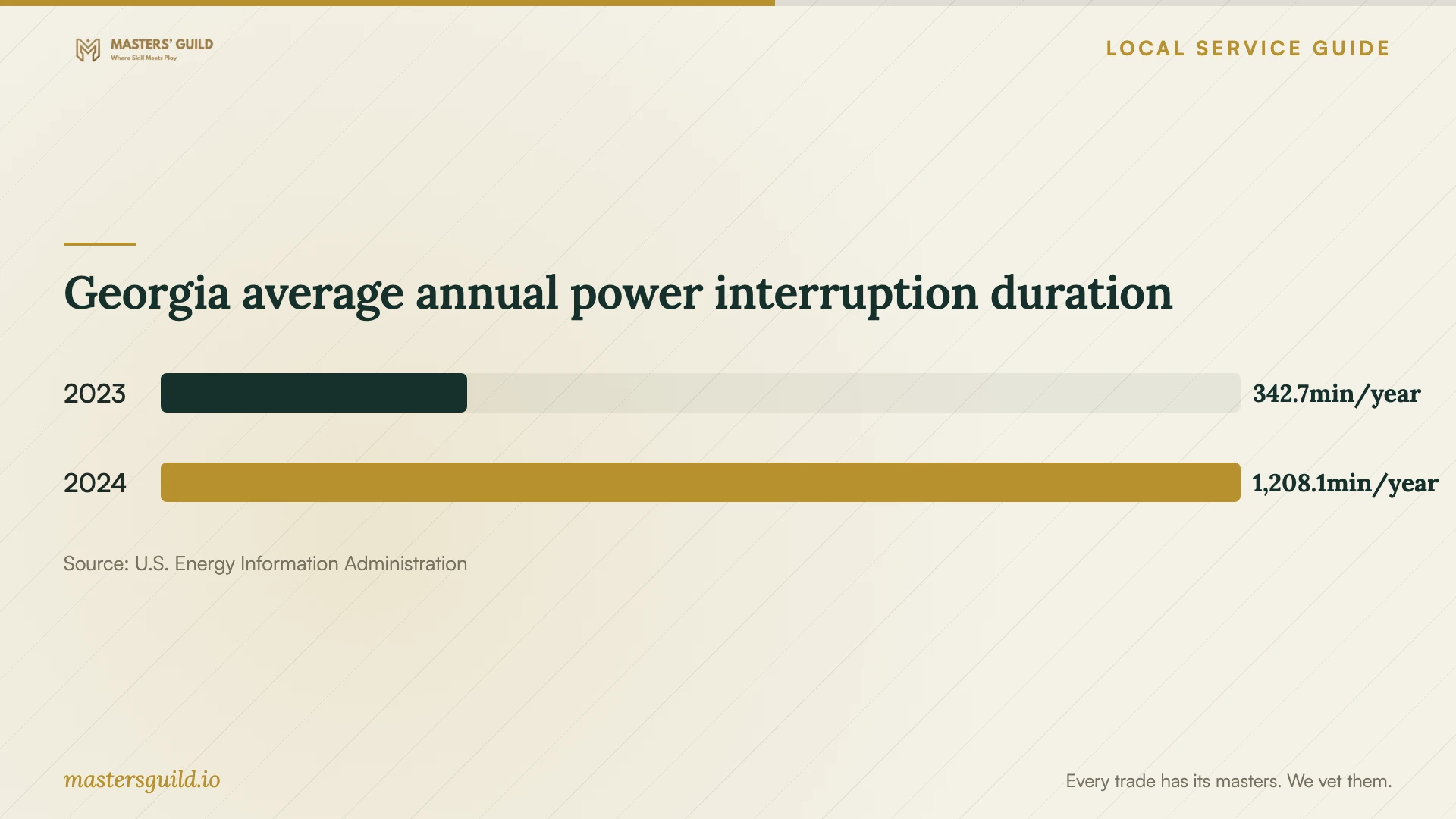
Georgia average annual power interruption duration
Local details that affect your job
Check the premises before placing backup equipment
Columbus Engineering identifies Bull Creek and the Chattahoochee River among waterways with past flooding. The city's floodplain page directs you to enter your address in its mapping service and enable the Flood Plane layer under Map Contents; staff offer help at 706-225-4441. Use that address check when discussing equipment placement, and ask your provider to keep a recovery copy outside the same property's flood exposure. The citywide guidance does not establish the risk at your particular building. [1]
Ask for Georgia invoice itemization
Georgia's Department of Revenue says itemized repair and installation labor charges are exempt from sales tax, while retail sales of tangible personal property generally attract tax. Ask the provider to distinguish any qualifying repair or installation labor from replacement drives and other goods. Have the provider explain the treatment of recovery work and subscription charges rather than assuming those charges fall under the repair-labor exemption. [3]
Agree on disposal of sensitive business records
Georgia's Attorney General explains that state law regulates disposal of business records containing covered personal information, including account details, tax-return information, and medical information. The guidance calls for shredding, erasing, or making the information unreadable and taking reasonable steps against unauthorized access. Before handover, ask your provider to document temporary-copy retention, who can access recovered records, and how it will return or erase copies after acceptance. Confirm those terms before authorizing disposal of the original media. [2]
Include power loss in the restore plan
EIA reports Georgia statewide average interruption durations of 342.7 minutes in 2023 and 1208.1 minutes in 2024, including major event days. These figures describe reported utility customers across the state, not Columbus premises. Ask your provider how backup jobs resume after power loss and whether backup power with controlled shutdown belongs in your scope. Use your own outage history when setting requirements. [5]
Match the provider to the problem
| Your situation | Scope to request | Acceptance question |
|---|---|---|
| You have a usable backup | Restore assistance and application checks | Can you demonstrate the required files and applications working? |
| Files are missing and no checked backup exists | Recovery diagnosis with an approval limit | Which priority files can I verify before accepting the result? |
| A device has physical damage or unusual noises | Specialist assessment and handling instructions | Who performs the work, and what further steps need my approval? |
| You suspect ransomware | Incident response, isolation, and recovery on a clean network | How will you investigate the compromise before restoring systems? |
| You need ongoing protection | Offline encrypted backups, monitoring, and restore testing | Who checks failures, and when will we demonstrate restoration? |
Your hiring checklist
- Record the device model, symptoms, failure time, and recovery attempts.
- List priority files and the applications needed to verify them.
- Identify the last backup you have opened and checked.
- Agree on diagnostic charges and an approval limit for further work.
- Confirm who receives the device and where recovery takes place.
- Document access, temporary-copy retention, and return or erasure terms.
- Arrange file verification and a witnessed backup restore at handover.
- Name the person who checks backup alerts and schedules restore tests.
Frequently Asked Questions
Can I use cloud synchronization as my backup service?
Ask the provider to demonstrate recovery after deletion, overwriting, and loss of account access. CISA recommends version control and deletion protections for cloud resources, along with offline encrypted backups. Put retention and restore testing in the contract rather than accepting synchronization alone as proof that you can recover your records. [4]
Should I shut down a computer with a ransom message?
CISA recommends disconnecting affected systems from the network first. Power down only if you cannot isolate them through network disconnection. Shutdown loses evidence in memory, so contact your incident responder and follow the business's response plan. [4]
How do I compare recovery prices without a local price range?
Compare written proposals for the same device and file priorities. Include diagnostic fees, recovery charges, shipping, return media, verification, and failed-recovery terms. Ask each provider to explain what triggers additional charges and require approval before exceeding your budget.
How should I accept recovered business files?
Review the file inventory and open representative priority files with the provider. Check application data in its intended software. Record unresolved gaps, confirm return of the original media, and agree on the date for erasing temporary copies after you accept the result.
Sources and scope
This guide combines the sources below with practical planning guidance. Figures apply to the stated geography and period; request a written quote for your property.