
Local service guide
Cloud Service Setup in Columbus, GA
Arrange Cloud Service Setup in Columbus, GA by asking a technician to quote the devices, accounts and folders you want connected, plus a recovery test and written handover. For basic computer help, consider Chattahoochee Valley Libraries before paying for a visit: the system offers computer classes and/or one-on-one tech assistance. Confirm whether staff can help with your specific account task. For a migration, check your home connection and agree who will monitor the upload after the appointment. [1]
Choose the work before choosing the technician
Write a short description of what you want to do after setup. For example, you might want to open household documents on a laptop and phone, give a family member access to one folder, or recover photographs if you lose a device. Name the devices and existing accounts involved. Ask the technician to explain which parts of your request they will configure and demonstrate.
For a migration, identify the source account, destination account and folders to move. Agree how the technician will handle duplicate files, excluded folders and files that fail to transfer. Keep your original files until you have checked the destination and completed the agreed recovery test. Ask for a separate quote if you also need account recovery or help with a failing device.
Check your connection before scheduling an upload
Use the FCC National Broadband Map to search your exact address and review the providers, service technologies and maximum advertised upload speeds they report. The FCC distinguishes fixed service at homes from mobile coverage; its mobile map describes outdoor or in-vehicle coverage and does not show indoor coverage. Avoid treating a mobile coverage result as confirmation that your indoor setup can support the planned transfer. [3]
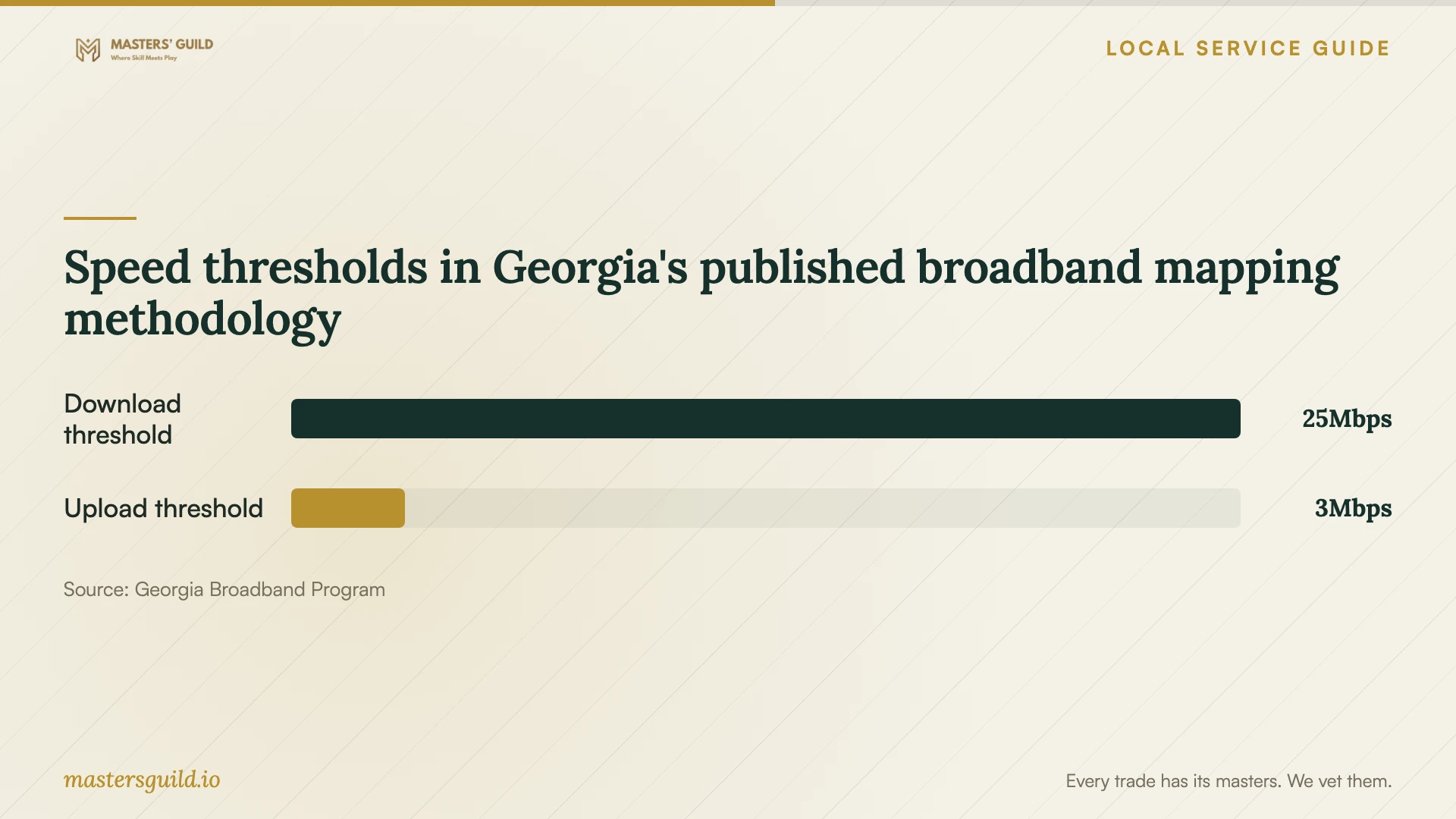
Georgia's broadband mapping program also uses home and business locations across the state. Its published explanation defines broadband for that mapping methodology as at least 25 Mbps download and 3 Mbps upload. Those thresholds describe the map's classification. They do not specify the connection you need for your particular cloud job. [2]
Measure the connection where the technician will work and share the result with them. Ask them to distinguish hands-on appointment time from the time needed to finish transferring your files. Agree whether you will leave a device powered on, who will check progress and what follow-up costs apply if the transfer needs attention.
Compare quotes with the same scope
Ask each technician to quote the same device list, folders and acceptance checks. Request a fixed price or an hourly rate with an agreed spending limit. Include travel, remote support, follow-up work and any charge for monitoring an upload. Ask who will purchase the subscription and which account will own it. Keep ongoing subscription charges separate from the setup fee.
For a quote that includes a router or backup drive, ask the seller to itemize equipment and installation labor. Georgia's Department of Revenue says most services are exempt from sales tax, tangible personal property can be taxable, and itemized repair or installation labor is not subject to sales tax. Ask the seller to explain the tax treatment of each quoted charge rather than applying a blanket exemption to the package. [4]
Keep control of accounts and verify completion
Use an account you own and keep control of its recovery email and phone number. Enter your password yourself when possible. Agree how the technician will obtain temporary access and remove it after handover. Ask them to review sharing permissions with you and record which family members can view or edit each shared folder.
Before accepting the job, open representative files from the destination account and test access on each included device. Ask the technician to demonstrate the agreed recovery task using a disposable test file. Have them explain the deletion and recovery settings for the service they configured. Keep a handover note with the account owner, included folders, recurring charges and steps for checking future uploads.
Speed thresholds in Georgia's published broadband mapping methodology
Local details that affect your job
Ask the local library about introductory help
Chattahoochee Valley Libraries lists computer classes and/or one-on-one tech assistance, with Columbus Public Library, North Columbus Public Library and South Columbus Public Library among the locations on its computer-help page. The system lists a contact number of (706) 243-2669. Ask about the appropriate branch, appointment arrangements and whether staff can cover your account question before booking paid help. Do not assume this listing includes a full migration. [1]
Check the actual Georgia address
The Georgia Broadband Program maps service availability at home and business locations across all 159 counties. For a Columbus home, use address-level availability information when discussing connection options, then ask the provider to confirm service at that address. Give the technician your measured upload result before agreeing on a migration schedule; statewide mapping classifications do not establish the performance of your connection. [2] [3]
Match the help to your task
| Your task | Suggested next step | Confirm before arranging help |
|---|---|---|
| Learn basic computer or account steps | Ask Chattahoochee Valley Libraries about classes or one-on-one assistance. | Confirm the branch, arrangements and whether staff can cover your question. |
| Connect household devices | Request a setup quote covering the named devices and accounts. | Include access tests, permissions and a written handover. |
| Move files between accounts | Request a migration scope and completion checks. | Identify excluded files, duplicate handling and upload follow-up. |
| Resolve connection uncertainty | Review your address on the FCC map and speak with your provider. | Distinguish advertised upload speeds from your measured connection. |
Your hiring checklist
- List the devices, operating systems, existing accounts and folders included in the job.
- Decide who should own the subscription and who may view or edit shared files.
- Check address-level internet availability and measure the connection at the work location.
- Keep an independent copy of important files before authorizing a migration.
- Request separate prices for labor, equipment, subscriptions and follow-up support.
- Agree who will monitor unfinished uploads and approve any additional charges.
- Test file access and recovery, collect handover notes and remove temporary technician access.
Frequently Asked Questions
How much should I budget for setup?
These sources do not establish a Columbus setup price. Obtain written quotes using the same devices, folders and recovery test. Ask for the setup charge, recurring subscription cost, equipment cost and follow-up terms so you can compare the full commitment.
Can the library handle my cloud migration?
Chattahoochee Valley Libraries advertises computer classes and/or one-on-one tech assistance. Its page does not specify cloud migration or recovery testing. Describe your task to staff and confirm the scope before relying on that assistance. [1]
Does the broadband map tell me how fast my upload will run?
The FCC map shows provider-reported availability and maximum advertised speeds at a location. It does not give a measurement of your current upload. Measure your connection and ask the technician to plan the transfer around that result. [3]
Can I arrange remote setup?
Ask the technician whether they can complete your device and account tasks remotely. Agree how you will approve access, enter credentials, test the result and end the remote session. Request an in-home option if you want hands-on help with equipment.
Sources and scope
This guide combines the sources below with practical planning guidance. Figures apply to the stated geography and period; request a written quote for your property.