
Local service guide
Technical Skills Training in Columbia, SC
Midlands Technical College lists a 24-hour workplace computer course for $169, giving you one published benchmark for Technical Skills Training in Columbia. For your business, choose a course for a defined syllabus or request private coaching around a specific task, such as preparing an Excel report. Before booking, confirm the software version, teaching format, total fee and work your staff should complete without help. [2]
Choose the skill and the result before choosing an instructor
Write your training brief around an observable result. For spreadsheet training, ask the learner to clean an export, create formulas and produce a report. For website work, define the page or feature they should build. For computer basics, identify the file, email or document tasks that need practice. Avoid a broad request to teach technology.
Ask the instructor to assess the learner's starting point before recommending a package. Request a lesson outline, practice tasks and an explanation of how they will check progress. For a staff group, ask how they would handle different skill levels. Consider separate sessions if beginners would need different exercises from experienced users.
Compare published course costs with a tailored quote
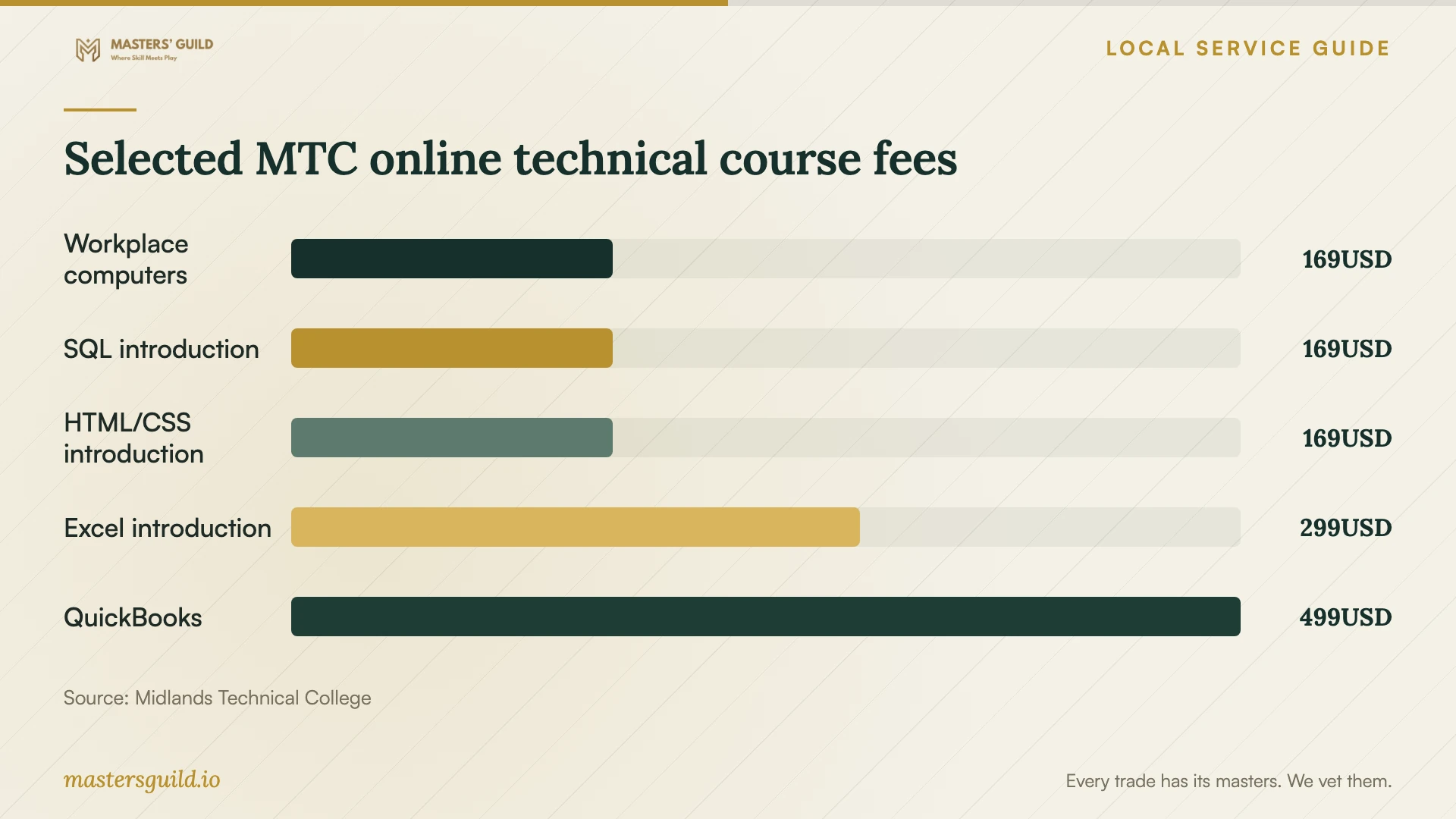
MTC's online training catalog lists Computer Skills for the Workplace, introductory SQL and introductory CSS3 and HTML5 at $169 each for 24 hours. It lists introductory latest-version Excel at $299 for 12 hours and QuickBooks at $499 for 18 hours. Use these examples to compare scope and time commitments before requesting a private training quote. [2]
These published fees describe named courses from one college. They do not establish an hourly coaching rate or a market average. Ask a private instructor to itemize preparation, teaching, travel, software, follow-up support and any group charge. Compare the total amount you would pay for the result you need, rather than dividing a course fee by its listed hours. [2]
Check the software edition before enrolling. MTC's catalog includes both latest-version Excel and Excel 2013 courses, alongside Word 2016 and Windows 10 listings. Ask which course matches your staff's installed tools and whether exercises require a separate license. [2]
Fit attendance and practice into the workweek
MTC defines virtual training as online attendance with a live instructor on specified days and times. Its online format lets learners work on their own schedule while meeting assignment deadlines. Hybrid courses combine campus and virtual classes; on-campus courses meet in person. Confirm the format of the actual course section before rearranging shifts. [2]
For private coaching, specify whether you want training at your premises or through screen sharing. Ask about session length, rescheduling and support between lessons. Reserve practice time during the workweek and give the learner a small task to repeat before the next session. Include that time when planning staff coverage.
Separate workplace lessons from career credentials
For a career change or a new technical role, investigate a program rather than booking isolated lessons without a plan. MTC lists QuickJobs pathways in IT support, network support, cybersecurity, database analysis and AI-enabled development. The college says prior field experience is not required and most QuickJobs programs take a few months, with some taking weeks. Confirm the duration and prerequisites of your chosen program. [1]
MTC distinguishes academic programs from noncredit training. Its training programs do not provide transferable college coursework and are not eligible for federal financial aid through FAFSA. A certificate can belong to either category, so check the program designation before assuming that it carries academic credit or qualifies for that aid. [1] [3]
Prepare a useful first lesson
Give the instructor the software name and version, device type, learner's experience and a sample task. Replace customer details, payroll figures and account information with dummy data. Keep control of passwords and account recovery settings. Ask the instructor to explain any installation or access request before the session.
Request evidence of relevant teaching and technical work, such as an anonymized lesson outline or a sample project. Agree on what the learner will produce and who owns lesson materials or code. Finish by having the learner repeat the task while the instructor observes, then record the steps that still need practice.
Selected MTC online technical course fees
Local details that affect your job
QuickJobs scholarship timing affects enrollment
As of October 13, 2026, MTC lists November 12, 2026 as the information-session date for Computers and Information Technology, Business, Employee Leadership, and Advanced Manufacturing and Skilled Trades. Scholarship eligibility requires attendance, 12 consecutive months of South Carolina residency with documentation, an application and no specified college debt or federal student-loan default. Scholarships depend on course space and funding. Confirm the session and award status before treating assistance as part of your budget. [1] [3]
Qualifying learners have a regional funding route
MTC directs people seeking WIOA tuition assistance for continuing education to their local SC Works Center in Richland, Lexington or Fairfield County. For an employee pursuing career training, investigate that eligibility before paying tuition. The college also advises learners to check employer education benefits. Neither route establishes an award for a particular learner or coverage for private coaching. [3]
Confirm the course details with continuing education
MTC provides 803.732.0432 and [email protected] for training questions and registration. Use that contact to confirm the current fee, course section, required software and attendance arrangements. Ask whether your selected offering uses a local instructor or the college's national LERN or Ed2Go network. [2] [3]
Match training to the business need
| Your goal | Option to investigate | Question before booking |
|---|---|---|
| Learn routine computer tasks | MTC's 24-hour Computer Skills for the Workplace course | Does the syllabus cover the tasks your employee needs? |
| Build spreadsheet skills | MTC's 12-hour latest-version Excel courses | Which level and software version match the learner? |
| Learn a database foundation | MTC's 24-hour introductory SQL course | Does the course environment fit your intended work? |
| Complete a specific business project | Private coaching scoped around a sanitized example | What will the learner complete, and what does the total quote include? |
| Prepare for an IT career role | MTC QuickJobs IT or cybersecurity pathways | What credential, schedule and funding conditions apply? |
Your hiring checklist
- Define a work task the learner should complete without assistance.
- Record the learner's starting skills and installed software version.
- Compare a named course syllabus with a tailored coaching outline.
- Request the full fee, including preparation, software and follow-up.
- Confirm attendance times, practice time and cancellation terms.
- Check any funding eligibility before committing payment.
- Prepare dummy data and agree on account-access boundaries.
Frequently Asked Questions
How much should I budget for technical training?
MTC publishes examples from $169 for a 24-hour introductory SQL course to $499 for an 18-hour QuickBooks course. Those figures describe specific courses. For private coaching, request a written quote tied to your learner count, software and intended result. [2]
Does online training include live teaching?
At MTC, virtual courses include live instruction at scheduled times. The college's online format lets you work on your own schedule with assignment deadlines. Confirm the course section's format rather than assuming that online attendance includes a live instructor. [2]
Can staff use FAFSA for an MTC training certificate?
MTC says noncredit training programs are not eligible for federal financial aid. Some certificates are academic and others are training programs. Check the designation, then investigate separate scholarships, employer benefits or WIOA eligibility where relevant. [3]
How should I judge a private instructor before buying a package?
Ask for a sample lesson plan, relevant project examples and an assessment of the learner's starting skills. Agree on a concrete result and the full fee. Consider an initial session before committing to a longer package, and ask the learner to demonstrate the task afterward.
Sources and scope
This guide combines the sources below with practical planning guidance. Figures apply to the stated geography and period; request a written quote for your property.