
Local service guide
Cloud Service Setup in Columbia, SC
Arrange Cloud Service Setup in Columbia, SC with a written scope naming your devices, selected folders, account recovery arrangements, and a sample file restore. Compare itemized quotes using that same scope. Before scheduling a large migration, check reported broadband options at your exact address through South Carolina’s broadband map, then confirm availability and upload specifications with the provider. [1]
Choose the result you need
Define completion in terms you can check. For access across devices, choose a document to open on each computer or phone. For a migration, name the source folders and review their destination copies. For a backup appointment, require a sample restore into a separate folder and an explanation of the chosen service’s recovery limits. These checks let you judge whether the setup meets your household’s needs.
Prepare one inventory of devices, accounts, external drives, and folders. Mark sensitive documents, family sharing needs, and files you want excluded. Include a storage review in the scope before approving a subscription, and decide who will review duplicates or unfamiliar folders. Keep the original files until you have checked the transfer and restore results.
CISA recommends backing up data to a secure external hard drive or a properly vetted cloud service. Have the technician explain the proposed backup destination and recovery process before you approve the setup, so you know where to look if a device fails or goes missing. [2]
Confirm connectivity before scheduling
The South Carolina Office of Regulatory Staff provides an address lookup for reported broadband availability, including providers, connection types, and download speeds. ORS says the map uses data from the majority of the state’s broadband providers. Use the lookup to investigate your home’s options, then confirm availability with the provider before arranging a connection change. [1]
Include an upload performance check on the device that will send your files. Base the transfer schedule on that check and the folders you plan to move, rather than accepting a completion deadline drawn from a download-speed advertisement. Set aside an appointment window for configuration and testing, and agree on how you will handle any upload that continues afterward.
CarolinaConnect’s Mid-Carolina product page advertises matching download and upload speeds for its residential fiber tiers. If your address qualifies, use those specifications when discussing a connection change. Request a review of your existing connection first, so you can decide whether to include an internet upgrade in the project. [4]
Compare itemized quotes
Give each technician the same device list, folders, and acceptance checks. Request separate amounts for setup labor, recurring cloud subscriptions, equipment, and connectivity changes. Have the quote identify who will configure accounts, move files, review sharing permissions, and demonstrate recovery. Include the price or charging method for additional devices and duplicate cleanup before work begins.
Define the completion point in the quote. For a backup job, you might require the agreed folders, a successful sample restore, and written recovery instructions. Put responsibility for unfinished uploads and any follow-up charge in the same agreement. This gives you a concrete basis for comparing offers and reviewing the finished work.
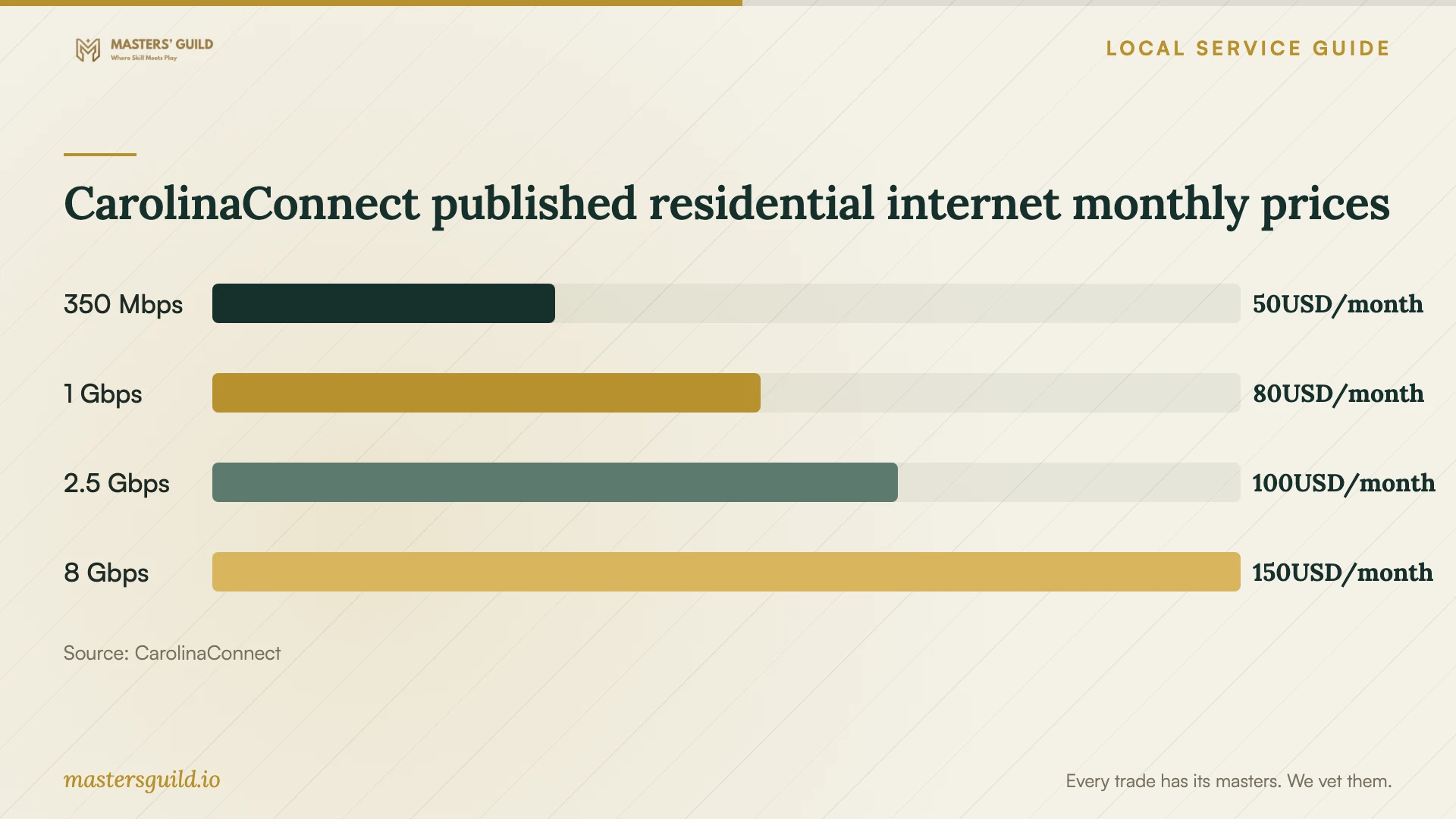
CarolinaConnect publishes residential internet plans from $49.95 per month for 350 Mbps to $149.95 per month for 8 Gbps. Treat these as connectivity costs for eligible addresses. Budget for cloud subscriptions and technician labor as separate items, and confirm installation terms before approving an internet change. [3]
Keep control of accounts and recovery
Use an account in your own name and an email address you control for recovery and billing. Enter your passwords during setup. Review who can access shared folders and practice removing access, so you can change family permissions without another appointment. For remote support, agree on when the technician will end access.
CISA advises backing up data, selecting an encryption solution, and securing the recovery key and password before starting encryption. Losing that information can cause permanent data loss. If you include encryption, have the technician demonstrate where you will keep recovery information and how you can retrieve it without their account. [2]
For an external backup drive, CISA recommends safe storage and disconnecting the drive when you are not backing up. It warns that ransomware could use an active connection to delete or corrupt backups. Include a written routine for connecting, backing up, and disconnecting the drive in your handoff. [2]
Check the work and keep a usable handoff
Before accepting the work, open your chosen files on the included devices and restore a sample document or photo into a separate folder. Review sharing permissions and excluded folders against the agreed scope. Performing these checks together lets you spot missing files or access settings while the technician can address them.
Keep a short handoff naming the service, covered folders, backup routine, recovery method, billing account, and remaining tasks. For an unfinished upload, include power and sleep instructions, a way to check progress, and the person responsible for errors or completion checks. Use these instructions to operate the setup after the appointment and to describe a problem if you need support.
CarolinaConnect published residential internet monthly prices
Local details that affect your job
Check the state map and report availability discrepancies
For a Columbia home, enter your exact address in the South Carolina Broadband Map before planning a provider change. ORS reports availability, connection types, and download speeds, but does not identify your current subscription. Confirm the proposed service with the provider. If the map indicates broadband service you cannot obtain, ORS invites consumers to report the discrepancy; resolve the availability question before tying a migration appointment to that connection. [1]
Confirm cooperative eligibility and installation costs
CarolinaConnect provides internet through partner electric cooperative fiber networks, including Mid-Carolina, Aiken, and Newberry. Use its eligibility check for your home rather than assuming citywide availability. Its residential page says it waives installation fees for electric cooperative members and that costs may vary for nonmembers. Confirm membership treatment and your installation terms before comparing the total cost of a connection change. [3] [4]
Choose a scope and a completion check
| Household goal | Scope to request | Completion check |
|---|---|---|
| Access files across devices | Account setup, folder selection, and access settings | Open a chosen file on each included device |
| Back up documents and photos | Backup destination, included folders, and recovery instructions | Restore a sample file into a separate folder |
| Move files from an old computer | Source inventory, destination folders, and duplicate review | Review destination copies before removing originals |
| Share files with family | Account ownership and individual permissions | Practice granting and removing access |
| Include device encryption | Back up first and secure recovery information, following CISA guidance | Locate the recovery key and explain how to retrieve it |
Your hiring checklist
- List the devices, accounts, drives, and folders included in the appointment.
- Mark files for backup, sharing, exclusion, or review before transfer.
- Check address-level broadband options and confirm upload specifications with your provider.
- Compare itemized quotes using the same scope and acceptance checks.
- Keep account ownership, billing, and recovery contacts under your control.
- Agree on a sample restore and retain originals until you review the results.
- Document remaining uploads, progress checks, follow-up responsibility, and charges.
Frequently Asked Questions
How should I budget for setup labor?
Compare itemized quotes using the same device list, folders, and acceptance checks. Include migration, account recovery instructions, and a sample restore in the requested scope. Separate labor from recurring subscriptions, and agree on charges for extra work or follow-up before the appointment.
Can I get CarolinaConnect at my home?
Check eligibility for your exact address. CarolinaConnect describes service through partner electric cooperative fiber networks and provides an eligibility check. Confirm your installation terms and membership treatment before including its advertised monthly price in your project budget. [3] [4]
Should the appointment include encryption?
Include a review of your current settings and the proposed changes. CISA recommends encrypting devices and relevant data, with a backup and secured recovery keys and passwords before encryption begins. Require recovery instructions you can follow yourself. [2]
What if the upload continues after the technician leaves?
Use the follow-up agreement and handoff instructions established before work begins. They should cover power and sleep settings, progress checks, errors, responsibility for confirming completion, and any follow-up charge. Keep original files until you have reviewed the upload and restore results.
Sources and scope
This guide combines the sources below with practical planning guidance. Figures apply to the stated geography and period; request a written quote for your property.