
Local service guide
Computer virus removal in Colorado Springs
For virus removal in Colorado Springs, choose a technician you contact through verified business details and request a written scope covering diagnosis, file preservation, cleanup, and any proposed reinstall. Tell the technician if you granted a stranger remote access or exposed financial information. Colorado Springs Police identify tech-support impersonation as a scam involving access to devices and sensitive information, so include account protection in your repair discussion. [1]
Describe the problem before choosing the service
Give the technician a short account of what happened: the warning you saw, the file or link you opened, any caller you spoke with, and any access you granted. Photograph the message without following its instructions. List the files you need to preserve and tell the technician whether you have a backup.
Ask for diagnosis before approving a cleanup or reinstall. Describe symptoms without assuming their cause. For example, say that the browser redirects or the computer fails to start, then ask the technician to explain what they found and what work they recommend.
Colorado Springs Police advise residents to end suspicious communication and contact the claimed organization through legitimate contact information. If a pop-up or unsolicited caller prompted your repair search, stop that conversation before arranging help. [1]
Agree on price, access, and file handling
Request a written quote that identifies the device, diagnostic charge, proposed work, and approval point for additional charges. Ask whether the technician will charge for an unsuccessful repair. Set a spending limit and require permission before they reinstall the operating system, replace storage, or purchase software.
Compare quotes against the same scope. Ask each technician whether they include file preservation, operating-system work, software installation, and a follow-up check. Request an explanation of any recurring subscription before agreeing to it. Use the quote to establish your total rather than assuming a local price from an unrelated repair example.
Choose remote help, drop-off, or a home visit after discussing your situation. Ask a remote technician how you will authorize access and end the session. For drop-off work, request a receipt identifying the device and accessories. For a home visit, agree on arrival arrangements and any travel charge.
Ask who will access your files, whether they will copy data elsewhere, and when they will remove any repair copies. Agree on how to provide required access without disclosing unrelated account passwords. Tell the technician which folders contain personal documents and which files matter most to you.
Include account protection after a support scam
Tell the technician if someone viewed your banking screen, requested payment, or gained remote access. Colorado Springs Police describe tech-support scammers as criminals who access devices and sensitive information to steal money. Ask the technician to review the access you granted and explain which account issues require action outside the computer repair. [1]
If someone used your card, checks, or account without authorization, contact your financial institution to report it. The city's identity-theft guidance also advises filing a law-enforcement report and gathering documents showing fraudulent transactions. Preserve messages, receipts, and transaction details for that conversation. [1]
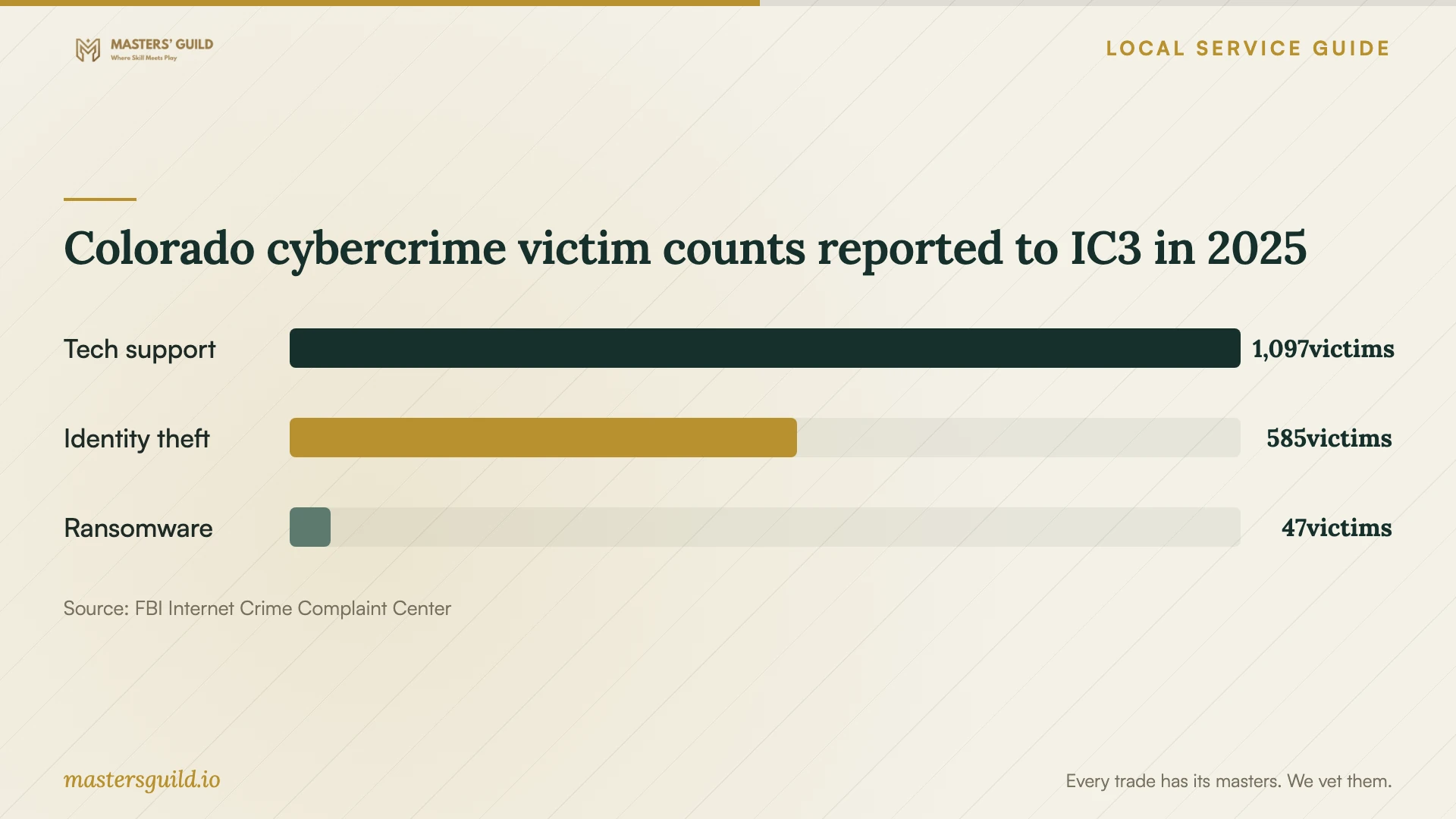
The FBI's 2025 Colorado report lists 1,097 tech-support victims and $32,098,456 in reported victim losses for that category. These statewide figures provide context for checking a repair offer and discussing financial exposure. They do not measure infections in Colorado Springs or establish the risk on your device. [3]
Check the handover before accepting the repair
Ask the technician to explain what they found, what they removed or changed, and what remains unresolved. Request a record of any reinstall, new software, and remote-access tools used during the job. Agree on the follow-up terms before paying, including whom to contact if the original symptom returns.
At handover, open the files you asked the technician to preserve and try the tasks that prompted the repair. Ask them to demonstrate the security settings they recommend and explain your backup plan. Colorado Springs Police advise keeping antivirus and security software up to date and avoiding pop-ups, unknown links, and attachments. [1]
Plan secure disposal if you choose replacement
Request a separate quote for transferring needed files and protecting information on the old device. Ask the technician to document the agreed data-handling work before you surrender the computer. El Paso County states that owners must protect their personal information on data-containing devices brought for recycling. [2]
The county's Household Hazardous Waste Facility accepts listed computer equipment, including laptops, CPUs, monitors, keyboards, and mice. Its household program serves El Paso and Teller County households and requires proof of residency at drop-off. Confirm your equipment and visit arrangements before transporting it. [2]
Colorado cybercrime victim counts reported to IC3 in 2025
Local details that affect your job
Local support-scam guidance changes the repair scope
Colorado Springs Police identify remote-access tech-support scams in their community guidance. If your incident involved an unsolicited support offer, arrange the repair through verified contact details and disclose any sensitive information the caller accessed. For unauthorized financial use, contact your financial institution and gather transaction records for a law-enforcement report. [1]
A household disposal option with residency and data conditions
El Paso County lists its Household Hazardous Waste Facility at 3255 Akers Dr., Colorado Springs, 80922. Bring proof of El Paso or Teller County household residency and protect stored information before drop-off. The published fall and winter 2026 hours are Monday through Friday, 8:30 AM to noon and 1:00 PM to 4:00 PM, excluding county holidays. Call 719-520-7878 to check acceptance or weather-related service availability before going. The household route excludes business and commercial waste. [2]
Choose the scope for your situation
| Your situation | Work to discuss | Approval question |
|---|---|---|
| Warnings or browser problems without known outside access | Diagnosis and a proposed cleanup plan | What did you find, and what does the quoted repair include? |
| You granted an unsolicited caller remote access | Device review and a discussion of exposed accounts | Which access will you remove, and which account actions should I take? |
| You need files preserved before a reinstall | File preservation and a separately approved reinstall | Which files will you preserve, and how will we check them? |
| You choose replacement and household recycling | File transfer and documented data protection before drop-off | How will you protect the information on the old device? |
Your hiring checklist
- Record the symptoms and any remote access you granted.
- Identify important files and describe your available backup.
- Verify the technician through business contact details you found independently.
- Get a written scope, total-price explanation, and spending limit.
- Require approval before a reinstall, storage replacement, or software purchase.
- Agree on file access, repair copies, and their removal.
- Request a handover record and test your needed files and tasks.
Frequently Asked Questions
Should I hire the support number shown in a warning?
Verify the organization through legitimate contact information before granting access or paying. Colorado Springs Police advise ending suspicious communication and avoiding pop-ups or links from unknown sources. Choose a technician through contact details you find independently. [1]
How should I compare repair quotes?
Give each technician the same symptoms, device details, and file-preservation requirements. Ask them to distinguish diagnosis, cleanup, a possible reinstall, and follow-up work. Agree on the charge if you decline the proposed repair and require approval for extras.
What should I do if the caller took money?
Contact your financial institution to report unauthorized use. Colorado Springs Police advise gathering records of fraudulent transactions and filing a law-enforcement report. Keep that reporting work alongside your computer repair plan. [1]
Can I recycle the old laptop through the county?
El Paso County lists laptops among accepted electronics for its household facility. The program requires proof of El Paso or Teller County household residency and makes you responsible for protecting stored personal information. Confirm acceptance before your visit. [2]
Sources and scope
This guide combines the sources below with practical planning guidance. Figures apply to the stated geography and period; request a written quote for your property.