
Local service guide
Cloud Service Setup in Colorado Springs, CO
For Cloud Service Setup in Colorado Springs, hire a technician against a written scope: named devices, selected folders, account access, and a demonstrated file restore. Check connectivity before committing to a migration appointment. Colorado Springs Utilities directs residents to check internet availability at their address; its fiber construction does not establish that a provider can install your connection. [1]
Define the cloud work and the connection work
Ask for a scope that separates internet installation from cloud account and device setup. Colorado Springs Utilities builds its fiber network for utility operations and leases excess capacity to Ting Internet. Utilities does not provide internet service or bill for internet access. If you need a new connection, confirm that arrangement with the internet provider before assigning the technician an upload deadline. [1]
For the cloud work, describe what you want to do: retrieve household documents from another device, share selected photos, protect folders, or move files between accounts. Ask the technician to explain how the proposed service handles deletion, version recovery, and a lost device. Include demonstrations of the functions you need in the quote.
Give each bidder a device list, account names, approximate data volume, and folders to include or exclude. Identify who needs access to shared files. Request separate charges for labor, subscriptions, equipment, and follow-up. Agree on who approves a storage upgrade and the point at which the technician must pause for approval of extra work.
Check the address before estimating upload completion
The FCC National Broadband Map lets you search a street address and review providers, connection technologies, and maximum advertised download and upload speeds reported for that location. Those figures describe advertised service rather than a measurement taken on your household device. Use them to prepare provider questions, then ask the technician to check the connection you intend to use. [3]
If a provider cannot supply service that appears on the map, the FCC offers an availability challenge process. Confirm orderability and installation details with the provider before tying your migration schedule to a listed service. Keep the connection appointment and the cloud appointment separate in your planning until you have confirmed both. [3]
Request separate expectations for the technician's hands-on work and the initial upload. Ask what must remain powered on, where you can check progress, and who will investigate an interrupted transfer. For an appointment with unfinished uploads, agree on a later completion check and a written record of what remains.
Choose an appointment location that supports the work
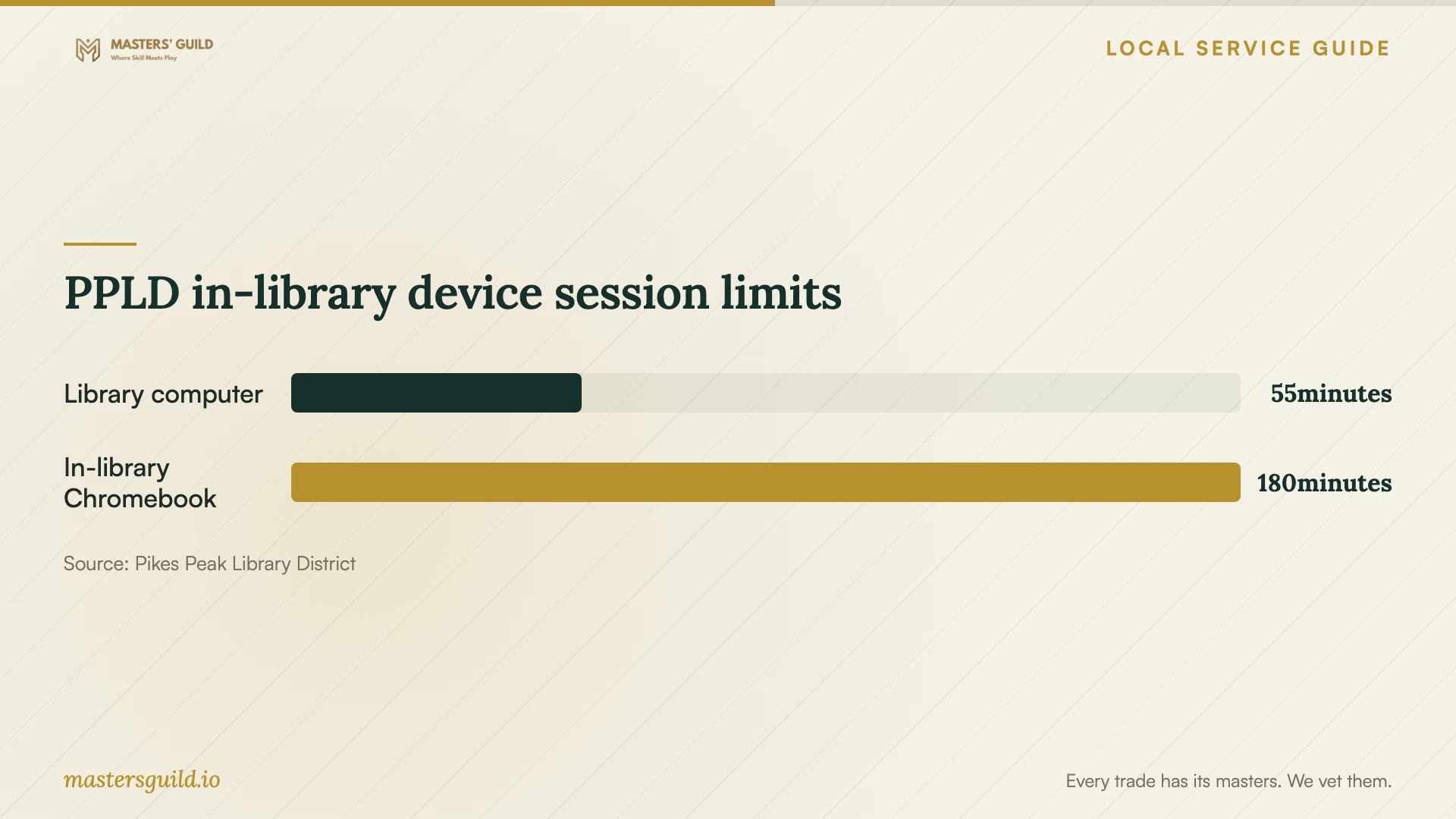
PPLD offers reserved computer sessions of 55 minutes and removes work saved on its computers when a session ends. Its in-library Chromebooks have a three-hour checkout and must remain within library facilities. If you plan to use library equipment, choose a bounded task such as reviewing settings, and agree on how you will retain any notes or documents. [2]
For temporary access at home, assess the connection as well as the appointment format. PPLD says devices connected to its hotspot cannot see one another. The FCC's mobile coverage map describes outdoor or in-vehicle coverage, rather than indoor reception. Test reception where you will work, and ask the technician whether the task requires devices to communicate with each other. [2] [3]
Consider remote help if you can open your accounts, connect the equipment, and participate during the session. An in-home appointment may suit you if you need help locating files on old devices or connecting external drives. Ask the technician to explain the tasks they can complete in your chosen arrangement and name the devices they will test.
Agree on account control and completion
Keep the account under your own email address and billing details. Enter passwords yourself, review recovery methods, and agree on temporary technician permissions. For remote work, ask which access software the technician plans to use and how you will end access after the appointment.
Before accepting the handoff, open a sample file on each agreed device and watch the technician restore a copy into a separate folder. Keep original files until you have checked the destination. Request written notes covering included folders, sharing permissions, subscription ownership, recovery steps, and any remaining work. Remove temporary access after the agreed checks.
PPLD in-library device session limits
Local details that affect your job
Confirm orderable fiber before booking a migration
Colorado Springs Utilities identifies active fiber construction areas and areas on hold. It leases excess capacity to Ting and does not control Ting's internet-service business decisions. A construction notice therefore gives you a reason to check availability, rather than a confirmed installation date. Confirm service at your address with the provider before scheduling a large upload around a future connection. [1]
Check library hotspot eligibility and device restrictions
Pikes Peak Library District offers free hotspots to borrowers aged 18 or older who have held a library card for at least 90 days. Loans last three weeks and include unlimited data where T-Mobile has coverage. Connected devices cannot see one another. Check availability and home reception, and tell the technician about that device restriction before choosing this option. [2]
Choose an arrangement for your setup
| Your situation | Suggested arrangement | Confirm before booking |
|---|---|---|
| You can operate the device and open your accounts | Consider a remote appointment | Tasks included, access software, and how to end access |
| You need help with old equipment or external drives | Consider an in-home appointment | Named devices, folders, and completion demonstrations |
| You are waiting for utility fiber construction | Confirm provider installation first | Orderable service at your address; Utilities does not provide internet |
| You need temporary home connectivity | Check a PPLD hotspot | Borrowing eligibility, T-Mobile reception, and device isolation |
| You plan to use a library computer | Choose a bounded account task | 55-minute sessions and removal of saved work at session end |
Your hiring checklist
- List the devices, accounts, folders, and household members included.
- Identify source and destination accounts and files to exclude.
- Confirm internet service and request an upload-performance check.
- Compare itemized labor, subscription, equipment, and follow-up charges.
- Prepare recovery access and retain control of passwords and billing.
- Agree on device-access checks and a sample-file restore.
- Keep original files until you have checked the migration.
- Record unfinished work and remove temporary technician access.
Frequently Asked Questions
How should I compare setup prices?
Give each technician the same device list, file scope, and completion requirements. Request separate labor and subscription charges. Ask whether the price includes migration checks, a restore demonstration, and follow-up for unfinished uploads. Compare those inclusions before choosing an offer.
Does nearby fiber construction mean I can order service?
Check your address with the internet provider. Colorado Springs Utilities leases excess network capacity to Ting, which may offer household internet service. Utilities does not control Ting's service decisions or provide internet access itself. [1]
Can a borrowed hotspot support my appointment?
Ask the technician to assess the planned work and test reception at home. PPLD hotspots depend on T-Mobile coverage, and connected devices cannot see one another. Borrowers must be at least 18 and have held a library card for at least 90 days. [2]
What should count as a completed setup?
Agree on completion before work starts. Request access checks on the named devices, a sample-file restore, and written recovery instructions. If an upload remains unfinished, record its status and arrange the completion check before accepting the final handoff.
Sources and scope
This guide combines the sources below with practical planning guidance. Figures apply to the stated geography and period; request a written quote for your property.