
Local service guide
Plan software installation in Cleveland, OH
For software installation in Cleveland, request an itemized quote that names your programs, devices, activation needs, and completion tests. Confirm internet access and account sign-in before choosing remote help. If you need to learn email or basic app use, consider Cuyahoga County Public Library's appointment-based Digital Navigator service and confirm whether your task fits its published learning support. [2]
Describe the installation and its completion test
Give the technician your computer model, operating system version, software name, and intended use. Explain whether you want a new application, activation of an existing purchase, or setup on a replacement computer. Include the exact error message from a failed attempt. Remove passwords, payment details, and personal documents from screenshots before sharing them.
Name any additional work in the quote. For email, specify the account you want added and whether you want existing messages available. For office software, request activation and a test opening your own document. For a replacement computer, list the files and settings you want transferred. Agree on the demonstration you will use to accept completion.
Use county library help for learning tasks
Cuyahoga County Public Library offers one-on-one Digital Navigator appointments for basic computer skills and technology tasks. Its examples include using computers and mobile devices, browsing the internet, creating and using email, and understanding apps. Request an appointment at 216.749.9420, in person at a branch, or through the library's contact form. [2]
The county library describes learning support; its Digital Navigator page does not promise application installation, operating system replacement, malware removal, or file migration. Describe your exact task when requesting an appointment. If you want installation work, ask a technician to confirm experience with your software and device and explain the proposed steps. [2]
Find city-listed device and internet resources
The City of Cleveland lists the Digital Navigators Hotline at 216.307.6990 for questions about devices, internet access, and computer classes. Community organizations connect callers with resources. The city describes a referral role rather than a software installation appointment. If connectivity prevents remote help, explain that obstacle and ask which resource fits. [1]
The city also lists PCs for People at 3126 St. Clair Ave. NE as a store offering low-cost refurbished laptops and desktops with updated software, along with computer repair solutions. Before paying for work on an existing computer, ask about replacement inventory, included software, repair scope, and eligibility. Compare those answers with the technician's proposed work. [1]
Schedule remote work around internet access
Cuyahoga County Public Library lends Wi-Fi hotspots to cardholders through select branches. Borrowers have a 21-day loan and can renew if nobody else is waiting. The library deactivates hotspots that are one day overdue. Confirm pickup availability, test the connection on your computer, and leave time to finish the work before returning the equipment. [3]
Ask the technician whether your connection suits the planned download and remote session. If you cannot get online or sign in, discuss an in-home appointment or taking the device to the technician. For a drop-off job, agree on the return date, approval for extra work, and how you will test the result at handover.
Set the price and control account access
Request a written scope and itemized price. Ask whether the charge includes licensing, activation, updates, configuration, and a demonstration. For hourly work, set a spending limit and require your approval before the technician exceeds it. Agree on the charge if the technician finds that your device cannot support the requested software.
Enter passwords and verification codes yourself. Stay available for account sign-in, and ask the technician to explain any remote access software before you authorize it. Agree on whether they will remove it afterward and whether you want any continuing access as part of follow-up support.
Back up the files you want to preserve and check that you can open the backup. Require your approval before an operating system reinstall, account deletion, or application removal. At handover, complete your intended task in the installed program. Confirm which account owns the purchase and how to request help with an unfinished item.
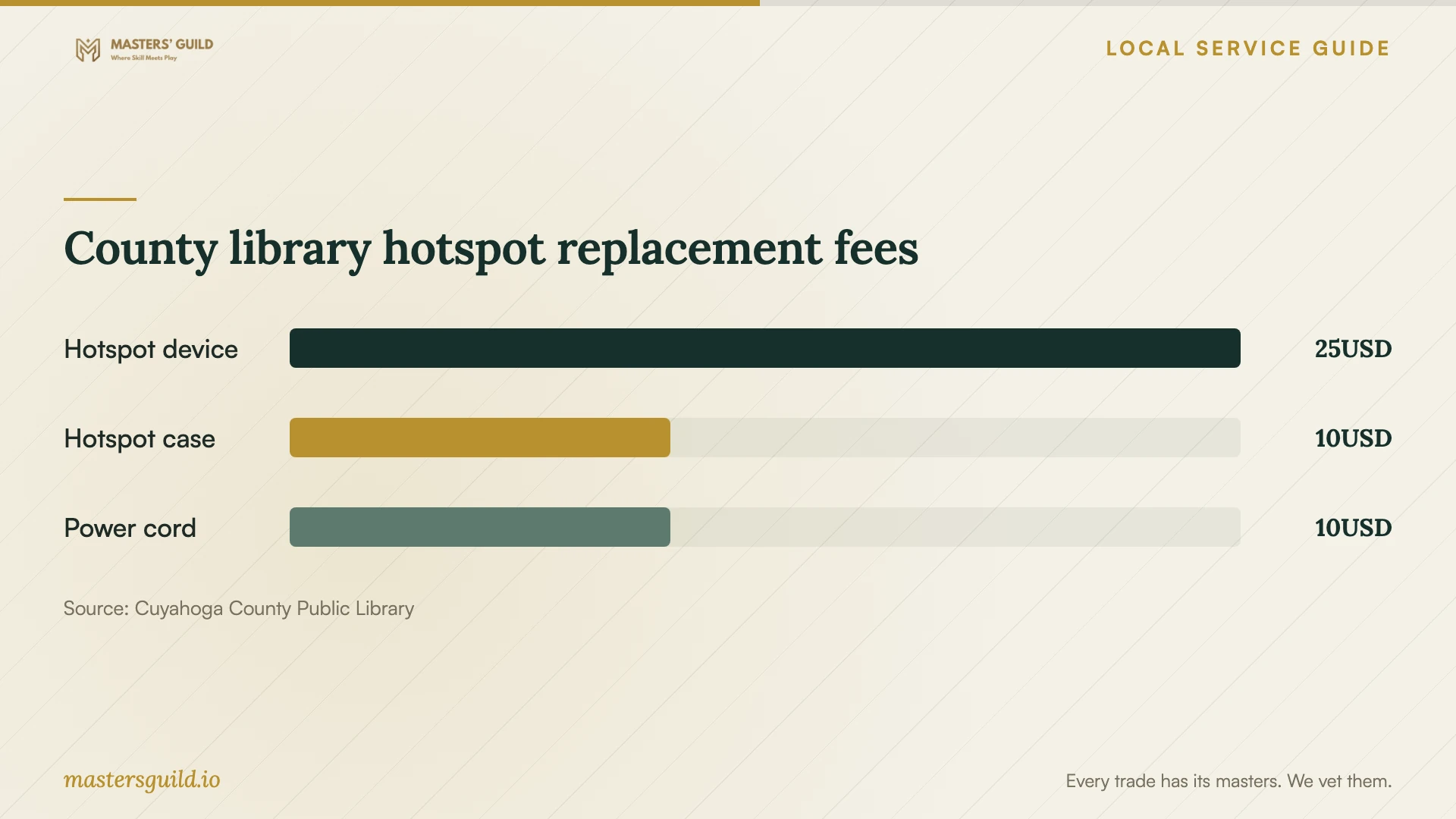
County library hotspot replacement fees
Local details that affect your job
County library appointments have a learning scope
Cuyahoga County Public Library offers Digital Navigator appointments for basic device use, browsing, email, and understanding apps. Call 216.749.9420 to describe your task. Its appointment form includes Garfield Heights, Strongsville, Parma-Powers, and Parma-Snow among the branch options. Choose a reachable county library location and confirm staff assistance before planning a visit for installation work. [2]
The city hotline connects you with resources
Cleveland's listed Digital Navigators Hotline, 216.307.6990, handles questions about devices, internet access, and computer classes through community organizations. Use this referral option if you need help identifying a connection or learning resource before arranging paid installation. Confirm the referred organization's service scope when you contact it. [1]
Compare repair with a city-listed replacement option
The city lists PCs for People at 3126 St. Clair Ave. NE, Cleveland, for low-cost refurbished computers with updated software and computer repair solutions. If you are considering installation on an older device, ask about available replacements and repair options before authorizing work. Confirm inventory, eligibility, and the software included with a particular computer. [1]
Hotspot borrowing affects appointment timing
County library cardholders can borrow hotspots at select branches for 21 days. Renewal depends on whether another borrower is waiting, and the library deactivates equipment that is one day overdue. Arrange pickup before booking remote assistance and test access from the place where you will use the computer. [3]
Choose help that fits your task
| Your situation | Next step | Confirm before arranging help |
|---|---|---|
| You need to learn email or basic app use | Request a county library Digital Navigator appointment | The published scope covers basic skills; describe your exact task |
| You want software installed and configured | Request a technician's written scope | Software version, activation, completion tests, and itemized charges |
| You lack home internet | Check county library hotspot availability | Cardholder access, participating branch, and the 21-day borrowing period |
| You need device or internet resource guidance | Contact the city-listed Digital Navigators Hotline | Explain the obstacle and confirm the referred service's scope |
| You are weighing work on an existing computer against replacement | Compare the quote with the city-listed PCs for People option | Available computers, included software, repair scope, and eligibility |
Your hiring checklist
- Record your device model, operating system version, software name, and error message.
- List the tasks you want to perform after installation.
- Confirm access to the purchasing account and activation information.
- Back up important files and open the backup to check it.
- Test internet access before a remote appointment.
- Get itemized prices for labor, software, file transfer, and follow-up help.
- Agree on approval for extra work and the handling of remote access.
- Test the installed software with your own task before accepting completion.
Frequently Asked Questions
How much should I budget for installation?
Request an itemized quote for your named software and device. Separate labor from software licenses, file transfer, troubleshooting, and follow-up help. Ask about minimum charges and set a spending limit if the technician bills by time.
Can the county library install software for me?
Cuyahoga County Public Library describes Digital Navigator help with basic skills, email, browsing, and understanding apps. Its page does not promise software installation. Describe your request when arranging an appointment and confirm what staff can help you do. [2]
Can I borrow internet access for remote help?
County library cardholders can borrow hotspots from select branches for 21 days, with renewal if nobody else is waiting. Confirm availability, test the connection, and ask the technician whether it suits your planned session before booking. [3]
Should I give the technician my password?
Arrange to enter passwords and verification codes yourself. Ask which accounts require sign-in and stay available during setup. Agree on how the technician will end remote access and whether you want continuing access for follow-up support.
Sources and scope
This guide combines the sources below with practical planning guidance. Figures apply to the stated geography and period; request a written quote for your property.