
Local service guide
Cloud Service Setup in Cleveland, OH
Arrange Cloud Service Setup in Cleveland by asking a technician to quote the devices, files, account access, and recovery checks you need. For basic email or app instruction, consider local library help before paying for a visit. For a household migration, request a written plan that keeps your existing copies until you check the transferred files and practice recovery. [2] [3]
Define the household job before requesting a quote
Write down which devices you want to connect and which files you want to include. Separate photos, documents, and shared household folders. Name the account that should own each collection, and explain who should have permission to view or change it. Ask the technician to confirm those choices before moving anything.
For a recovery job, ask the technician to explain how you would retrieve a file after deleting it or losing a device. For a sharing job, ask for a demonstration from each intended household account. Avoid accepting a completion description that says only that the technician installed an app.
For a migration, specify the starting account and destination account. Ask how the technician will handle duplicates, folder names, and files you want to exclude. Agree on who will monitor the transfer after the appointment and how you will confirm completion before closing the old account.
Choose instruction or a technician visit
Use a learning appointment when you want help understanding a device or completing a basic task. Cuyahoga County Public Library names email creation, app basics, and computer or phone use among its Digital Navigator examples. It accepts appointment requests by phone, in person, or through its branch-selection form. [2]
Cleveland Public Library offers computer access, classes, and one-on-one support. Consider those services for learning before or after a setup appointment. Ask the library about your proposed task rather than assuming staff will transfer a household collection or configure a particular cloud platform. [3]
For paid help, ask the technician to describe how they would approach your exact devices and accounts. Request a written scope for the transfer, permissions, and recovery demonstration. Choose an in-home appointment if you want hands-on help with several devices; consider remote help if you can follow the access steps and keep control of the session.
Check internet access before planning the transfer
Review the city's Digital Inclusion Resources if you need home internet before arranging setup. The city lists several affordable programs with different eligibility and availability conditions. It describes Canopy as providing a minimum of 100 Mbps symmetrical speeds, which gives you a published upload figure to discuss with a technician. [1]
Ask the technician to check your connection at the devices you plan to use and explain the upload plan before quoting a completion time. Agree on whether you should leave a computer running after the appointment, how to check progress, and whom to contact if the transfer stops.
Cleveland Public Library lends hotspots for 28 days to eligible adult cardholders who live in Cleveland, Bratenahl, Newburgh Heights, or Linndale. It limits borrowing to one hotspot per person and allows no renewals or holds. If you intend to use a loaned hotspot during setup, confirm availability and plan around the return date. [3]
Separate setup charges from ongoing commitments
Request an itemized quote for the technician's work. Ask it to name the devices, accounts, included folders, and follow-up help. Have the technician identify any cloud subscription you would purchase and explain who will pay for and manage it. Keep the service appointment, cloud subscription, and home internet charges separate in your budget.
Ask how the technician will charge for account recovery, duplicate cleanup, or work beyond the agreed scope. Set a point at which they must stop and ask you before adding work. The local figures below describe advertised internet subscriptions; use a written technician quote to budget the setup itself. [1]
Agree on completion checks and account control
Create and retain control of your own account. Enter passwords and verification codes yourself where possible. Ask the technician to review your recovery contact details with you and explain any access they need. Agree on when they will remove temporary access and how you will confirm its removal.
Before accepting the work, open a selection of important files on the intended devices. Check a shared folder from another household member's account and ask for a recovery demonstration. Keep your existing copies until you finish those checks. Request a short handover note describing what the technician configured, what remains in progress, and how to get the agreed follow-up help.
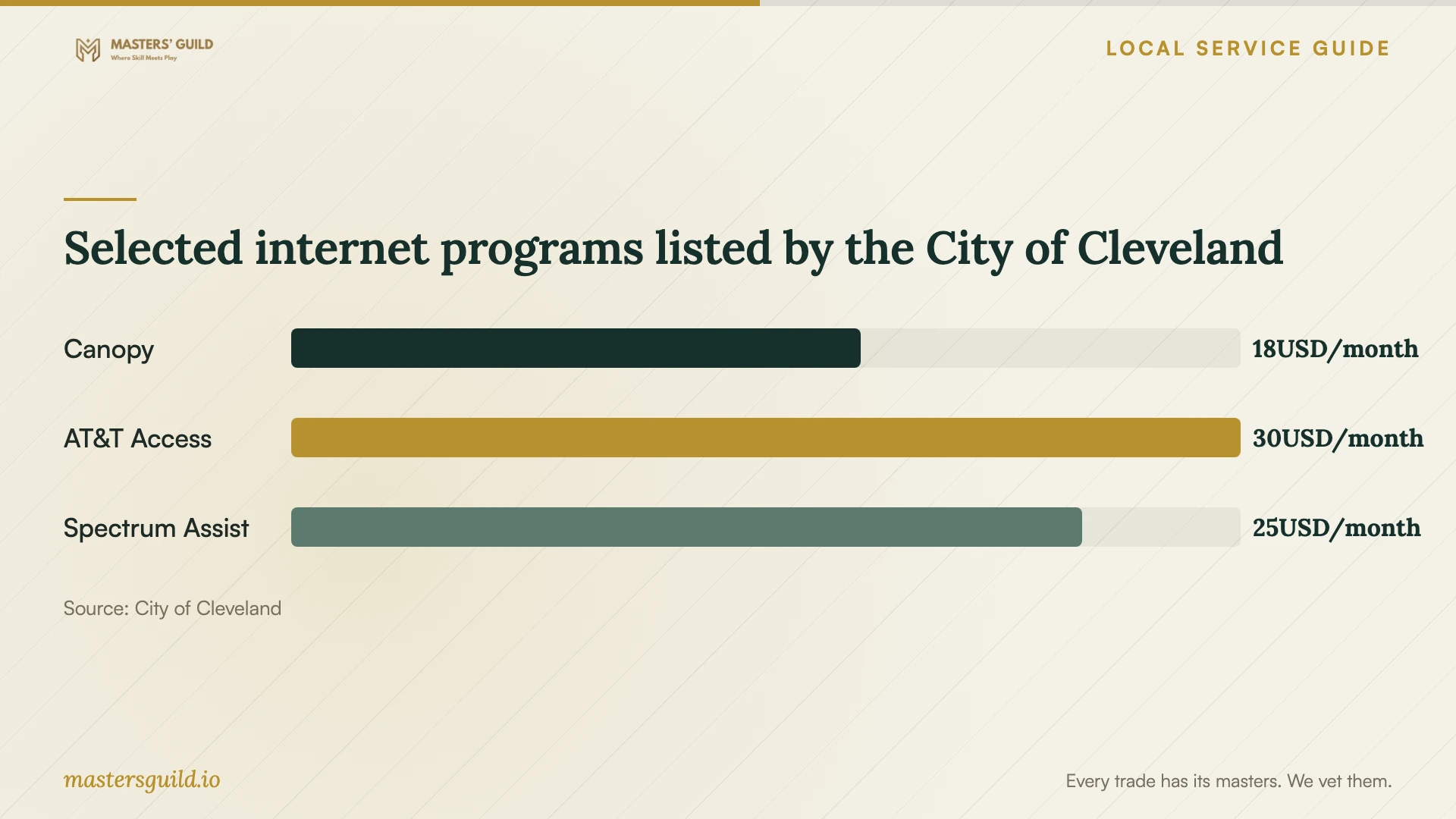
Selected internet programs listed by the City of Cleveland
Local details that affect your job
Home internet assistance through Cleveland
The city's Digital Navigators Hotline, 216.307.6990, connects callers with resources for devices, internet access, and computer classes. If you lack a home connection, use that resource to investigate access before scheduling a transfer. The city also lists Canopy at $18 per month for minimum 100 Mbps symmetrical service; confirm availability and current terms for your address. [1]
Regional appointments for basic technology help
Cuyahoga County Public Library accepts Digital Navigator appointment requests at 216.749.9420, in person, or through its online form. Its branch choices include Parma, Garfield Heights, and Strongsville. This regional option suits a request for basic device, email, or app instruction; ask about appointment location and task coverage before arranging paid setup. [2]
A temporary connection has borrowing restrictions
Cleveland Public Library requires hotspot borrowers to be at least 18, hold a library card in good standing, and reside in Cleveland, Bratenahl, Newburgh Heights, or Linndale. The loan lasts 28 days, with no renewals or holds. Confirm availability before relying on a hotspot for your appointment and keep the return deadline in your transfer plan. [3]
Choose help for the task you need
| Your situation | Option to consider | Confirm before arranging help |
|---|---|---|
| You need basic email or app instruction | Cuyahoga County Public Library Digital Navigator | Appointment location and whether staff can cover your task |
| You want computer access or technology lessons | Cleveland Public Library | Available support and access arrangements |
| You lack a home internet connection | City Digital Navigators Hotline | Address availability and program eligibility |
| You want files moved between household accounts | Technician with a written migration scope | Included files, retained originals, and completion checks |
| You want a household recovery plan | Technician with an agreed recovery demonstration | What you can recover and how you will perform the steps |
Your hiring checklist
- List the devices, accounts, and folders you want included.
- Identify who should own the account and who may view or edit shared files.
- Prepare access to your recovery email or phone without sending passwords to the technician.
- Ask for separate setup, subscription, and follow-up charges.
- Agree on how to handle duplicates and preserve existing copies.
- Confirm who will monitor an unfinished upload after the appointment.
- Require file-opening, sharing, and recovery demonstrations before accepting completion.
Frequently Asked Questions
Can I use library help before hiring someone?
Yes. Cleveland Public Library offers classes and one-on-one support, and Cuyahoga County Public Library offers appointments for basic technology tasks. Explain what you need and confirm coverage. For a household migration, request a technician scope that includes file checks and account ownership. [2] [3]
How much should I budget for setup?
Request a written quote for your devices, accounts, and files. The supplied local sources establish internet program prices, rather than technician charges. Ask the quote to separate the appointment, any cloud subscription, and follow-up work so you can compare offers on the same scope. [1]
Should I close my old account after the appointment?
Wait until you check the transferred files and practice the agreed recovery steps. Ask the technician to identify anything still uploading and to explain how you will verify completion. Set a separate decision point for closing the old account or deleting existing copies.
Can I borrow a hotspot for setup?
Cleveland Public Library offers 28-day hotspot loans to eligible adult cardholders in Cleveland and three named neighboring communities. It permits no renewals or holds. Confirm eligibility and availability, then ask the technician whether the borrowed connection fits your transfer plan. [3]
Sources and scope
This guide combines the sources below with practical planning guidance. Figures apply to the stated geography and period; request a written quote for your property.