
Local service guide
Technical Skills Training in Chula Vista, CA
Arrange Technical Skills Training around a task you or your staff need to complete: managing email, sharing files, building a spreadsheet, or maintaining a website. For basic computer skills, consider Sweetwater adult education’s local digital literacy classes before commissioning private lessons. For instruction on your business workflow, ask an instructor for a written lesson plan, a full quote, and an exercise using sample files. [1]
Define the task before choosing the instructor
Write a short brief that names the learner, the software, and the work they need to perform without help. For example, ask for instruction on creating an inventory spreadsheet with filters and a monthly summary. Include your device type, current skill level, preferred teaching language, and any deadline. Separate learning goals from work you want the instructor to complete for you.
Ask the instructor to explain how they would teach your example. Request a relevant sample lesson or exercise, then agree on a completion check: the learner repeats the task without prompts and explains the steps. For coding, website, or IT instruction, ask which tools and versions the instructor will use and what prerequisite knowledge they expect.
Check local classes against your work schedule
Sweetwater’s Division of Adult Education lists digital literacy classes at Chula Vista Adult School and its other adult schools. Topics include keyboard basics and logging in, basic computer skills, internet basics, email, and an introduction to Google Workspace. The district publishes class hours of Monday through Thursday, 1:00–2:30 p.m. Confirm the current schedule and available places before arranging staff coverage. [1]
For Southwestern College noncredit study, identify a suitable course in the current schedule before planning around it. The college’s registration instructions explain enrollment but do not establish that a particular technical course has an open seat or meets your business needs. Ask about prerequisites, location, teaching format, and required equipment for the course you select. [2]
Consider private instruction when you want practice with a specific business process or need a different meeting time. Ask whether the instructor will teach at your premises or online, whether staff can use their own devices, and how they will accommodate learners with different starting skills. Agree on these details before buying a package.
Compare the full cost
For a private lesson quote, request the session length, number of learners, preparation charges, travel charges, software subscriptions, and cancellation terms. Specify whether you want exercises, written instructions, and support between meetings. Ask the instructor to distinguish teaching time from setup, troubleshooting, or work they perform on your behalf.
Southwestern College publishes an enrollment fee of $46 per unit. Treat that as a unit-based enrollment charge when assessing credit study, rather than an hourly coaching price or a quote for a noncredit class. The college also notes that both credit and noncredit courses may require materials fees. Confirm the charges that apply to your selected course and student status. [3]
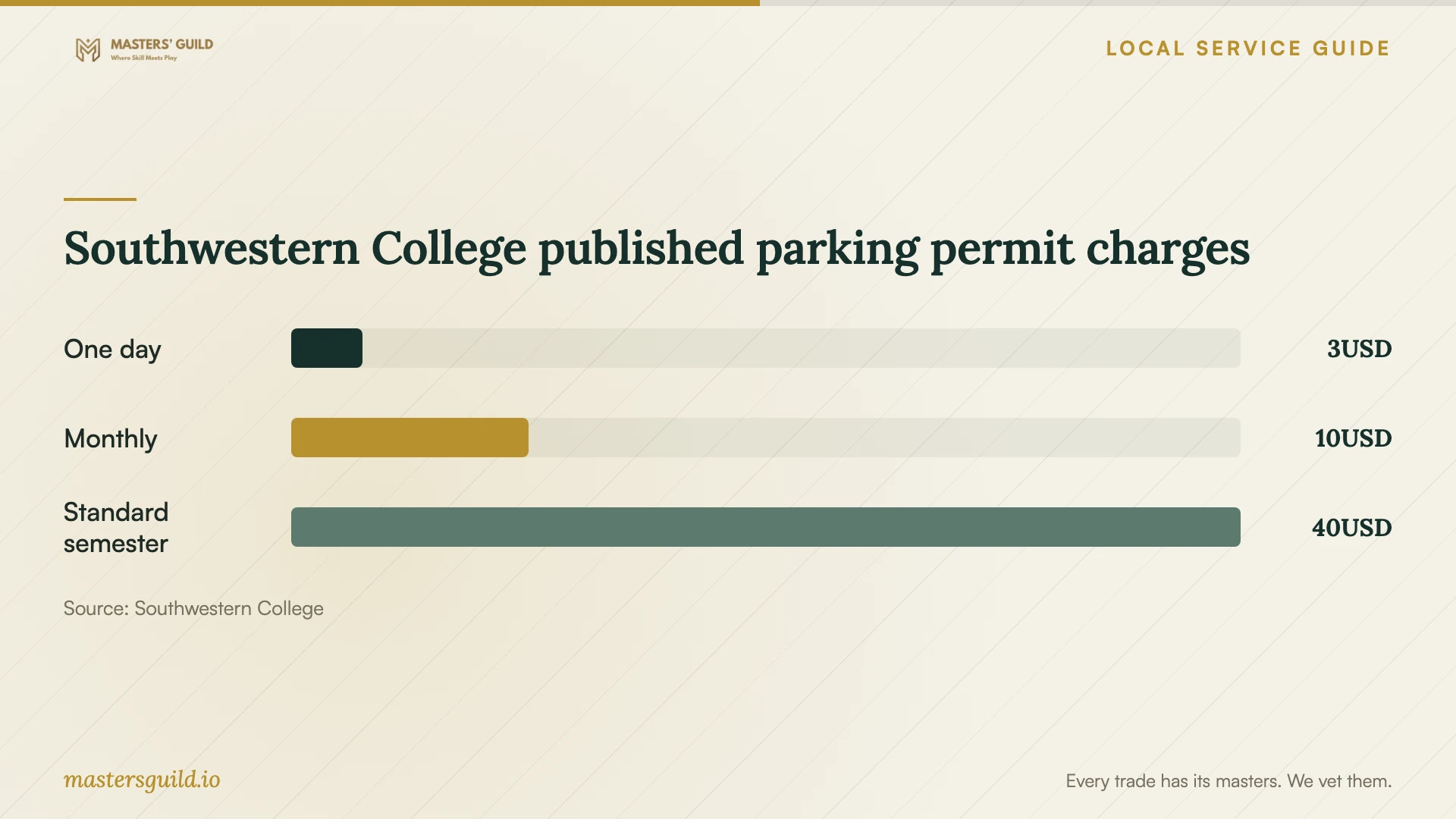
For campus parking, Southwestern lists a standard semester permit at $40, a summer-term permit at $22, and a semester permit for approved California College Promise Grant recipients at $20. It also lists monthly permits at $10 and one-day permits at $3. Compare the permit duration with your attendance plan and confirm any eligibility requirements before budgeting. [3]
Prepare the lesson and check what staff learned
Prepare a practice file that resembles your work while removing customer names, payment details, passwords, and confidential records. Confirm that each learner can open the required software before the lesson. For remote instruction, agree on screen sharing and any recording; for an onsite session, arrange a workspace where staff can hear and practice.
Ask the instructor to let staff perform the task during the lesson. Finish with a fresh example and record the steps that still require help. Use that result to decide whether to book another session, revise the goal, or move to independent practice. Keep a copy of the exercise and any agreed instructions so you can check progress against the original brief.
Southwestern College published parking permit charges
Local details that affect your job
Register for local digital literacy by phone or in person
Sweetwater directs learners to call or visit an adult school to register for digital literacy. It lists Chula Vista Adult School at 619-796-7000 and regular office hours Monday through Thursday, 8:45 a.m.–6:45 p.m., with Friday closure. The district warns that office hours may change. Confirm enrollment arrangements and class availability before assigning an employee to attend the published afternoon sessions. [1]
Allow time for a Southwestern account before enrollment
New noncredit students complete or update an application, wait for an activation email, activate MySWC, and register online. Southwestern states that the email arrives within 24–48 hours. Current students register through the Student Self-Service app in MySWC. For help, the college lists [email protected] and 619-482-6376, with Continuing Education at Building 68, 900 Otay Lakes Road. Start the account process before the date you hope to begin training. [2]
Choose a route around the learning goal
| Your goal | Route to consider | Check before committing |
|---|---|---|
| Learn email, internet, or computer basics | Sweetwater digital literacy | Confirm availability for the published Monday–Thursday, 1:00–2:30 p.m. classes. |
| Explore a scheduled noncredit course | Southwestern College | Check the current course schedule and complete application and MySWC registration. |
| Practice a specific office workflow | Private instruction | Request a lesson using your sample task and a written completion check. |
| Teach staff with different starting skills | A tailored staff session | Ask how the instructor will assess learners and provide practice for each person. |
Your hiring checklist
- Name the task each learner should complete without help.
- List devices, software versions, starting skills, and preferred teaching language.
- Confirm the class schedule or instructor’s proposed meeting times.
- Request a written quote covering preparation, travel, materials, and follow-up.
- Agree on cancellation terms and the scope of any between-session support.
- Prepare sample files with confidential business information removed.
- Ask each learner to complete a fresh example before deciding on further lessons.
Frequently Asked Questions
Can I learn basic computer skills through a local adult school?
Sweetwater lists digital literacy at Chula Vista Adult School, covering computer basics, internet use, email, and introductory Google Workspace skills. Call the school to confirm the current schedule, availability, and registration requirements. [1]
How do I enroll in a Southwestern noncredit course?
New students apply, receive an activation email within the college’s stated 24–48-hour window, activate MySWC, and register online. Current students use Student Self-Service in MySWC. Check the current course schedule before choosing a start date. [2]
Do published college fees cover everything?
Check the charges for your course and student status. Southwestern publishes separate enrollment and parking charges and says credit or noncredit courses may require materials fees. Ask about equipment and supplies before registration. [3]
How should I compare private training quotes?
Give each instructor the same sample task, learner count, software details, and desired result. Compare total cost, teaching time, preparation, exercises, cancellation terms, and follow-up. Ask how staff will demonstrate that they can perform the task without prompts.
Sources and scope
This guide combines the sources below with practical planning guidance. Figures apply to the stated geography and period; request a written quote for your property.