
Local service guide
Smart Appliance Setup in Chula Vista, CA
For Smart Appliance Setup in Chula Vista, choose help based on your appliance models and the results you want: app pairing, connection troubleshooting, schedule settings, or physical installation. Request a quote that separates digital setup from wiring and plumbing work. For construction projects, California requires a licensed contractor when the job needs a building permit, uses employee labor or workers, or totals $1,000 or more in combined labor and materials. [1]
Define the appointment before comparing quotes
Describe a result for each device. You might ask for a washer notification on your phone or help configuring a dishwasher’s delayed start. Give the provider the brand and model, and ask them to check whether that model supports the function. Include any existing connection error and what you have tried.
State whether the appliance already has its required physical connections. Identify any moving, mounting, wiring, or plumbing you expect. Ask the provider to price those tasks separately and explain who will perform them. For troubleshooting, agree on a time or spending limit and how the provider will obtain approval for additional work.
Check the construction scope and permit requirements
Check Chula Vista permit requirements for your installation before agreeing to construction work. Ask the provider to describe any proposed electrical or plumbing changes so you can present the full scope to the city. Do not assume that a small invoice settles the licensing question.
CSLB requires a current California contractor license when a construction project needs a building permit, uses employee labor or workers, or reaches $1,000 in combined labor and materials. For a single trade job, CSLB advises choosing a contractor licensed in that specialty. Verify the provider’s license and ask which specialty covers the proposed work. [1]
Prepare your accounts and agree on network changes
Have your phone, manufacturer instructions, model numbers, and access to your account email ready. Sign in before the visit and handle password recovery yourself. For a used appliance, ask the provider to check the manufacturer’s ownership-transfer instructions before resetting anything.
Ask the provider to explain proposed router changes before making them. Request a record of changed settings without passwords, and test your other connected devices afterward. At handover, use your own phone to try the requested functions and have the provider show you how to change or cancel schedules. Record unresolved problems and any agreed follow-up.
Choose schedules using your household’s electricity plan
If you receive SDG&E service, find your current plan under Rate in the Electric Service section of your bill or under Pricing Plans in My Energy Center. SDG&E lists peak hours from 4 p.m. to 9 p.m. for TOU-DR1 and TOU-DR2. Standard DR uses consumption-based pricing rather than time-based pricing. [2]
Bring that plan information to the appointment and ask the provider to demonstrate the model’s scheduling controls. Choose operating times that fit the manufacturer’s directions and your household routine. Confirm whether the setting delays the start or controls another part of the cycle.
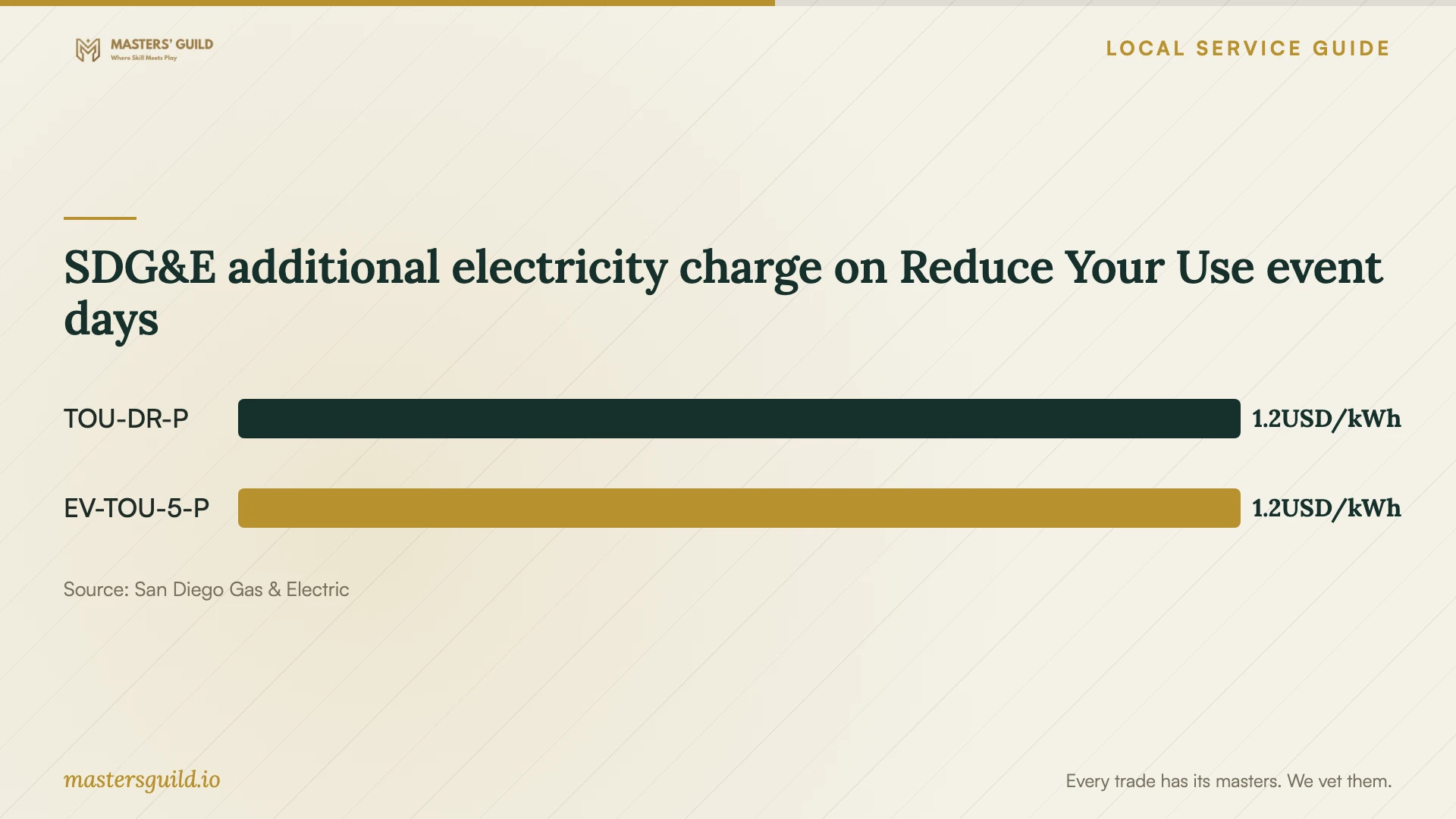
For customers on TOU-DR-P or EV-TOU-5-P, SDG&E publishes an additional event-day charge for electricity used from 4 p.m. to 9 p.m. The utility may call up to 18 events per year. The chart compares that additional charge, rather than ordinary electricity prices or appliance setup costs. [2]
SDG&E additional electricity charge on Reduce Your Use event days
Local details that affect your job
For SDG&E customers, check the plan and generation provider
Before programming energy-related schedules in a Chula Vista home receiving SDG&E service, check both the rate plan and whether a Community Choice Aggregator supplies generation. SDG&E separates CCA delivery-only prices from generation-and-delivery prices. CCA customers also pay their CCA’s generation charges. Ask the setup provider to use your actual plan, and consult My Energy Center’s usage-based comparison before considering a plan change. SDG&E says most plans require a 12-month commitment. [2]
Review thermostat program consent before enrollment
If you are an SDG&E customer considering its demand-response thermostat program, review enrollment separately from setup. The terms require an approved thermostat, permission for remote temperature adjustments, and sharing of specified account, energy, and thermostat information. They allow opting out of an adjustment or the program but state that doing so ends further rebates or incentives. Ask the provider to show the relevant controls, then decide whether to consent. The utility limits participation to its customers and makes incentives subject to available funds and program continuation. [3]
Choose help for the task you need
| Your task | Help to request | Question before hiring |
|---|---|---|
| Pair an installed appliance | Model-specific app setup | Will you check support for my requested functions and demonstrate them? |
| Resolve connection errors | Network troubleshooting | What is the troubleshooting limit, and which router changes need my approval? |
| Alter wiring or plumbing | Relevant trade contractor | Which license covers the work, and have you checked permit requirements? |
| Configure appliance schedules | Settings review using your rate plan | Have you checked my plan rather than assuming time-based pricing? |
| Enroll a thermostat in demand response | Program explanation and consent review | Can you explain remote adjustments, data sharing, and opt-out consequences? |
Your hiring checklist
- List each appliance’s exact model, requested function, and current error.
- Identify digital setup and physical installation tasks separately.
- Compare quotes for the same scope, including troubleshooting limits and follow-up charges.
- Check city permit requirements and contractor credentials for proposed construction.
- Prepare your phone, account email access, and manufacturer instructions.
- Find your electricity plan before requesting energy-related schedules.
- Review thermostat enrollment permissions before consenting.
- Test the requested functions and collect a record of changed settings.
Frequently Asked Questions
How should I compare setup prices?
Ask providers to quote the same device list and functions. Include account pairing, connection troubleshooting, schedule configuration, and a demonstration where needed. Ask how they charge for unresolved problems, extra time, and return visits. Separate equipment purchases and physical installation from digital setup.
Does construction below $1,000 require a licensed contractor?
It can. CSLB also requires a current license when the project needs a building permit or uses employee labor or workers. The $1,000 threshold covers combined labor and materials. Describe the full construction scope before checking the requirement. [1]
Should I schedule appliances after 9 p.m.?
Check your electricity plan and manufacturer instructions first. SDG&E’s TOU-DR1 and TOU-DR2 peak periods end at 9 p.m., while Standard DR does not price electricity by time of day. Ask the provider to demonstrate your model’s delay setting before relying on a schedule. [2]
Does SDG&E guarantee thermostat installation or savings?
SDG&E’s demand-response terms place selection, installation, operation, and repair responsibility on the customer. The utility does not guarantee thermostat functionality or contractor installation, and says actual savings vary. App cost estimates do not replace your billing information. Agree on installation testing with your provider. [3]
Sources and scope
This guide combines the sources below with practical planning guidance. Figures apply to the stated geography and period; request a written quote for your property.