
Local service guide
Software installation in Chicago: plan the job
For software installation in Chicago, hire a technician when you want someone to install, activate, configure, and test programs on your own computer. Agree on the applications, devices, backup plan, and total charges before granting access. If you need instruction in email or document creation, consider Chicago Public Library’s appointment-based Digital Navigator tutoring before arranging paid work. [1] [2]
Define the work before comparing quotes
Give the technician your computer model, operating system version, application names, and any error messages. Explain whether you want a new installation, an upgrade, or help restoring an application you already bought. Ask the technician to check compatibility before you purchase another license.
Write down the tasks you expect to complete afterward. For an office application, ask to open and save one of your existing documents. For email, request a sending and receiving test. Include printer setup, file transfer, or account recovery in the quote if you need them.
For an operating-system change, ask which files and applications the technician plans to preserve, what backup they require, and how they will handle a failed installation. Keep that work separate from a simple application install when comparing offers.
Choose remote, home, or drop-off service
Consider remote service if you can start the computer, connect to the internet, and follow the technician’s connection instructions. Describe startup failures or connection problems before booking. Ask whether the technician recommends a home visit or drop-off instead.
For a home visit, give the technician arrival instructions and explain any building access arrangements. For drop-off service, ask who will keep the computer, how they will contact you before extra work, and what you must bring. Agree on an expected completion window and a spending limit.
Choose the support contact yourself. The Illinois Attorney General warns against calls and internet pop-ups claiming that someone has hacked your computer. Its guidance says honest tech companies do not contact you unsolicited to report a problem. If a warning prompted the job, verify the provider through a contact channel you chose before allowing access. [3]
Prepare files and account access
Back up files you want to keep and check that you can open a sample from the backup. Tell the technician where you store your documents and photos. Ask them to explain any step that involves deleting files, resetting the computer, or removing existing software before you approve it.
Have your purchase receipt, license information, and account recovery method available. Enter passwords and verification codes yourself where possible. Ask the technician to use an account you control for purchases and activation, and agree on whether they may retain any access after the session.
Check the price and the finished result
Request a written quote that separates installation labor, software licenses, recurring subscriptions, travel or collection charges, and tax. Ask whether the technician charges a fixed amount or by time, what happens if activation fails, and whether follow-up corrections cost extra.
The Illinois Department of Revenue includes prewritten computer software in its general-merchandise category and directs readers to location-specific tax rates. It also notes that local governments may impose taxes or fees outside its collection. Ask the seller to identify the tax treatment of your purchase rather than assuming one rate applies to the entire job. [4]
Before you accept completion, open the application, perform your agreed test, and confirm that you control the account and license. Request a record of installed programs, renewal terms, and unresolved issues. Ask the technician to end the remote session and explain how to remove or disable any access tool you do not want to keep.
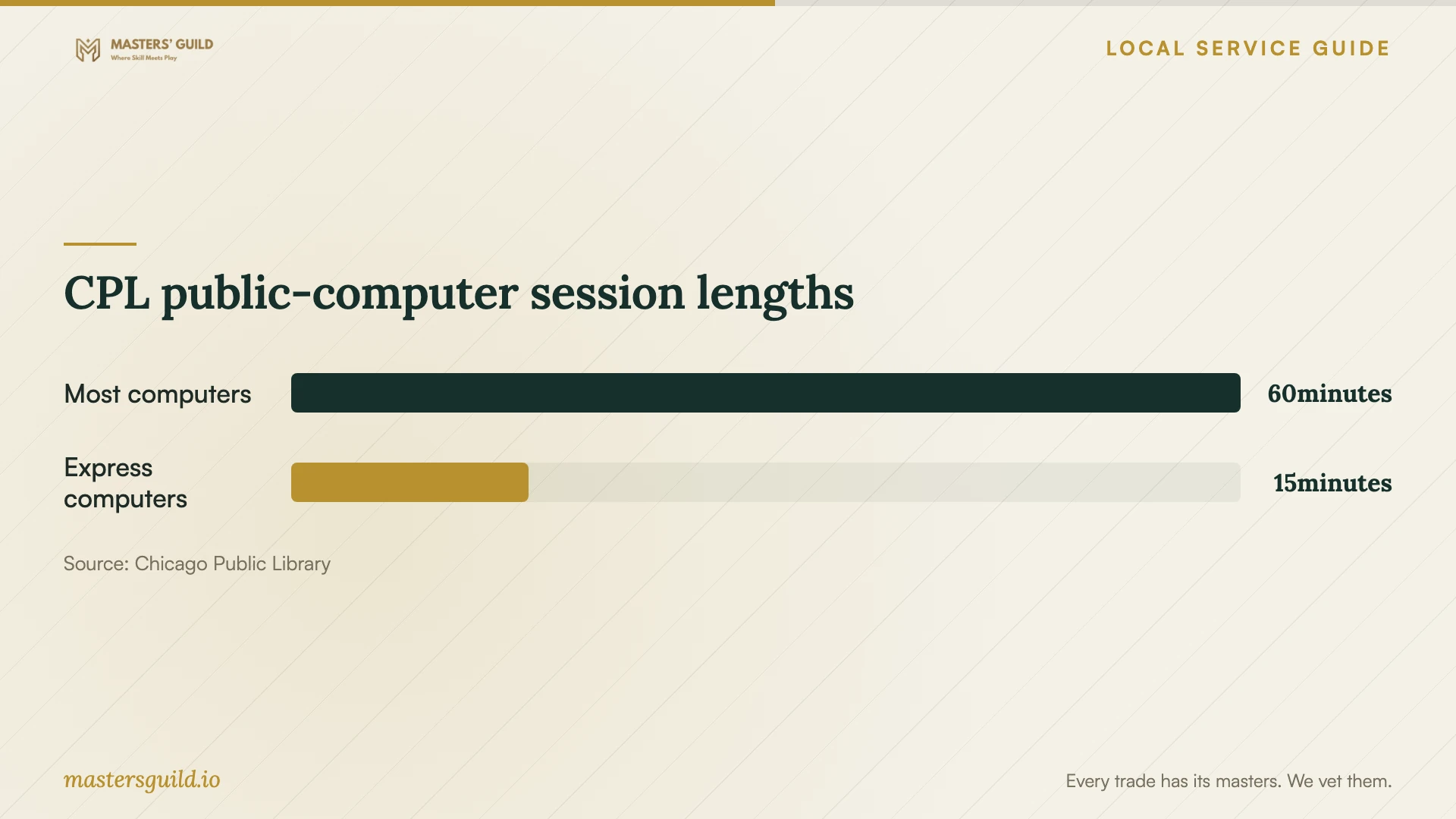
CPL public-computer session lengths
Local details that affect your job
Library tutoring can address a skills gap
Chicago Public Library lists Digital Navigator appointments at branches including Rogers Park, Harold Washington Library Center, and Little Village. Its September 25, 2026 announcement lists English and Spanish tutoring at Little Village and English and French at Harold Washington. Call the branch to confirm availability and an appointment. Tutors teach computer, email, internet, and document skills; ask whether they can help with your task before bringing a personal device for installation work. [2]
Public computers may cover a document task
CPL says its public computers include Microsoft Office, Adobe Reader, and several creative applications. If you need to create a document before deciding what to buy, consider using that equipment. CPL permits flash drives on one-hour computers, keeps no personal files on the hard drive, and does not permit flash drives on express computers. Save your work to your own storage before leaving. [1]
Illinois offers a complaint route for suspected scams
If an unsolicited support contact obtained access or money, treat that as a separate problem when describing the work to a technician. The Illinois Attorney General encourages suspected scam victims to file a complaint or contact its Consumer Fraud Hotlines. The Chicago hotline is 1-800-386-5438. [3]
Choose the next step for your situation
| Your situation | Next step | Confirm before proceeding |
|---|---|---|
| You need email or document instruction | Consider a CPL Digital Navigator appointment | Branch availability and whether the teaching scope fits |
| You need temporary access to Office | Consider a CPL public computer | Session length and how you will save your work |
| You need software on your own computer | Request an installation and configuration quote | Compatibility, account ownership, and completion tests |
| You need an operating-system change | Request a backup and recovery plan | Which files and applications the technician will preserve |
| An unsolicited caller claims you were hacked | Reject the access request and choose your own support contact | Whether you also need help addressing suspected fraud |
Your hiring checklist
- List each device, application, and task you want completed.
- Share operating-system details and exact error messages.
- Check a backup of files you want to preserve.
- Gather purchase records and confirm access to your own accounts.
- Agree on service format, charges, and approval for extra work.
- Set password-entry and remote-access boundaries.
- Test the agreed tasks and collect installation and renewal records.
Frequently Asked Questions
How much should I budget for installation?
Request an itemized quote for your specific devices and applications. Ask for labor, license purchases, recurring charges, and taxes as separate items, then compare offers with the same completion tests. Set a spending limit and require your approval before the technician adds work.
Will library tutors install software on my laptop?
CPL describes Digital Navigator help as skills instruction, including email, internet use, and document creation. It does not promise personal-device software installation. Call the participating branch and describe your task before arranging an appointment. [1] [2]
Should I allow remote access after a warning pop-up?
Do not grant access to someone because a pop-up or unsolicited call says your computer has a problem. The Illinois Attorney General warns that scammers use this approach to obtain access and install data-stealing software. Choose and verify your own support contact. [3]
Sources and scope
This guide combines the sources below with practical planning guidance. Figures apply to the stated geography and period; request a written quote for your property.