
Local service guide
Cloud Service Setup in Chicago, IL
Arrange Cloud Service Setup in Chicago by asking for a written scope that names the accounts, devices, files, access permissions, and handover tests. Hire help for a migration or shared business workspace; consider library instruction for basic computer skills. Chicago Public Library offers appointment-based Digital Navigator sessions covering email, online security, and Google Docs. [1]
Define the work before comparing quotes
Write down the outcome you need: staff sharing a project folder, transferring records from an old account, accessing documents from several devices, or recovering files after a problem. Ask the technician to explain which parts of that outcome the proposed setup covers. Specify whether the work includes email, calendars, paper-document scanning, or only files.
Give each bidder the same inventory of computers, phones, users, existing accounts, and folders. Identify the person who can approve access and subscription purchases. Ask for a fixed scope or a labor limit, plus the process for approving additional work. Agree on who will handle unfinished uploads after the appointment.
Compare quotes by deliverables
Ask each technician to itemize account setup, file transfer, permission configuration, device setup, and staff instruction. List subscription charges apart from labor and ask who will pay the provider. For ongoing support, request the included tasks, response arrangements, and cancellation terms in writing.
Ask for an example of how the technician would handle your specific migration: inaccessible files, duplicate folders, interrupted transfers, or an employee who should lose access. Request a written plan for preserving the originals until you approve the result. Choose the proposal whose scope and completion checks you can understand.
Check internet access before the transfer
Illinois DCEO's broadband resource page describes an Illinois Broadband Map showing access by speed and technology, and an availability dashboard with provider, technology, and speed filters. It also identifies the FCC National Broadband Map as a resource for providers and maximum advertised speeds at individual locations. These resources cover Illinois or the nation, rather than measuring your office connection. [2]
For your premises, ask the internet provider to confirm upload speed, any data allowance, and service restrictions. Ask the technician to test the connection you will use and propose an upload schedule around staff needs. Require a follow-up check before anyone treats the migration as complete.
Set account control and sensitive-data responsibilities
Create the main account under a business-controlled address. Keep recovery details with the designated owner and enter passwords yourself during setup. Ask the technician to enable the account's available security protections, assign named users, and document folder permissions. Agree on how the technician will handle temporary copies and remove their access.
The Illinois Attorney General explains that entities conducting business in Illinois and handling nonpublic personal information must disclose qualifying breaches involving Illinois residents without unreasonable delay. Certain businesses and state agencies must also notify the Attorney General. Before transferring customer or employee records, assign responsibility for investigating suspected exposure and obtaining advice about notification duties. [3]
Approve the setup through practical tests
Ask the technician to demonstrate the setup using a sample of your own files. Open documents from the intended devices, check that an authorized employee can access a shared folder, and confirm that a restricted user cannot. If the scope includes backup or recovery, ask for a recovery demonstration and written instructions.
Before approving completion, request an account list, permission summary, subscription details, and a record of files that failed to transfer. Keep the original copies until you have reviewed the result. Have a staff member repeat the routine tasks without the technician's help, then resolve any gaps in the handover.
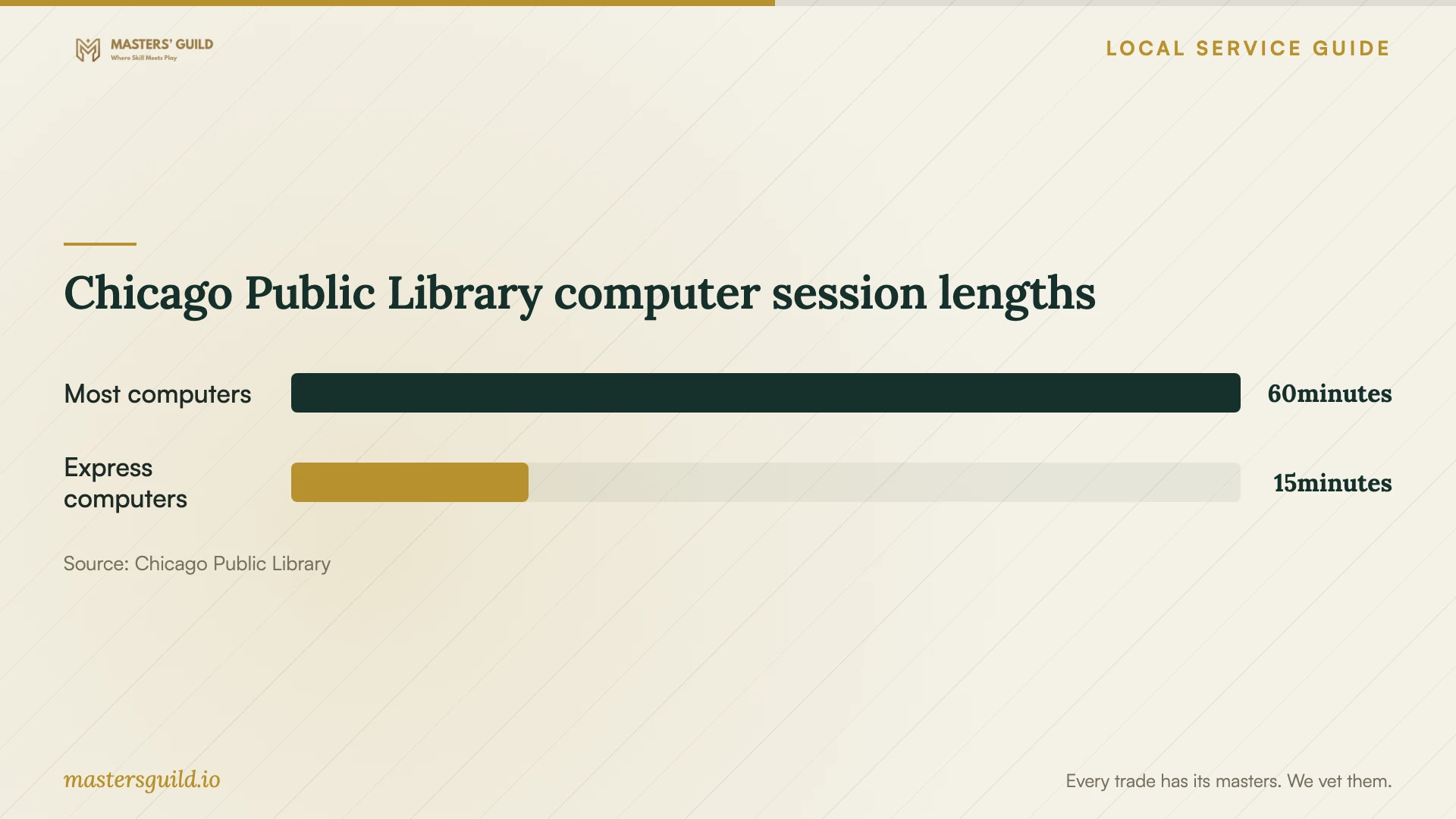
Chicago Public Library computer session lengths
Local details that affect your job
Choose library instruction for basic skills
Chicago Public Library offers one-on-one Digital Navigator appointments at specific locations, lasting up to an hour. Tutors cover email setup, online navigation and security, and creating documents in Microsoft Office or Google Docs. Consider this route for staff who need basic instruction. Confirm the appointment location and topic; the listed instruction does not establish a business migration or managed-backup service. [1]
Prepare paper records with local scanning
Most Chicago Public Library locations have scanners. The library lists Google Drive upload, USB saving, and email among the ways to collect scans; it states that scanning to USB or email is free. Confirm scanner availability before visiting and choose which business records you are comfortable handling on shared equipment. For public computer work, USB drives work on one-hour computers, but the library excludes them from 15-minute express computers. [1]
Choose the next step for your setup
| Your need | Next step | Confirm before proceeding |
|---|---|---|
| Basic email or document skills | Consider a CPL Digital Navigator appointment. | Confirm the location and instructional topic; sessions can last up to an hour. |
| Paper records for cloud storage | Consider a CPL scanner before hiring migration help. | Confirm scanner availability and your preferred collection method. |
| Shared files across staff devices | Request a technician's written setup and permissions plan. | Name the account owner and define access tests. |
| Transfer of sensitive business records | Assign data-handling and incident-response responsibilities. | Review applicable Illinois breach-notification duties with qualified advice. |
Your hiring checklist
- List users, devices, accounts, folders, and the outcome you want.
- Identify the business account owner and subscription approver.
- Mark sensitive records and agree on temporary-copy handling.
- Request an itemized scope, labor limit, and additional-work process.
- Ask for a connection test and an upload completion plan.
- Agree on file, permission, and recovery demonstrations.
- Collect handover instructions and remove temporary technician access.
Frequently Asked Questions
How much should I budget for setup?
Request a quote based on your users, devices, accounts, and transfer scope. Ask the technician to separate labor from subscription charges and identify any follow-up fees. Use the same inventory for each quote so you can compare the included work.
Can library help replace a paid technician?
Consider it for basic instruction. CPL lists email, online security, and document creation among Digital Navigator topics, with appointments lasting up to an hour. For a business migration, ask a technician to take responsibility for transfer checks, permissions, and handover. [1]
Should I delete the old files after setup?
Keep the originals until you approve the migration checks and any agreed recovery test. Ask the technician to identify failed transfers, duplicates, and excluded folders before you decide what to remove.
How do I check whether my connection is suitable?
Use the broadband resources described by Illinois DCEO to investigate provider and speed information, then confirm your plan with your provider. Ask the technician to test your actual upload connection and schedule the transfer around business activity. Advertised speeds alone do not establish your transfer time. [2]
Sources and scope
This guide combines the sources below with practical planning guidance. Figures apply to the stated geography and period; request a written quote for your property.