
Local service guide
Software Installation in Cheyenne, WY
For Software Installation in Cheyenne, list your programs, devices, and account needs before hiring a technician. Request a written quote separating labor, software purchases, and file transfer, with agreed completion checks. Check local alternatives first: the Cheyenne Library offers free scheduled computer help, and LCCC students can access Microsoft Office free of charge. Ask whether those services cover your task before arranging paid work. [1] [3]
Define the job and the completion checks
Write down your device model, operating system, application names, and the task you want to complete. Describe the result you need: editing a document, accessing a course, using email, or opening files from an older computer. Tell the technician whether you own the software and can sign in to the account associated with it.
Separate application installation from an operating system change, file transfer, or troubleshooting. Ask the technician to confirm compatibility before you purchase software. If you need files moved, identify the folders and agree who will create and check a backup before work starts.
Agree on completion checks before the appointment. Ask the technician to open the application, confirm activation where applicable, and let you perform your intended task. Include printer, email, or file-opening checks in the scope if you need them. Ask for a record of the programs installed and changes made.
Check local assistance before buying software or labor
The Cheyenne Library offers free scheduled computer-help sessions covering basic navigation, internet and email use, Microsoft Office, Google Suite, and downloading library apps such as Libby and Hoopla. Call 307-634-3561 to schedule a session. Describe your device and task, and ask whether staff can help with the work you need. [1]
For a project that needs creative software, the library lists computers with Adobe Creative Cloud and Audacity and requires reservations. Consider using a library computer before commissioning an installation on your own device. Confirm the application, reservation availability, and how you will save your work. [1]
LCCC says students and employees may download Microsoft Office applications through Office 365. Its online-learning guidance states that students receive Office free of charge. Eligible household members should check college access and download instructions before adding an Office purchase to an installation quote. [2] [3]
Agree how the technician will access your device
Ask whether the technician can complete your task remotely and what you must do during the appointment. Explain any connection problems or inability to sign in. For an appointment at home or a drop-off service, ask what equipment to provide, how you will approve changes, and when you can expect the device back.
For remote help, agree on the access method and when the session will end. Ask whether the technician intends to leave remote-support software installed or enable continuing access. Stay available to enter credentials yourself, and ask the technician to explain requests for administrator access before you approve them.
Wyoming Enterprise Technology Services warns that scammers use urgent emails or texts to persuade recipients to call a supplied number, then seek credentials, financial information, or remote computer access. If a message prompted your search for help, contact the claimed organization using independently verified official details before authorizing a session. [4]
Compare the quote and plan the handoff
Request a written total for the agreed work and a rule for approving additional charges. Ask whether the quote includes licenses, subscriptions, backup, file transfer, and follow-up help. Specify which purchases require your approval and who will own the account used to activate the software.
Ask what happens if installation fails or the technician finds another problem. Agree on a stopping point before troubleshooting extends beyond the original scope. Have your purchase records and account access ready, but keep passwords and private files out of the job description.
At handoff, sign in and open a representative file yourself. Check the tasks you agreed on, review any subscription renewal terms, and ask how to get help with an installation-related problem. Confirm whether that follow-up carries another charge before you accept the work.
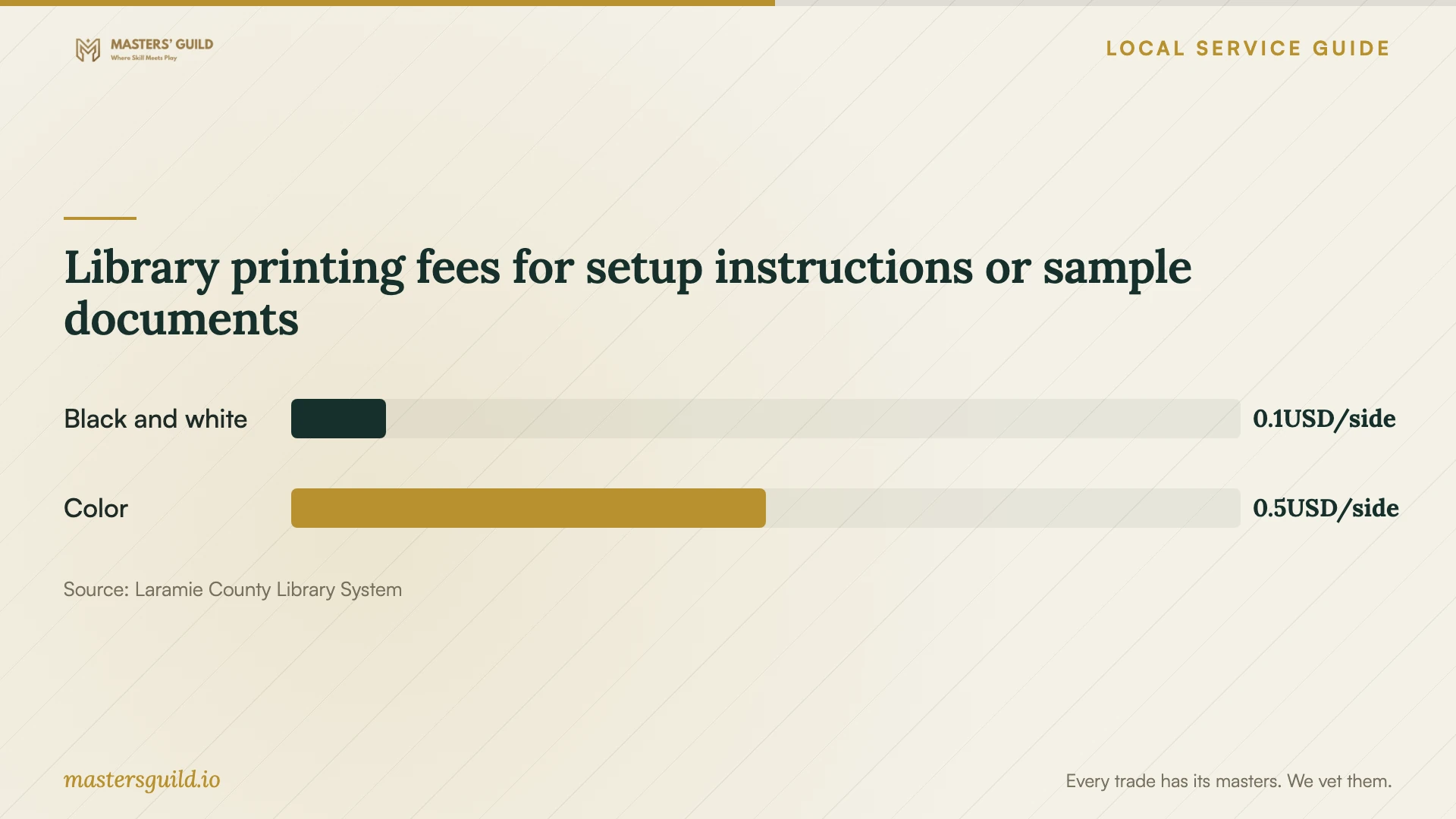
Library printing fees for setup instructions or sample documents
Local details that affect your job
Library help has a defined scope
The Cheyenne Library’s Computer Center sits on the third floor. Staff offer free scheduled help at 307-634-3561, including Office, Google Suite, and library-app assistance. The published list does not promise operating system installation or file migration. Describe those needs before treating a library appointment as a substitute for a technician. [1]
LCCC account setup comes before college software installation
LCCC provides Office downloads for students and employees and lists the ITS Support Desk at 307-778-4357. At first myLCCC login, the college prompts users to change their temporary password and register for multi-factor authentication. Establish your college account access before arranging software setup, and ask ITS for help if you cannot sign in. [2]
Bring the syllabus to a student setup appointment
LCCC recommends current Chrome or Firefox for Canvas, directs students to check their syllabus for additional software, and cautions against relying on tablets or mobile devices alone. Bring the course requirements to a student computer appointment and include browser setup and a Canvas sign-in check in the requested work. [3]
Choose the next step for your task
| Your need | Next step | Confirm before proceeding |
|---|---|---|
| Basic Office, email, or library-app help | Ask about a free Cheyenne Library computer-help session. | Whether staff can assist with your device and task. |
| Office for an LCCC student or employee | Check college Office download access and ITS support. | Your college account access and eligibility. |
| Temporary use of creative software | Ask about library computers with Adobe Creative Cloud or Audacity. | The application you need, a reservation, and how to save files. |
| Installation with backup or file transfer | Request a technician’s written scope. | Backup responsibility, included files, and completion checks. |
| Urgent support request received by email or text | Verify the organization through its official contact information. | The request’s legitimacy before granting remote access. |
Your hiring checklist
- List your devices, operating systems, applications, and intended tasks.
- Check existing software purchases and any eligible college access.
- Describe error messages without sharing passwords or private files.
- Agree who will create and check a backup before changes.
- Get a written quote separating labor, licenses, and file transfer.
- Verify the provider’s contact details before authorizing remote access.
- Agree on approval for extra work and any continuing remote access.
- Test sign-in, activation, and your intended task before handoff.
Frequently Asked Questions
How much should I budget for installation?
Request a quote for your exact devices and applications. Separate labor from software purchases, subscriptions, backup, and file transfer. Ask for the total for the agreed scope and require approval before extra work. The library printing fees shown here are ancillary costs and do not establish technician installation prices. [1]
Can the library install software on my home computer?
The library lists help with basic computer use, Office, Google Suite, and downloading library apps. Its published scope does not promise general installation work on home computers. Call 307-634-3561, describe your device and task, and ask whether a scheduled help session covers it. [1]
Do LCCC students need to buy Microsoft Office?
LCCC’s online-learning page says Microsoft Office is available to all LCCC students free of charge. Its technology page points to download instructions. Check your college access before buying a separate copy, and contact ITS if you cannot access your account. [2] [3]
Should I grant remote access after receiving a support message?
Verify the request first. Wyoming ETS describes scams that direct recipients to call a number in an unsolicited message, then pressure them to disclose credentials or grant remote access. Contact the claimed organization through independently verified official details before proceeding. [4]
Sources and scope
This guide combines the sources below with practical planning guidance. Figures apply to the stated geography and period; request a written quote for your property.