
Local service guide
Computer Virus Removal in Cheyenne, WY
Arrange Computer Virus Removal in Cheyenne by choosing a technician who explains the proposed work, itemizes the estimate and agrees on how to handle your personal files. Describe the symptoms and ask for a diagnosis before choosing a repair. If you need computer access during the appointment, consider the Cheyenne Library's public computers and free day-use passes when deciding whether to pay for urgent service. [1]
Describe the problem before choosing a repair
Tell the technician what you see: unfamiliar messages, browser changes, files you cannot open or a computer that stops responding. Include the device model and operating system if you know them. Explain when the problem started and any steps you have taken. Ask the technician to assess the cause rather than committing to a particular repair from your description alone.
Choose an appointment format that suits your household. Ask a prospective technician what they need for remote service, a home visit or drop-off work. For a home visit, identify a place where you can stay present. For drop-off service, confirm the collection arrangements and ask when you should expect an update.
Separate the repair appointment from your immediate need to finish schoolwork or household paperwork. The Cheyenne Library offers public computers and free day-use passes. Consider whether library access would cover that immediate task while you compare repair arrangements. [1]
Get an estimate you can compare
Request a written estimate that separates the diagnostic charge from cleanup and any proposed file copying or software reinstall. Ask for the total payable amount, including travel or collection charges where applicable. Confirm whether you are authorizing diagnosis alone or a defined repair, and set a spending limit for work beyond the estimate.
Ask what you would owe if the technician cannot complete the cleanup or recommends replacing the computer. Clarify whether follow-up work carries another charge and how you would report a returning symptom. Compare those terms alongside the price rather than choosing from a single advertised figure.
Keep the estimate and later approval messages with your payment record. The Wyoming Attorney General requests documents such as proposals, contracts, correspondence and proof of payment to support consumer complaints. Save the original records so you can describe a disputed charge with dates and amounts. [3]
Agree on access and file handling
Identify the documents, photos and other files you want to retain. Tell the technician whether you have a separate backup, where you keep it and whether you have checked its contents. Before approving deletion or a reinstall, ask what they intend to erase, copy and restore. Include the programs you need to use afterward in that conversation.
Discuss credential access before the appointment. Ask the technician to explain each password request and arrange to enter credentials yourself where practical. Agree on the handling of temporary file copies and the removal of remote-access software installed for the job. Avoid putting account passwords in the repair description.
The Wyoming consumer complaint unit lists consumer privacy invasions among the matters it can examine. For any concern about how a technician handled your information, keep a factual record of the access you authorized and the actions you question. [3]
Use local access to bridge the repair
At the Cheyenne Library, you can use the third-floor Computer Center with a library card and PIN or a free day-use pass from the kiosks. The library offers checkout laptops for in-library use only. Plan another arrangement if you need a temporary computer at home. [1]
Library staff offer free computer-help sessions by appointment at 307-634-3561. Their published scope includes basic navigation, internet and email use, Microsoft Office, Google Suite, social media and library apps. Choose this assistance for those tasks; the list does not advertise malware removal. [1]
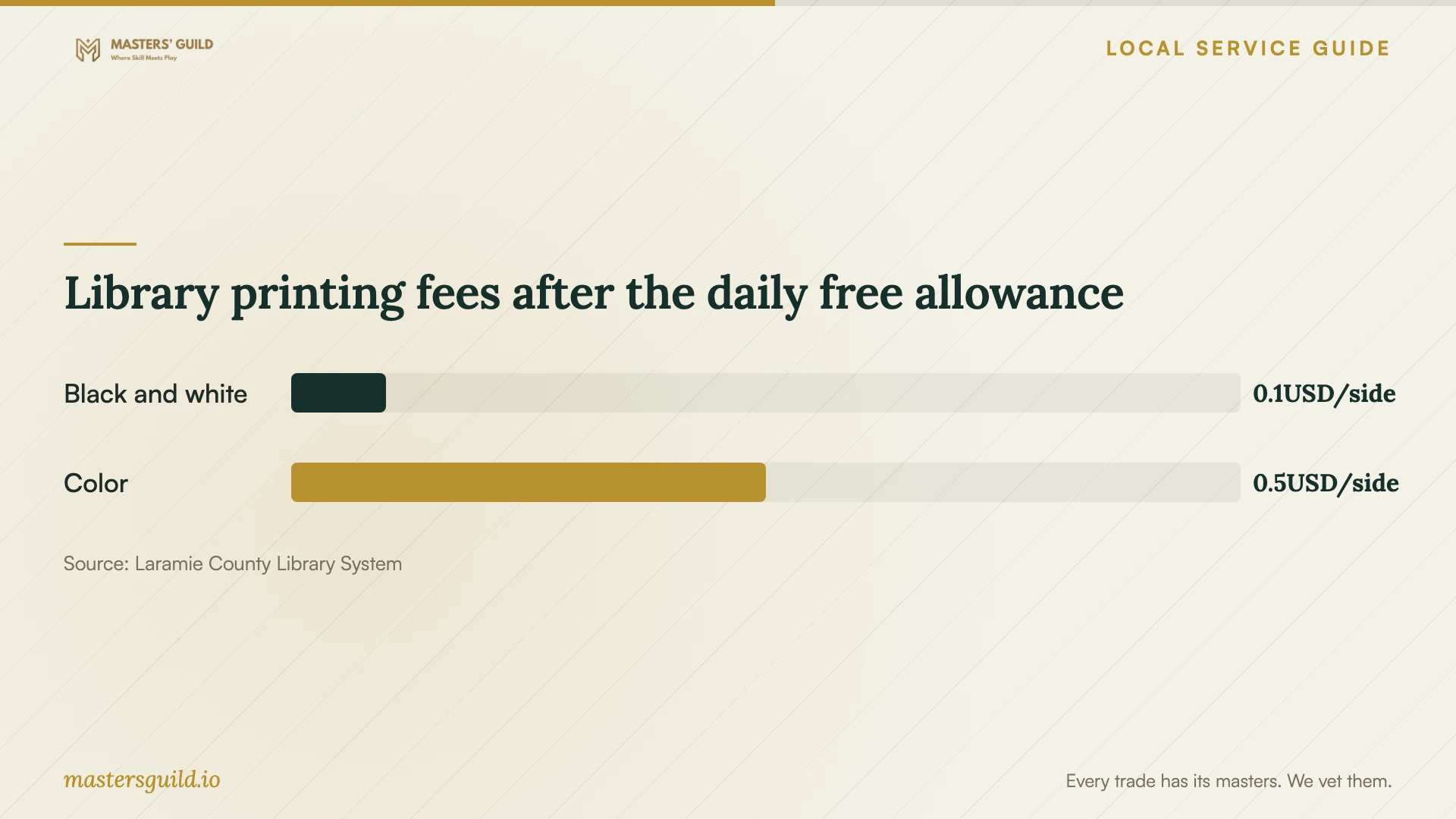
For temporary document access, the library system lists up to $1.00 in free printing per day, followed by charges of $0.10 per black-and-white side or $0.50 per color side. Confirm the printing arrangements before your visit. These are document-service fees, not computer repair prices. [2]
Check the handover and address disputes
At handover, ask the technician to explain what they found, what they changed and anything they left unresolved. Open the files you identified and try the tasks you need, such as launching a household document or using your browser. Request a work summary and instructions for reporting the same symptoms if they return.
For a billing or privacy dispute, first ask the business to address the specific issue. The Wyoming Attorney General asks consumers to attempt resolution before filing a complaint. Its consumer complaint unit can examine deceptive or unauthorized billing and privacy invasions, but excludes private contractual disputes. The office cannot act as your private attorney. [3]
Library printing fees after the daily free allowance
Local details that affect your job
Plan around in-library access
The Cheyenne Library's free day-use passes offer a way to complete a computer task without taking a replacement device home. Its checkout laptops permit in-library use only. Before selecting an urgent appointment, decide whether your immediate task requires home access or whether a library visit would cover it. [1]
Prepare a Wyoming complaint with privacy in mind
If you submit a consumer complaint, the Wyoming Attorney General asks you to remove sensitive information from the complaint and supporting documents. The office warns that complaints may face disclosure under the Wyoming Public Records Act. Prepare redacted copies of repair records rather than submitting passwords, credit card numbers or medical information. [3]
Match the next step to your immediate need
| Your situation | Suggested next step | Detail to confirm |
|---|---|---|
| You need to finish a document during the repair | Consider the Cheyenne Library Computer Center | Use a library card and PIN or a free kiosk day-use pass |
| You need a temporary laptop at home | Arrange access to another device | Library checkout laptops stay inside the library |
| You need help with email or office software | Consider a free library computer-help session | The published help list does not include malware removal |
| The technician recommends reinstalling software | Discuss what they will erase and restore | Confirm the programs and files you need afterward |
| You question an unauthorized repair charge | Ask the business to address it and retain supporting records | Wyoming's complaint unit excludes private contractual disputes |
Your hiring checklist
- Record the symptoms and device details before the appointment.
- Name the household tasks you need to resume.
- Compare itemized estimates and the charge for an unsuccessful repair.
- Discuss backups, credential access and any proposed deletion.
- Confirm appointment format, collection arrangements and the next update.
- Try your essential tasks at handover and retain the work summary.
Frequently Asked Questions
How much should I budget for virus removal?
Obtain an itemized written estimate from the technician. Ask whether it covers diagnosis, cleanup and any proposed file copying or software reinstall. Include appointment-related charges in your comparison and clarify what you would owe if the repair cannot be completed.
Can the library remove malware from my computer?
The library's published assistance list covers basic computer skills, internet, email, office software and related tasks. It does not list malware removal. Use that distinction when deciding whether you need a repair technician or help completing a basic computer task. [1]
Should I choose remote service or drop-off repair?
Describe the symptoms and ask the technician which arrangement they propose. For remote work, discuss how you will supervise access. For drop-off work, confirm collection and update arrangements. Choose the option that fits the proposed work and your ability to participate.
Will a Wyoming consumer complaint recover my repair payment?
Do not assume a refund through the complaint process. The Attorney General reviews properly filed complaints but cannot investigate all of them or represent you. The office uses complaints to identify patterns of concern and set enforcement priorities. [3]
Sources and scope
This guide combines the sources below with practical planning guidance. Figures apply to the stated geography and period; request a written quote for your property.