
Local service guide
Cloud Service Setup in Cheyenne: Plan the Job
For Cloud Service Setup in Cheyenne, hire a technician when you want help moving files, arranging household access, or testing recovery. Ask for a written scope that separates setup labor, subscriptions, and follow-up work. For introductory help, consider the library’s free computer-help sessions before paying for a visit; staff cover internet, email, Microsoft Office, and Google Suite. [1]
Define what you want the technician to finish
Write a short brief before requesting quotes. List the devices you want connected, the accounts you use, and the folders or photo collections you want included. Specify who should view, edit, or manage shared files. If you want backup help, request a demonstration of recovering a file as part of the work.
For a household migration, ask the technician to record the source account, destination account, and files you intend to move. Agree on how you will review the destination before approving deletion from the source. Keep an independent copy of important material until you have checked the transfer and recovery process.
Check the home connection before scheduling
The Wyoming Business Council’s broadband office explains that residential service typically offers faster downstream speeds than upstream speeds. It directs residents to the National Broadband Map to check address-level availability. Apply that guidance to your home address, then ask your internet provider about the upload service on your current plan. [3]
Ask the technician to distinguish time spent configuring accounts from time spent waiting for files to upload. Request a plan for interruptions, device sleep, and unfinished transfers. Agree on whether the technician will check completion after the appointment and whether that follow-up costs extra. Avoid committing to a completion deadline based only on download speed.
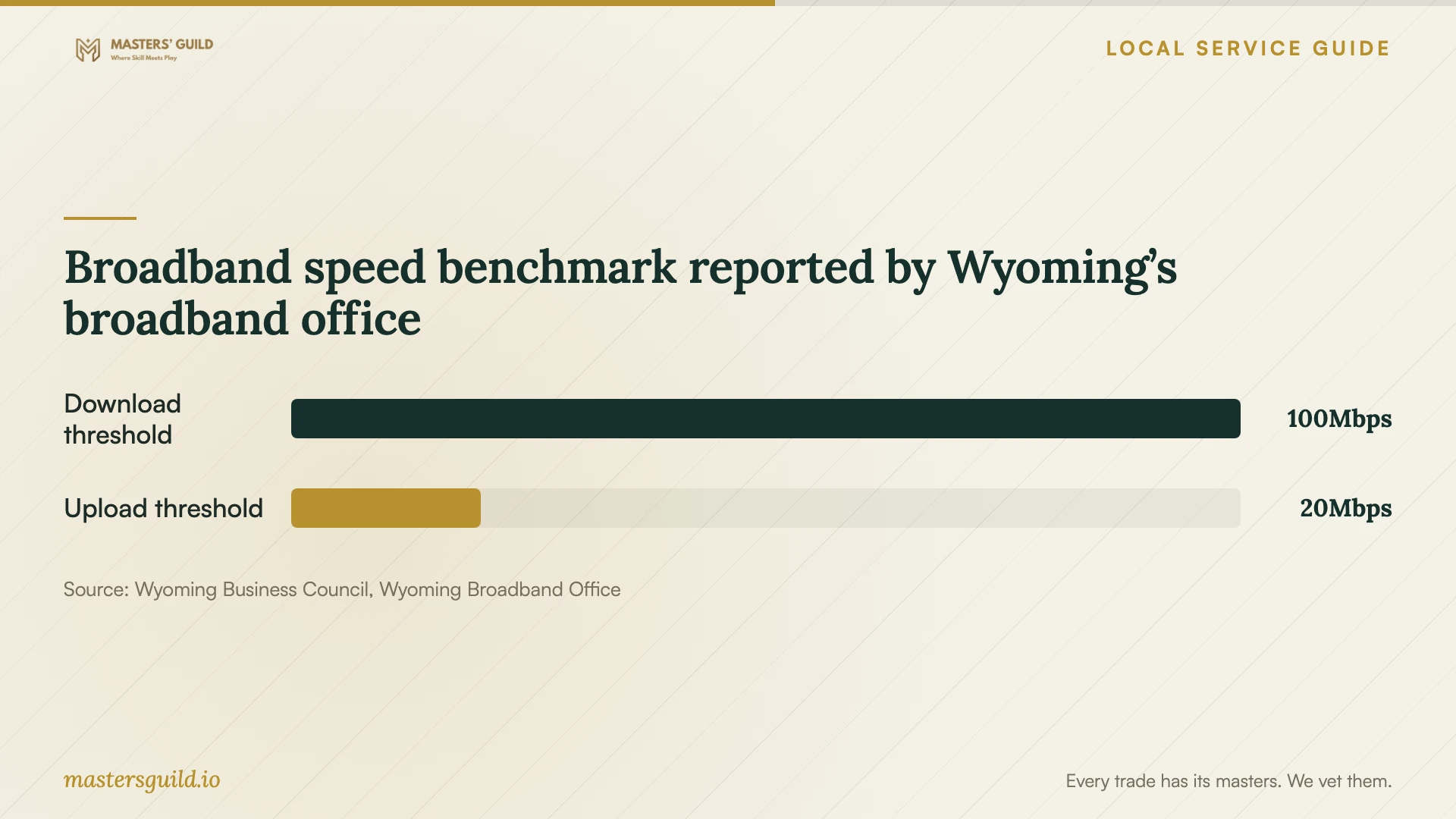
The broadband reference below compares the download and upload thresholds reported by the state office for the FCC’s advanced telecommunications benchmark. Use it to understand which direction of traffic you are discussing. Ask for a job-specific transfer plan rather than treating the benchmark as your measured home speed. [3]
Compare quotes by deliverables and recurring charges
Ask each technician to quote the same device list and file scope. Request separate amounts for labor, travel if applicable, subscription purchases, and follow-up. For an hourly quote, ask for a spending limit and the point at which the technician must contact you before continuing. For a fixed quote, ask what changes would trigger additional charges.
Before choosing a plan, ask the technician to show you the provider’s current storage allowance, renewal charge, cancellation terms, and recovery options. Keep billing and account ownership under your control. These sources do not establish local technician prices or cloud subscription charges, so obtain those figures from the written quote and the provider’s current terms.
Keep control of accounts and verify the handoff
Sign in yourself and enter your own passwords or verification codes. Ask the technician to explain any remote access before you approve it, including how to end the session. Review recovery contact details and ask for help setting up the account’s available security features. Keep recovery information somewhere you can reach if your main device stops working.
Before accepting the work, open a sample file on each intended device and review shared-folder access. For backup work, ask the technician to recover a sample file to a separate location. Request a short written handoff describing the accounts, included folders, checks performed, remaining uploads, and how you should seek help if something fails.
Broadband speed benchmark reported by Wyoming’s broadband office
Local details that affect your job
Free introductory help at the Cheyenne Library
Laramie County Library System offers free computer-help sessions by appointment at 307-634-3561. Its published topics include basic navigation, internet and email, Microsoft Office, and Google Suite. Ask staff whether your question fits those topics. The page does not promise cloud migration or backup-recovery work, so arrange a separate scope if you need those services. [1]
Temporary internet requires a loan and coverage check
The library offers seven-day hotspot loans, limits checkout to one hotspot per household, and allows catalog holds. Borrowers need a full privilege adult library card in good standing, a valid phone number and address on record, and a signed agreement. The devices use Verizon 4G LTE coverage. Plan the loan around your appointment and return it to the checkout location; the library prohibits outdoor book-drop returns. [2]
Choose help based on the work you need
| Your need | Suggested next step | Confirm before arranging help |
|---|---|---|
| Introductory email or Google Suite guidance | Ask about a free library computer-help session | Whether staff can cover your specific question |
| Files moved between accounts or devices | Request a technician’s written migration scope | Included folders, review process, and follow-up charges |
| A backup you can recover | Include a recovery demonstration in the job | Which files the technician will recover and where |
| Temporary internet during setup | Check library hotspot eligibility and availability | Verizon 4G LTE coverage, loan timing, and transfer suitability |
Your hiring checklist
- List the devices, accounts, folders, and household members included in the job.
- Check your home upload connection and discuss unfinished transfers with the technician.
- Keep a separate copy of important files before approving migration or deletion.
- Request a written quote separating labor, subscriptions, and follow-up.
- Prepare account access and recovery details; enter credentials yourself.
- Agree on sample-file, sharing-access, and recovery checks before accepting the work.
- Request a written handoff and a clear process for ending remote access.
Frequently Asked Questions
Can I get free help before hiring a technician?
The library offers free scheduled computer help covering internet, email, Microsoft Office, and Google Suite. Call 307-634-3561 and describe your question. Ask about the session’s scope before assuming it includes moving files or testing backups. [1]
How much should I budget?
Obtain a written quote for your device list and desired result. Ask for separate setup and recurring charges, plus a limit on additional labor. The supplied sources do not establish a Cheyenne price range for this service.
Can I use a library hotspot for the initial upload?
The library lends hotspots for seven days where Verizon 4G LTE service exists. Its page does not establish upload performance or suitability for a large transfer. Confirm the loan terms and discuss the planned upload before arranging the appointment around a borrowed device. [2]
What should I check before the job ends?
Open sample files on the intended devices, review household sharing permissions, and request a sample recovery if backup work was included. Record remaining uploads and follow-up responsibilities. Approve source-file deletion only after you have reviewed the destination and retained the copies you need.
Sources and scope
This guide combines the sources below with practical planning guidance. Figures apply to the stated geography and period; request a written quote for your property.