
Local service guide
Smart Appliance Setup in Charlottetown, PE
For Smart Appliance Setup in Charlottetown, arrange help based on your appliance models and the functions you want configured. Request a quote for your actual devices and agreed tasks, including pairing, troubleshooting and any hub integration. Identify physical installation or wiring changes before booking so you can arrange separate help where needed.
Match the provider to the setup you need
Start with a device list and a short description of the problem. Include the make, model, intended app and any hub you own. For an appliance that already works through its physical controls, explain which connected feature you need help with. For a failed setup, record the error message and the step where pairing stops.
Maritime Electric explains that most smart devices connect to a smartphone through Wi-Fi and that many support voice operation through a home hub. It recommends checking packaging for supported systems. Before arranging integration, have the provider confirm compatibility for your particular appliance and hub rather than assuming that a smart label means they work together. [1]
Separate app configuration from physical installation in your request. State whether someone has positioned the appliance and completed its power and water connections. If the job includes mounting, changing wiring or altering a connection, ask who will assess and perform that work. Keep unresolved physical installation tasks explicit when comparing offers.
Prepare the phone, network and household access
Have your phone, appliance instructions and Wi-Fi details ready for the visit. Sign in yourself and retain control of the owner account and recovery information. Decide which household members need access, and specify that in the job description. Avoid creating an arrangement that leaves you dependent on the provider's account.
Request a connection test where the appliance will stay. Describe whether the app cannot find it, pairing fails or the connection drops after setup. Before approving a replacement router or mesh system, have the provider explain the diagnosis, proposed change and added cost. Agree on whether network troubleshooting forms part of the original visit.
Maritime Electric describes phone-controlled smart plugs and notes that some models offer timers or voice control. If you want to add one, check the appliance instructions and the accessory's rating before purchasing it. Have the provider explain whether the accessory suits the intended use and which functions it supports. [1]
Compare the price and completion terms
Request a written breakdown covering the visit, device configuration, troubleshooting and proposed equipment. Establish whether the provider charges a fixed amount or bills for time. Include an approval point for extra work, and clarify what you owe if the provider cannot complete pairing. For a return visit, agree on the reason and price before scheduling it.
Define completion through the functions you plan to use. A suitable handover might include operating the appliance from your phone, receiving the agreed notification and changing a schedule. Record any unresolved function and the next step. Include follow-up terms so you know whom to contact and whether further help carries a charge.
Set useful schedules and plan for interruptions
Maritime Electric identifies PEI peak demand periods as 6 to 10 a.m. and 4 to 9 p.m. It asks customers to conserve energy when system conditions call for it. If your appliance supports delayed starts, include a demonstration of how to adjust them in response to a conservation request, following the manufacturer's operating instructions. [4]
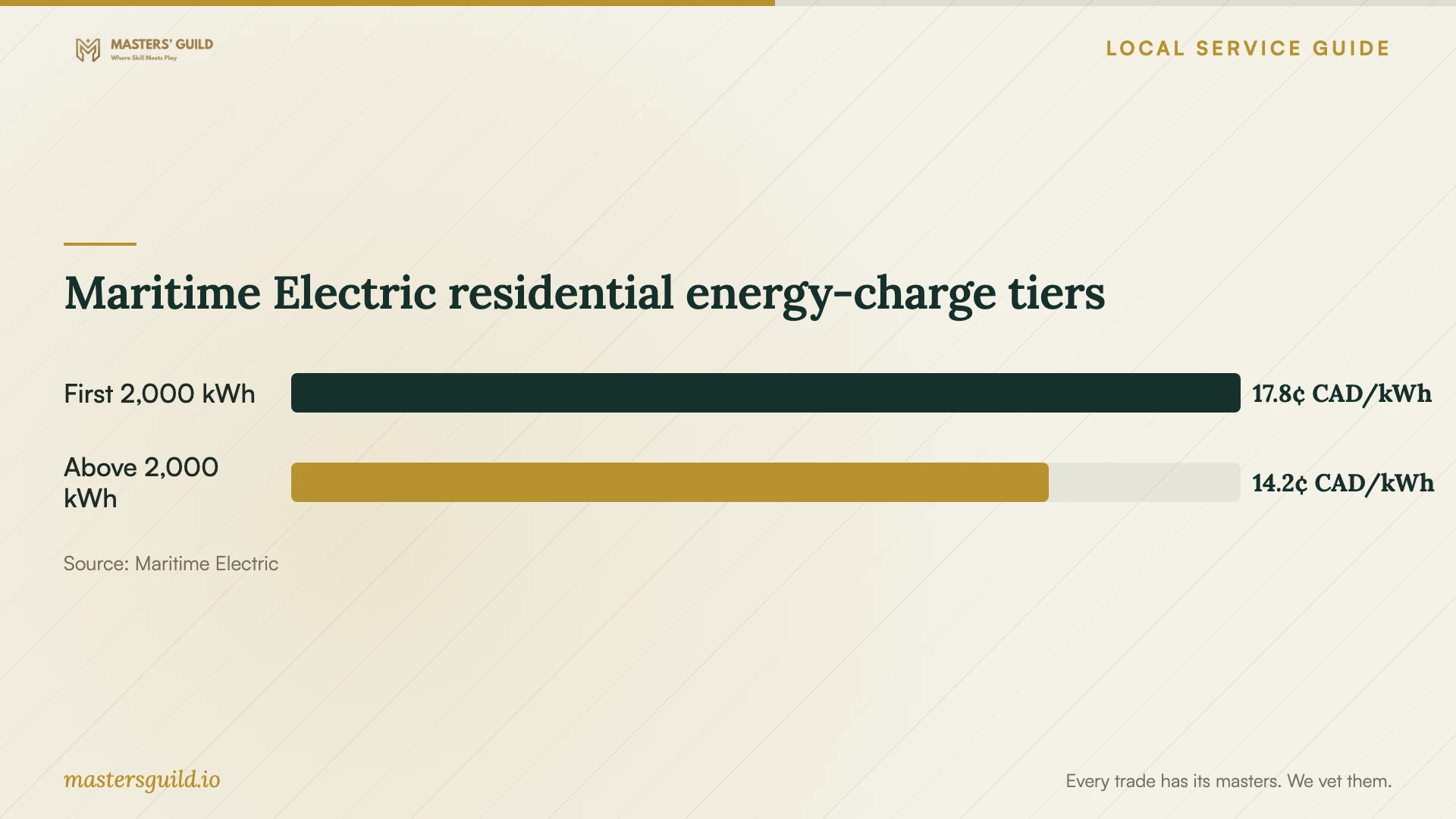
Maritime Electric's residential tariff effective August 1, 2026 lists 17.84 Canadian cents per kWh for the first 2,000 kWh per billing period and 14.23 cents for the balance. Those charges depend on consumption, rather than the hour of use. Treat a claimed scheduling discount as a question to resolve before paying for an automation intended to reduce your bill. [2]
For rotating outages, Maritime Electric advises unplugging as many appliances and devices as possible, then turning on and reconnecting devices in stages after restoration. It recommends surge protectors for sensitive electronics. Include the appliance's documented restart behaviour in your handover, with instructions for checking its connection and schedule after an interruption. [4]
Maritime Electric residential energy-charge tiers
Local details that affect your job
Use PEI conservation periods to choose a routine
Maritime Electric identifies morning and evening peak periods on PEI, with the highest peaks usually in December, January or February. When choosing a delayed-start routine, consider the utility's conservation requests and ask for a way to override your normal schedule. This helps you respond to local grid conditions without committing to one permanent start time. [4]
Check the tariff before buying an energy-saving automation
For a home billed under Maritime Electric's residential schedule, the published energy-charge tiers apply per billing period, with the lower tier applying to consumption above 2,000 kWh. The schedule does not list cheaper overnight electricity. Moving the same consumption to another hour alone does not earn a lower rate under this tariff, so request an explanation of any promised bill savings. [2]
Choose help by the task
| Your task | Suggested approach | Confirm before booking |
|---|---|---|
| Pair an installed appliance | Try the manufacturer's app instructions or arrange setup help. | Exact model and requested connected functions. |
| Add hub or voice control | Check supported systems before arranging integration. | Device packaging identifies compatibility with your intended hub. |
| Resolve failed pairing | Arrange diagnosis before buying network equipment. | Troubleshooting scope and charges if the fault remains unresolved. |
| Change wiring or connections | Arrange a separate assessment of the physical work. | Who will perform it and how they will establish applicable requirements. |
| Configure delayed starts | Request schedule controls and an override demonstration. | Manufacturer instructions and Maritime Electric's conservation guidance. |
Your hiring checklist
- List appliance models, intended apps and any existing hub.
- Specify the connected functions you want and record pairing errors.
- Identify unfinished physical installation or connection work.
- Prepare your phone, account recovery details and appliance instructions.
- Agree on the price, extra-work approval and unresolved-work terms.
- Try the agreed functions yourself at handover.
- Keep a short record of restart instructions and follow-up arrangements.
Frequently Asked Questions
Can I handle app setup myself?
Try the manufacturer's instructions if you feel comfortable with the app and account steps. Stop at the point where you need help, and record what happened. Keep any proposed wiring or physical connection changes as a separate task for assessment.
Will an overnight start reduce my electricity rate?
Maritime Electric's published residential schedule charges by consumption tier and lists no overnight discount. A delayed start can help you respond to conservation requests, but changing the hour alone does not qualify the same electricity use for a lower rate under that schedule. [2] [4]
What if the provider cannot connect my appliance?
Agree on this before the visit. Specify whether you will pay for diagnosis, how the provider will document the unresolved problem and whether another visit requires a new quote. Request an explanation before approving equipment purchases.
What should I check after a power interruption?
Follow the appliance manufacturer's restart instructions and check its app connection and schedules. For rotating outages, Maritime Electric advises reconnecting devices in stages after restoration. Have the setup provider leave instructions for the functions you configured. [4]
Sources and scope
This guide combines the sources below with practical planning guidance. Figures apply to the stated geography and period; request a written quote for your property.