
Local service guide
Home Office Setup in Charlottetown, PE
For Home Office Setup in Charlottetown, hire against a written task list covering furniture assembly, monitor positioning, cable routing and equipment testing. Measure the room before ordering furniture, and ask providers to quote the same scope. Include surge protection and an interruption plan: Maritime Electric recommends surge protectors for sensitive electronics and warns that emergency outage notice may be limited to minutes or less. [1]
Define the job before comparing offers
Write down what you want working when the installer leaves. Specify the desk, chair, monitor arms, docking station, printer and other equipment you want assembled or connected. Include model numbers and say whether you own the cables and mounting hardware. Ask the provider to separate assembly, wall mounting and computer or network configuration in the quote.
Request a written total or hourly terms, including minimum charges, travel, taxes and packaging removal. Agree on how the provider will handle missing parts or a return visit. Compare offers for the same equipment and tasks. If an offer leaves out a connection, mount or test you need, ask the provider to price it before accepting.
Measure the space you will use
Measure the proposed desk area, doorway and delivery route. Mark the desk footprint on the floor, pull out your chair and walk past it. Check whether you can open drawers and reach equipment without shifting furniture. Photograph outlets and your intended cable route for the provider.
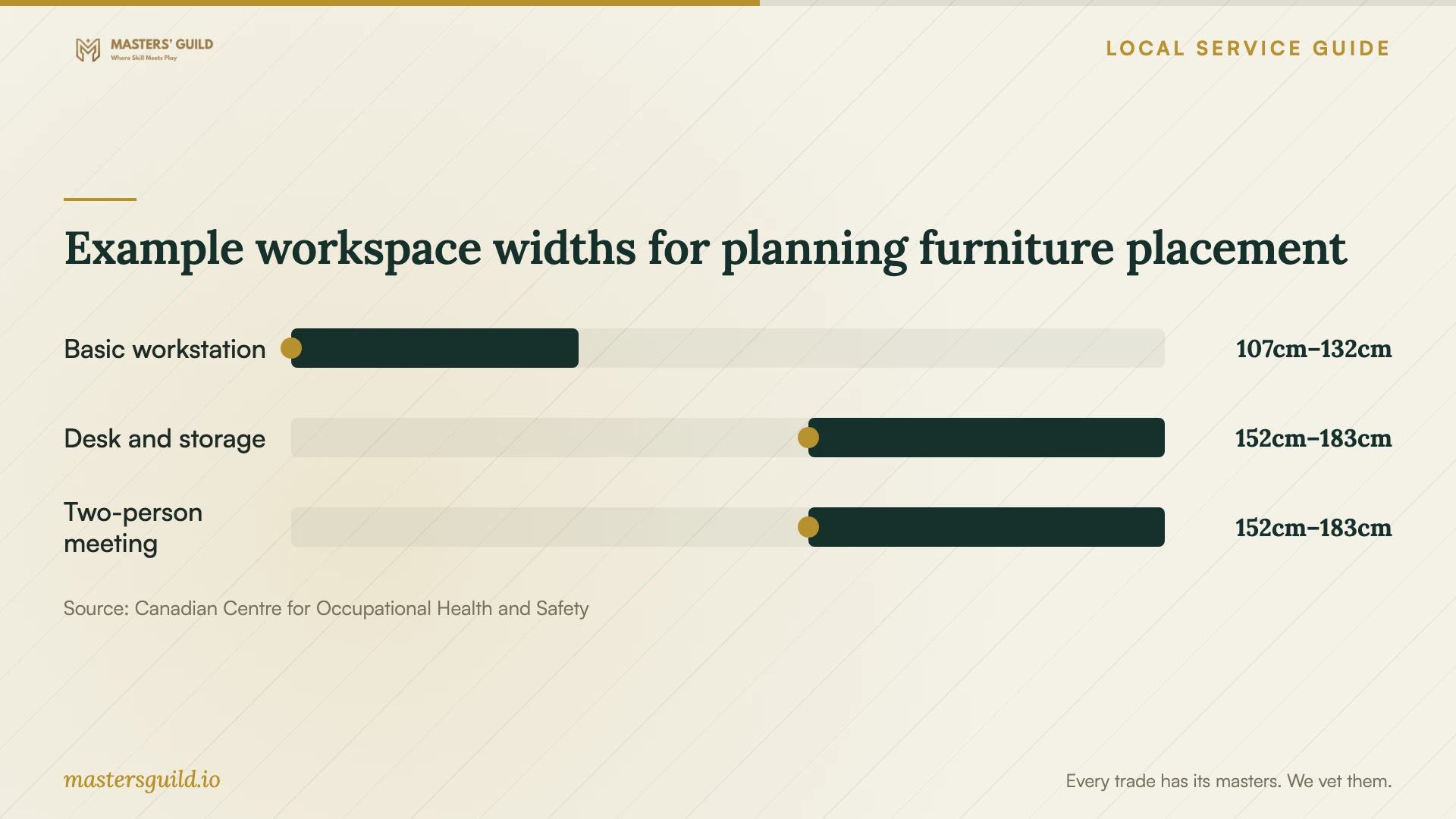
CCOHS advises considering movement, maintenance access, storage, privacy and the tasks you perform. Its workspace table includes examples for a basic workstation, a desk with secondary storage and an office where two people meet. CCOHS identifies the underlying 1979 dimensional reference as an example and cautions that space requirements vary. [2]
The chart compares example workspace widths. Check the companion depth before choosing furniture: CCOHS lists 152–183 cm for a basic workstation, 152–213 cm for a desk with a secondary surface, and 228–320 cm for two people meeting across a desk. These describe workspace envelopes rather than desk sizes. Use them to sketch a layout, then test your own chair movement and access. [2]
Agree on monitor placement before mounting
Sit in your intended chair and open a document at your usual text size. CCOHS recommends about an arm's length between you and the monitor as a starting point. If text is difficult to read at the recommended distance, it advises increasing font size rather than forcing a shorter viewing distance. [3]
CCOHS advises keeping the top of a tall or portrait screen no higher than your eyes. People using bifocal, trifocal or progressive lenses may prefer the top below eye level. Ask the installer to let you test the position before tightening an arm or choosing a permanent wall location. [3]
For two screens you use equally, CCOHS recommends placing them in front of you with their edges touching and angling them into a semicircle. If you use one screen more, place that screen in front and angle the secondary screen beside it. Tell the installer how you divide your work between screens. [3]
Plan the power arrangement and handover
Maritime Electric recommends surge protectors for sensitive electronics. Ask the provider to identify which devices connect to each power accessory and leave the product instructions with you. If you want battery backup, request equipment-specific sizing and a stated runtime at your intended load. The utility guidance does not specify a home-office battery size or runtime. [1]
Before accepting the work, test a video call, microphone and camera, external displays, printing and access to your usual files. Raise and lower an adjustable desk through its intended travel while checking cable slack. Ask the provider to label connections and show you how to disconnect equipment for cleaning or a move. Keep any passwords you enter private.
Example workspace widths for planning furniture placement
Local details that affect your job
Prepare for brief outage notice on the PEI grid
For a Charlottetown home supplied by Maritime Electric, plan how you will save work and pause calls during an interruption. The utility aims to provide advance notice of rotating outages, but emergencies may leave minutes or less. It describes approximately two hours per affected area as the typical planned duration, while actual durations may vary or extend. Ask a battery supplier for runtime at your equipment's load rather than treating that outage estimate as a guarantee. Keep access to utility updates available away from your desktop. [1]
Include conservation instructions for winter workdays
Maritime Electric identifies PEI peak demand periods as 6–10 a.m. and 4–9 p.m., with the highest peaks usually in December, January or February. During a Grid Status Warning, it asks customers to conserve energy at the indicated times, turn off high-consumption appliances and reduce thermostats. If you use additional heating in your office, decide how you will respond to those notices. Check the current utility status before acting; the published peak periods do not establish an outage schedule. [1]
Match the booking to the work
| Your situation | What to request | What to confirm |
|---|---|---|
| Furniture assembly | An assembly quote using exact model numbers | Parts check, placement and packaging removal |
| Desk and monitor arms | Assembly plus a seated screen-position trial | About an arm's length as an adjustable starting distance, following CCOHS guidance |
| Two-monitor workstation | Placement based on how much you use each screen | Primary screen in front if you use it more, following CCOHS guidance |
| Computer and call setup | Connection and configuration tasks listed separately | A working call, displays and access to your usual files |
| Power interruption preparation | Surge protection and an optional battery-backup discussion | Runtime at your equipment's load; Maritime Electric says outage durations can vary |
Your hiring checklist
- Send furniture model numbers, equipment details and workspace photos.
- Measure the room, doorways and delivery route before ordering a desk.
- Mark the furniture footprint and test chair movement and drawer access.
- Agree on screen positions while seated before fixing mounts.
- Request written pricing, exclusions and terms for missing parts or return visits.
- Ask for a clear power-accessory layout and keep product instructions.
- Test calls, displays, printing and adjustable-desk cable travel before handover.
- Keep an interruption plan and utility updates accessible away from the desktop.
Frequently Asked Questions
Should I buy the desk before booking an installer?
Confirm room measurements and the equipment layout first. Send the desk model and assembly instructions with your quote request. Ask whether the provider wants you to open the boxes, check parts or arrange help with delivery.
How much space does a home office need?
CCOHS says there is no single answer. Consider chair movement, storage, equipment, privacy and how you work. Its dimensional examples can help you compare layouts, but they do not establish a required home-office size. [2]
Where should my main monitor go?
CCOHS recommends placing the screen you use most in front of you and starting at about an arm's length. Adjust for readable text and your needs. People using corrective lenses for close work may prefer a lower screen position. [3]
Will a battery backup cover a rotating outage?
Ask the supplier to specify runtime for your connected equipment. Maritime Electric describes rotating outages as typically planned for approximately two hours, but says actual durations may vary or extend. That estimate cannot establish how long a particular battery will run your office. [1]
Sources and scope
This guide combines the sources below with practical planning guidance. Figures apply to the stated geography and period; request a written quote for your property.