
Local service guide
Data recovery and backup in Charlottetown
For Data recovery and backup in Charlottetown, ask a provider to assess whether you need a restore from an existing backup, recovery from a damaged device, or a new backup setup. Before handing over equipment, agree on diagnostic charges, approval limits, data handling and the files you need returned. For ongoing protection, require a demonstrated restore: the Canadian Centre for Cyber Security recommends testing backups and keeping an offline copy. [3]
Define the recovery job before approving work
Tell the provider which device holds the missing information, what happened before you lost access and which files matter to your operations. Identify accounting records, customer documents or project folders by name. Ask the provider to explain the proposed first step before authorizing repairs, recovery software or replacement equipment.
If you have a backup, ask the provider to check its contents and demonstrate a restore to a separate destination. The Canadian Centre for Cyber Security recommends routine recovery testing. Agree on how you will confirm success, such as opening a selection of returned documents and checking their dates. [3]
For a device that clicks, disconnects or shows physical damage, pause further attempts and request handling instructions from a recovery specialist. Record what you have tried. Ask whether the provider will assess the device locally or send it elsewhere, and who will approve any additional work.
Compare written quotes by scope
Request separate amounts for diagnosis, recovery work, replacement hardware, return storage and transport. Ask what you owe if the provider retrieves none of your priority files, whether you receive a file list before accepting the result, and how the provider defines a successful recovery. Set an approval limit for additional charges.
For backup installation, ask the provider to separate setup charges from recurring storage, monitoring and support. Specify which computers, shared folders and applications belong in the scope. Request an estimated completion date and identify any shutdown or staff access the provider needs. Arrange a handover that includes account ownership and recovery instructions.
Build a backup plan you can restore
The Canadian Centre for Cyber Security recommends the 3-2-1 rule: three copies of your information, including the original and two backups, on two media types, with one copy offsite. It also recommends offline storage. Ask the installer to explain which copies meet those requirements and who disconnects or isolates the offline copy. [3]
Choose backup frequency around how much work you can afford to recreate. Ask how long the service retains earlier versions and how you will receive failure alerts. Include a restore test in the handover, then assign someone to repeat it on an agreed schedule. The Cyber Centre recommends documenting backup frequency, recovery procedures and responsibilities. [3]
Discuss power protection alongside the backup schedule. Maritime Electric recommends surge protectors for sensitive electronics and says rotating outages typically have a planned duration of approximately two hours, with actual durations subject to change. Ask the installer to state the battery runtime for your equipment and demonstrate automatic shutdown. Do not assume a battery will cover the full interruption. [1]
Agree on privacy and equipment disposal
Ask who can access your files, which subcontractors or laboratories handle the device, where copies will reside and when the provider will delete working copies. Request a device receipt with its serial number and written return or destruction instructions. For cloud backups, ask about encryption, account access and the geographic location of stored data. [3]
The Office of the Privacy Commissioner’s national guidance says organizations subject to PIPEDA must take reasonable steps to protect information held by third-party processors. It also says organizations must explain foreign processing and possible access by authorities in that jurisdiction. Ask how the provider’s arrangements fit your business’s obligations before transferring customer or employee records. [4]
Agree on the old drive’s fate before the provider replaces it. The Cyber Centre includes sanitization and disposal among storage-security considerations. Ask for a separate erasure or destruction scope, and keep the device until you have checked the returned files. Confirm the accepted-item rules with IWMC before arranging a disposal trip. [3] [2]
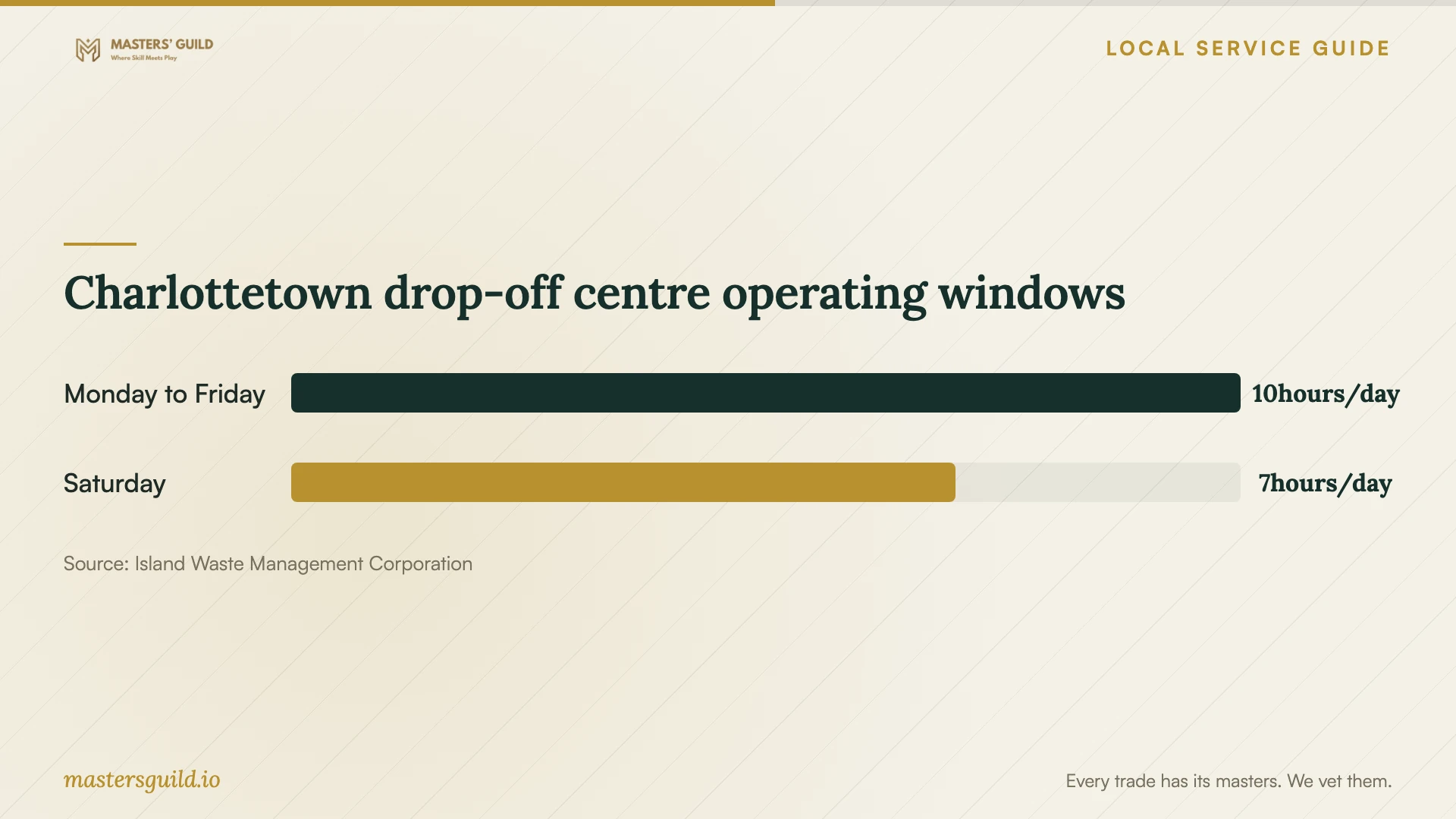
Charlottetown drop-off centre operating windows
Local details that affect your job
PEI power interruptions affect the installation brief
Maritime Electric says rotating outages are a last resort, typically planned for approximately two hours per affected area, and emergency notice may be minutes or less. For your Charlottetown premises, ask the installer how the computer, network storage and backup process will shut down during an interruption and resume afterward. Use the utility’s outage information when scheduling work; its guidance does not establish that your address faces an imminent outage. [1]
Plan the Charlottetown disposal handoff
IWMC lists the Capital drop-off centre at 8 Superior Crescent, with hours of 7:00 a.m. to 5:00 p.m. Monday through Friday and 7:00 a.m. to 2:00 p.m. Saturday, subject to change. Customers must unload and depart before closing. Confirm acceptance of your equipment and allow time for the queue. Ask the recovery provider to document data sanitization separately from the disposal arrangement. [2]
Choose the scope that matches your situation
| Situation | Requested service | Acceptance check |
|---|---|---|
| You have a backup of the missing files | Backup assessment and restore | Open priority files restored to a separate destination |
| You cannot access the device and have no checked backup | Diagnosis and a recovery proposal | Written scope, approval limit and agreed priority files |
| You need ongoing protection for business records | Backup installation and documented recovery procedure | Offsite and offline arrangements plus a restore demonstration |
| You are replacing storage equipment | File transfer and a separate sanitization or destruction scope | Checked destination files and documented old-device handling |
Your hiring checklist
- List priority folders, file dates, devices and the symptoms you observed.
- Describe any recovery attempts and provide handling instructions for confidential files.
- Obtain diagnostic charges, an approval limit and unsuccessful-recovery terms in writing.
- Confirm the laboratory destination, subcontractors and device handoff record.
- Specify backup coverage, retention, failure alerts and account ownership.
- Request a restore demonstration and power-interruption shutdown plan.
- Agree on working-copy deletion and old-drive return, erasure or destruction.
Frequently Asked Questions
How much should I budget for recovery?
Obtain a written, device-specific quote before approving recovery work. Compare diagnostic fees, approved recovery work, transport and return storage, and ask what you owe if the provider cannot retrieve your priority files.
Does a network storage device count as enough backup?
Ask for additional copies. The Cyber Centre warns that attackers can compromise network-attached storage and ransomware can spread to it. Its guidance recommends an offsite copy and an offline backup. Have the installer identify those copies in your proposal. [3]
Must my business keep its backups in Canada?
Check the requirements that apply to your information. The Cyber Centre says organizations may have regulatory or policy requirements for Canadian storage. The Privacy Commissioner says PIPEDA permits outsourcing while requiring safeguards and transparency about foreign processing. Ask the provider to identify storage and processing locations. [3] [4]
Sources and scope
This guide combines the sources below with practical planning guidance. Figures apply to the stated geography and period; request a written quote for your property.