
Local service guide
Computer virus removal in Charlottetown, PE
Arrange virus removal in Charlottetown by asking a technician for a written scope covering containment, file preservation, operating-system recovery and account security. Tell them whether the computer holds customer records or connects to other business devices. Disconnect a suspected infected computer from networks and contact your IT provider before continuing work on it, following Canadian Centre for Cyber Security guidance. [3]
Contain the problem before arranging service
Disconnect Wi-Fi, Ethernet and other network connections on the suspected computer. The Cyber Centre advises powering off a device if malware appears active or spreading, and avoiding sensitive account sign-ins from that device. Contact your existing IT provider if you have one; tell them which other computers, shared drives or accounts you used during the suspected incident. [3]
Write down what you noticed and when it started. The Cyber Centre lists browser redirects, disabled antivirus protection, inaccessible or encrypted files, and unusual account activity among infection indicators. Give the technician the wording of any alert or ransom demand. Describe symptoms without assuming that a slow computer proves an infection. [3]
Compare quotes by recovery scope
Ask each technician to quote the same task: assess the suspected infection, explain the proposed recovery method, preserve agreed files and document the work completed. Request separate amounts for diagnosis, malware removal, operating-system reinstallation, backup handling and any visit or transport charge. Ask whether you owe a diagnostic fee if you decline the repair.
Discuss drop-off, on-site and remote service before booking. Ask how the technician would contain the computer before connecting it for remote work. For a drop-off, agree who will hold the device, who may access its contents and how they will return it. Record the expected assessment date and the point at which they must ask you to approve extra work.
Identify the files and applications you need to resume business: accounting records, customer documents, email and any specialist software. Ask whether the quote includes checking those functions after recovery. Get written approval terms for erasing the drive, reinstalling software or abandoning file recovery, so the technician understands your priorities before making changes.
Include backups and accounts in the handover
Give the technician the dates and locations of available backups. The Cyber Centre recommends restoring from known clean backups made before the infection and scanning backup files before restoration. Ask the technician how they will assess those copies, which files they propose to restore and how they will handle files whose safety remains uncertain. [3]
Ask who will handle account recovery. The Cyber Centre recommends resetting passwords associated with the device, revoking active sign-in sessions and access tokens, and re-enrolling multi-factor authentication. Request a named person for this work, particularly if another provider administers your business email or other accounts. [3]
Agree on the evidence you need before reconnecting the computer. The Cyber Centre's organizational guidance calls for operating-system reinstallation and clean malware scans before reconnection, followed by monitoring for unusual behaviour. Ask the technician to explain their recovery approach, provide scan results and list any remaining concerns in the handover. [3]
Plan retirement before handing over the old computer
If you choose replacement, include recovery and secure data removal in the technician's scope before arranging recycling. EPRA Prince Edward Island requires consumers and businesses to remove personal data before drop-off. Ask for a written record identifying the device and the data-removal work, and confirm that you can open the recovered business files before authorizing erasure. [2]
Use the provincial electronics program to plan the disposal route. EPRA permits free drop-off of unwanted electronics from residents and businesses at its PEI locations. Confirm the intended location and accepted equipment before travel. Keep the recycling decision separate from permission to erase the drive, so you can approve each step after reviewing the technician's findings. [2]
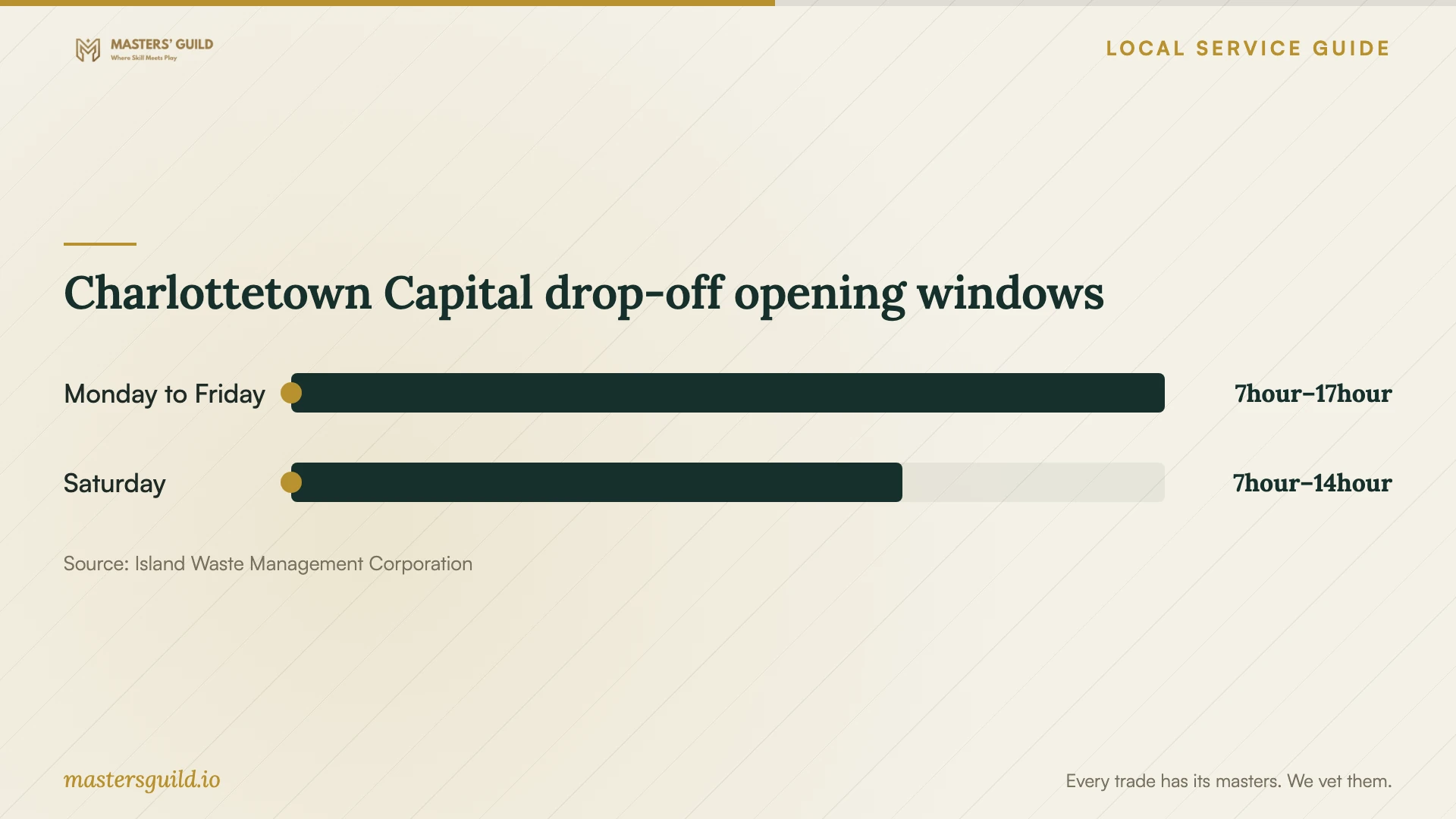
Charlottetown Capital drop-off opening windows
Local details that affect your job
PEI electronics recycling includes businesses
EPRA Prince Edward Island offers free unwanted-electronics drop-off to businesses as well as residents at its program locations. For an office computer you decide to retire, ask the technician to quote file recovery and data removal separately from transport. EPRA makes you responsible for removing personal data before delivery, so arrange that work before the recycling trip. [2]
Allow time to unload at the Charlottetown facility
IWMC lists the Capital Waste Watch Drop-Off Centre at 8 Superior Crescent, with hours of 7:00 a.m. to 5:00 p.m. Monday through Friday and 7:00 a.m. to 2:00 p.m. Saturday, subject to change. IWMC requires customers to unload and depart by closing time and may deny entry if a visit would run beyond it. Before taking a retired computer there, confirm electronics acceptance and current hours with the facility. [1]
Choose the scope to discuss with a technician
| Your situation | Requested scope | Approval point |
|---|---|---|
| Browser redirects or unknown programs | Diagnosis, containment and a proposed recovery method | Approve the method after reviewing findings |
| Encrypted files or a ransom demand | Incident assessment and review of clean backup options | Approve recovery work before changes to stored files |
| Unusual account logins or password changes | Device recovery plus password, session and MFA work | Assign responsibility for each affected account |
| You choose to retire the computer | Agreed file recovery and personal-data removal before EPRA drop-off | Check recovered files before authorizing erasure |
Your hiring checklist
- Record symptoms, alert wording and the approximate start of the problem.
- Tell the technician which business accounts and shared resources you used.
- List essential files, applications and available backup dates.
- Get an itemized quote and an approval limit for extra work.
- Agree on access to confidential records and retention of copied data.
- Require approval before drive erasure or operating-system reinstallation.
- Request a recovery report and an account-security handover.
- Confirm data removal and drop-off arrangements before recycling.
Frequently Asked Questions
How much should I budget for removal?
Ask for an itemized quote for your computer and recovery needs. Describe the symptoms and identify the files you need to preserve. Request the diagnostic fee, proposed repair amount, restoration charges and total payable before approving work. Agree on a spending limit that requires your approval before the technician adds work.
Can I keep using the computer while waiting?
The Cyber Centre advises disconnecting an infected device from networks and avoiding sensitive account sign-ins. If malware appears active or spreading, its guidance recommends powering off the device. Contact your IT provider for recovery instructions. [3]
Does removal include recovering my files?
Ask the technician to include file recovery in writing and identify the files you need. The Cyber Centre recommends restoring only known clean backups created before infection and scanning backup files before restoration. Ask for an assessment before accepting any recovery promise. [3]
Can a business recycle its infected computer for free?
EPRA Prince Edward Island offers free unwanted-electronics drop-off for businesses at its program locations. You must remove personal data before delivery. Arrange recovery and data removal first, then confirm the location and equipment acceptance. [2]
Sources and scope
This guide combines the sources below with practical planning guidance. Figures apply to the stated geography and period; request a written quote for your property.