
Local service guide
Computer Virus Removal in Charlotte, NC
For Computer Virus Removal in Charlotte, choose a technician you have checked, agree on file handling before work starts, and request a quote that separates diagnosis, cleanup, and any reinstall. For taxable services sourced to Mecklenburg County, budget for the current 8.25% sales tax. If a pop-up prompted your search, do not call its number or grant access through it; North Carolina’s consumer guidance warns against that route. [1] [2] [3]
Decide whether to scan or arrange help
Start by recording what you saw: the warning text, the program displaying it, and what you clicked or installed beforehand. Tell the technician whether the computer starts and whether you have run a scan. Arrange diagnosis before committing to a virus-removal package.
NCDOJ recommends updating security software and running a scan if you suspect a computer problem. It also warns that scammers use phone calls, emails, and pop-ups to persuade victims to grant remote access. Choose support through contact details you found yourself, rather than through the warning. [3]
Arrange professional help if you cannot complete that step, want someone to review the results, or need a file-preservation plan before proceeding. Tell the technician about any access you granted to a stranger. Include a review of that access in the written scope.
Choose how the technician will work
Check whether each candidate offers remote work, drop-off service, or a home visit. For remote work, agree on the connection method, who will supervise the session, and how the technician will end access. For drop-off service, obtain a receipt identifying the device and accessories. For a home visit, confirm the visit charge and any minimum bill.
Do not assume a technician can finish during one appointment. Confirm when they will provide a diagnosis, when they expect to return the device, and how they will contact you if they need approval for more work. Mention any deadline for accessing schoolwork, household records, or other essential files.
Set the file-handling and repair boundaries
Name the files you want preserved and describe your existing backup without handing over account passwords in the initial inquiry. Ask who will access your files, whether the technician will copy them elsewhere, and when they will delete any repair copies. Require explicit approval before a reset, drive erase, or operating-system reinstall.
Have the technician separate malware cleanup from file recovery and operating-system work. The quote should list what the service includes, what would trigger an added charge, and what the technician will do if they cannot preserve your files. Set a spending limit that requires them to contact you before exceeding it.
If you shared a password with a tech support scammer, NCDOJ advises changing it and changing it on other accounts where you reused it. Include that account follow-up in your own plan; do not treat the computer repair invoice as confirmation that you have secured your accounts. [3]
Compare the complete quote
Request a written quote for your device and symptoms, with separate entries for diagnosis, cleanup, file copying, reinstall work, travel, and any software purchase or subscription. Confirm whether the provider credits diagnosis toward repair and whether you owe anything if you decline the proposed work.
NCDOR subjects retail repair, maintenance, and installation services sourced to North Carolina to state, applicable local, and transit taxes unless a statutory exemption applies. Its definition includes troubleshooting to identify a problem and work to restore property to working order. Have the provider show the tax treatment of the diagnostic and repair charges. [1]
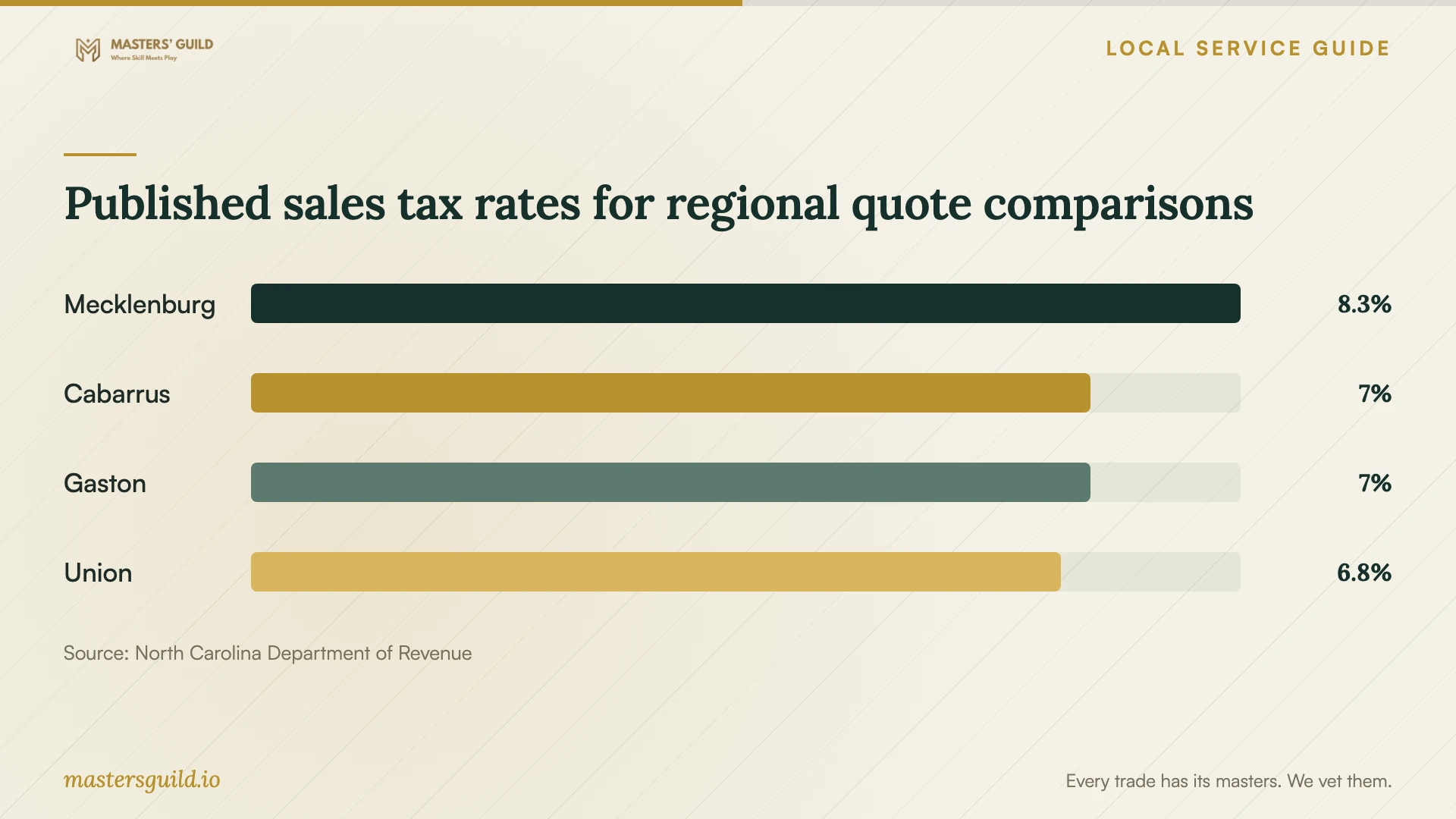
NCDOR lists Mecklenburg at 8.25%, Cabarrus and Gaston at 7%, and Union at 6.75%. If you compare providers across county lines, confirm which rate applies to your transaction and compare the final totals. Do not choose a rate based only on the provider’s mailing address. [2]
Agree on the handover
Before paying, have the technician describe what they found, what they changed, and what remains unresolved. Obtain the scan results or a written summary. Test access to the files and programs you named in the scope, and have the technician remove repair access that you no longer need.
Confirm what follow-up the provider includes if the same symptoms return and how to request it. Keep the invoice, repair summary, and any approval messages together. If you suspect a tech support scam, NCDOJ accepts reports through its consumer complaint process or at 1-877-5-NO-SCAM. [3]
Published sales tax rates for regional quote comparisons
Local details that affect your job
Check for the Mecklenburg tax change
NCDOR lists Mecklenburg’s total sales and use tax at 8.25% and dates its additional 1% local tax to July 1, 2026. For a taxable repair sourced there, have the provider use the current rate in the written total. If a quote uses an older rate, request a corrected total before approving work. [1] [2]
Use North Carolina’s scam-reporting route
North Carolina residents can report suspected scams to NCDOJ at 1-877-5-NO-SCAM or through its consumer complaint process. If someone obtained remote access or a password, tell your chosen technician what happened and follow NCDOJ’s guidance to update security software, scan the computer, and change shared passwords wherever you reused them. NCDOJ states that it does not represent individuals in private cases. [3]
Choose your next step
| Your situation | Next step | Question or boundary |
|---|---|---|
| A pop-up tells you to call for help | Follow NCDOJ’s advice not to call or click through the warning. | Find support through a company you know and trust. |
| You suspect a problem and can run security software | Update the security software and run a scan, as NCDOJ recommends. | Record the result for a technician if you need help reviewing it. |
| You need files preserved before repair | Arrange diagnosis with a written file-handling scope. | Require approval before an erase or reinstall. |
| You granted a stranger remote access | Tell your chosen technician; NCDOJ advises updating security software and scanning. | Change any password you shared, including reused passwords. |
| You have quotes from different counties | Compare itemized, tax-inclusive totals. | Confirm which tax rate applies to your transaction. |
Your hiring checklist
- Record the symptoms, warning text, and any recent downloads or remote-access sessions.
- Identify the device, operating system, and files you want preserved.
- Describe your backup and agree on a file-handling plan.
- Choose remote work, drop-off service, or a home visit after confirming the arrangements.
- Obtain an itemized total showing diagnostic charges, optional work, and tax.
- Require your approval before erasing files, reinstalling, or exceeding the agreed budget.
- Agree on a diagnosis update, return date, and follow-up terms.
- Review the repair summary and test your priority files before accepting completion.
Frequently Asked Questions
Does a virus warning mean I should pay for removal?
Do not approve payment based on the warning alone. NCDOJ warns that scammers use pop-ups to obtain remote access and advises against calling or clicking through them. Update security software, run a scan, or arrange diagnosis through a support company you trust. [3]
Can I ask the technician to preserve my files?
Yes. Name the files that matter and agree on a written preservation plan before authorizing work. Require separate approval for any reset or reinstall. Confirm what the technician will do if they cannot preserve the files and whether backup or recovery carries a separate charge.
Should a diagnostic charge include sales tax?
NCDOR includes troubleshooting within its repair-service definition and taxes covered retail services sourced to North Carolina unless exempt by statute. Have the provider explain the tax treatment on the invoice. Mecklenburg’s current total rate is 8.25%. [1] [2]
What should I do after sharing a password with a scammer?
NCDOJ advises changing the shared password and changing it on other accounts where you reused it. Tell the repair technician about any remote access you also granted. You can report the suspected scam to NCDOJ at 1-877-5-NO-SCAM. [3]
Sources and scope
This guide combines the sources below with practical planning guidance. Figures apply to the stated geography and period; request a written quote for your property.