
Local service guide
Cloud Service Setup in Charlotte, NC
For Cloud Service Setup in Charlotte, hire a technician against a written scope covering your business accounts, files, staff access, migration and recovery testing. Before approving the work, agree on who owns the accounts, how you will keep working during the transfer, and what the technician must demonstrate at handover. Request separate charges for setup, subscriptions and any network wiring.
Define the work before comparing offers
Write down the result you want: shared office files, staff email, a backup service or a move from an existing provider. List the accounts, computers and phones involved, the folders to transfer, and the person who can authorize access. Ask each technician to quote against that same inventory.
Ask the technician to explain the difference between the proposed file synchronization and recovery arrangements. Request a written description of how you would recover an accidental deletion, an overwritten document or files from a lost computer. Include a demonstration using a sample file in the acceptance criteria.
Check connectivity before scheduling the transfer
Use your exact business address when reviewing internet options. The FCC’s National Broadband Map shows which providers report service at a location, their connection technologies and maximum advertised upload and download speeds. Those listings describe reported availability, so ask your technician to assess your working connection before promising a transfer deadline. [3]
Give the technician the volume of data you intend to move and your business hours. Request separate estimates for hands-on setup and the remaining upload. Agree on who monitors progress, handles failed transfers and checks completion if the upload continues after the appointment. Choose a transfer window around the work you need to keep available.
Keep control of accounts and sensitive files
Create the main account under a business-controlled email address. Keep billing, recovery details and administrator ownership under your control. Ask the technician to use a temporary access arrangement, explain any remote-access software and remove their access at handover. Enter your own passwords during the session.
Before transferring customer or employee records, ask where the technician will store temporary copies, who can access them and how they will delete them. North Carolina DOJ states that businesses keeping North Carolina residents’ personal information on another company’s behalf must notify the owner or licensee immediately after discovering a security breach. Include a named incident contact and reporting procedure in your agreement. [4]
Compare the full quote
Request an itemized quote for account configuration, migration, staff onboarding, recovery testing and follow-up support. List subscription charges apart from labor, with the billing interval, account owner and cancellation arrangements. Ask how the provider will price extra devices, additional data or a return visit before authorizing those additions.
If the technician proposes physical network work, request a separate line for it. NCDOR’s real-property taxability chart lists computer-cable repair, maintenance and installation as taxable, while excluding underground utility installation from that entry. The department also says tax treatment can depend on the transaction’s circumstances. Ask the provider to explain the treatment of wiring without assuming account configuration and subscriptions receive the same treatment. [2]
Agree on a practical handover
Before signing off, open selected transferred files, test access with a staff account and recover a sample file. Check sharing permissions with the technician present. Ask for a written list of accounts, billing owners, recovery contacts, configured devices and any folders left outside the agreed scope.
Agree on when you will retire the old service and who authorizes deletion of the original files. Keep the original data until you have completed the agreed checks. Record the support contact, the period covered by the setup fee and the charge for later changes.
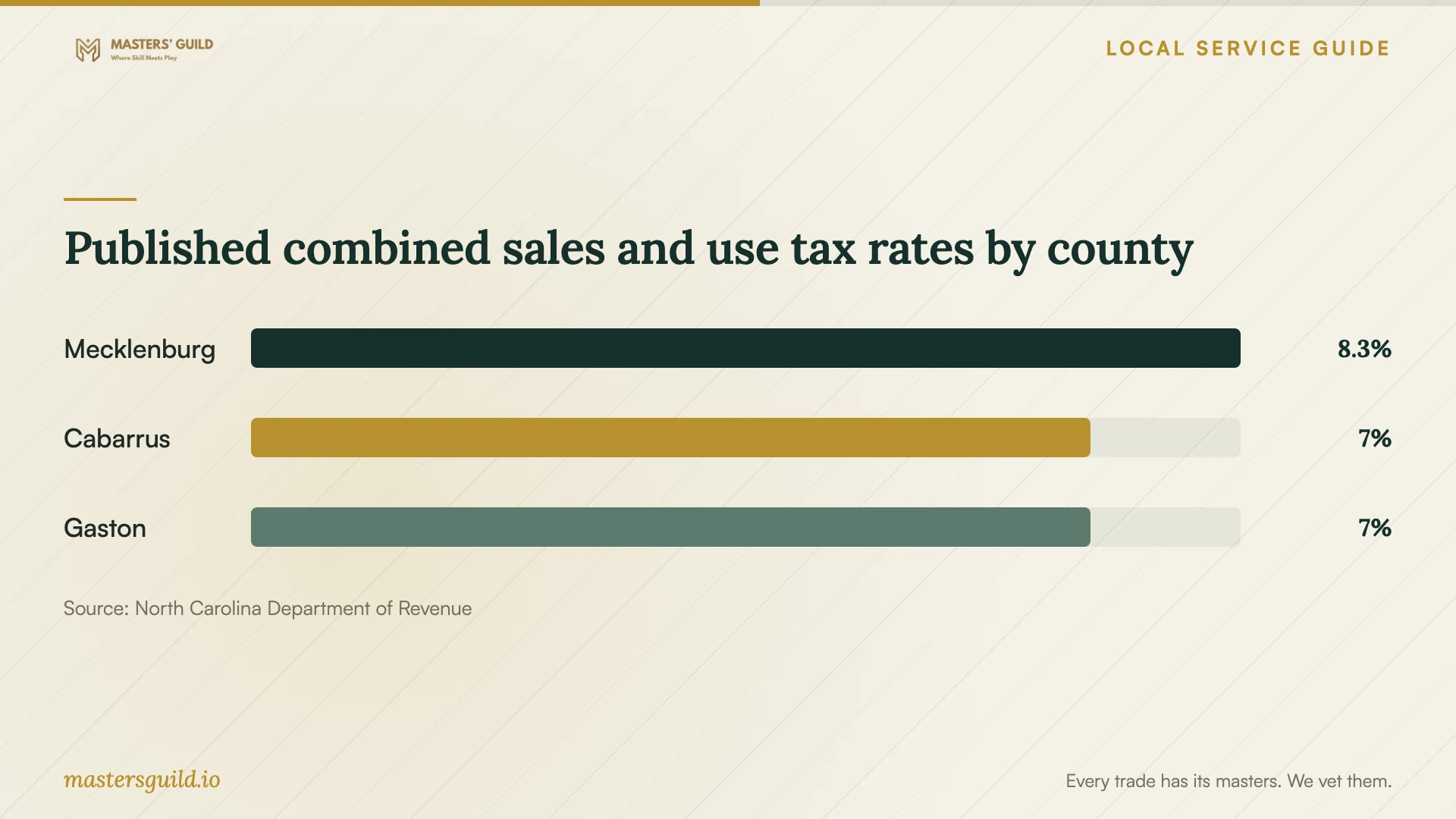
Published combined sales and use tax rates by county
Local details that affect your job
Check Mecklenburg tax on the itemized quote
NCDOR lists Mecklenburg County’s combined sales and use tax rate as 8.25%, including an additional 1% local rate effective July 1, 2026. For your Charlotte project, ask the provider to identify the applicable rate and taxable items on the invoice. Use the county figures below to review tax questions, not to estimate cloud setup labor or subscription prices. [1]
Put North Carolina breach reporting into the agreement
North Carolina DOJ says breach notification requirements cover businesses located in North Carolina or owning or licensing North Carolina residents’ personal information. Businesses holding those records for another company must notify the owner or licensee immediately after discovering a breach. Before giving a migration technician access, agree on whom they must contact and how they will report an incident involving your records. [4]
Choose the scope that fits your next step
| Your situation | Request in the scope | Acceptance check |
|---|---|---|
| You want shared business files | Account ownership, folder organization and staff permissions | Open a sample file using each agreed staff access level |
| You are changing providers | File inventory, transfer window and exception handling | Review transferred files and document omissions before retiring the old account |
| You need recovery protection | Written recovery arrangements and a demonstration | Recover a sample file with the technician present |
| You are unsure about connectivity | Check reported address-level options through the FCC map and assess the working connection | Agree on a transfer schedule after reviewing the connection |
| You hold sensitive customer records | Temporary access, copy deletion and an incident contact | Review access removal and the reporting procedure at handover |
Your hiring checklist
- List the accounts, devices, folders and staff members included in the job.
- Identify sensitive records and agree on temporary-copy handling before access begins.
- Keep administrator ownership, billing and recovery contacts under business control.
- Ask for a connection check and separate setup and upload estimates.
- Request itemized labor, subscriptions, wiring, tax and follow-up charges.
- Agree on a transfer window and a procedure for failed or incomplete transfers.
- Test staff access, sample files and recovery before approving completion.
- Remove technician access and document the decision to retire the old service.
Frequently Asked Questions
How much should I budget for setup?
Ask providers to quote your account count, devices, data volume and acceptance checks. Compare the total initial charge alongside ongoing subscriptions and the cost of support after handover. Request separate prices for additions you might need, such as extra devices or a return visit.
Should I choose remote or on-site help?
Ask whether the technician can complete the agreed checks through a supervised remote session. Consider an on-site visit if you want help with physical connections or several devices. Confirm the session method, access arrangements and any travel charge in the quote.
Does the broadband map prove my upload speed?
The FCC map shows provider-reported availability and maximum advertised speeds at a location. Ask the technician to check your working connection and review the transfer size before agreeing to a completion deadline. [3]
Will sales tax apply to the whole project?
Ask the provider to explain the tax treatment of each itemized charge. NCDOR lists Mecklenburg’s combined rate as 8.25% and identifies computer-cable work as taxable within its real-property guidance, subject to the stated scope and circumstances. Request an explanation for account configuration and subscriptions as separate charges. [1] [2]
Sources and scope
This guide combines the sources below with practical planning guidance. Figures apply to the stated geography and period; request a written quote for your property.