
Local service guide
Technical Skills Training in Charleston, SC
For Technical Skills Training in Charleston, start by naming the business task you want to complete, then choose instruction around that task. Consider CCPL’s free technology classes or 30-minute individual appointments for basic help, investigate Trident Technical College for credential preparation, and hire a private trainer when you want instruction built around your team’s software and workflow. Before booking, agree on the lesson scope, equipment, total charge and a practical task learners should complete without help. [1] [3]
Choose instruction around a business task
Write a brief that describes your starting point and desired result. For spreadsheet training, give an example such as cleaning an inventory export and producing a monthly summary. For website instruction, name the platform and the page you want staff to update. For coding, identify the language, project and problem. Ask prospective trainers to explain how they would teach that task.
Separate a lesson from a service job. Decide whether the instructor should demonstrate, supervise your work or produce a finished deliverable. Put that division in the quote. If staff need to repeat the process after the trainer leaves, request a practice exercise and written steps they can use at work.
Use library help for a defined starting point
Charleston County Public Library provides free technology classes and programs from computer basics to artificial intelligence. Its Tech Librarians offer scheduled 30-minute appointments for questions about laptops, smartphones, tablets, special projects and library digital services. Choose a narrow question for an appointment, and ask the branch whether your topic fits before arranging staff attendance. [1]
CCPL lists tech training locations in West Ashley, James Island, North Charleston and Mount Pleasant, among others. Its Tech Team page also describes online courses accessible with a library card and PIN, including coding, software development and IT. For a team learning project, check access requirements for each participant and pair independent study with a shared practice task. [1]
Check the studio rules before planning design training
The Keith Summey North Charleston Creative Studio has an Adobe Creative Cloud workstation for Illustrator, Photoshop, Audition, Premiere and InDesign. The library offers individual training and group classes by request. Studio users must be Charleston County residents, hold a valid CCPL card and be at least 18. They must complete orientation, applicable equipment training and a liability waiver before use. [2]
The library limits the Adobe workstation to two people who have completed orientation and the studio to four. It accepts reservations no more than 30 days ahead, with one reservation per patron at a time. Ask staff about a group class rather than assuming you can bring the whole team to a workstation reservation. [2]
Bring a personal storage device or arrange private cloud storage for exported work. The library deletes content left on its computers at logout and requires approval before users connect other personal equipment or download software. Use a practice copy of business files, confirm the export process and ask staff about equipment availability at least 24 hours before your visit. [2]
Investigate credential training and funding
Trident Technical College lists Certified Ethical Hacker, CompTIA A+ Prep, Linux+ Prep, Network+ Prep and Security+ Prep under scholarship-eligible continuing education programs. Applicants can select only a program available in the application’s Desired Training Program field. The college processes applications in order of receipt until funds run out; a listed program does not establish that a seat remains available. [3]
For 2026–27, Trident describes potential SCWINS assistance of up to $5,000 per academic year for eligible South Carolina residents in qualifying programs. The college applies other eligible aid before SCWINS, and eligible programs may change each year. For continuing education, assistance applies only to required courses in the eligible program. Ask the program manager to confirm eligibility, approved expenses and your remaining balance before committing. [3] [4]
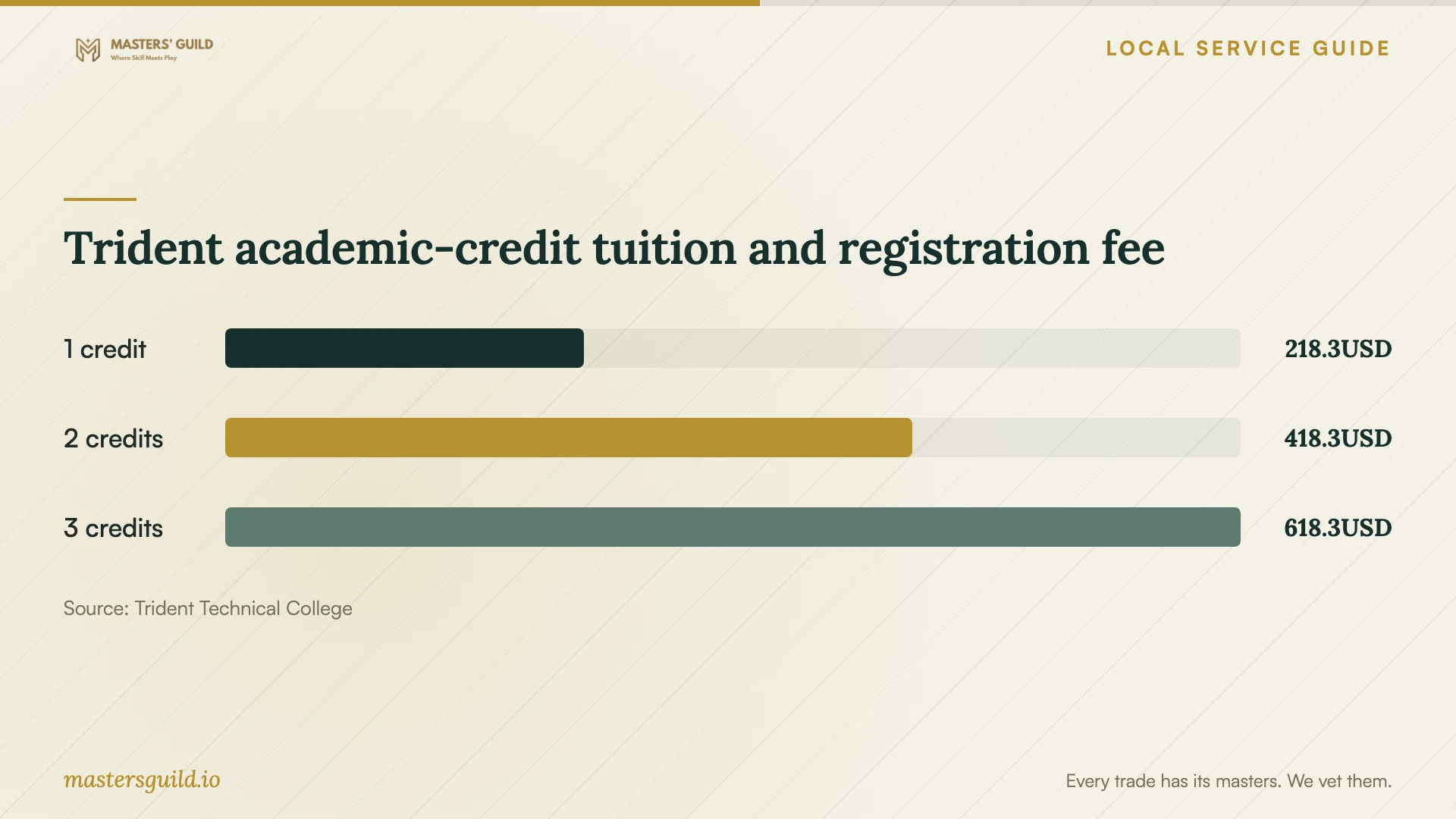
Trident treats continuing education as noncredit instruction and allows registration without college admission. Its academic-credit tuition tables use a different pathway. Compare the price of the exact course you want, and ask whether it includes exam vouchers, books or software. Use the tuition chart below only when considering academic-credit enrollment. [5]
Agree on the private trainer’s scope and price
Ask for examples of instruction using your software version and a proposed lesson outline. For a group, describe each learner’s starting skills and ask how the instructor will handle differences. Consider an initial session before purchasing a longer package. Agree on a task that lets you assess whether learners can apply the instruction.
Request a total quote that separates teaching time, preparation, travel, software licenses and follow-up help. Specify the venue, participant count, cancellation terms and who supplies computers. For remote lessons, confirm screen-sharing arrangements. Use sample data instead of customer records, and keep account passwords under your control.
Trident academic-credit tuition and registration fee
Local details that affect your job
A short appointment before a larger purchase
CCPL’s individual tech appointments last 30 minutes. Bring one defined problem, such as importing a file or finding a device setting, and confirm that the branch can address it. For a broader staff curriculum, use the appointment to clarify your next learning step rather than expecting a complete training program. [1]
North Charleston studio access needs preparation
Keith Summey studio orientation takes approximately 30–45 minutes, and the library states that orientation is not a class. Schedule the orientation and any equipment training before planning project time. Confirm that participants meet the county-residency, library-card and adult-age requirements. [2]
Continuing education funding follows a specific program
Trident’s scholarship recipients cannot move between continuing education programs under the described funding arrangement. Check the program choice before applying, especially if you are deciding between networking and security preparation. Continuing Education staff can answer program questions at 843.574.6152. [3]
Choose a training route
| Your goal | Route to consider | Confirm before booking |
|---|---|---|
| Resolve a focused device question | CCPL 30-minute individual tech appointment | Whether the branch can cover your question |
| Explore computer basics or AI | CCPL free technology classes | Current topic, location and registration requirements |
| Practice Adobe or media skills | Keith Summey Creative Studio training by request | Eligibility, orientation, equipment training and storage |
| Prepare for an IT credential | Trident continuing education | Available sections, prerequisites, funding and exam expenses |
| Teach your own business workflow | Private instruction with an agreed project scope | Software fit, total quote and learner practice |
Your hiring checklist
- Describe the business task, software version and learner starting skills.
- Choose individual, group, remote or in-person instruction.
- Ask public programs to confirm topic coverage, eligibility and available sessions.
- Request a written scope with teaching time, preparation and follow-up.
- Confirm the total charge, cancellation terms and equipment responsibilities.
- Prepare sample files and retain control of passwords and customer information.
- Agree on a practice task and a way to assess independent completion.
Frequently Asked Questions
Can I get free technology instruction locally?
CCPL offers free technology classes from computer basics to artificial intelligence. Most do not require advance registration. Contact the branch about the specific class, and ask whether its individual tech appointments suit a focused question. [1]
Can my staff use the North Charleston Adobe workstation?
Keith Summey requires studio users to be Charleston County residents with a valid CCPL card and age 18 or older. Users must complete orientation and applicable training. The Adobe workstation allows a maximum of two oriented users at a time; ask staff about group instruction. [2]
Does SCWINS make any technical course free?
Eligibility depends on the learner and program. Trident describes up to $5,000 per academic year for eligible programs, with other aid applied first. Continuing education assistance covers required courses in the approved program, and applications depend on available programs and funds. [3] [4]
How should I compare private trainer quotes?
Give each trainer the same task, software version, participant count and preferred format. Compare total charges and included preparation, materials and follow-up. Ask each instructor to describe the practice task learners will complete and the support available afterward.
Sources and scope
This guide combines the sources below with practical planning guidance. Figures apply to the stated geography and period; request a written quote for your property.