
Local service guide
Software Installation in Charleston, SC
For Software Installation in Charleston, choose a technician who will quote your named applications, configuration needs and completion tests before booking. Include file preservation or migration in the scope if you need it. For help learning software, consider Charleston County Public Library’s free technology classes and programs or its individual appointments. Confirm appointment costs and whether staff can address your question before arranging paid work. [1]
Define the job before comparing quotes
Give each technician the same description: computer model, operating system, application name and version, and the result you need. Include the exact error message from any failed attempt. Have the technician confirm compatibility before you purchase a license or authorize changes.
Distinguish application installation from an operating system replacement, file migration or repair. Specify whether you expect updates, activation, imported settings, printer connections or email configuration. For a diagnosis before installation, agree on the diagnostic charge and when the technician must seek approval for additional work.
Arrange remote help, a home visit or drop-off
For remote help, have the technician explain how you will start the session, approve access and end it. Reserve a time when you can remain at the computer. If you cannot start the device or establish the connection needed for the session, discuss a home visit or drop-off instead.
For a home visit, confirm the service address, arrival window and travel charge. For drop-off, establish which accessories to bring, how the technician will store your device and when you can collect it. Choose a contact method for decisions during the work, and identify a deadline if you need the computer for an appointment or household paperwork.
Set boundaries for files and account access
Choose the files you need to preserve and make a backup you can open. If you want the technician to handle that step, include it in the written scope and require a demonstration that the copy works before destructive changes. Give separate approval for drive erasure or an operating system reinstall.
Prepare software purchase records and check your access to the account used for activation. Enter passwords and verification codes yourself during an attended session. Have the technician explain requests for administrator access and agree on whether they will remove remote access software at handover. Keep software ownership and recovery information under your control.
Compare charges and agree on completion
Request an itemized total and establish whether the technician charges a fixed price or by time. Check for a minimum charge and clarify what you owe if compatibility or activation problems prevent completion. Require approval before added purchases, and identify who will handle any subscription renewal.
South Carolina Department of Revenue guidance excludes an associated installation charge from the tax base for a retailer’s sale of tangible personal property when the retailer states the charge separately on the bill and supports its reasonableness through its records. For a computer purchase bundled with setup, request separate line items and an explanation of the tax calculation. Do not extend this rule to every software or subscription transaction. [2]
Agree on a completion demonstration tied to your own use. Restart the computer, open the application and try a document or task you selected. Include activation and any agreed email or printer connection. Obtain a receipt identifying the work performed, software ownership details and the terms for follow-up help.
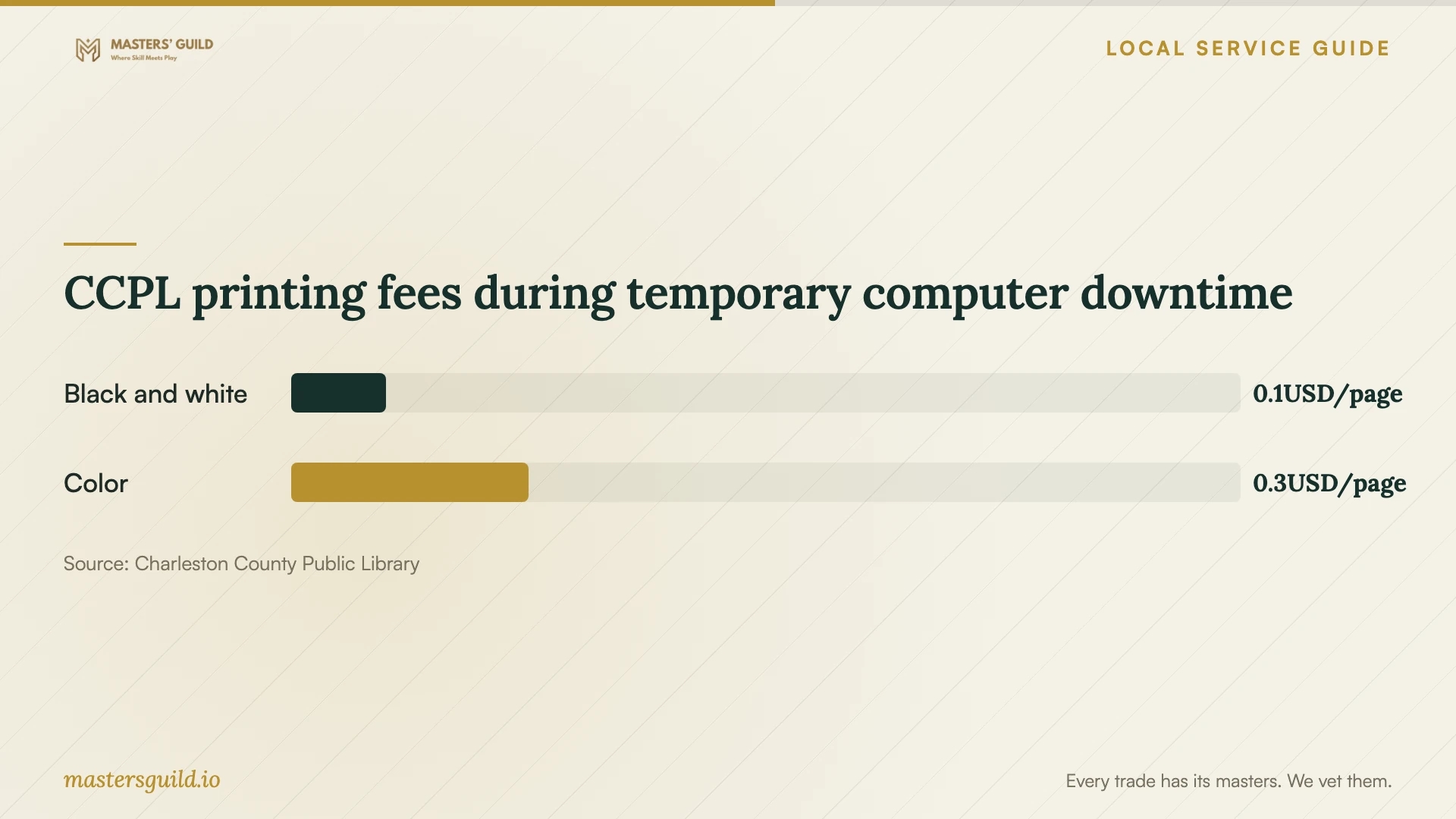
CCPL printing fees during temporary computer downtime
Local details that affect your job
Choose library instruction for a learning question
Charleston County Public Library offers free technology classes and programs. You can also schedule a 30-minute Tech Librarian appointment for questions about using a laptop, smartphone or tablet. The Tech Team lists training locations including Bees Ferry West Ashley and Baxter-Patrick James Island. Contact your branch with the question you need answered and confirm appointment costs and scope. Treat this as an instruction option; confirm any request for hands-on installation or repair with staff. [1]
Keep document work moving while your computer is away
CCPL lists public computers at every branch with Windows 11, Microsoft Office 2021 and several browsers. Consider a branch visit if you need to work on documents during installation or migration. CCPL permits continued computer use during regular library hours when nobody is waiting. Check branch hours and application suitability before relying on this option for a deadline. Budget for printing using the published fees below. [3]
Match your situation to the next step
| Your situation | Next step | Confirm before proceeding |
|---|---|---|
| You need help using an application | Consider a CCPL class or individual appointment | Appointment costs, topic suitability and branch arrangements |
| You want an application installed and configured | Request a scope naming the application and desired result | Compatibility, activation and included configuration |
| You are considering a reset or operating system replacement | Set file-preservation and recovery requirements | A readable backup and approval before erasure |
| You need temporary document access | Consider CCPL public computers with Office 2021 | Branch hours, waiting users and application suitability |
Your hiring checklist
- Write down your device model, operating system and requested applications.
- Capture error messages and identify a representative task for the technician.
- Choose a service format and confirm the appointment or collection arrangements.
- Review the itemized total, approval limit and recurring charges.
- Prepare the agreed file backup and software purchase records.
- Keep time available for the completion demonstration and save the receipt.
Frequently Asked Questions
Can the library install software on my computer?
CCPL describes technology instruction and individual help appointments. Contact the branch about your specific request before bringing a device for installation or repair. Confirm the scope and any appointment cost. [1]
Should I buy software before booking?
Have the technician confirm the required version, compatibility and license arrangement first. Decide whether you want a subscription or another available purchase option, and specify who will make the purchase.
Is installation labor exempt from sales tax?
SCDOR’s stated exclusion concerns reasonable installation charges that a retailer lists separately on the bill for an associated sale of tangible personal property. Have the seller explain the treatment of your itemized transaction rather than assuming the rule covers all software services. [2]
What if the technician cannot finish the installation?
Agree on that possibility before work begins. Specify any diagnostic or minimum charge, the spending limit for troubleshooting and the condition in which you expect the device returned. Require approval before a reset, replacement software purchase or further paid work.
Sources and scope
This guide combines the sources below with practical planning guidance. Figures apply to the stated geography and period; request a written quote for your property.