
Local service guide
Smart Appliance Setup in Charleston, SC
For Smart Appliance Setup in Charleston, hire for the work you need: app pairing, network troubleshooting, or physical appliance installation. Ask the provider to quote those tasks separately and demonstrate the finished setup on your phone. If the job includes electrical work, check the provider’s credentials and confirm permit requirements with the authority for your address. South Carolina requires a license for residential electrical work exceeding $500. [1] [2]
Choose the setup scope before choosing a provider
Write down each appliance’s brand and model number, whether someone has installed it, and the task you want help completing. Separate connecting an appliance to its app from replacing an outlet, altering plumbing, or connecting gas. Ask the provider to identify which parts of your request they will handle and which need a separate trade.
For app setup, request a demonstration of the functions you plan to use. That might mean viewing appliance status, receiving a completion notification, or setting a supported delayed start. Ask the provider to check the manufacturer’s instructions before promising voice control, shared access, or a particular automation.
Compare quotes by deliverables
Request a written quote that lists device count, account setup, connection testing, troubleshooting, and homeowner instruction. Ask whether the provider charges a fixed amount or bills for time, what happens if pairing fails, and whether a return visit costs extra. Agree on an approval point before the provider adds equipment or expands the work.
Describe the problem rather than requesting a solution in advance. For example, say that your washer will not pair from the laundry room and ask the provider to investigate before quoting a replacement router. For several appliances, ask for a separate price for each setup task and any shared network work.
Confirm jurisdiction and installation requirements
For physical installation, start with the address. The City of Charleston asks residents to confirm city limits through its interactive GIS map and points to county GIS services when an address does not appear. Use that check before directing permit questions to the city. [1]
Charleston lists plumbing and fuel-gas permits among its online submission options. For a necessary permit type absent from that list, the city directs applicants to email the submission to the Permit Center. Its Building Inspections Division handles electrical, plumbing, mechanical, and fuel-gas inspections. Ask the provider who will confirm the required permit, submit the application, and arrange inspection. [1]
For electrical work, South Carolina’s Residential Builders Commission states that residential work exceeding $500 requires a license. Ask for the provider’s license details and use the Licensee Lookup linked from the state’s electrician page. Treat the licensing threshold and the permit question as separate checks. [2]
Set appliance schedules around your actual utility plan
If you receive residential electric service from Dominion Energy South Carolina, check your rate before asking a provider to configure energy schedules. Dominion’s voluntary You Shift/You Save plan is Rate 5-TOU. The utility identifies customers who can shift major-appliance use as potential participants, but warns that customers can pay more if they do not shift enough usage away from peak periods. [4]
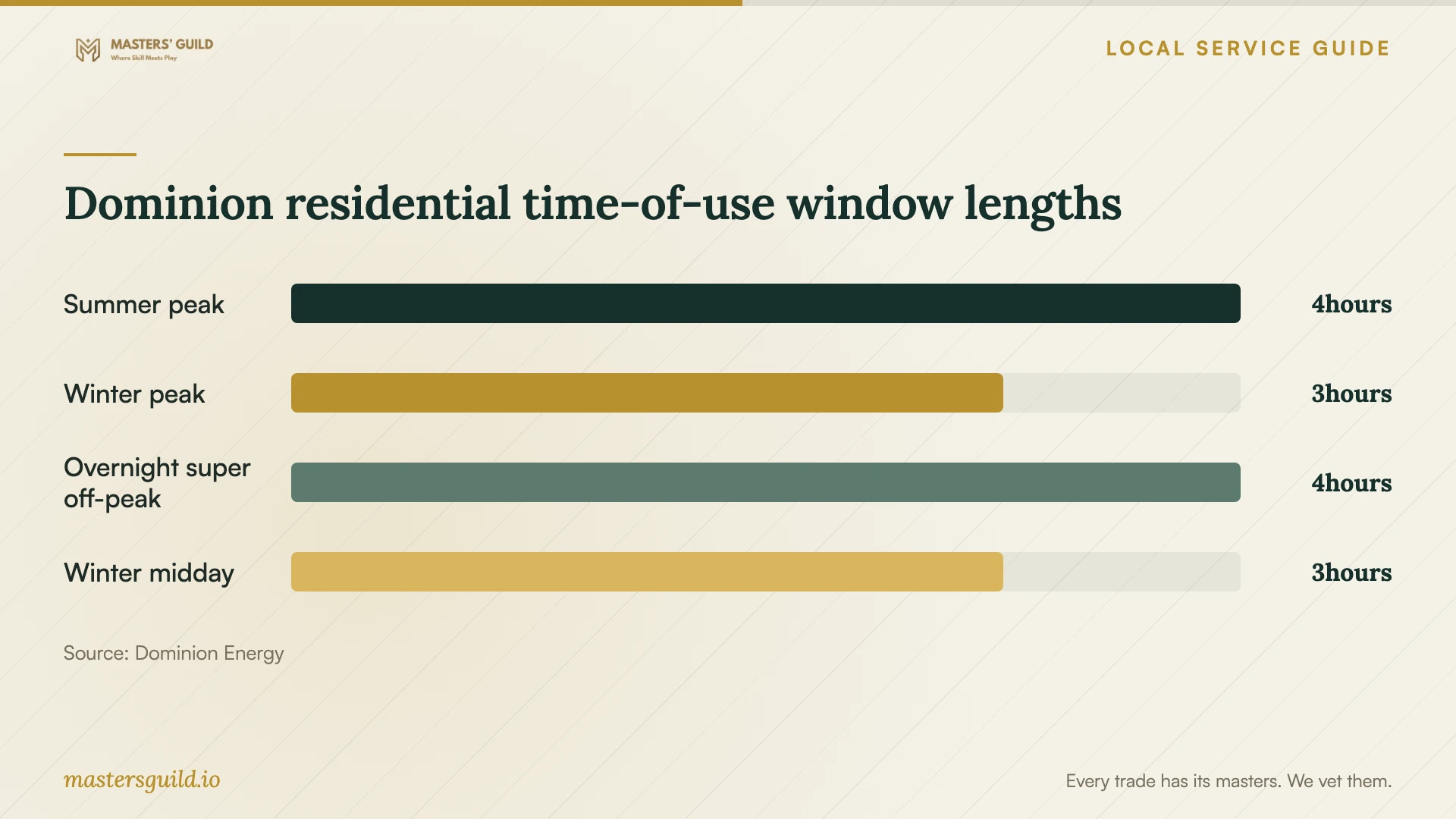
For residential Rates 5 and 7, Dominion’s periods effective July 1, 2026 include summer peak hours from 4 p.m. to 8 p.m., May through September, and winter peak hours from 6 a.m. to 9 a.m., October through April. Winter adds a noon-to-3 p.m. super off-peak window alongside the year-round 1 a.m.-to-5 a.m. window. Weekends and holidays follow the same periods as weekdays. [3]
Ask the provider to account for the appliance’s cycle length, your household routine, and the manufacturer’s operating instructions before adding a schedule. If you are considering changing rates, use Dominion’s Energy Analyzer and Rate Compare tools first. Dominion does not guarantee savings, and leaving You Shift/You Save prevents reenrollment for 12 months. [4]
Prepare your accounts and test the handoff
Have your phone, appliance manuals, model numbers, and account recovery access ready. Sign in yourself and enter passwords on your own device. Ask the provider to explain any account-sharing request before you approve it, and keep appliance ownership under an account you control.
Before the visit ends, operate each agreed feature from your phone. Review notifications, schedules, and household access. Ask the provider to leave a short record of completed tasks, unresolved problems, and any settings you changed together. Include instructions for changing a schedule and seeking help if the connection fails.
Dominion residential time-of-use window lengths
Local details that affect your job
Avoid a permit-document delay
For a City of Charleston permit application, submit PDF documents. The city does not accept JPEGs, embedded documents, or links as submissions. If you upload supplemental documents through Customer Self Service, notify the Permit Center: city staff do not receive upload notifications. Assign that follow-up to the person managing the application. [1]
Recheck an existing weekend or winter schedule
For Dominion residential Rates 5 and 7, review any automation based on older time-of-use periods. Since July 1, 2026, weekends and holidays include peak hours, and winter includes a new noon-to-3 p.m. super off-peak period. Ask the provider to review both seasonal schedules rather than copying your current weekday routine. [3]
Match the appointment to the work
| Your situation | Provider or next step | Confirm before booking |
|---|---|---|
| Installed appliance needs app pairing | Ask a setup provider to check the model instructions | Supported features and a demonstration on your phone |
| Appliance will not connect | Request connection troubleshooting | Diagnostic charge and approval before buying equipment |
| Setup includes residential electrical work | Check electrical credentials and local permit requirements | South Carolina requires a license for work exceeding $500 |
| Physical installation at a Charleston address | Confirm city limits through the city GIS tool | Who handles permit questions, applications, and inspections |
| You want utility-based schedules | Check your rate and review both seasonal routines | Dominion Rates 5 and 7 include weekend and holiday peak periods |
Your hiring checklist
- List appliance brands, model numbers, installation status, and requested features.
- Describe connection failures and previous troubleshooting attempts.
- Separate app setup from electrical, plumbing, or gas connection work.
- Agree on pricing, troubleshooting limits, and approval for added work.
- Prepare your phone, manuals, account access, and recovery method.
- Check your electricity rate before requesting energy schedules.
- Test agreed controls and notifications before the provider leaves.
- Keep a record of settings, unresolved issues, and follow-up responsibilities.
Frequently Asked Questions
Does app pairing need the same appointment as appliance installation?
Ask for separate scopes. Describe whether the appliance is installed and ready to operate, then identify the app features you want. If the provider also offers physical installation, request separate deliverables and confirm who handles any trade work.
Where should I ask about permits?
Confirm the property’s jurisdiction first. For an address within Charleston city limits, the Permit Center handles permitting questions and directs applicants to its online portal or email submission process. The city’s address-search GIS tool helps you make that jurisdiction check. [1]
Will scheduling appliances lower my electricity bill?
Check your rate and usage before assuming savings. Dominion says You Shift/You Save customers may pay more or less than under the Standard rate and does not guarantee savings. Use the account’s Rate Compare tool before changing plans. [4]
What should I ask the provider to demonstrate?
Ask to operate each agreed feature on your phone, review notifications and schedules, and confirm household access. Request instructions for changing settings yourself, plus a written note of any unresolved connection or compatibility problem.
Sources and scope
This guide combines the sources below with practical planning guidance. Figures apply to the stated geography and period; request a written quote for your property.