
Local service guide
Computer Virus Removal in Charleston, SC
For Computer Virus Removal in Charleston, SC, choose a technician who will assess the device and provide an itemized repair plan before changing files or software. Set a spending limit, identify essential business applications, and agree on data handling. If customer information may have been exposed, include a separate exposure assessment and qualified advice on South Carolina's breach-notification requirements. [4]
Choose the repair contact and define the incident
Choose the repair contact yourself. South Carolina Consumer Affairs describes service and repair scams in which impostor businesses charge for fake work. Verify a contact through a separate channel before paying or granting access, especially if a caller or warning message directed you to that service. [3]
Give the technician a short timeline: the warning you saw, software you installed, access you granted, and tasks you can no longer complete. Include the device model, operating system, and whether it starts. Keep relevant messages and screenshots, with sensitive information removed from anything you share for an estimate.
If you suspect unauthorized access, stop using the affected computer for banking or account administration. Use a separate trusted device to contact your bank or account provider through contact details you already know. Get instructions on isolation and evidence preservation before reconnecting the computer or deleting software.
You can report suspected scams to the state at 1 (844) TELL-DCA (835-5322), including unsuccessful attempts. Retain the contact details, payment records, and messages from the approach so you can describe what happened. [3]
Compare the quote and agree on recovery work
Request separate prices for diagnosis, cleanup, backup, operating-system repair or reinstallation, and follow-up support. Set a maximum authorized spend and require approval for added tasks or replacement parts. Compare each offer against your written scope rather than its headline total.
Select a service format with the technician. For remote work, name someone to supervise access. At drop-off, obtain a receipt identifying the computer and accessories. For a premises visit, identify the person who can approve changes and explain access restrictions.
Before approving a reinstall, list the files and applications you need back. Establish who will supply recovery keys, software credentials, and installation media. Specify how the technician may copy confidential files, where they may keep those copies, and when they must delete them. Keep account passwords out of ordinary messages.
Give the technician your payroll, booking, or invoicing deadline and agree on a status-update time. Prepare another way to complete essential work during the repair. At handover, test the agreed files and applications and obtain a summary of changes, unresolved concerns, and any remaining remote access.
Include customer-data assessment in the scope
Tell the technician which customer records, employee information, and shared accounts the computer can access. Identify who will assess possible exposure and document findings. Include qualified incident-response or legal advice before deciding whom to notify or deleting material an adviser may need.
South Carolina Consumer Affairs explains that state law imposes breach-notification requirements on private businesses and public bodies. When a business sends breach notices to 1,000 or more South Carolina residents at one time, it must also notify the Department and national credit reporting agencies. Have your adviser review the full requirements for your incident. [4]
For a required notice to the Department, collect the breach date, discovery date, consumer-notice date and method, affected South Carolina consumer count, a copy of the consumer notice, and action taken to avoid future breaches. Assign responsibility for gathering those details while the technician assesses the computer. [4]
Plan replacement and personal recovery
If you are considering replacement, request a repair estimate and a separate plan for preserving files and restoring essential applications on the replacement device. Authorize drive sanitization only after confirming which files you need and whether an incident adviser needs evidence preserved.
Charleston County lists household computers, monitors, printers, and TVs for resident drop-off at staffed convenience centers. It excludes electronics from curbside recycling carts. Before moving office equipment, confirm a disposal route with Environmental Management rather than assuming the household program accepts business computers. [1]
For suspected misuse of your own personal information, South Carolina's Identity Theft Unit offers tailored remediation and one-on-one assistance. Use its identity-theft intake process or call (800) 922-1594. Prepare a timeline and details of suspicious account activity for that conversation. [2]
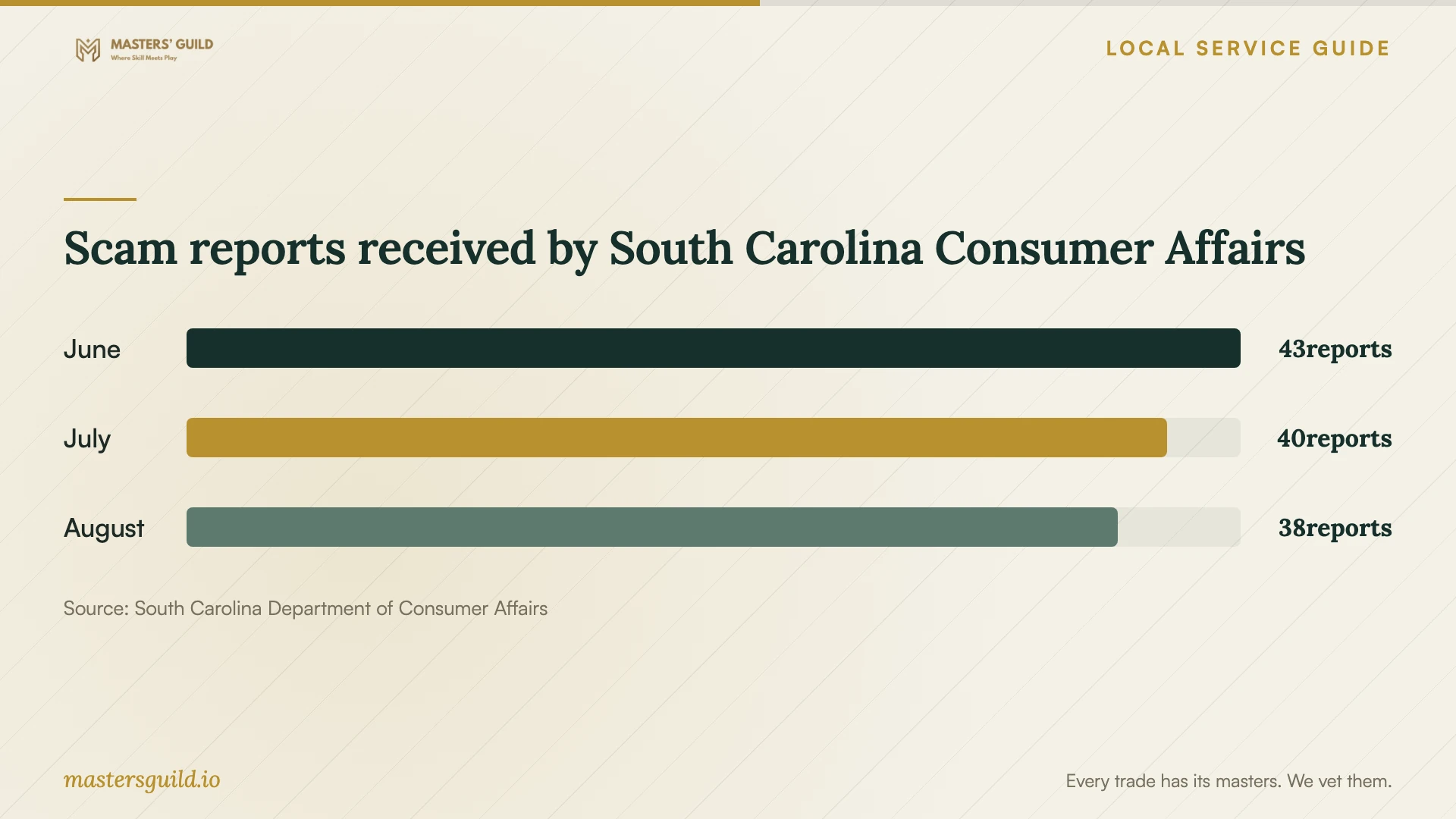
Scam reports received by South Carolina Consumer Affairs
Local details that affect your job
Confirm office-equipment disposal before transport
Charleston County's recycling page gives conflicting commercial-access instructions: one passage prohibits commercial businesses and contractors, while another permits household recyclables from commercial businesses. Neither establishes eligibility for office computers. Call Environmental Management at (843) 720-7111 and describe the equipment and its business use before arranging transport. For an eligible household drop-off, the county requires proof of county residency. Plan file preservation and drive sanitization separately from disposal. [1]
Prepare the South Carolina notification record
For a breach notice that a business must send to the Department, South Carolina Consumer Affairs requests incident dates, consumer-notification details, the affected state-resident count, the consumer notice, and preventive action. Give your adviser responsibility for that record and your technician responsibility for documenting technical findings. Keep both records together so you can explain the response without relying on a cleanup invoice alone. [4]
Separate personal identity help from the business response
South Carolina's Identity Theft Unit provides one-on-one assistance to people with identity-theft questions or concerns. If the incident exposed your own information, contact the Unit at (800) 922-1594 alongside arranging the business assessment. Describe the personal account activity you are concerned about; keep customer-data notification questions with your business adviser. [2]
Match the repair scope to your situation
| Situation | Next step | Resolve before approval |
|---|---|---|
| Warning messages without a diagnosis | Request a device assessment | Diagnostic fee if you decline repair |
| Customer information may have been exposed | Include exposure assessment and qualified breach advice | Responsibility for findings and notification decisions |
| A questionable contact offered repair | Verify the contact and consider a state scam report | Messages and payment records to preserve |
| You plan to retire an office computer | Confirm disposal options with County Environmental Management | Business-equipment eligibility and file-preservation plan |
Your hiring checklist
- Record the incident timeline and retain relevant messages.
- List essential files, applications, recovery keys, and work deadlines.
- Identify customer and employee information accessible from the computer.
- Compare itemized quotes and set an authorized spending limit.
- Name the person who will supervise access and approve changes.
- Agree on confidential-file copying, retention, and deletion.
- Test the agreed files and applications before accepting the repair.
Frequently Asked Questions
How much should I budget?
Obtain a device-specific quote that separates diagnosis, cleanup, backup, and restoration. Have the technician identify optional work, the fee for declining repair, and any follow-up charge. Set a spending limit before authorizing changes.
What should I receive at handover?
Request a repair summary recording the work performed, unresolved concerns, and remaining remote access. Test your essential applications and agreed files with the technician. Confirm the handling of any confidential copies made during the work.
Does the 1,000-resident threshold determine all breach obligations?
The state describes that threshold for additional notification to the Department and national credit reporting agencies when a business sends breach notices to South Carolina residents at one time. Have a qualified adviser assess consumer-notification duties and other requirements for your incident. [4]
Can I take an office computer to a county convenience center?
Confirm eligibility with Environmental Management at (843) 720-7111 before transport. The county lists household electronics for residents, but its conflicting commercial-access passages do not establish acceptance of business computers. [1]
Sources and scope
This guide combines the sources below with practical planning guidance. Figures apply to the stated geography and period; request a written quote for your property.