
Local service guide
Software Installation in Chandler, AZ
For Software Installation in Chandler, AZ, hire help with a written scope that names your device, the program, and the task you need to complete after setup. Ask the technician to separate installation labor, software purchases, and data transfer in the quote. Before booking, decide whether you need installation, troubleshooting, or instruction. For Office instruction, consider Chandler Public Library’s LinkedIn Learning courses before paying for a setup visit. [2]
Define the work before requesting a quote
Give the technician your computer model, operating system, application name, and any error message. Explain whether you want a new installation, a replacement for an existing program, or help restoring access to software you already purchased. Include the number of devices and tell the technician about any files you need to keep.
Set an acceptance task that reflects how you will use the program. For a document editor, ask to open, edit, save, and reopen one of your own files. For email, ask to send and receive a test message. For a printer application, ask to print a sample. Specify whether you want a short walkthrough included in the quote.
Choose a service arrangement you can supervise
Ask whether the technician proposes remote help, a home visit, or taking the computer away. For remote help, request an explanation of the access method and how you will end the connection. For a home visit, arrange access to the computer, its charger, and any connected equipment involved in your acceptance task.
If you plan to leave the device with a technician, agree on the return date, how they will report problems, and who may authorize extra charges. Ask about their experience with your exact application and operating system. Request a written account of any changes they make, including installed programs and removed software.
Protect files and account access
Before the appointment, make a backup of the files you want to preserve and check that you can open a sample from that backup. Tell the technician which folders matter. Ask them to explain any proposed reset, removal, or replacement before proceeding, and agree on whether backup verification belongs in the paid scope.
Prepare your purchase receipt or subscription details, but avoid placing passwords in the job description. Enter your own password and verification codes during the appointment. Ask the technician to explain any request for administrator access. At handoff, review remote access settings with them and confirm who controls the software account.
Separate installation costs from other work
Request a quote that identifies labor, software charges, travel, and any follow-up visit. Ask whether the technician charges a fixed amount or bills for time, whether a minimum charge applies, and what happens if they cannot complete the installation. For a subscription, ask who purchases it and who handles renewal.
Agree on a stop point for unexpected problems. You might authorize installation while requiring a new quote for file recovery, account recovery, or replacing another application. Compare offers using the same task list, backup requirements, and completion test. Avoid comparing a basic installation quote with an offer that includes migration and instruction.
Plan for downtime and learning
For temporary document work during an appointment, Chandler Public Library lists Windows 11 Professional, Word 2016, Excel 2016, PowerPoint 2016, and other applications on its public computers. Plan around the listed versions and test your document before relying on a library computer for a deadline. The library allocates computer use in 60-minute blocks on a first-come basis. [1]
For instruction after installation, the library offers LinkedIn Learning tutorials covering Microsoft Office products. In the learning app, the library directs users to select library-card sign-in and enter cpl as the Library ID. Consider that option when your remaining task is learning commands or formatting rather than changing the installation. [2]
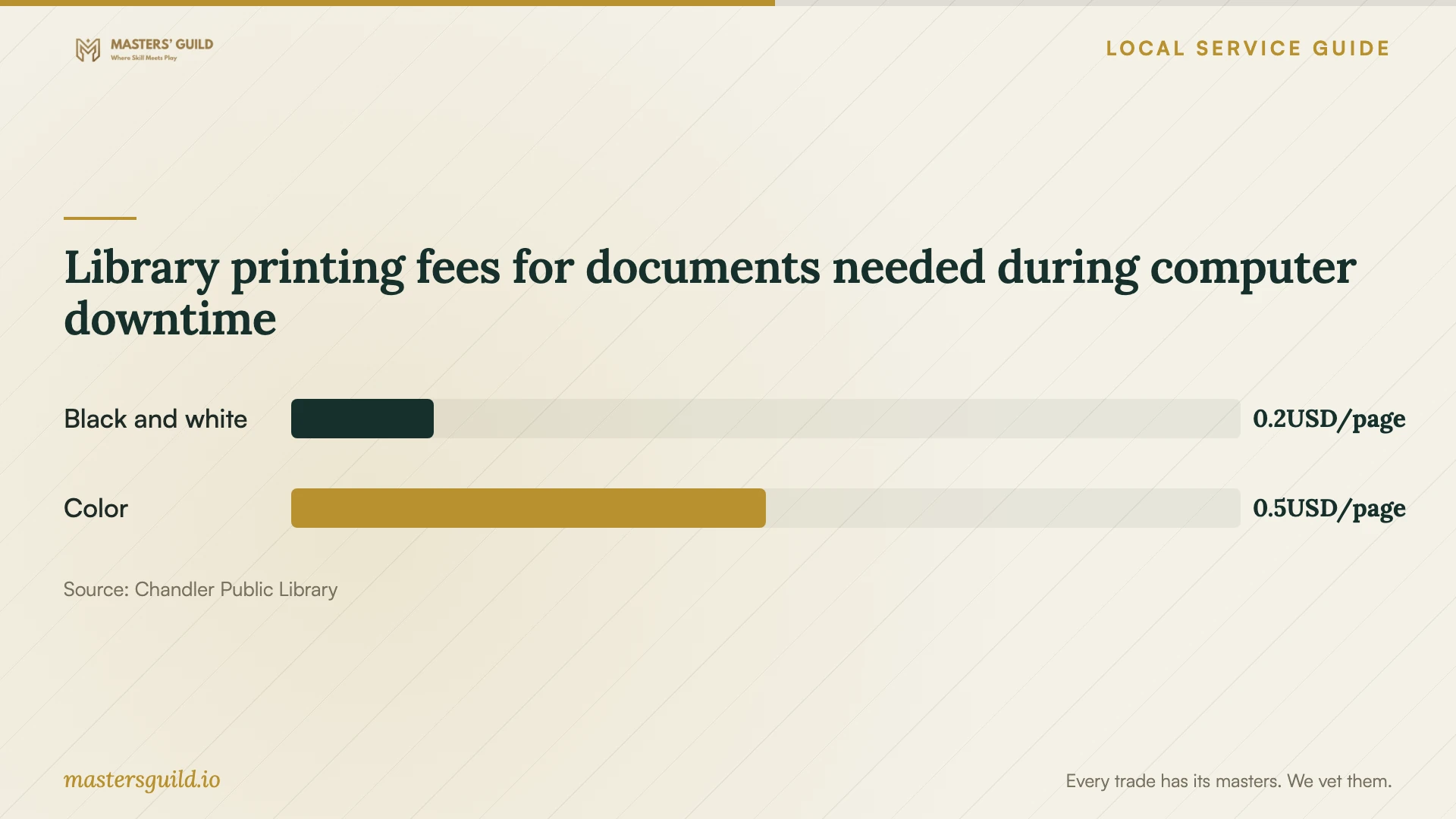
Library printing fees for documents needed during computer downtime
Local details that affect your job
Arrange temporary computer access before your device goes away
Chandler Public Library requires a library card to log in to its public computers. Users who do not qualify for a free card can request a guest pass at the customer service desk, limited to one daily 60-minute session. Cardholder sessions may extend when nobody is waiting; guest sessions do not. Plan deadline work around that limit instead of assuming you can occupy a computer for the afternoon. [1]
Choose the card route that fits your next task
Adult Maricopa County residents can apply online for an eCard to access online resources. For a full-access card in person, bring photo identification and proof of your current address if the identification shows an old address. Use the eCard route for online learning; follow the full-card instructions when arranging in-person library access. The library lists 480-782-2800 for questions. [3]
Match your next step to the problem
| Your situation | Next step | Detail to confirm |
|---|---|---|
| You need a program installed | Request an installation quote | Name the application, device, and completion test. |
| You cannot access a purchased program | Ask for diagnosis before authorizing a new purchase | Define whether account recovery belongs in the scope. |
| You need to learn Office commands | Consider the library’s LinkedIn Learning courses | Use library-card sign-in and cpl as the app’s Library ID. |
| Your computer will be unavailable | Plan temporary work on a library computer | Check the listed software and plan around 60-minute sessions. |
| You want online library resources | Consider an eCard if eligible | The online option applies to adult Maricopa County residents. |
Your hiring checklist
- Record the device model, operating system, application name, and exact error message.
- List the files and existing settings you want to preserve.
- Make a backup and open a sample file from it.
- Prepare purchase or subscription records and enter account credentials yourself.
- Agree on labor charges, software purchases, and approval for extra work.
- Choose a completion test using your own document, email, or connected equipment.
- Request a written handoff covering changes, account ownership, and follow-up terms.
Frequently Asked Questions
Should I buy the software before the appointment?
Ask the technician to confirm the intended application, version, and device requirements before you purchase. Request a quote that separates software charges from labor, and agree on whose account will own the purchase or subscription.
What should count as a completed installation?
Agree on a task you can perform yourself at handoff. Ask to open the application, confirm account access, and complete your intended workflow. Include file transfer or a walkthrough in the written scope if you need either.
Can I use a library computer while mine is with a technician?
Chandler Public Library provides public computers with listed applications including Word 2016 and Excel 2016. You need a library card or an eligible guest pass. Sessions run in 60-minute blocks on a first-come basis; guest passes permit one 60-minute session per day. [1]
Is there a local option for learning Office after setup?
Chandler Public Library offers LinkedIn Learning courses that cover Microsoft Office products. The library instructs app users to choose library-card sign-in and enter cpl as the Library ID. Adult Maricopa County residents can apply online for an eCard to access online resources. [2] [3]
Sources and scope
This guide combines the sources below with practical planning guidance. Figures apply to the stated geography and period; request a written quote for your property.