
Local service guide
Calgary website design: Quotes, Scope and Handover
Arrange website design in Calgary by giving each bidder the same customer task, page list, content responsibilities and required features. Use written project quotes to set your budget and launch date. Agree on account ownership, approval milestones and support before signing. For a Calgary-based provider, check credentials against the services included: the City exempts web and graphic design from municipal licensing, while paid photography or videography requires a business licence. [1]
Define what customers need to do
Choose the main action you want visitors to complete: request an estimate, book an appointment, find your shop or buy a product. Describe that journey from the first page through confirmation. Give the designer your actual service boundaries, opening hours and contact process so they can build around your operations.
Prepare a page list and assign a writer and approver for each page. Gather your logo, photographs and product or service descriptions. Mark material that needs replacement. For bookings, specify appointment types, staff calendars and cancellation settings; for sales, supply product options and delivery rules.
For a redesign, inventory the pages and functions you want to retain. Include existing page addresses, enquiry destinations and connected tools. Request a migration plan and agree on how you will keep access to the current site while reviewing the replacement.
Compare written quotes and set approval points
Request separate amounts for construction, hosting, domain renewal, software subscriptions and maintenance. Have bidders identify exclusions and optional work. Use written project quotes to set your budget and launch date.
Specify content entry, design reviews, integrations and staff training in the agreement. Name the owner of each account and confirm the access you will receive. Discuss ownership or usage rights for code, design, photographs and copy before work begins.
Tie payments to work you can inspect, such as an approved design, working customer journey and completed handover. Set your content deadlines alongside the designer’s review dates. Require written approval of the price and schedule impact before the designer starts additional work.
Decide how forms will handle personal information
Alberta’s privacy commissioner explains that PIPA applies to private organizations, including businesses. Organizations need a reasonable purpose for collecting, using or disclosing personal information and consent unless the law authorizes an exception. They must protect that information against loss and unauthorized access, use or disclosure. [2]
Map each collection point before approving forms or customer accounts. Record the information requested, the service receiving it, staff access and your proposed retention process. Keep enquiry fields focused on what you need to respond. Assign a business representative to approve privacy wording and information handling.
For a health practice, confirm the applicable requirements before commissioning patient intake forms. The commissioner names physicians, dentists and pharmacies among custodians governed by the Health Information Act. Have the person responsible for privacy approve the workflow before the designer builds it. [2]
Give an online store approved customer terms
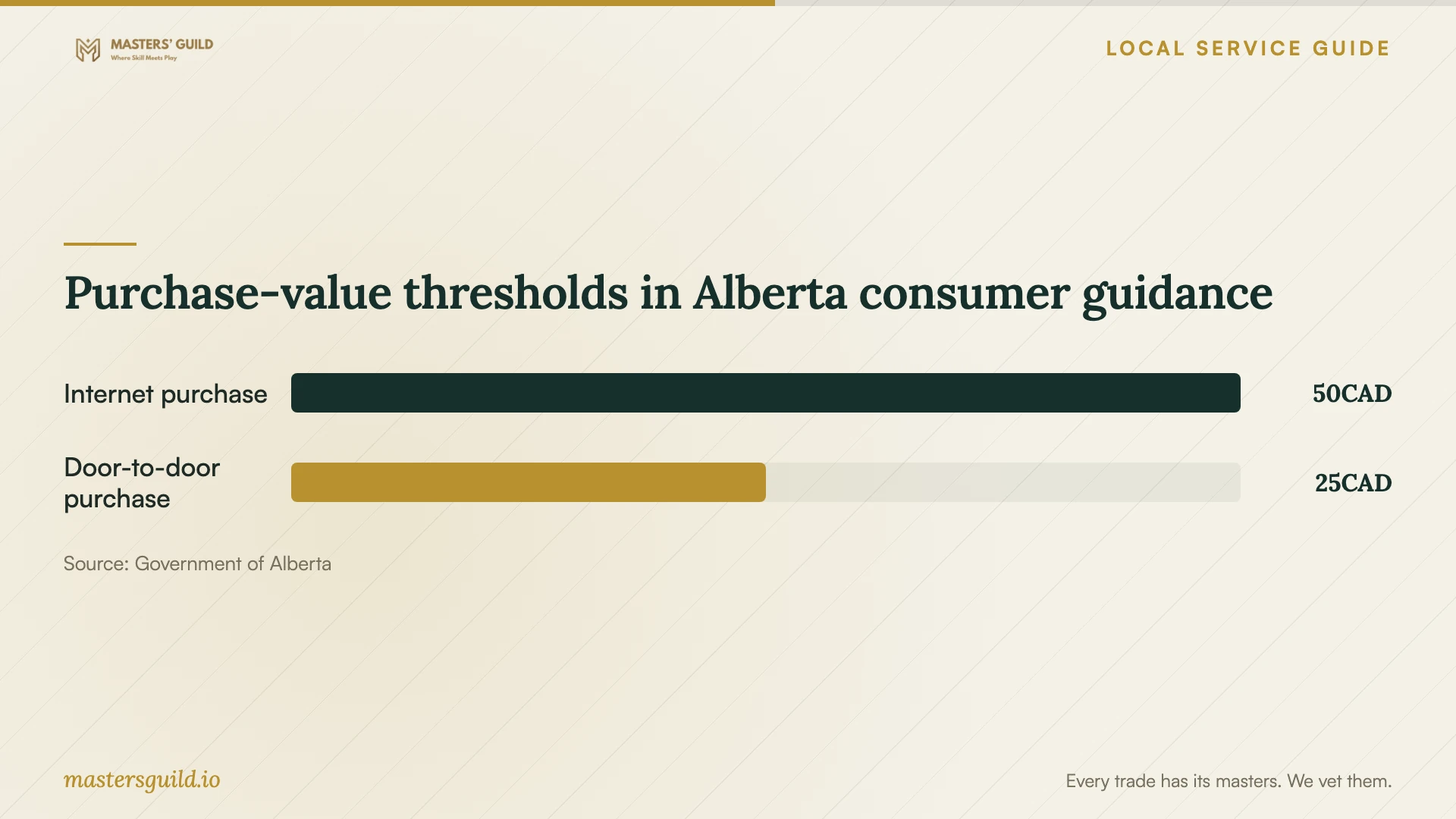
Alberta’s Consumer Bill of Rights guidance describes cancellation rights for qualifying internet purchases or contracts over $50 when businesses fail to disclose the total amount owed or fail to deliver within the stated conditions. Treat this as a prompt to review consumer-facing disclosures and delivery terms. The summary does not establish a complete cancellation timetable or determine rights under your business’s design contract. [3]
Provide approved pricing, delivery and customer policy text. During review, complete a purchase and inspect the total payable, delivery information and confirmation. Try a failed payment and a cancelled order. Assign responsibility for answering customer questions and updating the store’s policies after launch.
Test the working site and complete handover
Use a phone and a computer to complete the main customer tasks yourself. Check readable text, keyboard navigation, form labels and error messages. Send test enquiries and confirm the intended staff member receives them. Record problems with the page address and steps needed to reproduce them.
Before final approval, confirm access to the domain, hosting, site administration and connected services. Obtain a subscription list with renewal dates, editing instructions and backup and restoration procedures. Agree on the period for correcting defects, the person responsible for support and charges for later changes.
Purchase-value thresholds in Alberta consumer guidance
Local details that affect your job
Check the Calgary provider’s business approvals
The City lists web and graphic design as activities that do not require municipal licensing. Businesses without a licence still require a Business ID and land use approval. Have a Calgary-based provider explain how they addressed those requirements. Check paid photography or videography add-ons separately because the City requires licensing for those activities. Direct business-approval questions to the Planning Services Centre at 403-268-5311. [1]
Keep Alberta privacy approval with your business
The Alberta privacy commissioner states that responsibility for compliance remains with the organization, custodian or public body. Before authorizing a booking integration or customer account feature, identify who in your business will review its information handling. Obtain the designer’s proposed collection fields, submission destinations and access arrangements for that review. [2]
Review Alberta consumer disclosures before store launch
Alberta’s consumer guidance links qualifying internet-purchase cancellation rights to total-cost disclosure and delivery failures. Include a review of those subjects in an Alberta-facing consumer store project. Have your business approve the terms and then inspect the actual checkout and confirmation rather than approving policy text alone. [3]
Choose the scope around your customer workflow
| Your project | Include in the agreement | Review before approval |
|---|---|---|
| Service enquiries | Service boundaries, form fields and recipient | A test enquiry reaching the intended person |
| Appointment bookings | Appointment types, calendars and customer messages | Booking, confirmation and cancellation |
| Consumer online store | Approved total-cost disclosures, delivery information and policies | Checkout and confirmation against approved terms |
| Existing site redesign | Content inventory, existing addresses and migration responsibilities | Replacement pages and agreed redirects |
| Paid photography add-on | Who performs photography and supplies usage rights | The applicable Calgary business licence |
Your hiring checklist
- Prepare one brief with the main customer task, page list and operating boundaries.
- Assign content writing, policy review and final approval to named people.
- Compare build costs, recurring charges, exclusions and change rates.
- Resolve account access and content usage rights before signing.
- Document personal information collection and staff access.
- Complete customer journeys and record defects before approval.
- Obtain editing instructions, renewal details and written support terms.
Frequently Asked Questions
Does a Calgary website designer need a municipal licence?
The City exempts web and graphic design from municipal licensing, but businesses without a licence still need a Business ID and land use approval. Paid photography or videography requires licensing. Check the activities included in your package. [1]
How can I compare quotes with different totals?
Return to the shared brief and have each bidder identify included work and exclusions. Compare content entry, integrations, review rounds, training and support alongside recurring charges. Resolve unclear allowances before choosing.
Should I approve the appearance or the working site?
Set separate approval points for the design and the completed customer workflow. Reserve final approval until you have tested enquiries, bookings or purchases and received the agreed account access and handover material.
Sources and scope
This guide combines the sources below with practical planning guidance. Figures apply to the stated geography and period; request a written quote for your property.