
Local service guide
Calgary software installation: hiring and setup guide
Arrange software installation in Calgary by giving the technician a written list of devices, applications and tasks your staff need to complete. Ask for a quote that separates installation, licences, data transfer and follow-up support. Before granting access, agree on which accounts and files the technician may use, then set a test you can perform before accepting the work.
Describe the work before comparing quotes
Write down each device model, operating-system version, application name and intended user. Describe the outcome in everyday terms: two staff members need to access a shared mailbox, or the front desk needs to open and print customer documents. Tell the technician about error messages and failed installation attempts. Ask them to confirm compatibility before you purchase a licence.
Separate installing an application from moving files, configuring accounts and teaching staff to use it. Request a written scope for each part. For an operating-system reinstall, ask what the technician intends to erase, how they will protect existing files and how you will recover if the work fails. Require your approval before they expand the job.
Compare the total quote and service arrangement
Ask each provider to identify labour, software purchases, subscriptions, travel, backup work and follow-up charges. For hourly work, request an estimate and an approval point before further charges. For a fixed quote, ask what happens if the installer encounters an account problem or an incompatible device. Compare quotes against the same task list.
Discuss remote service, an office visit or drop-off based on the access you can provide. For remote work, ask how you will authorize and end the session. For an office visit, agree on arrival, workspace access and who will answer account questions. For drop-off, request a receipt naming the device and accessories, plus a written agreement about data access.
Choose an appointment when you can tolerate interruption and have the account owner available. Ask the provider to identify which staff tasks must stop during installation and whether you should arrange a temporary way to continue them. Include a short handover in the quote so staff can demonstrate the required tasks before the technician leaves.
Limit access to customer and staff information
The Office of the Information and Privacy Commissioner of Alberta explains that PIPA applies to private organizations, including businesses. Organizations generally need consent and a reasonable purpose to collect, use or disclose personal information, with exceptions under the Act. They must protect that information against loss and unauthorized access, use or disclosure. Treat the installer's access plan as part of choosing a provider. [3]
Ask which folders the technician needs, whether they will copy files elsewhere, who can access those copies and when they will delete them. Enter account credentials yourself where feasible. Agree on temporary access and remove it at handover. If your device contains customer records, ask the provider to describe how they will keep unrelated records outside the installation work.
If you believe a provider has mishandled your personal information, the Alberta privacy commissioner directs you to complain to the organization first before submitting a written privacy complaint to the OIPC. Keep your written scope, access agreement and correspondence so you can explain what happened. [3]
Test the setup and agree on support
Have the intended user sign in and complete a representative task. Open an existing document, save a change and check any required printing or sharing. Ask the technician to confirm activation, update settings and where you can find installation records. Record unresolved issues and agree on the next step before accepting completion.
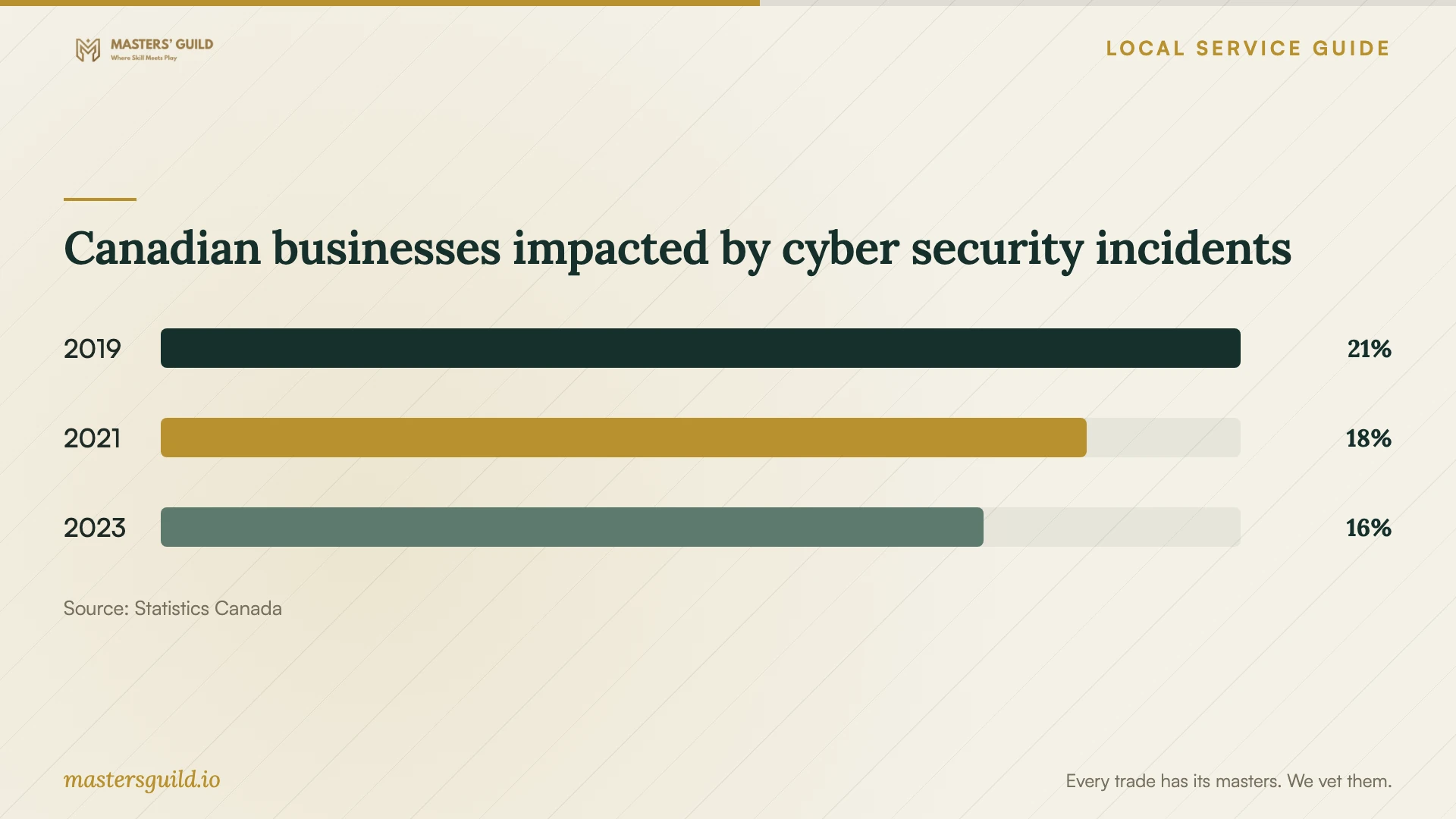
Include backup and security configuration in your planning questions. Statistics Canada reported that 16% of Canadian businesses in its survey population experienced impactful cyber security incidents in 2023. The population covered enterprises with at least 10 employees across most economic sectors, excluding public administration. This national figure does not measure Calgary installers or the risk to a smaller office, and it does not prove that an installation service prevents incidents. [4]
Ask who will handle updates after handover and how you should report a problem. Request the follow-up period, any exclusions and the price of additional support in writing. Keep software ownership and renewal information with your business records, and ask the technician to explain any ongoing access they propose retaining.
Canadian businesses impacted by cyber security incidents
Local details that affect your job
Use library help for a learning question
Calgary Public Library's Tech Mentors volunteers answer technology questions one-on-one and help adults practise with software, websites or devices. The program runs in person for ages 18 and older, with same-day signup on a first-come, first-served basis. Consider this route if you need help understanding software before commissioning installation. Check the event details before travelling, and ask whether your question fits the session; the page does not promise commercial deployment or account migration. [1]
Check the provider's actual business activities
Calgary's repair-services guide lists electronics repair shops as exempt from municipal business licensing, while stating that businesses without a licence requirement still need a Business ID and land-use approval. Do not use the absence of a repair licence alone to reject an electronics repair provider. For a software-only business, ask it to confirm its classification with the City. The Planning Services Centre lists 403-268-5311 for business-approval questions. [2]
Choose help for the task you need
| Your situation | Route to consider | Confirm before proceeding |
|---|---|---|
| You need to learn how to use software | Calgary Public Library Tech Mentors | Check the in-person event details; signup is same-day and first-come, first-served for adults. |
| You need applications configured for staff | An installer working from a written scope | Ask for licence ownership, user setup and a test of the required tasks. |
| You need an operating-system reinstall or file migration | A technician who agrees to a backup and recovery plan | Identify what may be erased and who will verify the preserved files. |
| The work involves customer or staff records | A provider who explains its data-access practices | Ask about necessary access, copies, retention and temporary credentials. |
Your hiring checklist
- List the devices, applications, users and business tasks included in the job.
- Confirm who owns each software account and can authorize purchases or changes.
- Agree on backup responsibility and check that you can open the files you need to preserve.
- Request a written price breakdown, exclusions and an approval point for extra work.
- Define permitted account access, file copying and deletion of temporary copies.
- Arrange an interruption window and keep the account owner available.
- Test the agreed tasks, remove temporary access and collect handover records.
Frequently Asked Questions
How much should I budget for installation?
Request a quote for your exact device and application list. Ask the provider to separate labour, licences, subscriptions, migration and follow-up support. Compare a fixed quote with an hourly estimate only after confirming that both include the same work and a clear approval process for extras.
Does an installer need a Calgary repair licence?
The City lists electronics repair shops among businesses that do not require municipal licensing, but that does not settle the classification of a software-only installer. Ask the provider which requirements apply to its activities. The City's guide says exempt businesses still require a Business ID and land-use approval. [2]
Should I give the technician my password?
Ask what access the job requires and enter credentials yourself where feasible. Agree on any temporary access before work starts, then remove it at handover. Ask the technician to explain any request to copy files or retain account access after completing the job.
Can the library help instead of a paid technician?
Tech Mentors offers adults one-on-one help with technology questions and practice using software, websites and devices. Consider it for guidance and learning. Confirm the session suits your question; the program page does not promise business installation, migration or responsibility for completing your setup. [1]
Sources and scope
This guide combines the sources below with practical planning guidance. Figures apply to the stated geography and period; request a written quote for your property.