
Local service guide
Smart Appliance Setup in Calgary
For Smart Appliance Setup in Calgary, ask for a quote that separates app pairing and Wi-Fi troubleshooting from physical appliance installation. Choose technical help for accounts, notifications and connection testing; arrange the appropriate trade contractor if the job involves new or altered wiring, plumbing or gas systems. Confirm who will obtain any required permits before work starts. [1] [2]
Define the job before requesting offers
Send the appliance brand, model number and a short description of its current state. Say whether someone has completed the physical installation, whether the appliance operates through its own controls, and where app setup fails. Include the exact error message rather than a description such as “the Wi-Fi is broken.”
List the outcomes you want: connecting the appliance to its manufacturer app, enabling a cycle-complete alert, sharing access with another household member, or testing a supported integration. Ask the provider to confirm compatibility against the model’s instructions before including voice control or automation in the quote.
For a combined installation and setup job, request separate line items for physical connections, app work and troubleshooting. Calgary requires permits when contractors install, alter or add to plumbing and gas systems; it also requires electrical permits for new wiring and changes to branch-circuit wiring. Ask the contractor to identify the permit requirements for your exact scope. [1] [2]
Compare quotes by scope and completion criteria
Ask each provider to describe the work they will complete, the charge for troubleshooting beyond that scope, and any proposed equipment purchases. Specify whether you want help with one appliance or several. Require your approval before the provider adds a router, hub, subscription or replacement accessory.
Agree on a completion test before the visit. You might ask the provider to demonstrate app access on your phone, trigger an agreed notification and show another household member how to use the controls. For an unresolved connection problem, request a written explanation of what they tested and which next step they recommend.
If you want energy monitoring, define the level of detail. ENMAX’s Easymax Energy Insights shows whole-property usage rather than usage by appliance or room, and updates when your bill becomes available. Ask the setup provider to verify whether your appliance supplies the specific readings you want. [4]
Prepare accounts and network access
Have your phone, appliance instructions and access to your Wi-Fi settings ready. Make sure you can sign into the account you intend to use and receive its verification messages. Enter passwords yourself during the visit, and ask the provider to explain any proposed network changes before making them.
Canada’s Office of Consumer Affairs recommends unique, strong passwords, regular security updates and providing the minimum personal information needed during setup. It also advises consumers to examine how manufacturers collect and share data. Ask the provider to review optional sharing settings with you and explain how you will receive future updates. [5]
For a secondhand appliance, ask the manufacturer how to remove stored data and restore factory settings before connecting it to your household account. The federal consumer checklist directs owners to the manual or manufacturer’s website for those instructions. Avoid guessing at a reset sequence that could erase settings you need. [5]
Check appliance settings and the handover
For a dishwasher with a configurable water-hardness setting, ask the provider to follow the model’s instructions and account for any treatment system in your home. Calgary describes its water as hard and reports that hardness varies by season and location. Use the City’s figures as context, then confirm the appropriate setting for your appliance and actual supply. [3]
Ask which functions work without internet access and how long the manufacturer expects to supply security patches. The federal IoT checklist identifies both questions as part of evaluating a connected device. Have the provider demonstrate any offline functions you plan to rely on, using the manufacturer’s instructions. [5]
Before the provider leaves, use the appliance app yourself. Review notifications, household access and account recovery. Request a short handover note recording the settings changed, unresolved issues and support arrangements. Remove temporary access you granted for the visit, and keep recovery information somewhere you can find it.
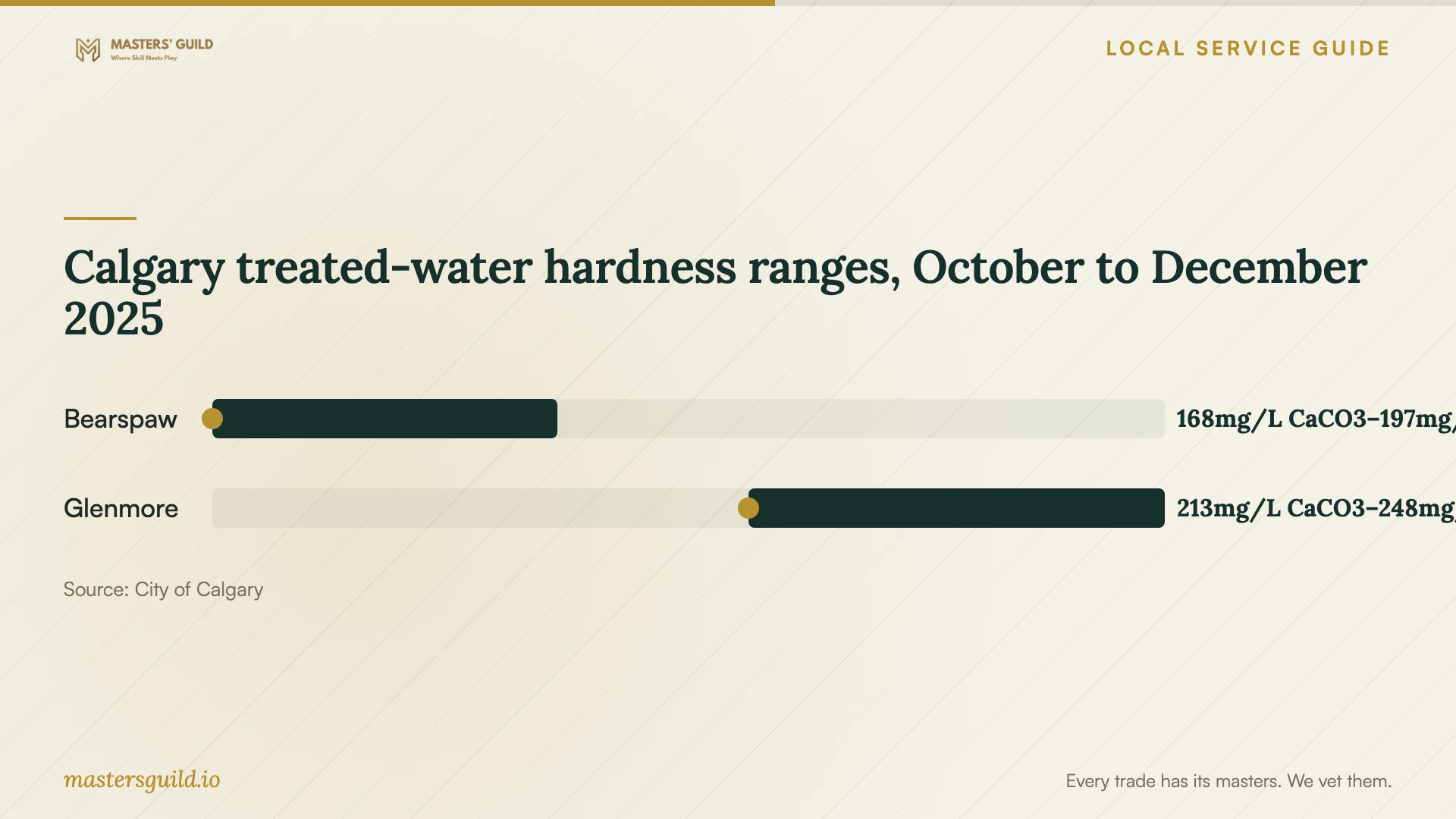
Calgary treated-water hardness ranges, October to December 2025
Local details that affect your job
Contractor permits and condo restrictions
If you hire someone for work requiring an electrical or plumbing permit, Calgary says the contractor must apply; you cannot obtain a homeowner permit on their behalf. Apartment-style condo owners must hire a licensed contractor for this work. Individually owned condominium townhouses can qualify for homeowner permits with board authorization, subject to the City’s eligibility rules. Tell the provider your building type before accepting an installation quote. [1]
Resolve uncertain connection work before booking
Calgary requires a gas permit for installing, altering or adding to a gas system. The City restricts homeowner gas permits to qualified gasfitters. If your smart range setup includes gas work, arrange a qualified contractor and confirm the permit scope. For uncertainty about permit requirements, the City lists the Planning Services Centre at 403-268-5311. [1] [2]
Use local water data without guessing your setting
The City says residents in the northern half of Calgary generally receive Bearspaw-treated Bow River water, while residents in the south receive most of their water through Glenmore from the Elbow River. Its published hardness ranges differ between the plants. Ask the provider to check your dishwasher’s instructions and your home’s water treatment before choosing a hardness setting from a citywide figure. [3]
Match the provider to the work
| Your situation | Provider to arrange | Confirm before booking |
|---|---|---|
| Installed appliance needs app pairing | Technical setup help | Model compatibility, account ownership and an agreed demonstration |
| New wiring or branch-circuit alteration | Electrical contractor | Contractor-obtained electrical permit |
| Installing or altering a plumbing system | Plumbing contractor | Connection scope and required plumbing permit |
| Installing or altering a gas system | Qualified gas contractor | Gas permit and separation of app work from gas work |
| Energy readings are your main goal | Setup provider who can verify the requested feature | Appliance-level support; Easymax Energy Insights reports whole-property usage |
Your hiring checklist
- Send the brand, model, installation status and exact connection error.
- List the app features and household access you want demonstrated.
- Separate physical installation, app setup and network troubleshooting in the quote.
- Identify your building type and ask who will handle required permits.
- Prepare your phone, account recovery access, instructions and Wi-Fi settings.
- Ask before approving equipment purchases, subscriptions or network changes.
- Test the agreed features yourself and collect a written handover.
Frequently Asked Questions
Do I need a permit just to connect an appliance app?
The cited Calgary permit rules address electrical wiring and plumbing or gas installation work. Describe an app-only job as account and connection setup. If the provider proposes physical alterations, ask them to confirm permit requirements before expanding the job. [1] [2]
Can I obtain the permit for an installer?
Calgary says you cannot obtain a homeowner permit on behalf of the person or company doing the work. A contractor you hire must apply for the required permit. [1]
Can my utility account show what one appliance uses?
ENMAX says Easymax Energy Insights shows overall property usage and does not break it down by appliance or room. Ask the provider to verify a separate appliance-monitoring feature if you need that detail. [4]
Should I give the provider my account password?
Enter credentials yourself and retain control of recovery details. The federal consumer checklist recommends unique, strong passwords and minimum personal information during setup. Ask the provider to guide you through settings while you remain signed in on your own phone. [5]
Sources and scope
This guide combines the sources below with practical planning guidance. Figures apply to the stated geography and period; request a written quote for your property.