
Local service guide
Network Setup and Support in Calgary
Arrange Network Setup and Support in Calgary by choosing a provider who will assess your connection problems before proposing equipment. Describe where you need service, then agree on the installation scope and budget. For in-wall phone or data work, confirm project-specific permit requirements: Calgary identifies communications work as potentially requiring additional permits. [1]
Describe the problem before choosing hardware
Give the provider examples they can investigate: a laptop drops calls at the upstairs desk, the basement television loses its connection, or several devices disconnect at the same time. Note when the problem occurs and whether moving the device changes it. Include your internet plan and the models of your modem, router and existing mesh equipment.
Ask the technician to compare a wired connection near the router with Wi-Fi at the affected locations. Request an explanation of what they checked and which findings support their recommendation. Keep equipment purchases subject to your approval, especially if you already own hardware you want to reuse.
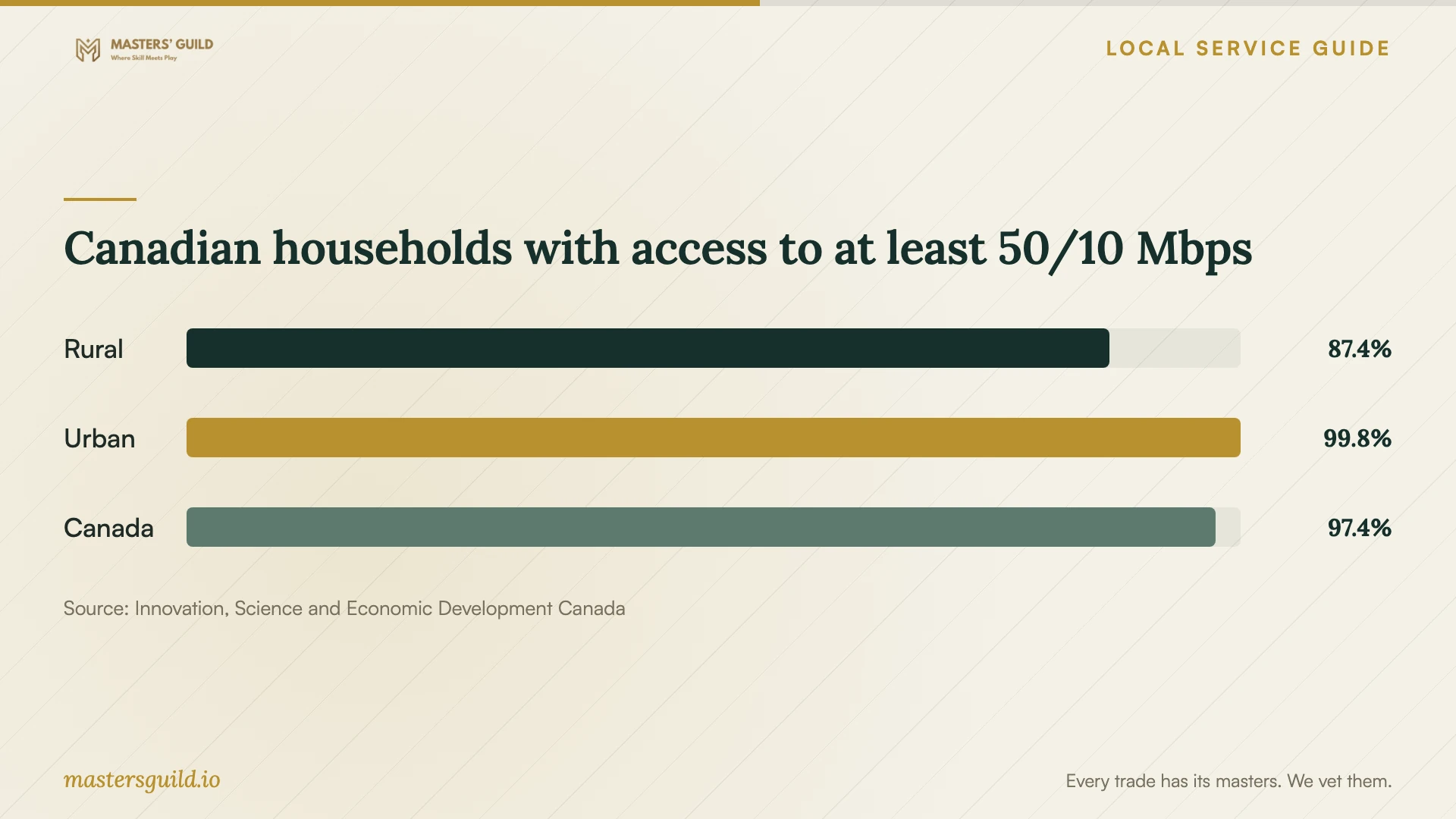
ISED reports household access to internet service at a minimum of 50 Mbps download and 10 Mbps upload. Its national figures describe access to service, rather than performance inside your home. Use the chart as context, then ask your internet provider about service at your address and your technician about the network within the property. [4]
Choose a scope you can compare
Ask the provider to explain the proposed arrangement in everyday terms: which equipment they would keep, where they would place new equipment and which devices would use cables. For a mesh proposal, request the node locations. For wired access points or Ethernet ports, mark the endpoints on a floor plan.
For cabling, include the cable type, proposed route, terminations, labels and testing in the scope. Ask the installer to inspect uncertain routes before committing to a fixed price. Identify who will move furniture, open walls, patch surfaces and remove debris. Include access to the garage or other outbuilding if that forms part of the project.
Set your budget using itemized quotes for the same work. Request separate amounts for assessment, labour, equipment, materials, repairs and any permit work. Clarify travel charges, minimum charges and return visits. Require approval for substitutions or extra work, and ask who owns the purchased hardware and any associated subscription.
Prepare access and plan the interruption
Choose an appointment window when you can tolerate a connection interruption. Tell the technician about devices you need to reconnect, including printers, televisions and home-office equipment. Ask whether anyone must remain available to approve changes or enter account credentials.
Clear access to the router, existing ports and proposed cable routes. Gather account information without sending passwords in the job description. Enter credentials yourself where possible, and agree on any temporary administrator access. If you rent or share building spaces, discuss the proposed work with the owner or building manager before booking invasive work.
For a renovation, coordinate the network installer with the person managing wall openings and repairs. Where the project includes permitted electrical work, Calgary describes rough-in inspection preparation that keeps wiring and terminations visible, with an exception for wiring fished into walls. Have the electrical contractor arrange the inspection sequence before you schedule finishes. [2]
Agree on acceptance and future support
Before installation, choose a few tasks you will use to check the result with your own devices. Include a call from the work desk or a connection check at an agreed port. Ask the technician to record the locations and results so you can describe a recurring problem without starting from memory.
At handover, request a basic network diagram, equipment details, port labels and restart instructions. Confirm that you control the administrator account. Discuss follow-up charges, equipment warranty handling and any permission for retained remote access. Keep these details with the invoice for the next support visit.
Canadian households with access to at least 50/10 Mbps
Local details that affect your job
Confirm the Calgary permit scope before installation
Calgary's contractor guidance identifies phone and data work as potentially requiring additional permits. It does not establish a blanket requirement for every Ethernet drop. Describe your building type, cable route and associated electrical work to the Planning Services Centre at 403-268-5311. For new electrical wiring or branch-circuit changes, Calgary requires an electrical permit; a hired contractor must apply for their own permit. [1] [2]
Use a licensed contractor for condo electrical work
Calgary prohibits homeowner permits for electrical work in apartment-style condo buildings and requires a licensed contractor. If your equipment location needs a new outlet, arrange that contractor as part of the project. Discuss access and proposed data-cable routes with the building manager as a separate preparation step. [2]
Arrange locates before a buried garage connection
ENMAX directs residents to locate underground electrical, natural-gas and telecom lines before digging. Its guidance gives 1-800-242-3447 for arranging locates. For a buried network link to an outbuilding, assign responsibility for the locate request before scheduling excavation, and include trenching and surface restoration in the installation scope. [3]
Match the project to the next step
| Your project | Scope to discuss | Before booking |
|---|---|---|
| Connection problems in particular rooms | Assessment at the router and affected devices | Describe the failures before authorizing equipment purchases |
| Ethernet ports through finished walls | Cable routes, terminations and surface repairs | Confirm project-specific communications-work permit requirements with Calgary |
| New power outlet for equipment | Electrical installation and permit responsibility | Have the hired electrical contractor obtain their own permit |
| New outlet in an apartment-style condo | Licensed electrical contractor and building access | Calgary prohibits homeowner electrical permits in this building type |
| Buried connection to an outbuilding | Cable installation, trenching and restoration | Arrange underground utility locates before digging |
Your hiring checklist
- List affected rooms, devices and examples of connection failures.
- Gather your internet plan and modem, router and mesh model details.
- Mark existing equipment and proposed ports on a floor plan.
- Compare itemized quotes with routes, repairs and exclusions.
- Resolve permit responsibility, building access and utility locates where applicable.
- Choose an appointment window that allows a connection interruption.
- Keep the acceptance results, account details and support terms with your invoice.
Frequently Asked Questions
Should I replace my router before the appointment?
Keep the purchase subject to the assessment. Give the technician the model details and explain what you need the connection to support. Ask whether they propose reusing, relocating or replacing the equipment, and why.
Can I obtain the electrical permit for my installer?
Calgary prohibits obtaining a homeowner permit on behalf of the person or company doing the work. A hired electrical contractor must obtain their own permit. This matters when a network project includes new electrical wiring or changes to an existing branch circuit. [2]
How should I arrange support after installation?
Ask who will respond if a problem returns, how they charge for remote and on-site help, and whether follow-up support has a time limit. Decide whether you want ongoing remote access, and record how you can withdraw that permission.
Sources and scope
This guide combines the sources below with practical planning guidance. Figures apply to the stated geography and period; request a written quote for your property.