
Local service guide
Data Recovery and Backup in Calgary
For Data Recovery and backup in Calgary, choose a provider who will assess your device, obtain your approval before recovery work, explain where they will handle your files and demonstrate a backup restore. Start by listing the business files you need and checking whether you have a usable backup. Ask for separate recovery and ongoing backup quotes, with written fees, handover terms and responsibility for testing.
Choose the service around the files you need
Describe the problem before requesting a quote: missing folders, an unreadable device, a lost laptop or suspected ransomware. Include the device model, the sequence of events and any actions you have taken. Ask the provider to recommend the next handling step before you attempt repairs or recovery software.
Make a short priority list. Name the accounting database, customer records, project folders or other files you need to resume work. Record the last date you remember accessing them and identify any passwords or encryption keys you control. Ask the provider how you should supply credentials through a secure channel.
If you have a backup, arrange a restore test to a separate destination before authorizing work on the affected device. The Cyber Centre recommends testing recovery processes and prioritizing business-critical data. Ask the technician to open representative files and, where relevant, demonstrate that your business application can use the restored data. [3]
Get a quote you can approve in stages
Request a written assessment scope and a separate approval point for recovery work. Ask whether you owe a diagnostic fee if you decline, what happens if the provider recovers only some files, and whether the price includes return storage, courier charges and taxes. Set a spending limit and require approval before the provider exceeds it.
Ask who will perform the work and where you will hand over the device. For a Calgary drop-off service, confirm whether staff assess it there or forward it to another lab. Request a receipt that identifies the device and accessories, plus a named contact for updates. Agree on the return method for the original device and recovered files.
Set a target for the assessment update and another for file delivery. Ask what an urgent-service charge changes. Define acceptance around files you can open and use, then agree on how long the provider may retain a working copy after handover.
Specify a backup service that includes recovery testing
The Cyber Centre recommends the 3-2-1 approach: three copies of your information, including the original and two backups, across two media types, with one copy offsite. It also recommends an offline backup. Ask your provider to explain how the proposed setup meets those recommendations and which copy you would use after a site incident. [3]
Choose backup frequency by deciding how much recent work you could afford to recreate. Tell the provider how long you could operate without your key application. Request a written schedule, retention settings, failure notifications and a named person responsible for responding to alerts.
Include encryption, account protection and restore testing in the scope. The Cyber Centre recommends encrypting sensitive data, using a strong password or passphrase and multi-factor authentication for cloud backup, and testing backups. Ask for a handover record showing what the technician restored, where they restored it and which checks you completed. [3]
Separate incident recovery from ordinary backup work
For suspected ransomware, ask whether the provider can coordinate incident response as well as restoration. The Cyber Centre explains that backups can help restore systems but cannot prevent an attacker from selling or leaking stolen information. Ask who will assess the affected environment before reconnecting restored systems. [3]
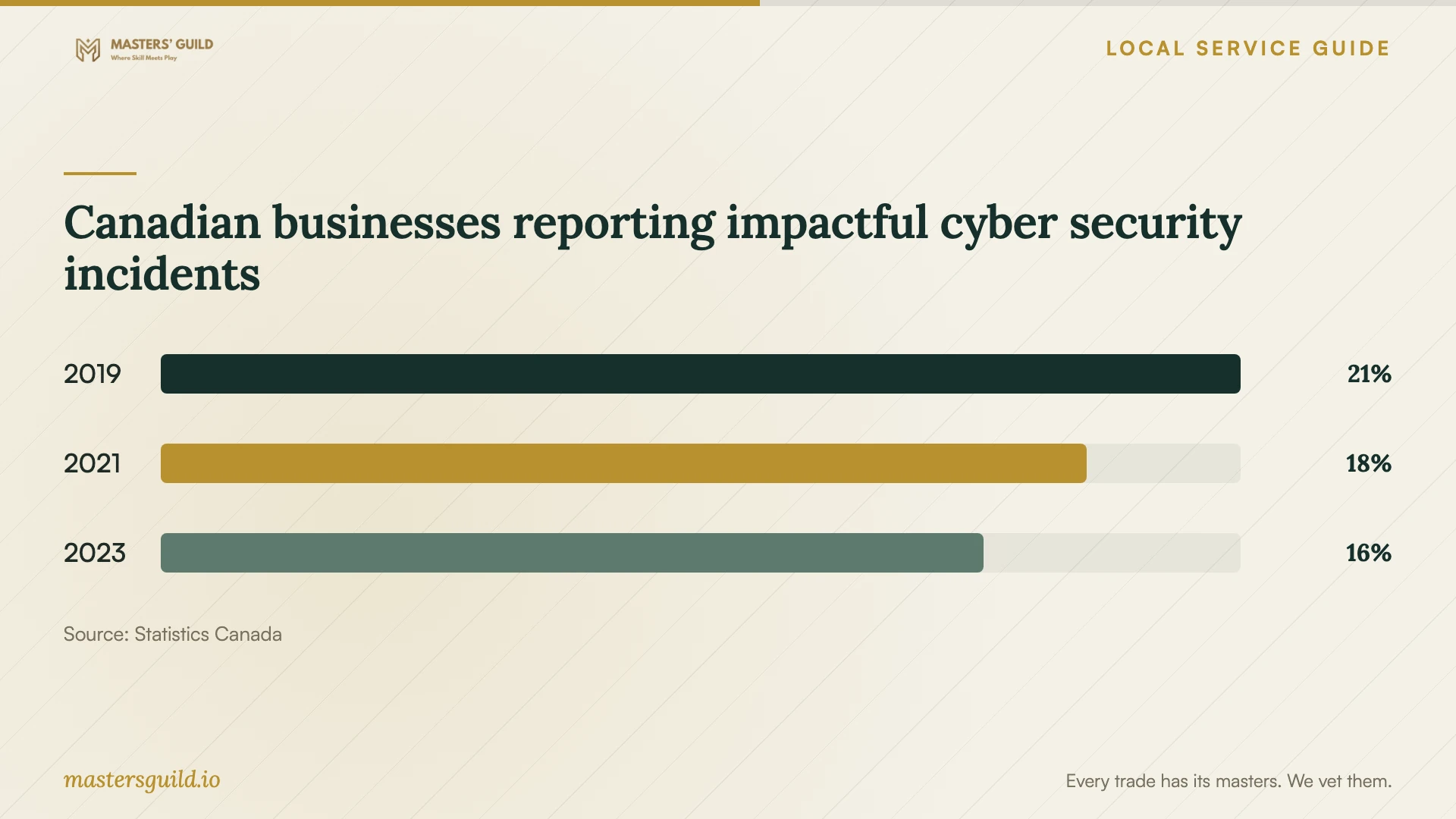
Statistics Canada reported that 16% of Canadian businesses in its survey scope experienced impactful cyber security incidents in 2023. That national figure covers enterprises with at least 10 employees across most sectors, excluding public administration. Use it as context for planning a recovery process, rather than as an estimate of your own business’s risk. [4]
Canadian businesses reporting impactful cyber security incidents
Local details that affect your job
Calgary basement storage needs an offsite counterpart
The City identifies mid-May to mid-July as the highest-risk season for river flooding and summer as the highest-risk season for local stormwater flooding. It describes basement flooding from groundwater and sewer backups. If you keep a server or backup drive in a basement, review its placement and arrange a copy outside the premises before the river-flood season. Ask your backup provider how you would restore files if you could not enter the building. [1] [3]
Alberta privacy questions belong before the transfer
Alberta’s PIPA guidance says organizations may collect personal information only for reasonable purposes and to the extent reasonably needed. It also describes notice requirements when an organization uses a service provider outside Canada, including transfers of previously collected information. Before sending customer or employee files to a recovery lab or cloud service, ask which countries and subcontractors will handle them. For an overseas provider, review the applicable notices, access to policies and named privacy contact before authorizing the transfer. [2]
Match the next step to your situation
| Situation | Arrange first | Ask before approval |
|---|---|---|
| You have a recent backup | A restore test to a separate destination | Can we open priority files and use them in the required application? |
| Files are missing or a device is unreadable | An assessment with a recovery approval point | What do I owe if I decline or you recover only part of the priority list? |
| You suspect ransomware | Incident-response coordination and a restore plan | Who will assess affected systems and any possible data exposure? |
| Your only backup stays at the premises | An offsite copy and an offline backup | How would we restore after losing access to this building? |
| A lab or cloud provider will handle personal information outside Canada | A review of applicable Alberta PIPA notices | How can individuals access our provider policies and contact the person answering privacy questions? |
Your hiring checklist
- List priority files, required applications and the last usable version you remember.
- Record the device model, symptoms and actions taken since the problem began.
- Check existing backups and arrange a restore to a separate destination.
- Get diagnostic fees, recovery charges and partial-recovery terms in writing.
- Confirm the lab location, subcontractors, privacy contact and credential handover method.
- Agree on update dates, a spending limit and approval for extra work.
- Include an offsite copy, an offline copy and a demonstrated restore in the backup scope.
Frequently Asked Questions
How much should I budget for recovery?
Request an assessment-based quote rather than assuming a standard price. Ask the provider to itemize diagnosis, approved recovery work, return media, shipping and taxes. Agree on charges for an unsuccessful or partial recovery before handing over the device.
Can I keep all my backups in the office?
The Cyber Centre recommends keeping a copy offsite because a fire or flood can affect the entire premises. In Calgary, the City identifies basement flooding from groundwater and sewer backups. Ask for a restore plan that you can carry out without entering your office. [1] [3]
Does Alberta require every backup to stay in Canada?
The cited Alberta guidance describes requirements for using service providers outside Canada; it does not establish a blanket Canadian-storage requirement. The Cyber Centre advises checking your regulatory and policy requirements for data residency. Ask the provider to identify storage and processing locations before you assess suitability. [2] [3]
How should I accept a completed backup setup?
Ask the technician to restore representative files to a separate destination and check them with you. Confirm the backup schedule, retention settings, account access and responsibility for failure alerts. The Cyber Centre recommends routine recovery testing, so agree on the next test as part of handover. [3]
Sources and scope
This guide combines the sources below with practical planning guidance. Figures apply to the stated geography and period; request a written quote for your property.