
Local service guide
Computer Virus Removal in Calgary: Hiring Guide
Arrange Computer Virus Removal in Calgary by asking for a written diagnosis and cleanup scope, a spending limit, and approval before anyone copies files or reinstalls your operating system. For an office computer, specify who may access customer records and how you want the technician to return the device. If you suspect theft or fraud, follow the Calgary Police Service reporting steps alongside the repair. [2]
Define the repair before choosing a technician
Describe what you observed rather than naming an infection you have not confirmed. Record warning messages, unfamiliar programs, browser changes and the last time the computer worked as expected. Tell the technician whether you opened an attachment, installed software or gave someone remote access. Ask them to explain what they intend to investigate before authorizing removal.
Request separate approval for malware cleanup, operating-system repair, file recovery and a full reinstall. Identify the documents and applications you need to preserve. For a bookkeeping or reception computer, include the software you need for daily work and ask who will check it after the repair. Set a spending limit and require a revised quote before the technician exceeds it.
Calgary Police Service describes viruses, Trojan horses, spyware and keyloggers as different forms of malware, including programs that steal information or damage files. Tell the technician whether your concern involves missing files, exposed credentials or suspicious account activity so you can agree on the investigation scope. [2]
Compare quotes and service arrangements
Ask each provider to state the diagnostic charge, cleanup charge and approval process for additional work. Request the total payable amount, including any travel, collection, software or tax charges. Clarify what you owe if the technician finds no malware, cannot complete the repair or recommends replacing the computer. Keep recovery work and replacement hardware as separate decisions.
Choose remote, drop-off or on-site service after discussing the symptoms and access requirements. For remote work, ask who will connect, how you authorize the session and how they will remove access afterward. For drop-off service, agree on a device receipt and collection arrangements. For an office visit, confirm whether the quote covers the affected computer alone or includes other devices.
Request an assessment time and a separate completion estimate. Tell the provider your business deadline and ask when they will contact you if they need a reinstall or file recovery. Agree on a handover check that covers startup, required applications, updates and any remaining concerns. Ask for a written record of the work and follow-up terms.
Control access to business and customer information
Before handing over a device, ask for the provider’s written privacy practices. Alberta’s PIPA guidance says organizations must take reasonable security measures against unauthorized access, use, copying and other handling of personal information. It also says organizations should make their policies available in writing on request. Use that guidance to ask how the repairer will handle the records on your computer. [3]
Agree on which folders the technician may inspect, whether they may create a backup and where they will store it. Name the person who can approve broader access. Ask how long the provider will retain copies and how they will destroy them. Alberta guidance says organizations should retain personal information only as long as reasonable for business or legal purposes, then securely destroy it or make it anonymous. [3]
Ask whether anyone outside Canada will access or receive personal information during remote support or backup work. Alberta guidance sets policy and notification requirements when organizations use service providers outside Canada. If the arrangement involves such a provider, request the countries involved, the purpose of access and a contact who can answer privacy questions. [3]
Keep fraud and privacy follow-up in the work plan
If you suspect online crime, Calgary Police Service directs general reports to its non-emergency line at 403-266-1234. For online financial crime, it advises reporting to police and obtaining a case number, contacting the bank or credit card provider, placing fraud alerts with Equifax or Transunion, and reporting to the Canadian Anti-Fraud Centre at 1-888-495-8501. [2]
Tell the technician if you have reported an incident and ask how to preserve relevant messages and records before authorizing deletion or a reinstall. Keep a timeline of what happened, whom you contacted and what access you granted. Assign responsibility for reviewing affected accounts and confirming that your staff can resume their work.
For an Alberta organization subject to PIPA, an actual privacy breach that poses a real risk of significant harm requires notification to the Office of the Information and Privacy Commissioner. Alberta guidance says this applies even when only one individual is at risk. If customer or employee information may be involved, include a privacy assessment alongside the technical repair. [3]
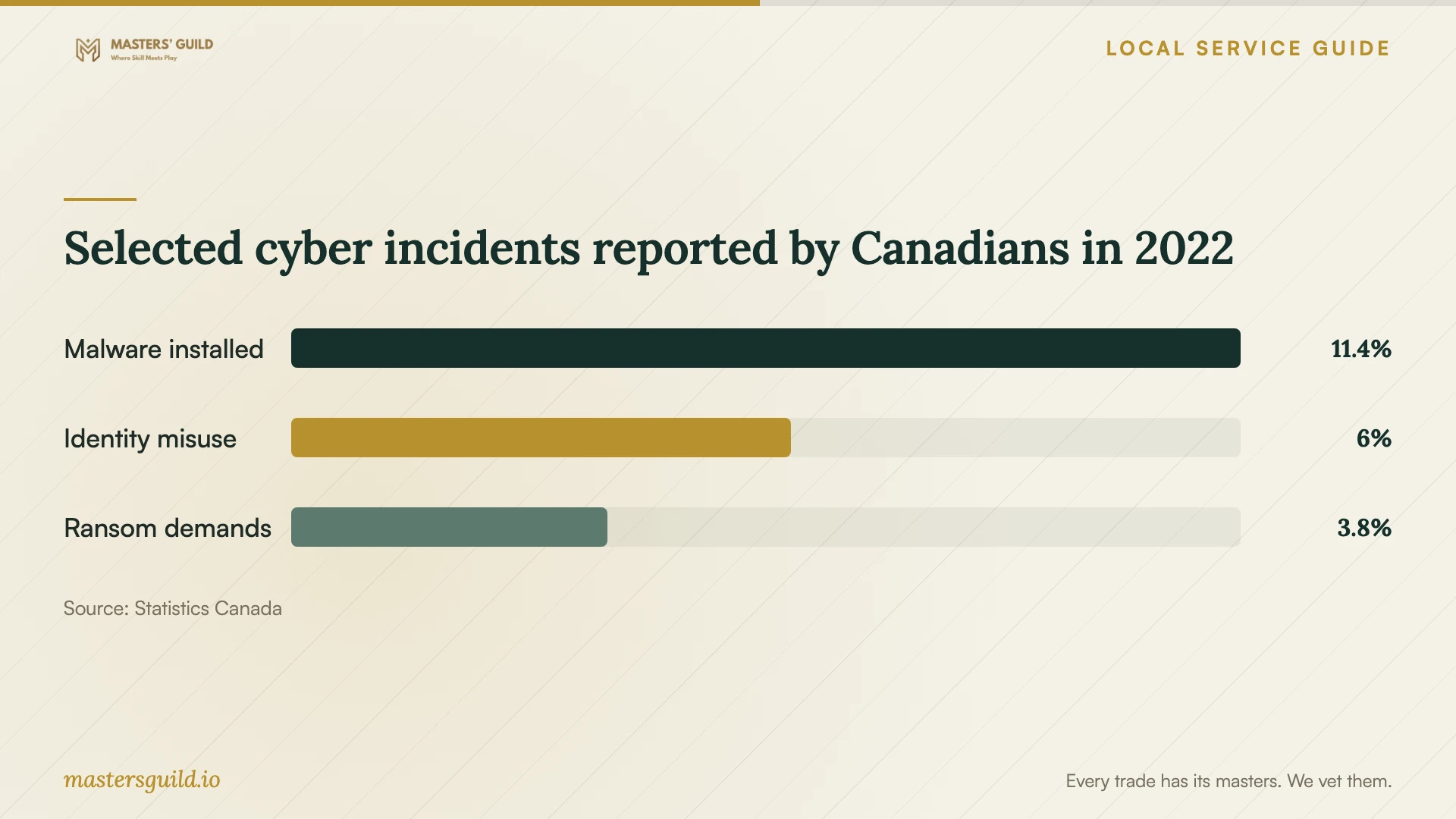
Selected cyber incidents reported by Canadians in 2022
Local details that affect your job
Check the provider’s Calgary business status
The City exempts electronics repair shops from municipal licensing while still requiring a Business ID and land-use approval for businesses without a licence. Ask a prospective repairer for its business identity and operating location. Confirm requirements for any additional business activities rather than rejecting a shop solely because it lacks an electronics repair licence. [1]
Use the local reporting route when crime is involved
Calgary Police Service lists 403-266-1234 for general online crime reports. If money or payment information is involved, include the police case number and bank contact in your incident notes. The police guidance also calls for credit-bureau fraud alerts and a Canadian Anti-Fraud Centre report, so arrange those steps alongside the cleanup appointment. [2]
Match the next step to your concern
| Your concern | What to arrange | What to clarify |
|---|---|---|
| Suspicious messages or unfamiliar programs | A diagnosis before authorizing cleanup | Diagnostic charge, findings and proposed work |
| Important files need preservation | An agreed backup or recovery scope | Files to preserve, storage location and approval before deletion |
| A reinstall is proposed | Separate authorization and a restoration plan | Required applications, files and handover checks |
| Money or payment details may be compromised | Police reporting and contact with your bank or card provider | Police case number, fraud alerts and Anti-Fraud Centre reporting |
| Customer or employee information may be exposed | A privacy assessment alongside repair | Whether the incident meets Alberta PIPA breach-reporting requirements |
Your hiring checklist
- Record symptoms, warning messages and recent downloads or remote-access sessions.
- List essential files and applications, and tell the technician about your existing backups.
- Get a written scope, total charges and a spending limit before work begins.
- Require approval before a reinstall, file deletion or additional recovery work.
- Agree on file access, backup storage, subcontractors and deletion of retained copies.
- Confirm the assessment time, completion estimate and contact for delays.
- Request a repair summary and check required applications at handover.
Frequently Asked Questions
Does a Calgary electronics repair shop need a municipal licence?
The City lists electronics repair shops as exempt from municipal licensing. It says businesses without a licence still require a Business ID and land-use approval. Ask about the provider’s business activities and identity when checking its status. [1]
Should I authorize a full reinstall at the start?
Ask for a diagnosis and discuss file preservation first. Require separate approval for a reinstall, with a written plan for restoring your files and required applications. Identify anything you cannot replace before work begins.
What should I ask about repair backups?
Ask what the technician will copy, who can access it, where they will store it and when they will delete it. Alberta guidance requires reasonable safeguards for personal information and limits retention to reasonable business or legal purposes. [3]
Who should I contact if I suspect financial cybercrime?
Calgary Police Service advises reporting to police, obtaining a case number and contacting your bank or credit card provider. It also recommends fraud alerts with Equifax or Transunion and reporting to the Canadian Anti-Fraud Centre at 1-888-495-8501. [2]
Sources and scope
This guide combines the sources below with practical planning guidance. Figures apply to the stated geography and period; request a written quote for your property.