
Local service guide
Technical Skills Training in Burnaby, BC
Arrange Technical Skills Training around a task your staff need to complete: a spreadsheet report, shared-document workflow, website update or coding project. Ask a trainer to assess starting skills, teach with a practice version of that task and quote the full scope. Before buying a package, compare Burnaby Public Library’s free learning platforms and BCIT’s computing courses with your need for individual feedback. [1] [2]
Define the result before choosing a trainer
Write a short training brief that names the software, your staff’s starting skills and the result you want. For example, ask for instruction in cleaning a sales export and creating a repeatable monthly report. Include the operating system and software version so the instructor can prepare exercises for your equipment.
Ask each learner to attempt a sample task before the lesson. Note where they need help, such as finding files, writing formulas or interpreting errors. Give the trainer this information and request a lesson plan with a practical completion check. Have learners repeat the task without prompts before you approve further sessions.
Compare library study, courses and private coaching
Burnaby Public Library provides free access to CodeCombat, LinkedIn Learning and O’Reilly for Public Libraries. LinkedIn Learning includes structured paths, topic-specific videos and hands-on practice. O’Reilly covers technology roles including software development, business analysis, data analysis and AI or machine learning. [1]
Try a relevant library lesson and ask staff to complete a small exercise before commissioning private training. Use the exercise to identify questions for a coach. For a formal course, compare the syllabus and prerequisites with the task you need to teach. Ask a private instructor to explain how they would adapt the material to your workflow and learner skill levels.
Treat BCIT’s part-time Computer Systems Technology diploma as a longer study pathway. BCIT builds it on the Computer Systems Certificate and requires additional unique credits. For a specific business skill, examine the individual course requirements and registration conditions before choosing a credential pathway. [2]
Match the course level and schedule
BCIT’s COMP 2010 Microsoft Office Applications covers Word, Excel and PowerPoint, with Access used to demonstrate database design. Its formal prerequisite is 60% in COMP 1002 or 60% in ACIT 1420. BCIT also expects Windows 11 proficiency and file management on networks and in the cloud. Check eligibility and ask a trainer to cover missing foundations before attempting that level of instruction. [2]
BCIT describes COMP 2362 Microsoft Excel Advanced as a six-week course for learners with prior basic and intermediate Excel skills. Its published prerequisite is 60% in COMP 2010, and the page lists an annual spring offering in April. Confirm the current section and your eligibility before planning staff release time. [2]
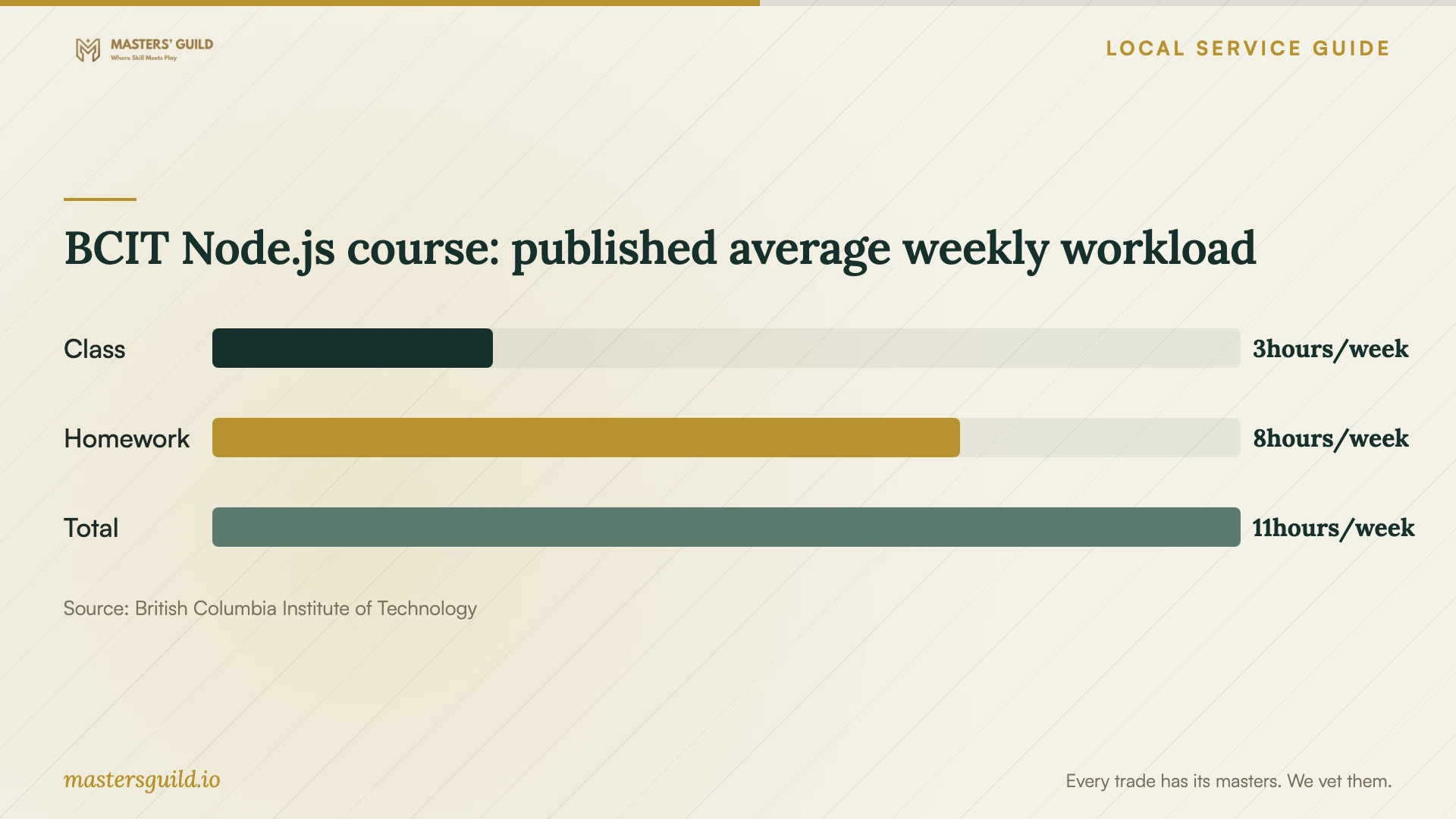
Include homework in your schedule. For COMP 3012 Back-End Web Development with Node.js, BCIT describes a possible average weekly commitment of 11 hours: three hours of class and eight hours of homework. That example concerns a programming course. Check the workload for the particular course you choose when planning staff availability. [2]
Compare complete quotes and lesson boundaries
For private coaching, request a written total that identifies session length, participant numbers, preparation, travel, software costs and follow-up. Ask whether the trainer includes setup time in teaching time. Compare proposals against the same brief and agree how either party can reschedule or end the arrangement.
Ask candidates for an example exercise in the software you use and an explanation of how they assess progress. For team training, request a plan for learners who need extra help. Specify whether you want instruction, configuration work or both, and define the deliverables for each.
Use dummy customer records and a practice copy of your files. Keep control of passwords and approve any remote-access arrangements before the session. For AI training, ask the instructor to teach output checking and agree which business information learners may enter into the tools.
BCIT Node.js course: published average weekly workload
Local details that affect your job
A free local starting point
Burnaby Public Library requires a library card and a computer with internet for its technology learning platforms. It lets learners study on their own schedule and track course progress by creating an account. Check access before purchasing coaching, then bring questions from a relevant lesson to the instructor. [1]
Confirm the campus for each course
BCIT lists the Burnaby Campus at 3700 Willingdon Avenue, the Downtown Campus at 555 Seymour Street in Vancouver, and distance or online learning for the part-time Computer Systems program. Some courses run on campus, others online, and some blend formats. Check the individual section before committing to a commute or reserving office space for remote study. [2]
Degree study has separate payment and withdrawal terms
BCIT’s BSc Applied Computer Science Flexible Learning guidance requires course fees at registration and directs students to refund deadlines on their tuition receipt. It describes evening and weekend teaching in Burnaby and downtown Vancouver, with occasional online delivery. If you sponsor an employee on this degree pathway, review those terms before paying; do not apply them to private lessons or other BCIT programs. [3]
Choose a learning route
| Your need | Route to consider | Check before committing |
|---|---|---|
| Explore a topic before paying | Free library learning | Library card, internet-connected computer and a relevant course |
| Practise Office applications | BCIT COMP 2010 | Formal prerequisite: 60% in COMP 1002 or 60% in ACIT 1420. Also check Windows 11 and network/cloud file-management skills. |
| Develop advanced spreadsheet skills | BCIT COMP 2362 | Formal prerequisite: 60% in COMP 2010. Check prior basic/intermediate Excel skills and the current section; BCIT lists an annual April offering. |
| Learn a specific business workflow | Private coaching | Request a tailored exercise, written scope and completion check. |
| Pursue degree-level computing study | BCIT BSc Flexible Learning | Check admission, course location, payment at registration and refund deadlines on the tuition receipt. |
Your hiring checklist
- Name the task learners should complete without help.
- Record software versions, equipment and starting skills.
- Check library access or formal course prerequisites before paying.
- Confirm the instructor, location, format and attendance expectations.
- Request a full quote covering preparation, teaching and follow-up.
- Prepare practice files with dummy business data.
- Agree on cancellation terms and a practical progress check.
Frequently Asked Questions
Can staff start without paying for lessons?
Burnaby Public Library offers free technology learning platforms, including LinkedIn Learning and O’Reilly. Learners need a library card and an internet-connected computer. Try a relevant lesson and use a practice task to decide whether to arrange coaching. [1]
Does an Office course suit complete computer beginners?
Check the entry level. BCIT’s COMP 2010 requires 60% in COMP 1002 or 60% in ACIT 1420 and expects Windows 11 proficiency and network/cloud file-management skills. Ask for foundational instruction first if learners need help navigating their computer or finding and saving files. [2]
How much should I budget for private training?
Get a written quote for your task and participant count. Ask for the total cost, session length, preparation, travel, software and follow-up terms. Compare quotes against the same brief and agree how you will assess progress before committing to a package.
Can I assume a BCIT computing course meets in Burnaby?
Check the individual course schedule. The part-time Computer Systems program lists Burnaby, downtown Vancouver and online options, with delivery formats that vary by course and section. [2]
Sources and scope
This guide combines the sources below with practical planning guidance. Figures apply to the stated geography and period; request a written quote for your property.