
Local service guide
Software Installation in Burnaby, BC
Arrange Software Installation in Burnaby by giving the technician your device model, operating system, application names and the tasks you need to complete. Request a written quote that separates installation, software purchases and data transfer. Before booking a home visit, ask which Burnaby business licence covers the provider’s work; the City lists a non-resident category for mobile companies without a fixed location in the city. [1]
Describe the job before comparing quotes
Write down what you want to do after the appointment. Describe application installation, email configuration and file transfers as separate tasks. Tell the technician whether you own the software, need help choosing it or want to use an existing subscription. Ask them to confirm compatibility with your device before you purchase anything.
Send the application name and version, your operating-system version and the wording of any error message. Describe earlier installation attempts. Avoid screenshots that expose account details or personal files. For a new computer, name the programs and files you want transferred and agree on who will check the results.
Agree on a completion test. For email, send and receive a message. For document software, open an existing file, make a change and save it. For creative software, try a representative project. Include any accessibility settings or instruction you need in the original scope.
Choose remote help or a home appointment
Ask whether the provider can complete your specific job remotely. Explain whether the computer starts, connects to the internet and lets you sign in. Request an in-person appointment if you want someone beside you during setup, need help connecting equipment or cannot establish a remote session.
For a home visit, provide entry instructions and clarify parking arrangements when booking. For remote work, agree on the access tool, appointment time and who initiates the connection. Stay available to approve changes and enter account credentials. Ask whether the technician intends to leave remote-access software installed and how you can disable it.
Compare the full quote and tax treatment
Request comparable written quotes using the same device count, application list and completion tests. Each quote should separate installation labour, software licences, subscriptions, backup or transfer work, travel charges and applicable taxes. Ask whether the provider charges a fixed price or by time, and require approval before they exceed your agreed limit.
B.C.’s software guidance says you do not pay PST on services to test, install, configure, modify, repair or restore software. Unless an exemption applies, you pay 7% PST on purchased software for use on a device ordinarily situated in B.C. The province includes qualifying browser-accessed software subscriptions in this rule. [3]
Ask for an explanation if the appointment includes hardware repair or a single bundled charge. B.C. treats hardware services as PST-taxable related services. For bundles containing taxable and non-taxable components, the province applies PST to the taxable component’s fair market value as a general rule, with exceptions. Have the provider explain the treatment of each charge. [3]
Protect files and account ownership
Before work begins, back up files you cannot replace and check that you can open a few copied files. Agree on any deletion, reset or reinstall before the technician starts. Discuss the recovery plan if installation fails. Keep the original computer or storage device until you have checked transferred files.
Use an account you control for purchases and activation. Keep receipts and renewal details. Enter passwords and verification codes yourself rather than including them in the job description. Ask the technician to review update settings, account verification and app permissions with you, then explain how you can change those settings later.
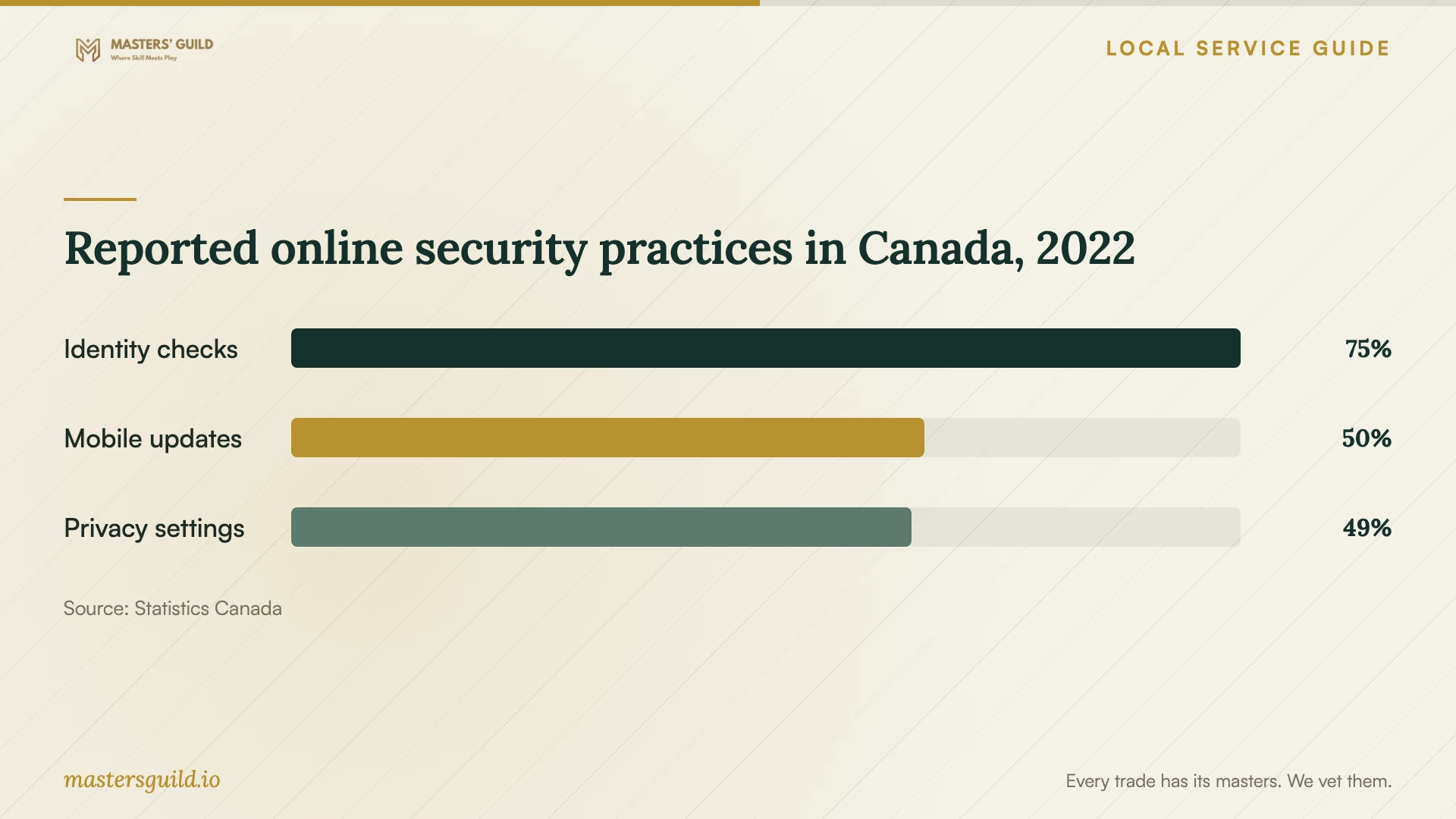
The chart uses historical findings from Statistics Canada’s 2022 survey, published in an archived 2023 infographic. It describes reported identity-verification, mobile-update and privacy-setting practices among eligible respondents across Canada’s ten provinces. Use those topics to plan questions for your installer. The findings do not describe current practices or measure Burnaby households. [4]
Reported online security practices in Canada, 2022
Local details that affect your job
Check the visiting provider’s municipal licence
The City of Burnaby requires businesses operating here to hold a valid business licence and lists resident and non-resident categories. Ask a visiting technician which licence covers their work. Before accepting an inter-municipal licence as sufficient, check its scope: the City lists eligibility for construction or trades work involving land and buildings, and home health-care services. For clarification about a provider’s category, contact Burnaby Licensing at 604-294-7320. [1]
Consider a Metrotown studio session before purchasing
Burnaby Public Library’s Digital Studio has three Studio Station computers with Windows 11 and applications including Photoshop, Illustrator, Premiere Pro, Blender and Audacity. Consider a session for an occasional creative project. BPL recommends reservations, permits up to three hours per day and allows reservations up to seven days in advance. You can reserve up to two times per Monday-to-Sunday week; the library applies these limits to an individual, group or portion of a group. Reserve through a service desk at Bob Prittie Metrotown or call 604-294-7755. Bring your library card number, PIN and personal storage to save your project. You will use the library’s computer for this option. [2]
Choose the next step for your setup
| Your situation | Next step | Confirm before proceeding |
|---|---|---|
| One application on a working computer | Ask about remote installation | Compatibility, account access and a completion test |
| Computer will not start or connect | Request an assessment before booking installation | Whether repair work falls outside the quoted scope |
| New computer with files to transfer | Quote setup and transfer as separate tasks | Backup responsibilities and how you will check copied files |
| Occasional design, audio or video project | Consider a BPL Studio Station | Listed applications, reservation limits and personal storage |
| Software purchase plus installation | Request separate invoice lines | PST treatment of software, installation services and any hardware work |
Your hiring checklist
- List each device, operating system and application involved.
- Confirm whether you own the required licence and can access the associated account.
- Describe the task you will use to test completion.
- Request an itemized quote and an approval limit for extra work.
- Ask which municipal business licence covers a home visit.
- Back up important files and check a few copies before work begins.
- Agree on remote-access permissions and enter credentials yourself.
- Test the result, keep purchase records and confirm follow-up terms.
Frequently Asked Questions
How should I set a budget for installation?
Request written quotes for the same device count, application list and completion tests. Ask each provider to separate software purchases, subscriptions, transfer work and travel charges. Agree on a spending limit and require approval for extra work before the appointment begins.
Does B.C. charge PST on installation labour?
B.C. exempts services to software, including installation and configuration, from PST. Purchased software attracts 7% PST when the province’s rules apply, unless an exemption applies. Hardware work and bundled charges require separate consideration, so ask the provider to explain the invoice. [3]
Should I give the technician my password?
Plan to enter your password yourself. Stay available for verification prompts and ask the technician to explain requests for administrator access. Keep purchases under your own account and agree on whether any remote-access software will remain after the session.
Can the library meet my need without a home installation?
Consider the Digital Studio if you want to use one of its listed creative applications on a library computer. BPL recommends reserving a Studio Station and asks you to bring personal storage to save your project. If you need the application on your own device, discuss that installation with a technician. [2]
Sources and scope
This guide combines the sources below with practical planning guidance. Figures apply to the stated geography and period; request a written quote for your property.