
Local service guide
Smart Appliance Setup in Burnaby, BC
For Smart Appliance Setup in Burnaby, hire setup help for app pairing, account access and connection troubleshooting; arrange qualified trade help if your job includes electrical installation, gas hookups or plumbing changes. Ask for a written scope that separates those tasks. Burnaby issues its own electrical permits, and its residential trade guidance covers single-family and duplex homes. [1] [2]
Define the job before choosing help
Start with what you want to do: receive a cycle-complete alert, control an appliance from your phone, share access with another household member or set a schedule. Give the provider the manufacturer and model number, your phone type, the app you use and any error message. Explain whether the appliance already works through its normal controls.
Ask the provider to confirm support for your model and requested functions before the visit. Include account setup, firmware checks, connection testing and a demonstration in the proposed scope. If you want voice control or a shared automation, ask them to check compatibility before you buy a hub or replacement device.
Separate physical installation from connected features. Burnaby requires electrical permits for electrical work and installations in single-family and duplex dwellings, including low-voltage installations. Its guidance also requires permits for installing, modifying or upgrading gas systems and for installing or changing plumbing systems in those homes. Confirm the requirements for your proposed work before booking. [1]
Compare quotes by scope and completion
Request an itemized quote for the devices you listed. Ask whether the provider charges a fixed amount or bills for time, what troubleshooting the quote includes, and how they will obtain your approval for additional work. Request separate amounts for equipment, travel, trade work and any follow-up visit. Treat utility rewards as a separate consideration when setting your budget.
Agree on a completion test. For example, ask the provider to demonstrate an app connection, a notification and a schedule on your own phone. Ask them to show you how to cancel the schedule and use the appliance controls. If they cannot complete a feature, request an explanation of the unresolved issue and the next step.
For regulated work, check the contractor's licence and authorized scope rather than relying on a general description of their services. Technical Safety BC's contractor guide explains how to search by company name or licence number and review scope and enforcement history. It also describes a separate tool for checking an individual's certification. [3]
Prepare accounts and Wi-Fi access
Have your phone, appliance manual and account recovery access ready. Sign in yourself and enter passwords during the visit instead of sending them with the job description. Ask the provider to use an account you control and to explain any permissions they request. Decide who in your household should retain access after the work.
Tell the provider where the router and appliance sit, whether you can manage the router settings and whether other devices lose their connection in the same room. Ask them to check the manufacturer's network requirements before changing settings or recommending new hardware. Agree on any network changes and record how to reverse them.
Before the provider leaves, review notifications, remote-control permissions and any recurring subscription they propose. Ask them to remove temporary access and write down the steps for reconnecting the appliance. Keep unresolved manufacturer or account problems in a handover note so a second visit has a clear purpose.
Choose schedules that fit your home
Check your BC Hydro rate plan before asking someone to program an energy-saving schedule. On optional time-of-day pricing, BC Hydro discounts overnight electricity from 11 p.m. to 7 a.m. by 5 cents per kWh and adds a 5-cent surcharge from 4 to 9 p.m., using local time. The utility applies neither adjustment during the remaining hours. [4]
Use BC Hydro's rate estimator to compare plans against your past usage before changing your rate. The utility generally does not recommend time-of-day pricing for apartment or condo customers unless their use includes EV charging. It also notes that building noise restrictions can limit overnight dishwasher and laundry use. Check your own building's rules before choosing a start time. [4]
Ask the provider to follow the appliance manufacturer's instructions for delayed or remote operation. Choose a schedule you can cancel and test it while you are present. For a shared laundry area or an appliance outside your unit, confirm who controls it and who can authorize changes.
Request Peak Saver enrollment only for eligible devices
BC Hydro's Peak Saver device program covers specified EV chargers, smart thermostats, load controllers, home batteries and water heaters. Check the exact brand and model against the utility's list before buying equipment or paying for enrollment help. Do not assume a connected dishwasher or washer qualifies because it has an app. [5]
To qualify, you must be the BC Hydro account holder with an active MyHydro profile, have an eligible device and own the residence or have the owner's consent as a tenant. BC Hydro excludes E-Plus accounts. Enrollment routes differ by manufacturer, so ask the provider to identify the required app or utility process. [5]
During occasional winter peak events, BC Hydro adjusts enrolled devices for no more than four hours. You retain override control, but opting out of more than 50% of events in a season may affect eligibility for the seasonal reward. Ask the provider to demonstrate the override and explain the settings you have agreed to before enrollment. [5]
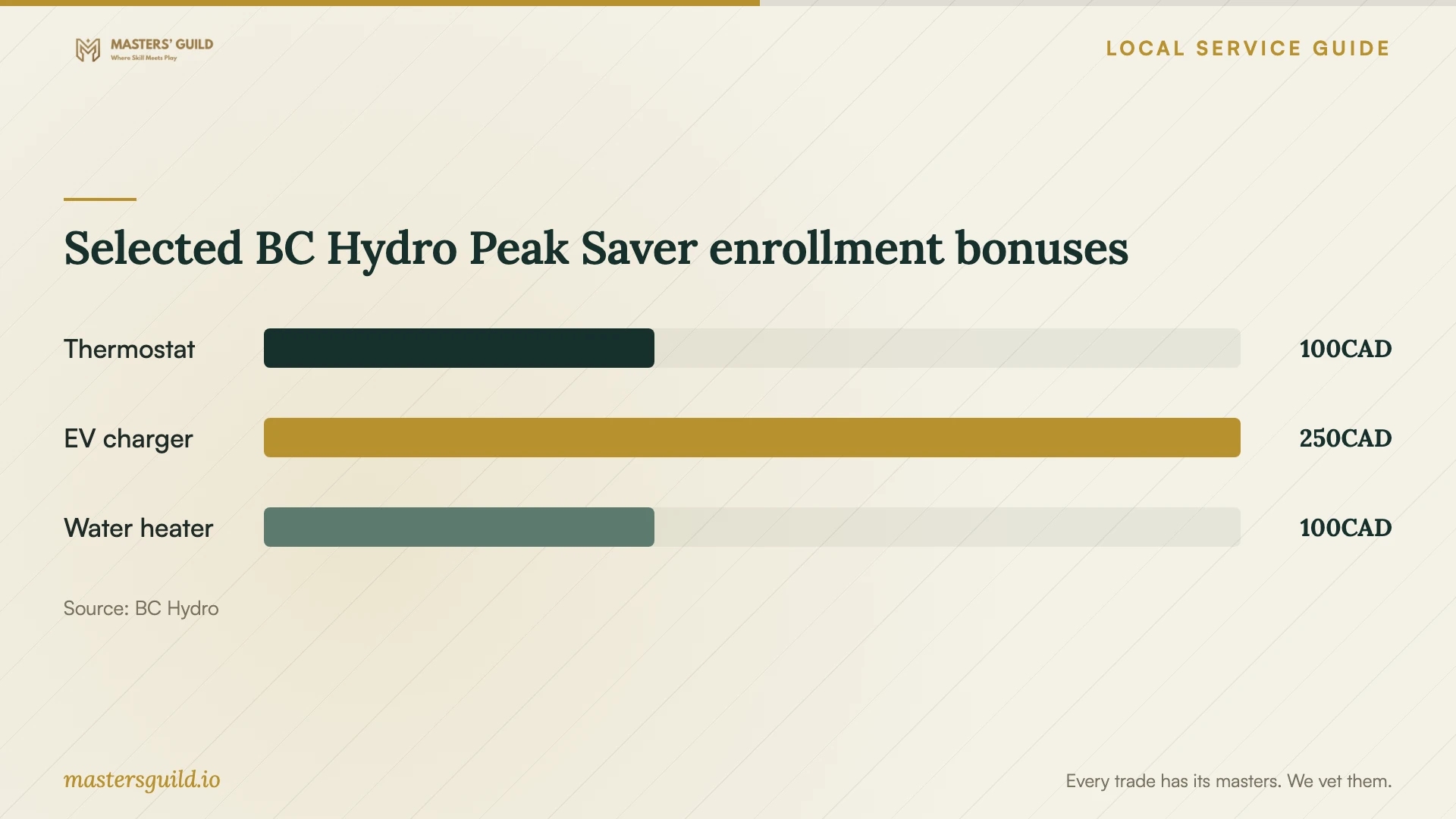
Selected BC Hydro Peak Saver enrollment bonuses
Local details that affect your job
Route installation questions to Burnaby
Technical Safety BC names Burnaby among the municipalities that issue their own electrical installation permits. For single-family and duplex work, the City's My Permits Portal supports electrical, gas and plumbing applications and inspection bookings. Contact Building Permits at 604-294-7130 to clarify your scope. For an apartment or condo, ask the City which process applies; the cited residential trade page covers single-family and duplex dwellings. [1] [2]
Check condo constraints before overnight automation
BC Hydro's regional rate guidance cautions that apartment and condo noise restrictions may prevent overnight dishwashing or laundry. Its time-of-day pricing also excludes common-area accounts in multi-residential buildings. For a Burnaby condo, confirm your unit's rate plan and building rules before paying someone to create an overnight routine. [4]
Plan eligible-device enrollment before winter
BC Hydro runs Peak Saver during November through March. After enrollment, the utility says it reviews the information and emails next steps within about 10 business days. If you want enrollment assistance during setup, check eligibility and account access beforehand and allow for that review instead of expecting the provider to finish utility approval during the visit. [5]
Choose help for the work you need
| Your situation | Help to arrange | Confirm before booking |
|---|---|---|
| Installed appliance needs app pairing | Setup help familiar with your model | Account access, requested features and a completion demonstration |
| Appliance repeatedly loses its connection | Setup help that includes network troubleshooting | Manufacturer requirements and approval for router changes |
| Job includes electrical installation | Qualified electrical contractor | Authorized scope and Burnaby permit requirements |
| Gas or plumbing system needs changes | Appropriate qualified trade help | City permit requirements for your dwelling and proposed work |
| You want Peak Saver enrollment | Setup help familiar with the eligible device | Exact model, account eligibility and manufacturer-specific enrollment route |
Your hiring checklist
- List appliance model numbers and the functions you want demonstrated.
- Describe existing installation, app errors and connection problems.
- Confirm who handles physical installation and permit questions.
- Request an itemized quote and an approval process for extra work.
- Have your phone, account recovery access and router access ready.
- Check building rules and manufacturer instructions before choosing schedules.
- Agree on a completion test and ask for reconnection and override instructions.
Frequently Asked Questions
Can I handle app pairing myself?
Try the manufacturer's setup instructions if you are comfortable managing your account and network access. Hire help if you want troubleshooting or a guided handover. If the job expands into electrical installation or gas or plumbing changes, confirm trade and permit requirements before proceeding. [1] [2]
Does smart appliance setup require a Burnaby permit?
Describe the exact work to the City rather than relying on the service name. Burnaby's residential trade guidance requires permits for electrical installations and gas or plumbing system changes in single-family and duplex homes. That page does not establish an app-pairing permit requirement or the process for apartments. [1]
Will an overnight schedule reduce my electricity bill?
BC Hydro offers an overnight discount under optional time-of-day pricing, alongside an evening surcharge. Your overall result depends on when your household uses electricity. Compare plans with the utility's rate estimator, then check appliance instructions and building noise restrictions before setting a schedule. [4]
Can any smart appliance earn a Peak Saver reward?
BC Hydro limits device enrollment to eligible models in specified categories. Check the exact model and your account eligibility first. The utility offers enrollment bonuses per device type per household, and it excludes free thermostats from the thermostat enrollment bonus. [5]
Sources and scope
This guide combines the sources below with practical planning guidance. Figures apply to the stated geography and period; request a written quote for your property.