
Local service guide
Home Office Setup in Burnaby, BC
For Home Office Setup in Burnaby, hire for the tasks you need: furniture assembly, equipment connections, mounting, and workstation adjustment. Separate new outlets, installed wiring, and proposed wall changes from the assembly quote. The City requires electrical permits for electrical installations in single-family and duplex dwellings, including low-voltage installations, and building permits for building or removing walls. Resolve those scopes before scheduling the final setup. [1] [2]
Define the work before comparing quotes
Write a task list for the workstation. Name the desk and chair models, monitor count, computer, dock, printer, and accessories. Specify whether you want assembly, positioning, connections, software configuration, or a working demonstration. Ask the provider to identify exclusions before you accept the quote.
For mounting, send the monitor and mount model numbers with photos of the proposed location. Ask the installer to confirm equipment compatibility, the attachment method, and the hardware they will supply. For a desk clamp, have them check the desktop and clearance behind it. For a wall mount, ask them to assess the wall before committing to installation.
Describe cable management in concrete terms: an under-desk tray, reusable ties, a surface route, or installed cabling. Burnaby includes low-voltage installations in its electrical-permit requirements for single-family and duplex dwellings. Ask the City about a proposed installed cable route before treating it as part of furniture assembly. [1]
Resolve wall changes before the setup visit
If you want to build a partition or remove a wall to create an office, plan the renovation first. Burnaby's home-improvement guidance includes building and taking down walls within its alteration-permit guidance. The City exempts specified minor work from building permits, including replacing fixtures, cabinets and flooring, interior painting, and minor non-structural exterior repairs. Contact the Building Department if you are unsure how your proposed work fits. [2]
Keep a furniture layout available when you discuss outlets and cable routes. Mark the intended desk position, equipment locations, and access points. Ask whoever handles the electrical or renovation scope to confirm the sequence, permit responsibility, and inspections before you arrange final assembly.
For a condo, ask your building manager which access arrangements and alteration approvals apply to your proposed work. For a rental, confirm permission with your landlord before drilling or changing the room. Share any approved work limits with the provider, along with parking, delivery, and elevator arrangements.
Ask for a workstation you can adjust
Include time to adjust the workstation with you present. WorkSafeBC explains that your chair, keyboard, mouse, and monitor affect body position, and that poor adjustment can increase injury risk. Ask the provider to show you how to change each adjustable component rather than leaving it at the assembly position. [3]
Try your usual work during the handover: typing, using the mouse, reading the screen, and joining a call. Check that you can reach controls and connections without rearranging the desk. If you use a standing desk, move it through your intended positions and check the cable slack before securing the cables.
Agree on a functional check before the visit. Include the display connection, dock, keyboard, microphone, camera, and printer if they form part of the job. Enter your own passwords and approve account access yourself. Ask the provider to explain any remaining problem and whether fixing it falls within the agreed scope.
Compare the full quote and ongoing costs
Request a written quote that separates assembly, mounting, tech configuration, and cable management. Ask whether the provider charges a fixed amount or by time, how they handle extra work, and whether they include hardware, packaging removal, and travel or access charges. Set an approval process for additions before work starts.
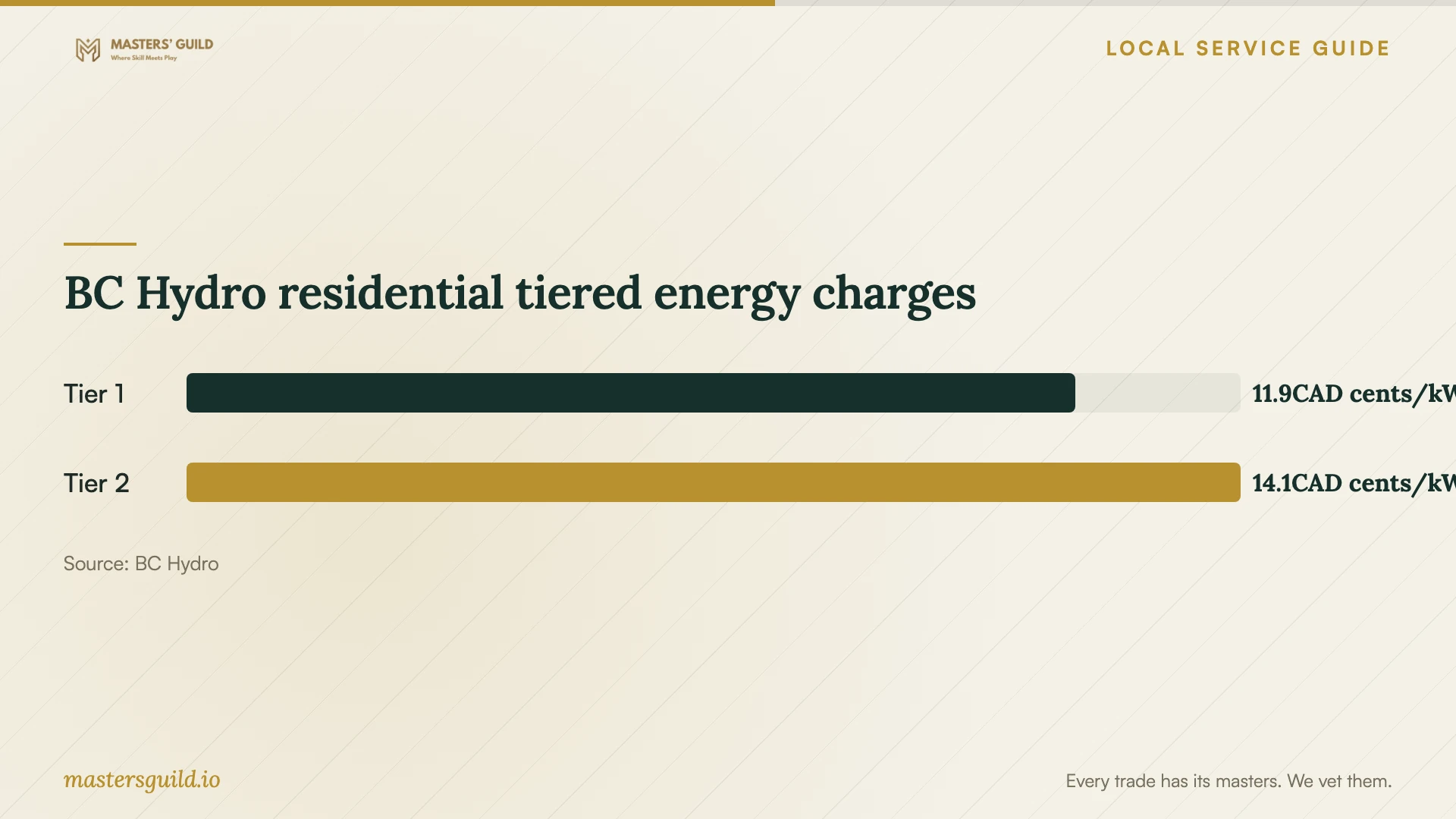
For ongoing electricity use, check your actual rate plan. BC Hydro's residential tiered page lists energy charges of 11.87 Canadian cents per kWh under the Tier 1 threshold and 14.08 cents per kWh above it. These charges apply to electricity use, not the cost of hiring someone to set up an office. [4]
BC Hydro calculates the Tier 1 threshold using the number of billing days multiplied by 22.1918 kWh. Your household's total consumption determines how much use falls into each tier. To budget for office equipment, use its measured consumption and your bill rather than assuming that a desk or monitor count predicts the cost. [4]
BC Hydro residential tiered energy charges
Local details that affect your job
Electrical applications for houses and duplexes
Burnaby requires an electrical permit application for electrical work and installations in single-family and duplex dwellings, including low-voltage installations. The City accepts electrical applications through My Permits Portal, where applicants can manage applications and book inspections. Before adding an outlet or installed cabling, confirm who will handle that scope and the application. For an apartment, ask the City which permit process applies; this residential trade page addresses houses and duplexes. [1]
Office partitions use the alteration process
Burnaby accepts alteration applications online through My Permits Portal. For approved alteration permits, the City instructs applicants to print the permit package and drawings at the approved size, 36 by 24 inches, in the issued colour and keep a printed copy on site for inspections. If your office plan includes a new or removed wall, arrange the alteration approval and inspection access before booking the finished workstation setup. [2]
Choose the scope before booking
| Your plan | Scope to request | Next step |
|---|---|---|
| Assemble a freestanding desk and chair | Furniture assembly and positioning | Provide model numbers and ask for an adjustment demonstration. |
| Connect screens, a dock, and peripherals | Tech connections and functional testing | List each device and agree on the handover checks. |
| Mount a monitor | Compatibility and attachment assessment | Send mount details and photos; confirm hardware and permissions. |
| Add an outlet or installed low-voltage wiring in a house or duplex | Separate electrical scope; Burnaby requires an electrical permit | Confirm permit responsibility and the work sequence. |
| Build or remove a wall | Residential alteration; Burnaby requires a permit | Resolve the alteration application before final office setup. |
Your hiring checklist
- List furniture models, equipment, and the tasks you want included.
- Measure the room, desk location, doorway, and delivery route.
- Photograph the proposed mounting surface and nearby connections.
- Identify outlet changes and installed cabling for a separate scope discussion.
- Confirm building access arrangements and any required permissions.
- Ask for written inclusions, exclusions, and approval terms for extra work.
- Keep manuals, supplied hardware, and equipment available for the visit.
- Test connections and adjustments with the provider before handover.
Frequently Asked Questions
How much should I budget for the setup?
Obtain itemized quotes for your actual equipment and room. Compare providers using the same task list, hardware assumptions, and access arrangements. Ask each provider to separate assembly, mounting, tech configuration, and any electrical or renovation work, and to explain how they charge for additions.
Do I need a permit for a home office?
Assess the work you plan, rather than the room's name. Burnaby requires electrical permits for electrical installations in single-family and duplex dwellings, including low-voltage installations. Building or removing walls requires an alteration permit. The City exempts specified minor work, including interior painting and replacing cabinets or flooring. Ask the Building Department about uncertain work. [1] [2]
Should I include ergonomic adjustments?
Ask for adjustments and a demonstration with you using the workstation. WorkSafeBC identifies chair, keyboard, mouse, and monitor adjustment as relevant to body position and injury risk. Confirm that the provider includes this step in the quoted service. [3]
Will using a room for work change my electricity rate?
BC Hydro's residential eligibility guidance includes a dwelling where a portion supports a business if one meter supplies the whole dwelling. Check your account's rate plan before budgeting, and ask BC Hydro about your circumstances if the metering or use differs. [4]
Sources and scope
This guide combines the sources below with practical planning guidance. Figures apply to the stated geography and period; request a written quote for your property.