
Local service guide
Technical Skills Training in Burlington, VT
Arrange Technical Skills Training around a task you or your staff need to complete, then request a lesson plan and written quote before buying a package. Consider Fletcher Free Library’s 30-minute support sessions for a basic software or device question, CCV’s IT programs for a credential pathway, and private coaching for instruction on your business workflow. Specify your software, starting level, and deadline so you can compare the proposed instruction. [1] [3]
Choose an outcome before an instructor
Write a brief that names the learner, task, and result. For example, an employee needs to turn a sales export into a spreadsheet with formulas and a summary table. Include the software edition, device type, current skill level, and deadline. Ask the instructor to explain the exercise they would use and how they would check understanding.
For team instruction, describe each participant’s starting level. Ask whether everyone needs a computer, how the coach will divide teaching and practice time, and which materials participants will keep. Request an exercise related to your workflow before agreeing to a broad course on office software, coding, or AI.
Use library help for a focused question
Fletcher Free Library staff provide in-person help with software questions, devices, smartphones, and library digital resources. Each patron receives a 30-minute session on a first-come basis. Bring a narrow question and your device if appropriate. Staff do not repair broken computers, devices, or phones. [1]
The library also directs learners to free Udemy tutorials covering Google Workspace, Excel, programming languages, and other topics. Ask about access requirements before planning staff learning around those resources. After trying a tutorial, list the steps where you need individual instruction. [1]
Compare coaching with formal IT study
CCV lists an IT associate degree, cybersecurity and networking, data analytics and AI, and IT support certificates, plus credentials that include AWS Certified Cloud Practitioner and CompTIA certifications. The college describes stackable pathways in which classes contribute to credentials, certificates, and degrees. [3]
CCV’s Winooski center serves greater Burlington at 1 Abenaki Way. New degree-seeking students begin with a one-on-one advising appointment. Ask an advisor about prerequisites and the next available course, then confirm its teaching location and format before arranging travel. [4]
For private coaching, request a plan tied to your task. If an instructor proposes certification preparation, ask which exam version they teach, whether their price includes exam fees, and which practice assessments they provide. Define course completion and passing an external exam as separate goals in your brief.
Compare complete costs
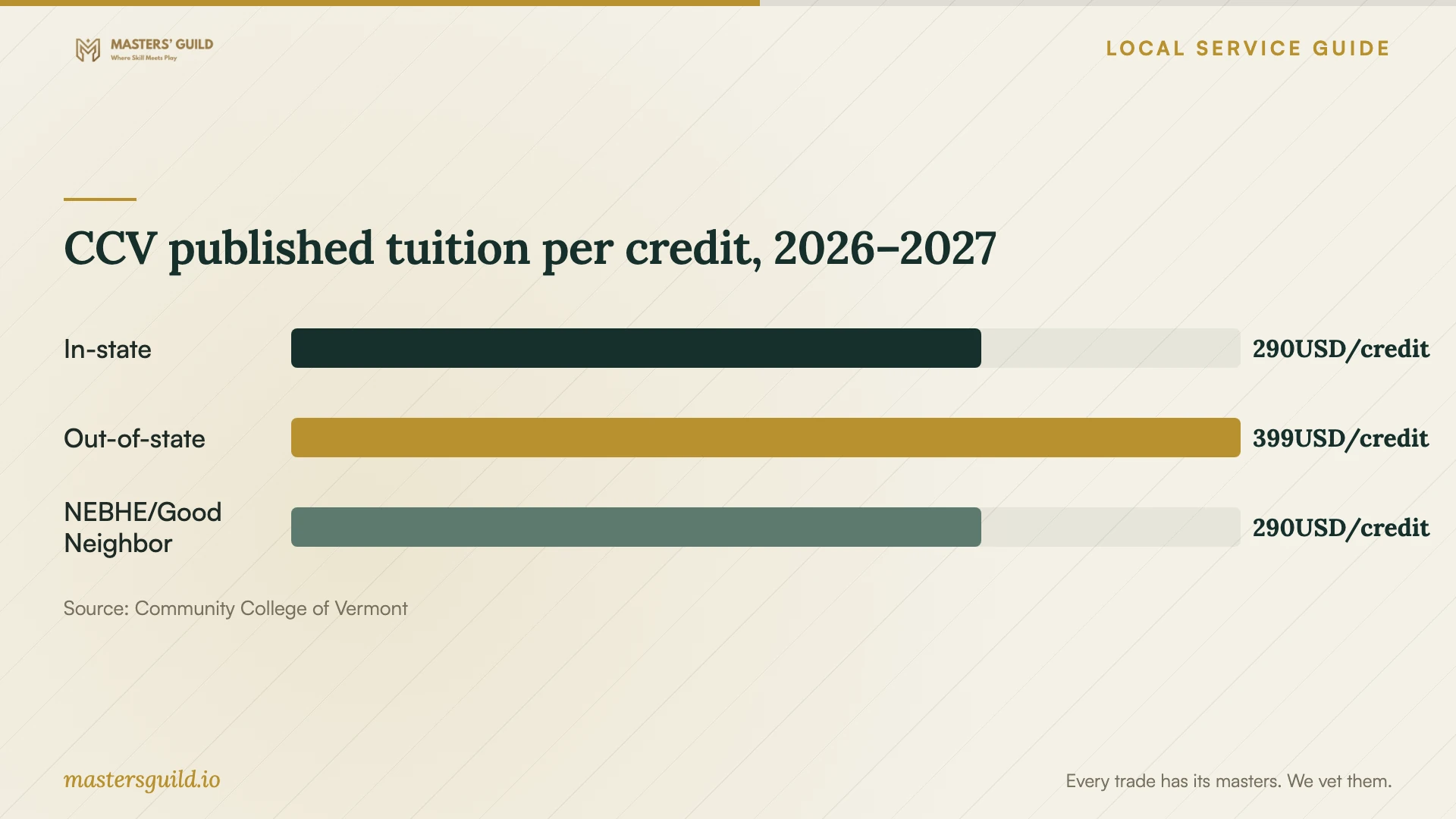
For academic year 2026–2027, CCV publishes tuition of $290 per credit for in-state students, $399 for out-of-state students, and $290 under NEBHE/Good Neighbor eligibility. The college lists a $125 nonrefundable administrative fee; textbooks, course-specific fees, and non-credit workshop charges vary. Confirm your tuition classification and complete charges before enrolling. [5]
Request a written quote stating session length, participant count, preparation charges, travel, software subscriptions, and follow-up support. Ask about cancellation terms and package expiry. Give each instructor the same brief and compare the exercises and support included in their price.
Ask CCV’s financial aid staff about eligibility before budgeting from tuition alone. The college encourages students to complete the FAFSA and Vermont Grant Application so staff can identify funding sources for which they qualify. [5]
Prepare equipment and a practice task
Confirm that your device runs the required software and that you can sign in to the correct account. Test screen sharing before remote instruction. Prepare a sample file with customer names, payroll details, and other confidential information removed. Keep control of passwords and ask the instructor to explain proposed account permissions or settings changes.
Ask the instructor to leave written steps and a practice exercise. End the session by completing the target task yourself. Before booking further lessons, identify which steps you can perform without prompting and which need another demonstration.
CCV published tuition per credit, 2026–2027
Local details that affect your job
Confirm New North End support hours before travelling
Fletcher Free Library lists Sunday support from 4–6 pm at the Main Library and Tuesday support from 12:30–2 pm at the New North End Branch. The same page lists regular Tuesday branch opening at 2 pm, leaving the support access arrangement unclear. Confirm it with library staff before travelling to 1127 North Avenue. The Main Library is at 235 College Street. [1]
Plan Office practice around borrowing limits
Adults with active regular resident library memberships and no unpaid fines or fees can borrow free equipment kits, subject to availability and a signed agreement. Laptop & Hotspot Kits include Word, Excel, PowerPoint, and OneNote; Chromebooks do not include Microsoft Office. The library limits Laptop & Hotspot Kits to one checkout per month. Loans last one week, with one renewal if nobody has placed a hold. Library devices delete saved documents at each shutdown, so save practice work to your own storage first. The library disables overdue kits and charges $5 per day in late fines. Return kits to the Help Desk during opening hours, rather than the outside drop box. Confirm availability and return timing before arranging lessons around borrowed equipment. [2]
Arrange Winooski parking before an in-person course
CCV charges a nonrefundable $50 fee for semester parking privileges at the Winooski City Parking Garage. Privileges begin two business days after vehicle registration and cover levels 4–7. Students must reapply and pay for additional semesters. Include parking in your study budget and register your vehicle ahead of the first class. [4]
Match your goal to a training route
| Your goal | Route to consider | Confirm before arranging |
|---|---|---|
| Resolve a basic software or device question | Fletcher Free Library drop-in support | Session access and timing; 30-minute first-come limit; repair exclusion |
| Learn background skills at your own pace | Library-listed free Udemy tutorials | Access requirements and coverage of your software |
| Practise a business workflow | Private coaching | Task-based lesson plan, complete quote, and practice materials |
| Pursue an IT degree or certificate | CCV information technology programs | Prerequisites, course availability, delivery format, and total charges |
| Practise Microsoft Office on borrowed equipment | Fletcher Free Library Laptop & Hotspot Kit | Eligibility, availability, monthly checkout limit, return deadline, and file storage |
Your hiring checklist
- Name the work task, software edition, and result you want.
- Describe each learner’s starting level and accessibility needs.
- Confirm devices, accounts, subscriptions, and internet requirements.
- Request a relevant teaching example and proposed lesson plan.
- Compare complete quotes, cancellation terms, and package expiry.
- Prepare practice files without confidential business information.
- Agree on an exercise you will complete without prompting.
Frequently Asked Questions
Can library staff repair my computer during support?
No. Fletcher Free Library excludes repairs of broken computers, devices, and phones. Staff assist with software questions, device use, and library digital resources. Describe the problem before choosing instruction or repair assistance. [1]
Can I complete a CCV IT program online?
CCV marks its IT associate degree and its cybersecurity and networking, data analytics and AI, and IT support and service operations certificates as programs students can complete fully online. Confirm course schedules and pathway requirements with an advisor. [3]
Can I keep a library laptop for ongoing weekly lessons?
Plan around a one-week loan and one renewal if nobody has placed a hold. Laptop & Hotspot Kits have a one-checkout-per-month limit, subject to availability. Confirm borrowing dates before booking recurring lessons and arrange another device for gaps. [2]
How should I compare private instructors?
Give each instructor the same task brief. Compare proposed exercises, relevant teaching experience, participant limits, and complete charges. Ask what you will practise during the lesson, how you will demonstrate understanding, and which notes or files you will keep.
Sources and scope
This guide combines the sources below with practical planning guidance. Figures apply to the stated geography and period; request a written quote for your property.