
Local service guide
Software installation in Burlington, VT
Software installation in Burlington, VT starts with a defined job: ask a technician to quote installation, configuration and testing for your named programs and devices. Include backup and restoration terms for an operating-system reinstall. For a basic software question, consider Fletcher Free Library’s one-on-one support. Before booking paid work, agree on labor, software purchases, downtime and follow-up help in writing. [1]
Choose help that matches the task
Describe the result you need. Name the application, computer model and operating system, and include any error message. Explain whether you need a new installation, an upgrade, account activation or help opening existing files. Ask the technician to confirm compatibility before you purchase a license.
Consider remote help if you can start the computer, connect to the internet and stay present for sign-ins. Choose an in-person appointment if you want someone beside you for setup or cannot operate the device enough to begin a remote session. Agree on who handles a hardware fault or a problem outside the installation scope.
Fletcher Free Library staff provide one-on-one support at the Main Library and New North End Branch. They offer 30-minute sessions on a first-come basis for software questions and device use, excluding broken-device repair. Ask about your task before expecting staff to carry out an installation. [1]
Get a quote you can compare
Request separate amounts for installation labor, licenses or subscriptions, file transfer, backup work and travel. Ask whether the technician charges a fixed amount or bills for time. Set an approval point before extra troubleshooting. For an operating-system reinstall, have the technician spell out what they will preserve, erase and restore.
Vermont’s Department of Taxes says sales of prewritten software have been subject to sales and use tax since July 1, 2024, whether buyers obtain it on storage media, download it or access it through the internet. The department lists development and technical support services as nontaxable. Ask the seller to identify the software and support components of your invoice and explain their tax treatment. [3]
Burlington participates in Vermont’s 1% local-option sales tax, which adds to the 6% state sales tax for a 7% total on applicable taxable sales. The state bases local-option tax on the destination where the buyer takes possession or receives delivery. Confirm the purchase address and applicable tax with the seller before calculating the total. [4]
Prepare files, accounts and your connection
Make a backup before work begins, then open a few important files from it. Tell the technician which folders, photos, email archives and settings matter to you. Before approving work that could erase the computer, agree on the backup location and restoration steps.
Keep your license receipt, account email and recovery method available. Enter passwords yourself and stay present for authentication prompts. Ask the technician to use the software publisher’s download source and explain any remote-access tool before you grant access. At handover, review whether you still need that tool.
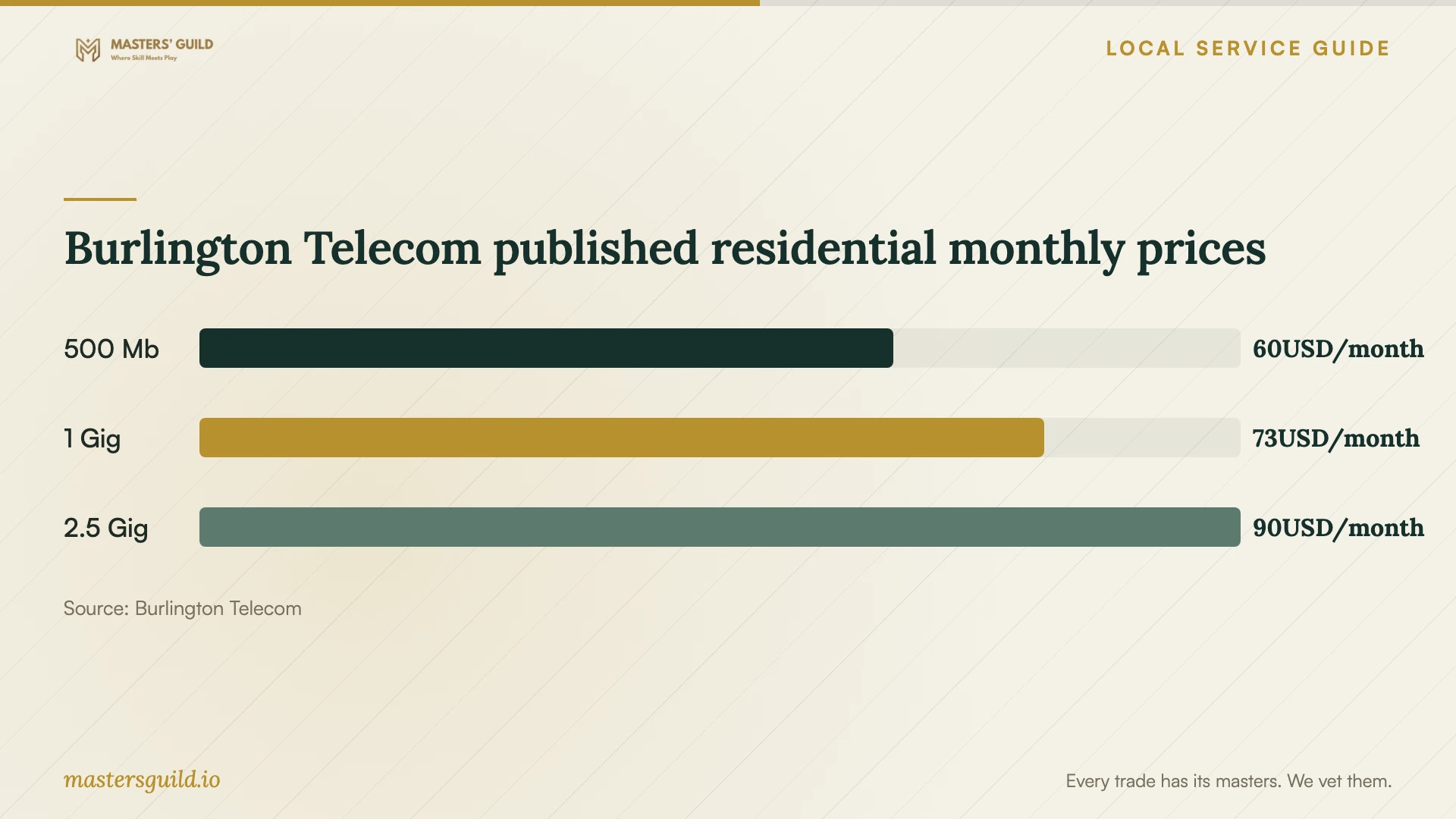
Test your internet connection before a remote appointment and report connection problems to the technician. Burlington Telecom publishes residential broadband prices and typical speeds for its Chittenden County service. Use the chart as context for a separate broadband decision, and ask about download needs before changing your plan. [5]
Plan downtime and test the result
Ask how long to reserve for the work, when you will lose access to the computer and whether the technician plans to take it away. Arrange access to essential documents before the appointment. If you want a library loan during the work, confirm eligibility and availability before choosing the service date.
Fletcher Free Library lends kits to adults with active regular resident memberships and no unpaid fines or fees. Borrowers must sign an agreement for each checkout. Kits go out for one week, with one renewal if nobody has placed a hold. The library disables overdue kits and charges $5 per day in late fines. Plan another option if the reinstall could exceed your loan period. [2]
The library allows one checkout per month for each laptop-and-hotspot, Chromebook-and-hotspot and standalone hotspot kit. Standalone Chromebook kits allow more frequent borrowing, subject to availability. Library laptops include Word, Excel, PowerPoint and OneNote; Chromebooks do not include Microsoft Office. Choose around the tasks you need to continue. [2]
Before ending the appointment, open the installed program and complete a task you care about, such as editing a document or sending email. Find your files, sign in and restart the computer. Request a record of installed programs, license ownership, recurring charges and unresolved issues, plus the terms for correcting a failed installation.
Burlington Telecom published residential monthly prices
Local details that affect your job
Call before a Tuesday branch support visit
The library lists Sunday support from 4 to 6 pm in Main Reading Room North at 235 College Street. Its Tuesday support listing at the New North End Branch, 1127 North Avenue, runs from 12:30 to 2 pm, but the same page lists Tuesday branch opening hours as 2 to 6 pm. These listings conflict. Call 802-863-3403 to confirm access before planning that Tuesday visit. Sessions last 30 minutes per patron and run first come, first served. [1]
Arrange a loan around your reinstall
Eligible borrowers can request kits at 802-863-3403, in person or through the library catalog, with pickup at the Tech Center Help Desk at 235 College Street. Check your monthly borrowing allowance before scheduling downtime. Save work from borrowed laptops and Chromebooks to a flash drive or cloud account because the library deletes saved documents at shutdown. Return kits to the Help Desk during open hours; the library prohibits outside-drop-box returns. [2]
Separate software purchases from support charges
For applicable prewritten-software purchases delivered to Burlington, budget for the 6% state sales tax plus the 1% local-option sales tax. Vermont includes remotely accessed prewritten software in its taxable category and lists technical support services as nontaxable. Ask for separate software and support charges so the seller can explain the tax calculation for your purchase. [3] [4]
Choose your next step
| Your situation | Suggested help | Confirm before proceeding |
|---|---|---|
| You need help understanding a software feature | Consider library one-on-one support | 30-minute, first-come sessions; call to resolve Tuesday branch access |
| You want an application installed and configured | Request a defined technician quote | Compatibility, license ownership and a working test |
| You need an operating-system reinstall | Arrange backup and restoration terms with a technician | Files to preserve, permission to erase and downtime |
| You need a temporary computer | Check library kit eligibility and availability | One-week loan, borrowing limits and deletion of borrowed-device documents at shutdown |
Your hiring checklist
- List the programs, devices and exact tasks you want completed.
- Provide the computer model, operating-system version and error messages.
- Confirm license ownership and recurring subscription charges.
- Back up important files and test that you can open them.
- Agree on labor, travel, tax and approval for additional work.
- Keep account recovery methods available and enter passwords yourself.
- Arrange temporary computer access before approving downtime.
- Test the software and review follow-up terms before handover.
Frequently Asked Questions
How much should I budget for installation labor?
Obtain an itemized written quote for your device and program list. Ask the technician to separate labor from licenses, backup work and travel, and confirm whether they charge by time or by the job. Agree on your approval before extra troubleshooting begins.
Can library staff install my software?
The library describes support for software questions and device use without committing to installation work. Ask about your task before visiting. Staff exclude broken-device repair, and sessions last 30 minutes per patron. Call 802-863-3403 before a Tuesday branch visit because the support listing conflicts with branch opening hours. [1]
Does Vermont tax an online software subscription?
Vermont includes prewritten software accessed remotely through the internet in its taxable category. Ask the seller how your subscription qualifies and whether Burlington’s destination-based local-option tax applies. The state lists development and technical support services as nontaxable. [3] [4]
How do I know the installation is complete?
Agree on an acceptance test before booking. Open the program, sign in, use an important file and restart the computer. Review unresolved errors and ask who handles a failure after the appointment, under what terms and for how long.
Sources and scope
This guide combines the sources below with practical planning guidance. Figures apply to the stated geography and period; request a written quote for your property.